Apache Iceberg interview questions and answers, from beginner to advanced
100 Apache Iceberg interview questions with answers, in four levels: beginner, intermediate, advanced and production scenarios. Covers the metadata tree, catalogs, partitioning, commits, row-level deletes, maintenance, streaming and migration, with runnable Spark SQL.
TL;DR
- 100 questions in four parts: beginner, intermediate, advanced and scenario-based. Click any question to open it.
- Most Iceberg questions come back to one idea: a table is an immutable tree of metadata, and a commit is an atomic swap of one pointer.
- The advanced answers separate things that sound alike:
CommitFailedExceptionandValidationException, position and equality deletes, expiring snapshots and removing orphan files.- The 20 scenarios start from a symptom. Practise saying the diagnosis out loud, in order.
- The SQL runs in sequence against one small table, set up in Run the examples.
An Iceberg interview rarely stops at “what is a snapshot”. The follow-up is what happens when two jobs commit at once, why storage keeps growing after a compaction, or how you would undo a bad load at 2 a.m. Each answer below gives the direct reply first and then the mechanism that survives the follow-up.
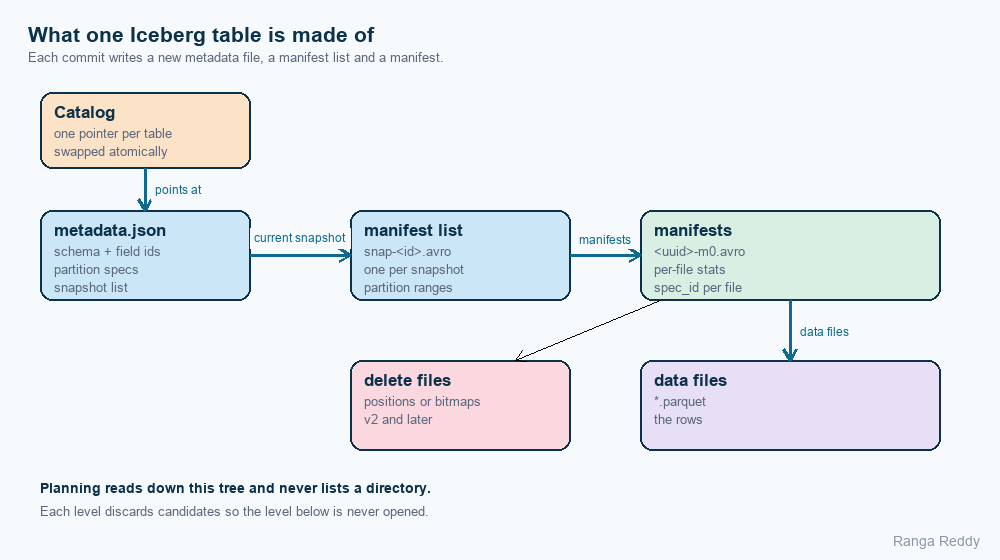 Almost every question below is about one level of this tree.
| Part | Questions | What it tests |
|---|---|---|
| Beginner | 1-25 | Vocabulary, the metadata tree, everyday SQL |
| Intermediate | 26-60 | Layout, evolution, maintenance, catalogs, streaming |
| Advanced | 61-80 | Commit protocol, isolation, deletes, format versions |
| Scenario-based | 81-100 | Symptom to cause to fix |
Run the examples
The SQL in the answers runs on Spark 3.5.9 with Iceberg 1.12.0 and a Java 17
JVM. Start a shell with a local Hadoop catalog named demo:
spark-sql \
  --packages org.apache.iceberg:iceberg-spark-runtime-3.5_2.12:1.12.0 \
  --conf spark.sql.extensions=org.apache.iceberg.spark.extensions.IcebergSparkSessionExtensions \
  --conf spark.serializer=org.apache.spark.serializer.KryoSerializer \
  --conf spark.sql.catalog.demo=org.apache.iceberg.spark.SparkCatalog \
  --conf spark.sql.catalog.demo.type=hadoop \
  --conf spark.sql.catalog.demo.warehouse=file:///tmp/iceberg-interview
The two Python examples need a pyspark shell started with the same
--packages and --conf options.
Then create the table the examples use. A Hadoop catalog is fine for a laptop and wrong for shared storage, for the reason given in question 50.
CREATE NAMESPACE IF NOT EXISTS demo.shop;
DROP TABLE IF EXISTS demo.shop.orders PURGE;

CREATE TABLE demo.shop.orders (
  order_id    BIGINT,
  customer_id BIGINT,
  amount      DECIMAL(10,2),
  status      STRING,
  order_ts    TIMESTAMP
) USING iceberg
PARTITIONED BY (days(order_ts));

INSERT INTO demo.shop.orders
SELECT id, id % 100, CAST(id % 500 AS DECIMAL(10,2)), 'NEW',
       TIMESTAMP '2026-11-01 00:00:00' + make_interval(0, 0, 0, CAST(id % 5 AS INT))
FROM range(1000);
Beginner
1. What is Apache Iceberg?
Apache Iceberg is an open table format for large analytic datasets. It defines how data files and metadata files together make up a table, so that different engines can read and write the same table safely.
It is a specification plus libraries, not a server. It adds to plain files the things a database table has: atomic commits, snapshot isolation, schema and partition evolution, row-level deletes and time travel.
2. What problems with Hive tables does Iceberg solve?
A Hive table is a directory, and its partitions are subdirectories. That causes most of the pain:
| Hive tables | Iceberg |
|---|---|
| Planning lists directories | Planning reads metadata files |
| A multi-file write can be seen half done | A commit appears all at once or not at all |
| Queries must filter on the partition column | Filters on the source column prune partitions |
| Changing partitioning means rewriting data | The partition spec can evolve in place |
| Renaming a column can break old files | Columns are tracked by ID |
The root difference: Iceberg tracks individual files, not directories.
3. Is Iceberg a file format, a storage system or a query engine?
None of the three. Data is stored in Parquet, ORC or Avro files. Those files sit in storage such as S3, ADLS, GCS or HDFS. Engines such as Spark, Flink or Trino run the queries. Iceberg is the layer in between that says which files belong to the table, with which schema, at which point in time.
4. Which file formats can an Iceberg table use?
Parquet, ORC and Avro for data and delete files. Parquet is the default, set by
write.format.default, and new tables compress it with zstd. Metadata uses
JSON for the table metadata file and Avro for manifest lists and manifests.
5. Which engines work with Iceberg?
Spark, Flink, Trino, Presto, Hive, Impala, Dremio, StarRocks and a number of cloud warehouses can work with Iceberg tables. Support is not uniform: one engine may read format features that it cannot write, or may lag on a newer format version. Before adopting a feature, check every engine that touches the table, readers included.
6. What is a snapshot?
A snapshot is the complete state of a table at one commit: the set of data and delete files that were live then. Every write produces a new snapshot and never edits an old one.
SELECT snapshot_id, operation, committed_at
FROM demo.shop.orders.snapshots
ORDER BY committed_at;
Snapshot IDs are random numbers. Order by committed_at, never by the ID.
7. How does Iceberg provide ACID guarantees on object storage?
All files a write produces are new files, invisible until the commit. The commit is a single atomic step: the catalog moves the table’s pointer from the old metadata file to the new one.
- Atomicity: the pointer moves or it does not.
- Consistency and isolation: a reader loads one metadata file and sees that snapshot for the whole query; writers use optimistic concurrency.
- Durability: files are written to durable storage before the pointer moves.
The guarantee covers one table per commit.
8. What is a catalog and why does Iceberg need one?
A catalog maps a table name to the location of its current metadata file, and performs the atomic swap of that location during a commit. Without it, two writers could each publish their own version and one would silently overwrite the other. Nothing on storage alone says which metadata file is current. That is why the catalog is part of the table’s correctness, not just a name lookup.
9. Describe the layers of Iceberg metadata.
| Level | Holds |
|---|---|
| Catalog | The pointer to the current metadata file |
Metadata file (*.metadata.json) |
Schemas, partition specs, sort orders, properties, snapshot list |
| Manifest list (one per snapshot) | The manifests in that snapshot, with partition ranges |
| Manifest | Data or delete files, with partition values and column statistics |
| Data and delete files | The rows, and records of removed rows |
Each level is immutable. A commit writes new files at the top and reuses the unchanged ones below.
10. What is the difference between a manifest and a manifest list?
A manifest lists data files or delete files, one entry per file, with that file’s partition values, row count and column statistics. A manifest list belongs to one snapshot and lists the manifests that make it up, with summary counts and the partition value range of each.
The split lets planning discard a whole manifest from the list alone, without opening it. It also lets a new snapshot reuse old manifests.
11. What is hidden partitioning?
The table declares a partition as a transform of a column, and Iceberg derives the value itself. Writers do not supply a separate partition column, and readers filter on the real column.
EXPLAIN SELECT order_id, amount FROM demo.shop.orders
WHERE order_ts >= TIMESTAMP '2026-11-02 00:00:00'
  AND order_ts <  TIMESTAMP '2026-11-03 00:00:00';
The query names order_ts. In the plan, the Iceberg scan lists the order_ts
filters it was given, and uses them to keep only the matching daily partition. With
Hive you would also need a dt = '2026-11-02' predicate, and forgetting it
meant a full scan.
12. Which partition transforms does Iceberg support?
| Transform | Example | Typical use |
|---|---|---|
| identity | region |
Low-cardinality columns |
| year, month, day, hour | days(order_ts) |
Time-series data |
| bucket[N] | bucket(16, customer_id) |
High-cardinality keys, joins |
| truncate[W] | truncate(4, sku) |
Prefixes and numeric ranges |
The spec also has a void transform, which always produces null and is used
when a partition field is removed from a version 1 table.
13. What schema changes can you make without rewriting data?
Add, drop, rename and reorder columns, including fields inside structs; widen some types; and make a required column optional. These are metadata changes.
ALTER TABLE demo.shop.orders ADD COLUMN channel STRING;
ALTER TABLE demo.shop.orders RENAME COLUMN channel TO sales_channel;
ALTER TABLE demo.shop.orders ALTER COLUMN amount TYPE DECIMAL(12,2);
ALTER TABLE demo.shop.orders DROP COLUMN sales_channel;
Old files are not touched. A reader fills a newly added column with null (or a default value on newer format versions).
14. What is time travel?
Querying the table as it was at an earlier snapshot, identified by snapshot ID, timestamp, branch or tag.
ALTER TABLE demo.shop.orders CREATE TAG initial_load;

SELECT count(*) FROM demo.shop.orders VERSION AS OF 'initial_load';
SELECT count(*) FROM demo.shop.orders TIMESTAMP AS OF current_timestamp();
It works only while the snapshot still exists. Once expiry removes it, that point in history is gone.
15. What is a table format version?
It states which features the table’s metadata may use, so older readers do not misread newer features.
| Version | Main addition |
|---|---|
| 1 | Analytic tables on immutable files |
| 2 | Row-level deletes with delete files, sequence numbers |
| 3 | Deletion vectors, row lineage, default values, new types |
| 4 | Relative paths in metadata; still under development |
Current libraries create version 2 tables by default.
SHOW TBLPROPERTIES demo.shop.orders ('format-version');
16. What are copy-on-write and merge-on-read?
Two ways to change rows in immutable files.
- Copy-on-write: rewrite every data file that contains an affected row. Writes cost more, reads stay simple. This is the default for
DELETE,UPDATEandMERGE. - Merge-on-read: leave data files alone and write a small record of which rows are gone. Writes are cheap, and readers apply the deletes until compaction folds them in.
17. Does Iceberg support UPDATE, DELETE and MERGE?
Yes, through engines that implement them. In Spark they need the Iceberg SQL extensions.
UPDATE demo.shop.orders SET status = 'PAID' WHERE order_id < 100;
DELETE FROM demo.shop.orders WHERE order_id BETWEEN 100 AND 109;

MERGE INTO demo.shop.orders t
USING (SELECT 1L AS order_id, 'SHIPPED' AS status) s
ON t.order_id = s.order_id
WHEN MATCHED THEN UPDATE SET t.status = s.status;
Iceberg has no primary key index, so MERGE is a join between source and
target.
18. What are metadata tables?
Read-only tables that expose Iceberg’s own metadata, queried with the usual SQL.
SELECT file_path, record_count, file_size_in_bytes FROM demo.shop.orders.files;
SELECT * FROM demo.shop.orders.history;
SELECT partition, file_count, record_count FROM demo.shop.orders.partitions;
SELECT name, type FROM demo.shop.orders.refs;
Others include snapshots, manifests, delete_files, entries,
metadata_log_entries, position_deletes and the all_* variants. They are
the first tool for diagnosing a slow or bloated table.
19. How is an Iceberg table different from a folder of Parquet files?
A folder of Parquet files has no definition of which files count, what the current schema is, or when a write finished. Iceberg adds exactly that. A file sitting in the table’s data directory but absent from metadata is not part of the table, and a query ignores it.
20. How does Iceberg compare with Delta Lake and Apache Hudi?
All three give ACID tables on object storage. The designs differ:
| Iceberg | Delta Lake | Hudi | |
|---|---|---|---|
| Metadata | Tree of snapshots and manifests | Transaction log plus checkpoints | Timeline plus file groups |
| Partitioning | Hidden transforms, evolvable | Partition columns, generated columns, clustering | Partition path from key generator |
| Distinctive strength | Engine neutrality and catalog API | Tight Spark and Databricks integration | Record keys, indexes, incremental pipelines |
Choose by workload and by the engines you must support. A claim that one is simply faster needs a benchmark on your data. The comparison of the open table formats goes further.
21. What happens when you run an INSERT?
- The engine writes new data files.
- It writes a manifest listing them.
- It writes a manifest list for the new snapshot, referencing the new manifest and the old ones.
- It writes a new metadata file.
- The catalog swaps the pointer, if the base version is still current.
If the job dies before step 5, readers see nothing new. The files it wrote stay behind as orphans.
22. How do you roll a table back?
With a procedure that makes an earlier snapshot current. No data is rewritten.
DELETE FROM demo.shop.orders WHERE status = 'PAID';

CALL demo.system.set_current_snapshot(table => 'shop.orders', ref => 'initial_load');

SELECT count(*) FROM demo.shop.orders;
rollback_to_snapshot and rollback_to_timestamp do the same for an ancestor
of the current state. Rolling back also discards every later good commit on that
branch, so check what you are about to lose.
23. What is the difference between DROP TABLE and DROP TABLE PURGE?
In Spark, DROP TABLE ... PURGE asks for the table’s data and metadata files to
be deleted. What a plain DROP TABLE keeps depends on the catalog. A metastore
or service catalog typically removes the entry and leaves the files. The Hadoop
catalog, including the demo catalog here, deletes the table directory even
without PURGE, because the directory is the table. Test your catalog before
relying on a drop for cleanup or for recovery.
24. Where does Iceberg store a table's files?
Under the table location, normally in two directories: data/ for data and
delete files and metadata/ for metadata files, manifest lists and manifests.
The layout is a convention. Metadata records the location of each file, so
files may live elsewhere, for example after add_files or with object-storage
paths enabled.
25. Does Iceberg require Hive Metastore?
No. Hive Metastore is one catalog option among REST, JDBC, AWS Glue, Nessie and the file-system based Hadoop catalog. It is common because many platforms already run it.
Intermediate
26. How does Iceberg plan a query?
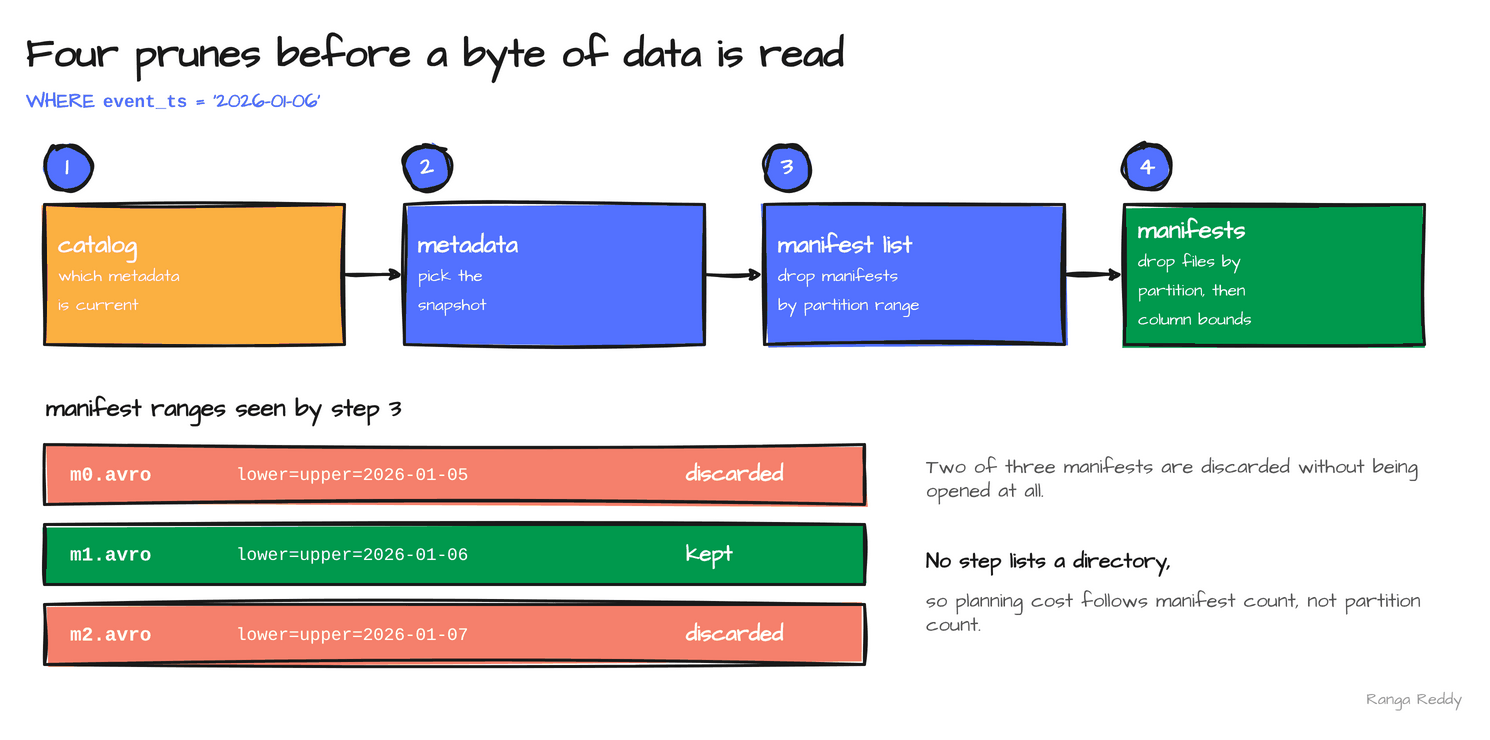 Two rounds of pruning happen before any data file is opened.
- Load the current metadata file and pick the snapshot.
- Read its manifest list, and skip manifests whose partition ranges cannot match.
- Read the remaining manifests, and skip files by partition value and by column bounds.
- Attach the delete files that apply to each surviving data file.
- Split the files into tasks.
Parquet row group and page statistics then prune further inside each file.
27. What column statistics does Iceberg keep, and what limits them?
Per file and per column: value counts, null counts, NaN counts, column sizes and
lower and upper bounds. The default metrics mode is truncate(16), so string
bounds keep a 16-character prefix. For wide tables, metrics are inferred only for
the first 100 columns (write.metadata.metrics.max-inferred-column-defaults).
A filter on a column without bounds cannot skip files. Set a per-column mode
with write.metadata.metrics.column.<name>.
28. Why are column renames safe?
Every field has a permanent field ID, and data files record those IDs. A rename changes only the name attached to an ID. A dropped column’s ID is never reused, so adding a new column with an old name cannot expose old values. Files imported without IDs need a name mapping so readers can match columns.
29. Which type promotions are allowed?
On format versions 1 and 2: int to long, float to double, and a wider
decimal precision with the same scale. Version 3 also allows date to
timestamp without time zone and promotion from unknown. Narrowing, changing
a decimal’s scale, or turning a string into a number is rejected, because old
files could not be read correctly.
30. What is partition evolution?
Changing the partition spec of an existing table. Each manifest records the spec its files were written with, so old data keeps its layout and new data uses the new one.
ALTER TABLE demo.shop.orders ADD PARTITION FIELD bucket(4, customer_id);

INSERT INTO demo.shop.orders (order_id, customer_id, amount, status, order_ts)
VALUES (2001, 3, 15.00, 'NEW', TIMESTAMP '2026-11-02 08:00:00');

SELECT spec_id, count(*) AS files FROM demo.shop.orders.files GROUP BY spec_id;
Old files are not reorganised. If old data needs the new layout, rewrite it
explicitly with rewrite_data_files.
31. Why does Iceberg not need to list directories?
Manifests already name every file in the snapshot. Planning reads a bounded number of metadata files instead of listing one directory per partition. On object storage, where listing is paged and slow, planning cost then follows the number of manifests rather than the number of partitions.
32. How do you choose a partitioning scheme?
Start from the filters queries actually use, and from the volume per partition.
- Time-series data usually takes
days(ts), ormonths(ts)when daily volume is small. - A high-cardinality key that queries filter or join on suits
bucket(N, key). - Aim for partitions that hold at least several target-sized files.
Over-partitioning is the common mistake: thousands of tiny partitions mean tiny files and large metadata. Because the spec can evolve, start coarse.
33. What is a table sort order, and how does it help?
A declared order that writers apply, so each file covers a narrow range of the sort columns and its bounds become selective.
ALTER TABLE demo.shop.orders WRITE ORDERED BY customer_id, order_ts;
Without clustering, every file spans most of the value range and column bounds skip nothing. For filters on several independent columns, a Z-order rewrite spreads the benefit across them, at some cost to the first column. See sorting and clustering.
34. What are the write distribution modes?
write.distribution-mode controls the shuffle before writing:
| Mode | Behaviour |
|---|---|
none |
No shuffle; each task writes whatever it holds |
hash |
Shuffle by partition key |
range |
Range shuffle for a global ordering |
When unset, the Spark writer picks range for a sorted table, hash for a
partitioned one and none otherwise. none is cheapest and the usual source of
many small files.
35. What controls output file size?
write.target-file-size-bytes, 512 MB by default. It is a target, not a
guarantee: a task cannot produce a file larger than the data it holds, so many
small tasks still give small files. Distribution mode, partition count, shuffle
sizing and compaction all affect the real result.
36. Why are small files a problem?
Each file adds a manifest entry, an object-store request to open it, and a footer to parse. Planning slows as metadata grows, and scans spend time opening files instead of reading data. Frequent commits and fine partitioning are the usual causes. Compaction fixes the symptom; a better trigger interval or distribution mode reduces the cause.
37. How does compaction work?
rewrite_data_files reads selected files and commits larger replacements in a
replace snapshot.
CALL demo.system.rewrite_data_files(
  table => 'shop.orders',
  options => map('min-input-files', '2'));
By default a file is a candidate when it is below 75% or above 180% of the target
size. A group of candidates is rewritten if it has at least 5 files, or holds more
than one file totalling over the target size, or holds more data than the maximum
file size, or contains a file that crosses a delete threshold. Useful options:
delete-file-threshold, delete-ratio-threshold, partial-progress.enabled,
and a where argument to limit the scope. The strategy can also be sort,
including Z-order.
38. What does expire_snapshots do?
It removes old snapshots from metadata and deletes the files that no remaining snapshot references.
CALL demo.system.expire_snapshots(
  table => 'shop.orders',
  older_than => TIMESTAMP '2030-01-01 00:00:00',
  retain_last => 5);
Without arguments the age limit comes from
history.expire.max-snapshot-age-ms, 5 days by default, keeping at least 1
snapshot. Snapshots referenced by a branch or tag are retained. Expiry is the
step that frees storage, and it shortens how far back you can travel. The date
in the example is far in the future only to make everything eligible on a test
table.
39. What are orphan files, and how do you remove them?
Files under the table location that no metadata references, typically left by failed or killed jobs.
CALL demo.system.remove_orphan_files(table => 'shop.orders', dry_run => true);
The default age limit is 3 days, and the Spark procedure refuses an interval under 24 hours, because a file from a write still in progress looks exactly like an orphan. Run it dry first. Never point two tables at the same location.
40. When do you rewrite manifests?
When planning is slow and the table has many small manifests, or manifests whose entries are scattered across partitions so none can be skipped.
CALL demo.system.rewrite_manifests('shop.orders');
Iceberg already merges manifests on some commits
(commit.manifest-merge.enabled). Rewriting reorganises metadata only; data
files stay as they are.
41. Why do metadata files pile up, and how do you stop it?
Every commit writes a new metadata.json, and old ones are kept unless told
otherwise.
ALTER TABLE demo.shop.orders SET TBLPROPERTIES (
  'write.metadata.delete-after-commit.enabled' = 'true',
  'write.metadata.previous-versions-max' = '50');
Deletion is off by default, with a version limit of 100. This setting does not expire snapshots or remove manifests and data.
42. What is the difference between a branch and a tag?
Both are named references to a snapshot. A branch moves as you commit to it.
A tag stays on one snapshot. The reference itself protects its snapshot from
expiry. RETAIN limits how long the reference lives: after that age, expiry can
remove the reference and then the snapshot. Without it, a branch or tag is kept
under the default settings.
ALTER TABLE demo.shop.orders CREATE BRANCH etl_test RETAIN 7 DAYS;
ALTER TABLE demo.shop.orders CREATE TAG month_end RETAIN 365 DAYS;
main is the branch normal reads and writes use.
43. What is write-audit-publish?
Write the data where consumers cannot see it, validate it, then publish it in one metadata operation. With branches:
ALTER TABLE demo.shop.orders CREATE BRANCH audit;

INSERT INTO demo.shop.orders.branch_audit (order_id, customer_id, amount, status, order_ts)
VALUES (5001, 1, 10.00, 'NEW', TIMESTAMP '2026-11-03 09:00:00');

SELECT count(*) FROM demo.shop.orders.branch_audit WHERE amount < 0;

CALL demo.system.fast_forward('shop.orders', 'main', 'audit');
fast_forward succeeds only if main has not diverged from the branch. A
second form stages a snapshot under a wap.id and publishes it with
publish_changes.
44. How do you read only the data added between two snapshots?
An incremental read with start-snapshot-id (exclusive) and
end-snapshot-id (inclusive) in the DataFrame reader:
ids = [r.snapshot_id for r in spark.sql(
    "SELECT snapshot_id FROM demo.shop.orders.snapshots "
    "WHERE operation = 'append' ORDER BY committed_at").collect()]
start_id, end_id = ids[-2], ids[-1]

(spark.read.format("iceberg")
    .option("start-snapshot-id", start_id)
    .option("end-snapshot-id", end_id)
    .load("demo.shop.orders"))
It reads data from append snapshots only. Updates and deletes in the range are not represented, so use the changelog view for those.
45. How do you capture row-level changes from an Iceberg table?
Create a changelog view, which reports inserts and deletes between snapshots,
with columns _change_type, _change_ordinal and _commit_snapshot_id.
CALL demo.system.create_changelog_view(table => 'shop.orders', changelog_view => 'orders_changes');

SELECT _change_type, count(*) FROM orders_changes GROUP BY _change_type;
With identifier columns, updates can be reported as before and after images. It depends on snapshots that still exist, and some kinds of delete file limit what a changelog scan supports.
46. Why does a MERGE fail with MERGE_CARDINALITY_VIOLATION?
More than one source row matched the same target row, so the result would be ambiguous. Deduplicate the source first, keeping the newest event per key.
The opposite case is silent: two source rows with a key that does not exist yet are both inserted. Deduplication is needed even when the statement never fails.
47. What are position deletes and equality deletes?
| Position delete | Equality delete | |
|---|---|---|
| Identifies rows by | File path and row position | Column values |
| Writer must read the target | Yes, to find positions | No |
| Read cost | Skip known positions in one file | Compare rows in every file in scope |
| Typical writer | Spark | Flink upsert pipelines |
Equality deletes make streaming writes cheap and reads expensive. Format version 3 replaces position delete files with deletion vectors.
48. What is the difference between static and dynamic partition overwrite?
It decides what INSERT OVERWRITE replaces in Spark. In static mode, the
default, an overwrite without a partition clause replaces the whole table. In
dynamic mode only the partitions present in the new data are replaced.
SET spark.sql.sources.partitionOverwriteMode=dynamic;

INSERT OVERWRITE demo.shop.orders (order_id, customer_id, amount, status, order_ts)
VALUES (6001, 2, 20.00, 'NEW', TIMESTAMP '2026-11-04 10:00:00');

SET spark.sql.sources.partitionOverwriteMode=static;
With hidden partitioning it is easy to guess wrong about which partitions are
touched. A MERGE or overwrite with an explicit condition states the intent
more safely.
49. How do you choose a catalog?
| Catalog | Fits |
|---|---|
| REST | Many engines, central access control, vendor-neutral API |
| Hive Metastore | Existing Hadoop or Hive platforms |
| AWS Glue | AWS-centred platforms |
| JDBC | Small deployments with a relational database |
| Nessie | Branching across many tables |
| Hadoop | Local tests only |
Ask which engines support it, who enforces permissions, how it handles concurrent commits and what happens when it is down. See Iceberg catalogs.
50. Why is the Hadoop catalog unsafe on object storage?
It commits by renaming a file to the next version number and relies on that rename being atomic and failing if the target exists. HDFS provides that. Many object stores do not, so two writers can both believe they committed, and one commit is lost. The spec marks this file-system scheme as unsafe and deprecated. Use a catalog with an atomic check-and-swap.
51. What are Iceberg views?
A view definition stored with a spec of its own, so engines can share it. It holds the SQL text, the dialect, a schema and a version history. Sharing is not automatic translation: an engine needs a representation in a dialect it understands. View support depends on the catalog, and the Hadoop catalog does not provide it. See Iceberg views.
52. How do you migrate a Hive table to Iceberg?
| Procedure | What it does |
|---|---|
snapshot |
Creates a new Iceberg table over the source files; the source is unchanged |
migrate |
Replaces the source table with an Iceberg table using the same files |
add_files |
Imports existing files into an existing Iceberg table |
Test with snapshot, then cut over with migrate. A full rewrite with CTAS is
the alternative when the layout or file sizes need fixing anyway. See
Hive to Iceberg migration.
53. What does register_table do?
It adds an existing Iceberg table to a catalog by pointing at one of its metadata files, without copying data. It is useful for moving between catalogs or for recovery. Never leave the same table registered and writable in two catalogs: their pointers diverge, and maintenance in one can delete files the other still needs.
54. How does Spark Structured Streaming write to Iceberg?
Each micro-batch is one commit.
events = (spark.readStream.format("rate").option("rowsPerSecond", 5).load()
    .selectExpr("value AS order_id", "value AS customer_id",
                "CAST(1 AS DECIMAL(12,2)) AS amount", "'NEW' AS status",
                "timestamp AS order_ts"))

query = (events.writeStream.format("iceberg")
    .outputMode("append")
    .trigger(processingTime="1 minute")
    .option("checkpointLocation", "/tmp/ckpt/orders")
    .toTable("demo.shop.orders"))

# after a few triggers:
query.stop()
The writer records the query ID and epoch in the snapshot summary, so a replayed
batch is not committed twice. That guarantee covers the sink only. With
foreachBatch you must make the write idempotent yourself. Short triggers mean
many commits and small files. If you reset the table and run the example again,
remove the checkpoint directory first.
55. Can you stream from an Iceberg table?
Yes. Spark reads new snapshots incrementally, and stream-from-timestamp sets
the start. The source is designed for appends: a delete or overwrite snapshot
stops the query unless you set streaming-skip-delete-snapshots or
streaming-skip-overwrite-snapshots, which skip those changes rather than
propagate them. Snapshot expiry must not run ahead of a lagging consumer.
56. How do you upgrade the format version?
Set the property. It is a metadata change.
DROP TABLE IF EXISTS demo.shop.upgrade_demo PURGE;
CREATE TABLE demo.shop.upgrade_demo (id BIGINT) USING iceberg;
ALTER TABLE demo.shop.upgrade_demo SET TBLPROPERTIES ('format-version' = '3');
There is no downgrade. Confirm that every reader and writer, including maintenance jobs, supports the new version before upgrading.
57. What does write.object-storage.enabled do?
It adds a hash-based prefix to data file paths so that writes and reads spread across many object-store key prefixes, which reduces throttling on busy tables. It is off by default. The directory layout stops mirroring partitions, which does not matter to Iceberg because metadata records every path.
58. Which table properties do you review first on a production table?
| Property | Default |
|---|---|
format-version |
2 |
write.target-file-size-bytes |
536870912 |
write.delete.mode, write.update.mode, write.merge.mode |
copy-on-write |
history.expire.max-snapshot-age-ms |
5 days |
write.metadata.delete-after-commit.enabled |
false |
commit.retry.num-retries |
4 |
Set them from the workload, then confirm the behaviour through metadata tables.
59. What Spark configuration does Iceberg need?
The runtime jar matching your Spark and Scala versions, a catalog under
spark.sql.catalog.<name>, and
spark.sql.extensions=org.apache.iceberg.spark.extensions.IcebergSparkSessionExtensions.
The extensions add Iceberg DDL such as partition evolution, write order,
branches and tags. A misspelt class name only logs a warning, so the first sign
can be a PARSE_SYNTAX_ERROR on an ALTER TABLE.
60. How do you check the health of a table?
SELECT content, count(*) AS files,
       round(avg(file_size_in_bytes) / 1048576, 2) AS avg_mb,
       sum(record_count) AS records
FROM demo.shop.orders.files
GROUP BY content;

SELECT count(*) AS manifests, sum(length) AS manifest_bytes
FROM demo.shop.orders.manifests;

SELECT count(*) AS snapshots, min(committed_at) AS oldest
FROM demo.shop.orders.snapshots;
content is 0 for data, 1 for position deletes and 2 for equality deletes. Watch
the trend: average file size falling, delete files climbing, manifests and
snapshots growing.
Advanced
61. Walk through the commit protocol.
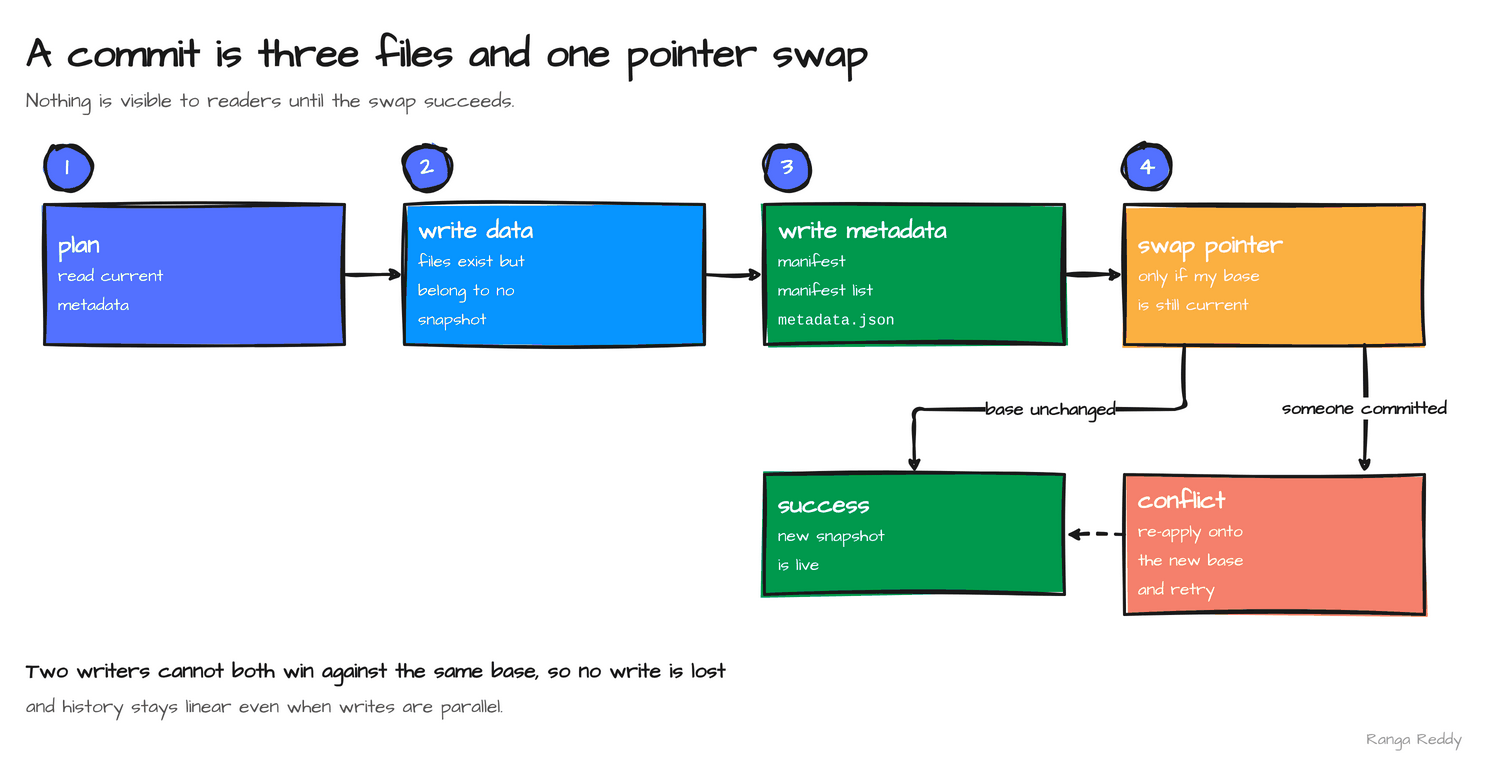 A commit is new files plus one conditional pointer swap.
- Read the current metadata; this is the base.
- Write data and delete files.
- Write manifests, a manifest list and a new metadata file on top of the base.
- Ask the catalog to swap the pointer from the base to the new file.
- If another writer got there first, reload, validate that the change is still correct against the new base, and retry.
Data files are not rewritten on a retry; only metadata is rebuilt. This is optimistic concurrency: no locks are held while data is written.
62. Compare CommitFailedException, ValidationException and CommitStateUnknownException.
| Exception | Meaning | Right response |
|---|---|---|
CommitFailedException |
Lost the pointer swap | Safe to retry; Iceberg retries automatically first |
ValidationException |
Another commit changed data the operation depends on | Re-run the whole operation, or remove the overlap |
CommitStateUnknownException |
The outcome could not be determined | Check the table before doing anything; do not blindly retry or delete files |
Treating the third as a failure and retrying can apply a write twice. Deleting its files can corrupt a table if the commit in fact succeeded.
63. What isolation levels do row-level operations offer?
serializable (the default) and snapshot, set per command with
write.delete.isolation-level, write.update.isolation-level and
write.merge.isolation-level.
Under serializable, a commit fails if another writer added data that could match the operation’s condition. Under snapshot isolation those new rows are tolerated, so more commits succeed, but the result may not equal any serial order. Both reject conflicts such as the same rows being rewritten twice.
64. How are commit retries configured?
| Property | Default |
|---|---|
commit.retry.num-retries |
4 |
commit.retry.min-wait-ms |
100 |
commit.retry.max-wait-ms |
60000 |
commit.retry.total-timeout-ms |
1800000 |
Waits back off exponentially. Raising retries helps many independent appends. It does not help operations that fail validation, which need non-overlapping writes or serialisation.
65. What are sequence numbers for?
Each successful commit gets a monotonically increasing sequence number, and files carry the number of the commit that added them. Readers use it to decide which deletes apply: a delete affects older data, never data written later. New files are written with a null number that is inherited at commit time, so a retried commit does not have to rewrite manifests. Compaction can keep the older data sequence number on rewritten files so that deletes still apply correctly.
66. When does a delete file apply to a data file?
| Delete type | Applies when |
|---|---|
| Deletion vector | It references that file, the data sequence number is at most the delete’s, and the partition matches |
| Position delete | Same sequence and partition rule, the path matches, and no deletion vector applies |
| Equality delete | The data sequence number is strictly less than the delete’s, and the partition matches or the delete is unpartitioned (global) |
The strict rule for equality deletes lets one commit delete a key and insert its new version without removing the new row.
67. What are deletion vectors, and why replace position delete files?
A deletion vector is a bitmap of deleted positions for one data file, stored as a blob in a Puffin file, introduced in format version 3. There is at most one per data file in a snapshot, so a new delete merges with the existing vector.
That bounds the read-side work: no collection of delete files to merge, and cheap membership tests. In version 3 tables, new position delete files must not be written, though existing ones remain valid.
68. What is row lineage?
Version 3 tracks two values per row: _row_id, a stable identifier, and
_last_updated_sequence_number, the commit that last changed it. Writers keep
them when rows move between files, which makes incremental processing and change
tracking far easier. Both are assigned by inheritance, so little extra is
written for new rows.
Rows changed through equality deletes are not tracked as updates, because the writer never read the old row. They look like a delete plus a new row. Snapshots from before an upgrade have no row IDs.
69. What else does format version 3 add, and what is the status of version 4?
Version 3 adds variant, geometry, geography, nanosecond timestamps and
unknown types, column default values, multi-argument transforms, table
encryption keys, row lineage and deletion vectors. A spec feature is not the
same as engine support, so verify each one in your engines.
Version 4 is under development and not formally adopted. Its documented change so far is support for relative paths in metadata. Do not use it for production tables.
70. How does a REST catalog change commits and security?
The client sends the server a list of requirements (for example, that a branch still points at a given snapshot) and updates. The server checks the requirements and applies the change, so conflict handling and the atomic swap live in one place, behind one API for every language.
It can also vend short-lived storage credentials or sign requests, so engines do not need broad storage keys, and it is a natural point for authorisation. Apache Polaris is one implementation.
71. What is the difference between a fast append and a merge append?
A fast append writes a new manifest for the new files and reuses the others,
so the commit is cheap and manifests accumulate. A merge append may combine
small manifests during the commit, once there are at least
commit.manifest.min-count-to-merge (100) of them, aiming at
commit.manifest.target-size-bytes (8 MB). Streaming writes often choose fast
appends for low commit latency and clean up with rewrite_manifests.
72. How are files turned into Spark tasks?
Iceberg splits large files and bins small ones. read.split.target-size is 128
MB, read.split.open-file-cost (4 MB) is the minimum weight a file counts for,
so thousands of tiny files are not packed into one task, and
read.split.planning-lookback controls how many bins stay open. Spark can also
adapt the split size to the scan. Too few tasks underuse the cluster; too many
add scheduling overhead.
73. What is a storage-partitioned join?
When two tables are partitioned compatibly on the join keys, Spark can join them
partition by partition and skip the shuffle. It needs
spark.sql.sources.v2.bucketing.enabled=true and Iceberg’s
spark.sql.iceberg.planning.preserve-data-grouping=true, compatible partition
transforms, and matching join conditions; further settings control partially clustered or
mismatched partition values. Confirm it by checking that the plan has no
Exchange on either side.
74. How do you run compaction alongside active writers?
Compaction commits a replace operation, which fails if the files it rewrote were changed meanwhile. To reduce conflicts:
- Filter compaction to partitions that are no longer receiving writes.
- Use
partial-progress.enabled, so groups commit separately and one conflict does not discard all the work. - Keep file groups small and schedule around heavy
MERGEjobs.
With partial progress, check that every group actually committed; do not assume the job finishing means the table is compacted.
75. Why can delete files survive a compaction?
Data compaction replaces data files, which can leave delete files that point at
files no longer live. These dangling deletes change no result but still cost
planning and storage. Remove them with rewrite_position_delete_files (its
defaults may select nothing, so check) or, on recent releases, the
remove-dangling-deletes option of rewrite_data_files. A data file with a few
deletes is not rewritten by default until deletes reach 30% of its rows
(delete-ratio-threshold). See
copy-on-write or merge-on-read.
76. What are Puffin files and table statistics?
Puffin is a file format for blobs that do not fit in manifests. Iceberg uses it for deletion vectors and for table statistics such as distinct-value sketches, which cost-based optimisers can use.
CALL demo.system.compute_table_stats('shop.orders');
Statistics are tied to a snapshot and do not refresh themselves, so recompute them after large changes. An engine has to support reading them to benefit.
77. Why might one session not see another session's commit?
The Spark catalog caches loaded tables. cache-enabled is true by default, with
cache.expiration-interval-ms at 30 seconds. The timer restarts on every access,
so a session that queries the table more often than that can keep reading the
earlier snapshot indefinitely. REFRESH TABLE reloads it, and disabling the cache
trades extra catalog calls for freshness. This is staleness, not lost data.
78. Does Iceberg support multi-table transactions?
The table format guarantees atomicity for one table per commit. The REST catalog specification includes a multi-table commit endpoint, but support in catalogs and engines varies, and ordinary Spark SQL does not give you a transaction across tables. Designs that need consistency across tables use idempotent jobs with a publish step, tags that mark a consistent set, or a catalog with cross-table branching such as Nessie.
79. How do you honour a right-to-erasure request?
A DELETE is only the start: the old rows remain in earlier snapshots and files.
- Delete the rows.
- Make sure merge-on-read deletes are folded into rewritten data files.
- Remove or update branches and tags that retain old snapshots.
- Expire those snapshots so the old files are deleted.
- Remove orphan files, and check backups, replicas and storage versioning outside Iceberg.
Verify by querying all_data_files and checking storage, not only the current
table.
80. What do you check before several engines write to one table?
- All use the same catalog, so commits go through one atomic swap.
- All support the table’s format version and every feature in use, including delete types.
- Partition transforms, types and timestamp semantics behave the same.
- One service owns maintenance, with retention long enough for the slowest reader.
- Write patterns do not overlap heavily, or validation failures will be routine.
Test the actual engine versions. Compatibility on paper is not compatibility in your platform.
Scenario-based
Each question starts from a symptom. Say what you would look at first, why, and what you would change.
81. Queries have slowed steadily over three weeks with no data growth. What do you do?
Split the time into planning and execution, then check the metadata tables.
- Many small files: compare average file size with the target, then compact.
- Delete files climbing: fold them into data files and remove dangling ones.
- Many manifests, slow planning: rewrite manifests.
- Poor skipping: compare files scanned with files matching, then add a sort order.
Then fix the source, usually a short commit interval with no scheduled maintenance. Name the measurement before the remedy.
82. Storage keeps growing although the row count is flat. Why?
Old snapshots keep old files alive. Every compaction, update and overwrite adds new files while earlier snapshots still reference the previous ones.
- Check the oldest snapshot and the snapshot count.
- Check
refs: a forgotten branch or tag blocks expiry. - Run
expire_snapshotswith agreed retention. - Run
remove_orphan_filesfor leftovers from failed jobs, dry run first. - Check object-store versioning, which keeps deleted objects regardless of Iceberg.
83. Twenty jobs append to one table and some fail with CommitFailedException. How do you fix it?
They are losing the pointer swap more times than the retry budget allows. Appends never conflict logically, so this is contention.
- Raise
commit.retry.num-retriesand the wait settings. - Commit less often: bigger batches or longer triggers.
- Funnel the streams into fewer writers.
- Check that long commits are not caused by too many manifests.
Also confirm the catalog can sustain the commit rate.
84. Two MERGE jobs fail intermittently with ValidationException. What is happening?
Each found that the other changed files or added rows that its own condition covers. Retrying the same commit cannot fix a logical conflict.
- Make the jobs touch disjoint partitions, and include the partition predicate in the
ONcondition so Iceberg can see they are disjoint. - Serialise them if they truly overlap.
- Consider snapshot isolation only if concurrent appends may safely be ignored.
- Shorten each job to narrow the conflict window.
85. A CDC table gets slower every hour. How do you diagnose it?
Each micro-batch adds delete files that readers must apply.
- Group the
filestable bycontentto see which delete type is growing. - Compare delete records with data records.
- Schedule
rewrite_data_fileswith a delete threshold, scoped to recent partitions, then remove dangling deletes. - Lengthen the trigger interval: the delete file count follows the number of commits.
- For equality deletes from Flink, compact more aggressively.
See CDC into Iceberg.
86. A query waits a minute before the first task starts. Where do you look?
That is planning, so look at metadata rather than executors. Count manifests and their size, and check whether their partition ranges overlap so that none can be skipped. Rewrite manifests, reduce commit frequency, and reconsider very fine partitioning. Check catalog latency and the driver’s memory, since planning large metadata happens there unless distributed planning is used.
87. Someone ran a DELETE without a WHERE clause an hour ago. How do you recover?
- Stop writers and pause maintenance, so expiry cannot remove what you need.
- Find the last good snapshot in
historyand tag it. - If nothing good was committed since, roll back to it.
- If later commits must be kept, insert the lost rows from the tagged snapshot back into the current table.
- Verify counts, then re-enable the jobs.
Prevention: restricted delete permissions, scheduled tags and a retention window longer than your detection time.
88. A bad batch reached production dashboards. How do you stop it happening again?
Adopt write-audit-publish: load into a branch, run checks on row counts, nulls,
duplicates and business totals, and fast-forward main only when they pass. Fail
the pipeline loudly otherwise and keep the branch for inspection with a retention
period. Account for other writers: if main advanced, a fast-forward is refused,
and you need to rebuild the branch or cherry-pick the staged change.
89. Plan the migration of a very large Hive table to Iceberg with little downtime.
- Inventory formats, partitioning, writers, readers and engine support.
- Create a test table with
snapshotand validate counts, aggregates and query plans. - Decide between in-place
migrateand a rewrite; rewrite if file sizes or partitioning are poor. - Pause writers, run the migration, validate and repoint jobs.
- Keep the backup until confidence is established, with a written rollback step.
- Turn on maintenance from the first day.
While a snapshot table exists, deleting the source files breaks it, and in-place migration keeps the old small-file problems.
90. A streaming job creates thousands of small files a day. What do you change?
Count first: files per commit multiplied by commits per day. Then attack both.
- Lengthen the trigger to the longest latency the consumers accept.
- Distribute by partition so fewer tasks write to each partition.
- Reduce shuffle partitions, or let adaptive execution coalesce them.
- Coarsen the partitioning.
- Compact cold partitions on a schedule, and expire snapshots.
The fanout writer avoids sorting but holds many files open, which costs memory.
91. A busy table gets 503 Slow Down errors from object storage. What do you do?
Requests are concentrating on a few key prefixes or there are simply too many of
them. Enable write.object-storage.enabled for new data, reduce the request
count by compacting small files, and check client retry and back-off settings in
the file IO. Existing files keep their paths until rewritten.
92. Queries fail with a missing data file after a cleanup job. How can that happen, and how do you respond?
Likely causes: orphan removal with too short a retention, or run against a location shared by two tables; a path or scheme mismatch that made live files look unreferenced; the same table registered in two catalogs; or a storage lifecycle rule.
Stop the cleanup, identify missing files from the error and all_data_files, and
restore them from storage versioning or backup. If that is impossible, remove the
references by rewriting the affected partitions from a source. Then fix retention
and ownership.
93. Spark and Trino report different counts for the same table. How do you investigate?
Check that both resolve the same catalog and metadata location. Compare the snapshot ID each one reads. Then consider table caching, a branch or time-travel setting in one session, engine support for the delete files or format version in use, and timestamp or time-zone differences in the filter. Reproduce both queries pinned to one snapshot ID: if they still differ, it is an engine behaviour, not freshness.
94. One customer produces half of all events. How do you partition?
Partitioning directly by customer creates one huge partition and many tiny ones.
Partition by time, add a bucket on a higher-cardinality key to spread writes, and
sort by customer within files so filters on it still skip well. Check write task
skew: a large tenant may need salting in the distribution or a larger bucket
count. Measure partition sizes through the partitions table before and after.
95. You must change partitioning on a live table. How?
Use partition evolution: add the new field and drop the old one, which affects only new writes. Verify that every engine handles multiple specs and that dynamic overwrite jobs still replace what they intend to. Rewrite older partitions in batches only if their queries need the new layout, during quiet periods, then expire snapshots to release the replaced files.
96. An auditor needs a report exactly as it ran six months ago. Is that possible?
Only if the snapshot still exists. With normal retention it will not, so this has to be designed in advance: tag the snapshot at each reporting close with a long retention, record snapshot IDs of every input table with the report, and keep the query and code version. Time travel is not a backup, and very long retention of everything is expensive.
97. Compaction keeps failing because streaming upserts run continuously. What are the options?
Compact partitions that no longer receive changes; enable partial progress with small file groups so conflicts lose little; keep upserts and compaction apart in time with short pauses; or change the design so recent data is append-only and merged periodically. Check which side loses: if the stream fails instead, its retry and restart behaviour matters too.
98. A job ends with CommitStateUnknownException. What now?
Do not rerun it yet, and do not delete its files. Query snapshots and look for
a commit with the expected operation, summary and time, or for the written rows.
If it is there, mark the job successful. If it is not, once the catalog is
healthy, rerun it. Make jobs idempotent, for example with a MERGE on a key or a
batch identifier stored in the snapshot summary, so this question has an easy
answer next time.
99. A replay of a change stream created duplicate keys. How do you clean up and prevent it?
Find keys with a count above one, then keep the newest version of each, using a sequence column from the source, by rewriting the affected partitions in one atomic overwrite. Validate on a branch first.
Prevention: deduplicate each batch by key, guard both the update and delete clauses with the source sequence number, and monitor uniqueness. Iceberg does not enforce a primary key; identifier fields declare one but do not stop duplicates.
100. Design the Iceberg settings for a raw, cleaned and reporting pipeline.
| Layer | Write pattern | Choices |
|---|---|---|
| Raw | Frequent appends | Partition by ingest day; frequent compaction; keep source fields |
| Cleaned | Upserts by key | Merge-on-read if updates are frequent; compact deletes; partition by event time |
| Reporting | Batch rebuilds, heavy reads | Copy-on-write; sort by filter columns; tag each published load |
State the latency, volume and retention you assumed, schedule maintenance per layer, publish reporting data through a branch, and say which metrics would make you revise the design.
Key takeaways
- The tree explains the behaviour. Planning, time travel, concurrency and cleanup all follow from immutable metadata levels under one pointer.
- A commit is optimistic. Losing the swap is retryable; failing validation is not; an unknown outcome must be checked.
- Writes create maintenance. Compaction, delete cleanup, snapshot expiry and orphan removal each solve a different problem.
- Support is per engine. A feature in the spec is usable only when every engine on the table implements it.
- In scenarios, measure first. Name the metadata table or plan you would inspect before the fix.
References
- Iceberg table specification
- Iceberg configuration for table properties and defaults
- Iceberg Spark procedures
- Iceberg reliability for the concurrency model
- Apache Iceberg architecture
- Apache Iceberg on Spark: the complete cheat sheet
- Running Iceberg in production
- The Iceberg write path
- Top Apache Spark interview questions
Trademarks
Apache Iceberg, Apache Spark, Apache Flink, Apache Hive, Apache Hudi, Apache Parquet, Apache ORC, Apache Avro, Apache Impala, Apache Polaris and Apache are either registered trademarks or trademarks of The Apache Software Foundation in the United States and other countries. Delta Lake is a trademark of the Linux Foundation.
Found this useful?
These posts and tools are free. If one saved you an afternoon, you can buy me a coffee.
Comments
Questions, corrections and reviews are welcome. Sign in with GitHub to post; comments are stored in this site's public GitHub Discussions.