Copy-on-write or merge-on-read: choosing how an Iceberg table pays for a delete
An Iceberg table can rewrite whole data files when you delete a row, or write a small delete file and merge it at read time. The same DELETE produced two completely different file layouts and two different snapshot operations. Here is what each costs, and which workloads want which.
- The question this setting answers
- The same delete, measured twice
- What a delete file actually is
- Run it yourself
- What the reader does with a delete file
- Tuning each mode
- Choosing per operation, in practice
- The modes are per operation
- Which one does your workload want?
- What neither mode does
- How to tell which mode a table is using
- Common misconceptions
- A model worth keeping
- References
- Trademarks
TL;DR
- The same
DELETEon two tables differing only inwrite.delete.modeleft 2 data files holding 3,900 records under copy-on-write, and 2 data files still holding 4,000 records plus a 100-record delete file under merge-on-read. Both queries return 3,900 rows.- The snapshot’s
operationnames the choice:overwritefor copy-on-write,deletefor merge-on-read.- The setting is per operation, not per table:
write.delete.mode,write.update.modeandwrite.merge.modeare independent, so a table can rewrite onDELETEand defer onMERGE.- Merge-on-read moves cost from write time to every read until compaction runs, and compaction with default options may not run at all: here it rewrote nothing until a delete threshold was set.
- Neither mode reclaims space on its own. The files the old snapshot still references stay until
expire_snapshots.
The question this setting answers
Deleting one row from a table stored as immutable Parquet files is not obvious. The file holding that row cannot be edited in place, so something has to give.
Iceberg offers two answers, and you choose per operation, per table.
Copy-on-write rewrites the whole data file without the deleted row, and the new snapshot points at the replacement. The cost is paid now, once, by the writer.
Merge-on-read leaves the data file alone and writes a small delete file recording which rows no longer count. The cost is paid later, repeatedly, by every reader that has to apply it.
That is the entire trade, and it is worth seeing in the files rather than taking on faith.
The same delete, measured twice
Two tables of orders, identical except for their mode, each loaded with 4,000 rows in 2 data files (order ids 0 to 1,999 in one, 2,000 to 3,999 in the other):
CREATE TABLE ice.blog_cow_mor.cow (
  order_id BIGINT, customer_id BIGINT, status STRING, amount DECIMAL(10,2))
USING iceberg
TBLPROPERTIES ('write.delete.mode' = 'copy-on-write');

CREATE TABLE ice.blog_cow_mor.mor (
  order_id BIGINT, customer_id BIGINT, status STRING, amount DECIMAL(10,2))
USING iceberg
TBLPROPERTIES ('write.delete.mode' = 'merge-on-read');
Then the identical statement against each:
DELETE FROM ice.blog_cow_mor.<table> WHERE order_id < 100;
Reading the accounting from the files metadata table, where content is 0 for
data and 1 for position deletes:
| data files | records in them | delete files | query returns | |
|---|---|---|---|---|
| copy-on-write before | 2 | 4,000 | 0 | 4,000 |
| copy-on-write after | 2 | 3,900 | 0 | 3,900 |
| merge-on-read before | 2 | 4,000 | 0 | 4,000 |
| merge-on-read after | 2 | 4,000 | 1 (100 records) | 3,900 |
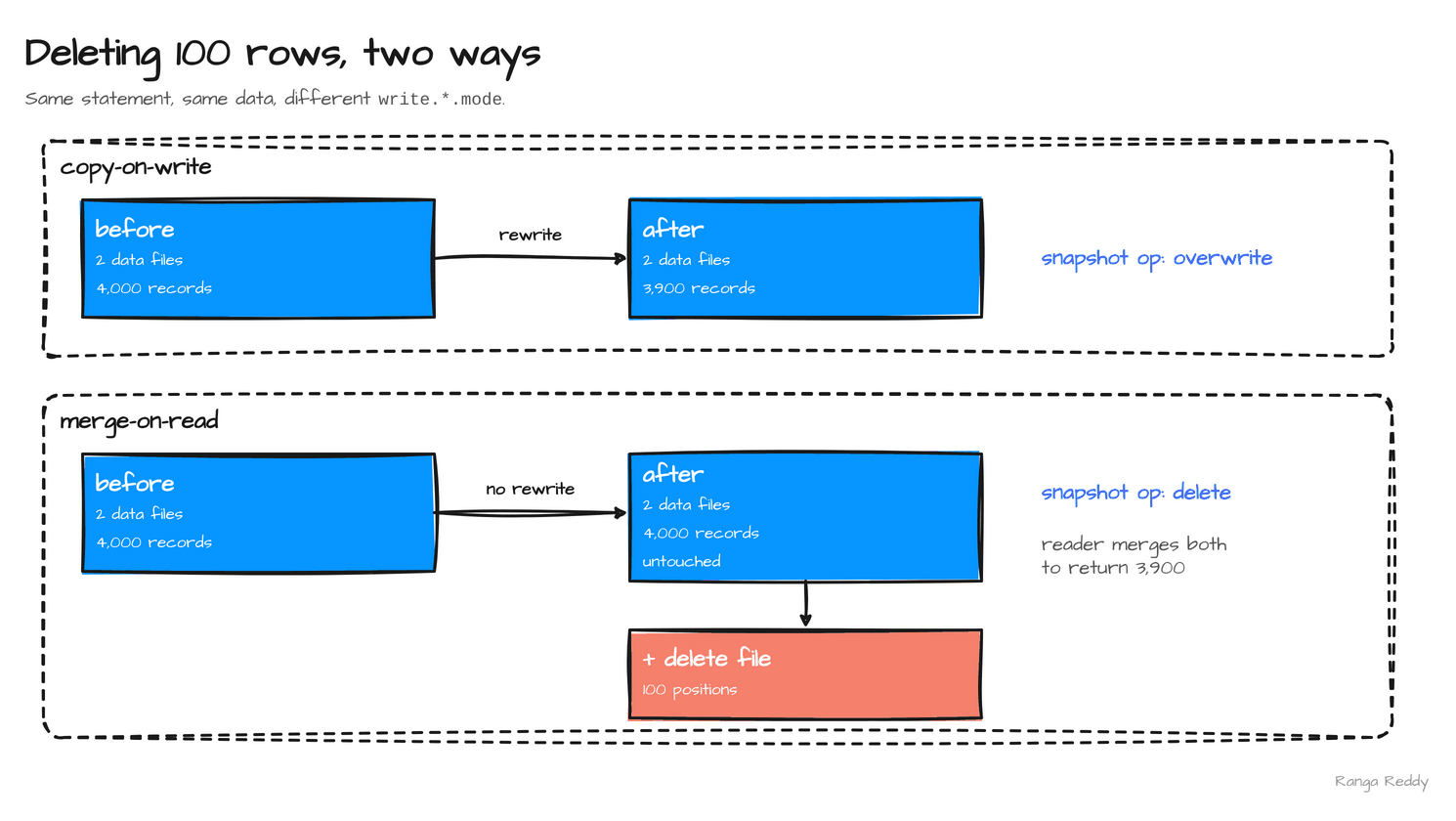
That table is the whole post. Under copy-on-write one data file was
rewritten: still two files, now containing 3,900 records, the 100 deleted rows
physically gone from the current snapshot. Only the file that held them was
replaced; the commit’s summary records deleted-data-files=1,
added-data-files=1, deleted-records=2000 and added-records=1900, and the
file holding orders 2,000 to 3,999 was never touched. Under merge-on-read the data files
were never touched — they still hold all 4,000 records — and a separate file
records the 100 positions to skip. Both queries return 3,900 rows, because the
reader merges the delete file on the way past.
The snapshot log names what happened, without you having to count files:
copy-on-write   snapshot ops: ['append', 'overwrite']
merge-on-read   snapshot ops: ['append', 'delete']
The merge-on-read commit’s summary records only added-position-delete-files=1
and added-position-deletes=100: no data file was added or removed.
overwrite means files were replaced. delete means a delete file was added.
If you ever need to know which mode a past operation used, that column is the
record.
What a delete file actually is
The merge-on-read run produced one extra file next to the data:
00000-439-a3044dc1-8c40-49ab-84c9-eec790160787-00001-deletes.parquet
It is a Parquet file like any other, which is a detail worth internalising:
counting *.parquet in a table directory does not tell you how many data files
there are. My first attempt at this measurement did exactly that and reported
merge-on-read as having gained a data file. It had not; it had gained a delete
file. The files metadata table and its content column are the honest source.
There are three kinds, and the difference matters operationally:
| Kind | What it records | Format | Written by |
|---|---|---|---|
| Position delete | this file, these row positions | Parquet, format v2 | Spark on v2 tables |
| Deletion vector | a bitmap of deleted positions for one data file | Puffin, format v3 | Spark on v3 tables |
| Equality delete | rows where these columns equal these values | Parquet | streaming writers, notably Flink; Spark never writes them |
The same DELETE on a v3 table wrote a Puffin file rather than a Parquet one
(file_format = PUFFIN in the files table, content still 1). The query
returned 3,900 rows either way, and so did Trino 483 reading the v2 and v3
tables from the stack’s metastore: count(*) of 3,900 and 0 rows below order
100 on both.
A position delete is cheap to apply, because the reader knows exactly which rows in which file to skip. An equality delete is a predicate, so the reader must evaluate it against rows it reads, and it applies to every data file in scope rather than one named file. Equality deletes let a streaming writer delete without first finding out where the row lives, which is why Flink CDC pipelines produce them, and they are the more expensive of the two to read.
flowchart LR
    subgraph COW["copy-on-write"]
      D1["data file<br/>4000 rows"] -->|"DELETE rewrites it"| D2["new data file<br/>3900 rows"]
    end
    subgraph MOR["merge-on-read"]
      E1["data file<br/>4000 rows, untouched"] --> R["reader merges"]
      E2["delete file<br/>100 positions"] --> R
      R --> O["3900 rows"]
    end
Run it yourself
Everything in this post runs on the local lakehouse stack described in Run every demo on this blog locally. Start it once:
git clone https://github.com/rangareddy/datalake-playground.git
cd datalake-playground
SPARK_VERSION=3.5.9 sh run_datalake.sh start
sh run_datalake.sh status
The scripts were run on its default line, Spark 3.5.9 with Iceberg
1.11.0. The Trino check uses PROFILE=all SPARK_VERSION=3.5.9 sh
run_datalake.sh start instead.
Script 1: the same delete, five ways
Save as cow_vs_mor.py. It builds the two tables above, shows what each commit
changed, lists the files with their sequence numbers, checks the defaults of a
fresh table, and repeats the merge-on-read delete on format v1 and v3.
"""The same DELETE under copy-on-write and merge-on-read, measured from the metadata.

Run inside the datalake-playground stack:
  docker cp cow_vs_mor.py spark-master:/tmp/
  docker exec spark-master bash -c '$SPARK_HOME/bin/spark-submit --master "local[2]" \
    --driver-memory 1g --jars $(ls $ICEBERG_HOME/iceberg-spark-runtime*.jar) \
    /tmp/cow_vs_mor.py'
"""
from pyspark.sql import SparkSession, functions as F

spark = (
    SparkSession.builder.appName("iceberg-cow-vs-mor")
    .config("spark.sql.extensions",
            "org.apache.iceberg.spark.extensions.IcebergSparkSessionExtensions")
    .config("spark.serializer", "org.apache.spark.serializer.KryoSerializer")
    .config("spark.sql.catalog.ice", "org.apache.iceberg.spark.SparkCatalog")
    .config("spark.sql.catalog.ice.type", "hive")
    .config("spark.sql.catalog.ice.uri", "thrift://hive-metastore:9083")
    .config("spark.sql.catalog.ice.warehouse", "s3a://warehouse/")
    .config("spark.eventLog.enabled", "false")
    .config("spark.ui.enabled", "false")
    .getOrCreate()
)
spark.sparkContext.setLogLevel("ERROR")
sql = spark.sql
NS = "ice.blog_cow_mor"
LABEL = {0: "data", 1: "position-delete", 2: "equality-delete"}


def orders():
    """4,000 orders in 2 data files: ids 0-1999 in one, 2000-3999 in the other."""
    return (spark.range(0, 4000, numPartitions=2)
                 .withColumnRenamed("id", "order_id")
                 .withColumn("customer_id", (F.col("order_id") % 500) + 1)
                 .withColumn("status", F.when(F.col("order_id") % 7 == 0, "CANCELLED")
                                        .otherwise("SHIPPED"))
                 .withColumn("amount", (F.col("order_id") % 250 + 5).cast("decimal(10,2)")))


def build(name, mode, version=2):
    sql(f"DROP TABLE IF EXISTS {NS}.{name} PURGE")
    sql(f"""CREATE TABLE {NS}.{name} (
              order_id BIGINT, customer_id BIGINT, status STRING, amount DECIMAL(10,2))
            USING iceberg
            TBLPROPERTIES ('format-version' = '{version}',
                           'write.delete.mode' = '{mode}',
                           'write.update.mode' = '{mode}',
                           'write.merge.mode'  = '{mode}')""")
    orders().writeTo(f"{NS}.{name}").append()


def accounting(name, tag):
    rows = sql(f"""SELECT content, count(*) AS files, sum(record_count) AS records
                   FROM {NS}.{name}.files GROUP BY content ORDER BY content""").collect()
    desc = "  ".join(f"{LABEL[r['content']]}={r['files']}f/{r['records']}r" for r in rows)
    live = sql(f"SELECT count(*) c FROM {NS}.{name}").collect()[0]["c"]
    print(f"  {tag:<28} {desc:<44} query returns {live}")


sql(f"CREATE NAMESPACE IF NOT EXISTS {NS}")

print("== 1. the same delete, twice ==")
for name, mode in (("cow", "copy-on-write"), ("mor", "merge-on-read")):
    build(name, mode)
    accounting(name, f"{mode} before")
    sql(f"DELETE FROM {NS}.{name} WHERE order_id < 100")
    accounting(name, f"{mode} after DELETE")
    ops = [r["operation"] for r in sql(
        f"SELECT operation FROM {NS}.{name}.snapshots ORDER BY committed_at").collect()]
    print("    snapshot ops:", ops)

print("\n== 2. what each delete commit changed ==")
for name in ("cow", "mor"):
    s = sql(f"""SELECT operation, summary FROM {NS}.{name}.snapshots
                ORDER BY committed_at DESC LIMIT 1""").collect()[0]
    keys = ["added-data-files", "deleted-data-files", "added-records", "deleted-records",
            "added-position-delete-files", "added-position-deletes"]
    print(f"  {name}: {s['operation']:<9}",
          {k: s["summary"][k] for k in keys if k in s["summary"]})

print("\n== 3. the files, by content and sequence number ==")
# `files` has no sequence numbers; `entries` carries them next to each file
for r in sql(f"""SELECT data_file.content AS content, data_file.file_format AS fmt,
                        sequence_number, data_file.record_count AS records,
                        regexp_extract(data_file.file_path, '[^/]+$', 0) AS file
                 FROM {NS}.mor.entries WHERE status < 2
                 ORDER BY sequence_number, content, file""").collect():
    print(f"  content={r['content']} {r['fmt']:<7} seq={r['sequence_number']} "
          f"records={r['records']:<5} {r['file']}")

print("\n== 4. the default modes of a fresh table ==")
sql(f"DROP TABLE IF EXISTS {NS}.fresh PURGE")
sql(f"CREATE TABLE {NS}.fresh (order_id BIGINT) USING iceberg")
for r in sql(f"SHOW TBLPROPERTIES {NS}.fresh").collect():
    print(f"  {r['key']} = {r['value']}")
orders().select("order_id").writeTo(f"{NS}.fresh").append()
sql(f"DELETE FROM {NS}.fresh WHERE order_id < 100")
print("  DELETE on it committed:", sql(
    f"SELECT operation FROM {NS}.fresh.snapshots ORDER BY committed_at DESC LIMIT 1"
).collect()[0][0])

print("\n== 5. merge-on-read on format v1 and v3 ==")
build("mor_v1", "merge-on-read", 1)
sql(f"CREATE OR REPLACE TEMP VIEW changes AS SELECT 5L AS order_id, 'REFUNDED' AS status")
for stmt in (f"DELETE FROM {NS}.mor_v1 WHERE order_id < 100",
             f"UPDATE {NS}.mor_v1 SET status = 'REFUNDED' WHERE order_id = 150",
             f"""MERGE INTO {NS}.mor_v1 t USING changes c ON t.order_id = c.order_id
                 WHEN MATCHED THEN UPDATE SET t.status = c.status"""):
    verb = stmt.split()[0]
    try:
        sql(stmt)
        op = sql(f"SELECT operation FROM {NS}.mor_v1.snapshots "
                 f"ORDER BY committed_at DESC LIMIT 1").collect()[0][0]
        print(f"  v1 {verb:<6} committed: {op}")
    except Exception as e:
        print(f"  v1 {verb:<6} failed: {type(e).__name__}: {str(e).splitlines()[0]}")
accounting("mor_v1", "v1 after the three")

build("mor_v3", "merge-on-read", 3)
sql(f"DELETE FROM {NS}.mor_v3 WHERE order_id < 100")
accounting("mor_v3", "v3 after DELETE")
op = sql(f"SELECT operation FROM {NS}.mor_v3.snapshots "
         f"ORDER BY committed_at DESC LIMIT 1").collect()[0][0]
fmts = [r[0] for r in sql(f"SELECT DISTINCT file_format FROM {NS}.mor_v3.files "
                           f"WHERE content = 1").collect()]
print(f"    operation: {op}   delete file format: {fmts}")

print("\n== 6. deleted rows are still readable through time travel ==")
first = sql(f"SELECT snapshot_id FROM {NS}.mor.snapshots ORDER BY committed_at "
            f"LIMIT 1").collect()[0][0]
print("  mor now:", sql(f"SELECT count(*) FROM {NS}.mor").collect()[0][0],
      "  VERSION AS OF the load:",
      sql(f"SELECT count(*) FROM {NS}.mor VERSION AS OF {first}").collect()[0][0])

spark.stop()
The output, with Spark’s log lines removed:
== 1. the same delete, twice ==
  copy-on-write before         data=2f/4000r                                query returns 4000
  copy-on-write after DELETE   data=2f/3900r                                query returns 3900
    snapshot ops: ['append', 'overwrite']
  merge-on-read before         data=2f/4000r                                query returns 4000
  merge-on-read after DELETE   data=2f/4000r  position-delete=1f/100r       query returns 3900
    snapshot ops: ['append', 'delete']
== 2. what each delete commit changed ==
  cow: overwrite {'added-data-files': '1', 'deleted-data-files': '1', 'added-records': '1900', 'deleted-records': '2000'}
  mor: delete    {'added-position-delete-files': '1', 'added-position-deletes': '100'}
== 3. the files, by content and sequence number ==
  content=0 PARQUET seq=1 records=2000  00000-432-f2031978-dd6a-4a4f-85a9-e80acb89500a-0-00001.parquet
  content=0 PARQUET seq=1 records=2000  00001-433-f2031978-dd6a-4a4f-85a9-e80acb89500a-0-00001.parquet
  content=1 PARQUET seq=2 records=100   00000-439-a3044dc1-8c40-49ab-84c9-eec790160787-00001-deletes.parquet
== 4. the default modes of a fresh table ==
  current-snapshot-id = none
  format = iceberg/parquet
  format-version = 2
  write.parquet.compression-codec = zstd
  DELETE on it committed: overwrite
== 5. merge-on-read on format v1 and v3 ==
  v1 DELETE failed: IllegalArgumentException: Deletes are supported in V2 and above
  v1 UPDATE failed: IllegalArgumentException: Deletes are supported in V2 and above
  v1 MERGE  failed: IllegalArgumentException: Deletes are supported in V2 and above
  v1 after the three           data=2f/4000r                                query returns 4000
  v3 after DELETE              data=2f/4000r  position-delete=1f/100r       query returns 3900
    operation: delete   delete file format: ['PUFFIN']
== 6. deleted rows are still readable through time travel ==
  mor now: 3900   VERSION AS OF the load: 4000
content is the column that matters, and the reason to use the metadata
table rather than counting files on disk: the delete file is also a .parquet
file.
Script 2: what merge-on-read accumulates, and what clears it
Save as mor_maintenance.py and run it after the first script, the same way.
It applies four deletes and an update to a merge-on-read table, then compacts it
three ways and expires its snapshots, and repeats the expiry on the
copy-on-write table from script 1.
"""What merge-on-read deletes accumulate, what compaction clears, and what expiry reclaims.

Run inside the datalake-playground stack, after cow_vs_mor.py:
  docker cp mor_maintenance.py spark-master:/tmp/
  docker exec spark-master bash -c '$SPARK_HOME/bin/spark-submit --master "local[2]" \
    --driver-memory 1g --jars $(ls $ICEBERG_HOME/iceberg-spark-runtime*.jar) \
    /tmp/mor_maintenance.py'
"""
from pyspark.sql import SparkSession, functions as F

spark = (
    SparkSession.builder.appName("iceberg-mor-maintenance")
    .config("spark.sql.extensions",
            "org.apache.iceberg.spark.extensions.IcebergSparkSessionExtensions")
    .config("spark.serializer", "org.apache.spark.serializer.KryoSerializer")
    .config("spark.sql.catalog.ice", "org.apache.iceberg.spark.SparkCatalog")
    .config("spark.sql.catalog.ice.type", "hive")
    .config("spark.sql.catalog.ice.uri", "thrift://hive-metastore:9083")
    .config("spark.sql.catalog.ice.warehouse", "s3a://warehouse/")
    .config("spark.eventLog.enabled", "false")
    .config("spark.ui.enabled", "false")
    .getOrCreate()
)
spark.sparkContext.setLogLevel("ERROR")
sql = spark.sql
NS = "ice.blog_cow_mor"
T = f"{NS}.orders_cdc"


def orders():
    return (spark.range(0, 4000, numPartitions=2)
                 .withColumnRenamed("id", "order_id")
                 .withColumn("customer_id", (F.col("order_id") % 500) + 1)
                 .withColumn("status", F.lit("SHIPPED"))
                 .withColumn("amount", (F.col("order_id") % 250 + 5).cast("decimal(10,2)")))


def live(tag, table=T):
    rows = {r["content"]: (r["files"], r["records"]) for r in sql(
        f"""SELECT content, count(*) AS files, sum(record_count) AS records
            FROM {table}.files GROUP BY content""").collect()}
    # all_* tables list a file once per manifest that references it: count distinct paths
    every = {r["content"]: r["files"] for r in sql(
        f"""SELECT content, count(DISTINCT file_path) AS files FROM
              (SELECT content, file_path FROM {table}.all_data_files
               UNION ALL SELECT content, file_path FROM {table}.all_delete_files)
            GROUP BY content""").collect()}
    d, x = rows.get(0, (0, 0)), rows.get(1, (0, 0))
    print(f"  {tag:<34} live data={d[0]}f/{d[1]}r  live deletes={x[0]}f/{x[1]}r  "
          f"all snapshots: data={every.get(0, 0)}f deletes={every.get(1, 0)}f  "
          f"rows={sql(f'SELECT count(*) FROM {table}').collect()[0][0]}")


def just_after_now():
    """expire_snapshots wants a literal timestamp, not current_timestamp()."""
    ts = sql("SELECT current_timestamp() + INTERVAL 1 SECOND AS t").collect()[0]["t"]
    return f"TIMESTAMP '{ts}'"


sql(f"CREATE NAMESPACE IF NOT EXISTS {NS}")
sql(f"DROP TABLE IF EXISTS {T} PURGE")
sql(f"""CREATE TABLE {T} (
          order_id BIGINT, customer_id BIGINT, status STRING, amount DECIMAL(10,2))
        USING iceberg
        TBLPROPERTIES ('write.delete.mode' = 'merge-on-read',
                       'write.update.mode' = 'merge-on-read',
                       'write.merge.mode'  = 'merge-on-read')""")
orders().writeTo(T).append()

print("== 1. deletes accumulate, one commit at a time ==")
live("after load")
for lo, hi in ((0, 100), (1000, 1100), (2000, 2100), (3000, 3100)):
    sql(f"DELETE FROM {T} WHERE order_id >= {lo} AND order_id < {hi}")
    live(f"after DELETE [{lo}, {hi})")
sql(f"UPDATE {T} SET status = 'REFUNDED' WHERE order_id BETWEEN 500 AND 549")
live("after UPDATE of 50 rows")

print("\n== 2. which delete files apply to which data files ==")
for r in sql(f"""SELECT data_file.content AS content, sequence_number,
                        data_file.record_count AS records,
                        regexp_extract(data_file.referenced_data_file, '[^/]+$', 0) AS target
                 FROM {T}.entries WHERE status < 2
                 ORDER BY content, sequence_number""").collect():
    print(f"  content={r['content']} seq={r['sequence_number']} records={r['records']:<5}"
          f" referenced_data_file={r['target'] or '-'}")

print("\n== 3. compaction with the defaults, then with a delete threshold ==")
r = sql(f"CALL ice.system.rewrite_data_files(table => '{T[4:]}')").collect()[0]
print(f"  defaults: rewritten={r['rewritten_data_files_count']} added={r['added_data_files_count']}")
live("after default rewrite")
r = sql(f"""CALL ice.system.rewrite_data_files(table => '{T[4:]}',
             options => map('delete-file-threshold', '1'))""").collect()[0]
print(f"  delete-file-threshold=1: rewritten={r['rewritten_data_files_count']} "
      f"added={r['added_data_files_count']}")
live("after threshold rewrite")
r = sql(f"""CALL ice.system.rewrite_data_files(table => '{T[4:]}',
             options => map('remove-dangling-deletes', 'true'))""").collect()[0]
print(f"  rewrite_data_files remove-dangling-deletes: rewritten={r['rewritten_data_files_count']}"
      f" removed_delete_files={r['removed_delete_files_count']}")
live("after remove-dangling-deletes")
r = sql(f"CALL ice.system.rewrite_position_delete_files(table => '{T[4:]}')").collect()[0]
print(f"  rewrite_position_delete_files (defaults): "
      f"rewritten={r['rewritten_delete_files_count']} added={r['added_delete_files_count']}")
r = sql(f"""CALL ice.system.rewrite_position_delete_files(table => '{T[4:]}',
             options => map('rewrite-all', 'true'))""").collect()[0]
print(f"  rewrite_position_delete_files (rewrite-all): "
      f"rewritten={r['rewritten_delete_files_count']} added={r['added_delete_files_count']}")
live("after rewrite_position_delete_files")

print("\n== 4. compaction does not reclaim storage; expiry does ==")
r = sql(f"""CALL ice.system.expire_snapshots(table => '{T[4:]}',
             older_than => {just_after_now()}, retain_last => 1)""").collect()[0]
print(f"  expire_snapshots: deleted data={r['deleted_data_files_count']} "
      f"position deletes={r['deleted_position_delete_files_count']} "
      f"manifests={r['deleted_manifest_files_count']}")
live("after expire_snapshots")

print("\n== 5. copy-on-write: the replaced file stays until expiry ==")
C = f"{NS}.cow"
live("cow now", C)
r = sql(f"""CALL ice.system.expire_snapshots(table => '{C[4:]}',
             older_than => {just_after_now()}, retain_last => 1)""").collect()[0]
print(f"  expire_snapshots: deleted data={r['deleted_data_files_count']}")
live("cow after expire_snapshots", C)

print("\n== 6. per-operation modes on three tables ==")
for name in ("customers", "orders", "events"):
    sql(f"DROP TABLE IF EXISTS {NS}.{name} PURGE")
    sql(f"CREATE TABLE {NS}.{name} (id BIGINT, v STRING) USING iceberg")
sql(f"""ALTER TABLE {NS}.customers SET TBLPROPERTIES (
          'write.delete.mode' = 'copy-on-write',
          'write.update.mode' = 'copy-on-write',
          'write.merge.mode'  = 'copy-on-write')""")
sql(f"""ALTER TABLE {NS}.orders SET TBLPROPERTIES (
          'write.delete.mode' = 'merge-on-read',
          'write.update.mode' = 'merge-on-read',
          'write.merge.mode'  = 'merge-on-read')""")
sql(f"""ALTER TABLE {NS}.events SET TBLPROPERTIES (
          'write.delete.mode' = 'copy-on-write',
          'write.merge.mode'  = 'merge-on-read',
          'write.target-file-size-bytes' = '134217728',
          'write.merge.isolation-level' = 'snapshot')""")
for name in ("customers", "orders", "events"):
    props = {r["key"]: r["value"] for r in sql(f"SHOW TBLPROPERTIES {NS}.{name}").collect()}
    print(f"  {name:<10}", {k: v for k, v in sorted(props.items()) if k.startswith("write.")
                             and k != "write.parquet.compression-codec"})

spark.stop()
The output:
== 1. deletes accumulate, one commit at a time ==
  after load                         live data=2f/4000r  live deletes=0f/0r  all snapshots: data=2f deletes=0f  rows=4000
  after DELETE [0, 100)              live data=2f/4000r  live deletes=1f/100r  all snapshots: data=2f deletes=1f  rows=3900
  after DELETE [1000, 1100)          live data=2f/4000r  live deletes=1f/200r  all snapshots: data=2f deletes=2f  rows=3800
  after DELETE [2000, 2100)          live data=2f/4000r  live deletes=2f/300r  all snapshots: data=2f deletes=3f  rows=3700
  after DELETE [3000, 3100)          live data=2f/4000r  live deletes=2f/400r  all snapshots: data=2f deletes=4f  rows=3600
  after UPDATE of 50 rows            live data=3f/4050r  live deletes=2f/450r  all snapshots: data=3f deletes=5f  rows=3600
== 2. which delete files apply to which data files ==
  content=0 seq=1 records=2000  referenced_data_file=-
  content=0 seq=1 records=2000  referenced_data_file=-
  content=0 seq=6 records=50    referenced_data_file=-
  content=1 seq=5 records=200   referenced_data_file=-
  content=1 seq=6 records=250   referenced_data_file=-
== 3. compaction with the defaults, then with a delete threshold ==
  defaults: rewritten=0 added=0
  after default rewrite              live data=3f/4050r  live deletes=2f/450r  all snapshots: data=3f deletes=5f  rows=3600
  delete-file-threshold=1: rewritten=3 added=1
  after threshold rewrite            live data=1f/3600r  live deletes=1f/250r  all snapshots: data=4f deletes=5f  rows=3600
  rewrite_data_files remove-dangling-deletes: rewritten=0 removed_delete_files=0
  after remove-dangling-deletes      live data=1f/3600r  live deletes=1f/250r  all snapshots: data=4f deletes=5f  rows=3600
  rewrite_position_delete_files (defaults): rewritten=0 added=0
  rewrite_position_delete_files (rewrite-all): rewritten=1 added=0
  after rewrite_position_delete_files live data=1f/3600r  live deletes=0f/0r  all snapshots: data=4f deletes=5f  rows=3600
== 4. compaction does not reclaim storage; expiry does ==
  expire_snapshots: deleted data=3 position deletes=5 manifests=13
  after expire_snapshots             live data=1f/3600r  live deletes=0f/0r  all snapshots: data=1f deletes=0f  rows=3600
== 5. copy-on-write: the replaced file stays until expiry ==
  cow now                            live data=2f/3900r  live deletes=0f/0r  all snapshots: data=3f deletes=0f  rows=3900
  expire_snapshots: deleted data=1
  cow after expire_snapshots         live data=2f/3900r  live deletes=0f/0r  all snapshots: data=2f deletes=0f  rows=3900
== 6. per-operation modes on three tables ==
  customers  {'write.delete.mode': 'copy-on-write', 'write.merge.mode': 'copy-on-write', 'write.update.mode': 'copy-on-write'}
  orders     {'write.delete.mode': 'merge-on-read', 'write.merge.mode': 'merge-on-read', 'write.update.mode': 'merge-on-read'}
  events     {'write.delete.mode': 'copy-on-write', 'write.merge.isolation-level': 'snapshot', 'write.merge.mode': 'merge-on-read', 'write.target-file-size-bytes': '134217728'}
To read the same tables from Trino in the all profile:
docker exec trino trino --execute "SELECT count(*) FROM iceberg.blog_cow_mor.mor"
docker exec trino trino --execute "SELECT count(*) FROM iceberg.blog_cow_mor.mor_v3"
Clean up afterwards. The drops run first and the prefix is removed only if they succeed:
docker exec spark-master bash -c '$SPARK_HOME/bin/spark-sql --master "local[2]" \
  --jars $(ls $ICEBERG_HOME/iceberg-spark-runtime*.jar) \
  --conf spark.sql.catalog.ice=org.apache.iceberg.spark.SparkCatalog \
  --conf spark.sql.catalog.ice.type=hive \
  --conf spark.sql.catalog.ice.uri=thrift://hive-metastore:9083 \
  -e "DROP TABLE ice.blog_cow_mor.cow PURGE; DROP TABLE ice.blog_cow_mor.mor PURGE;
      DROP TABLE ice.blog_cow_mor.fresh PURGE; DROP TABLE ice.blog_cow_mor.mor_v1 PURGE;
      DROP TABLE ice.blog_cow_mor.mor_v3 PURGE; DROP TABLE ice.blog_cow_mor.orders_cdc PURGE;
      DROP TABLE ice.blog_cow_mor.customers PURGE; DROP TABLE ice.blog_cow_mor.orders PURGE;
      DROP TABLE ice.blog_cow_mor.events PURGE; DROP NAMESPACE ice.blog_cow_mor"' 2>/dev/null \
&& docker exec mc /usr/bin/mc rm --recursive --force minio/warehouse/blog_cow_mor.db/
What the reader does with a delete file
A position delete names a data file and the row positions to skip, so applying it is a merge of two sorted streams — cheap, and proportional to the rows actually read.
An equality delete is a predicate. The reader has no idea which files contain matching rows, so it must evaluate the predicate against every data file in scope whose sequence number is older than the delete. That is why:
- equality deletes cost more per row read than position deletes,
- they cost more the wider the scope, not just the deeper the history,
- and a table accumulating them degrades faster than the file count suggests.
Sequence numbers are what keep this correct. Every commit gets one, and the spec scopes each kind of delete by it. A position delete or deletion vector applies to data files whose sequence number is less than or equal to its own, and only to the data file it names. An equality delete applies only to data files with a strictly lower sequence number. That is how a row inserted after an equality delete is not wrongly removed by it, and it is why deletes cannot simply be applied to everything.
The sequence numbers are not in the files table: selecting sequence_number
from it fails with UNRESOLVED_COLUMN. They are in entries, next to each file:
SELECT data_file.content, sequence_number, data_file.record_count, data_file.file_path
FROM ice.blog_cow_mor.mor.entries WHERE status < 2
ORDER BY sequence_number;
In script 1 the two data files carry sequence number 1 (the load) and the delete
file sequence number 2 (the DELETE).
Tuning each mode
The mode is the big decision; two properties refine it.
Under copy-on-write, the cost is how much gets rewritten, which is driven by file size. Large files mean a one-row delete rewrites a lot:
ALTER TABLE ice.blog_cow_mor.events SET TBLPROPERTIES (
  'write.delete.mode' = 'copy-on-write',
  'write.target-file-size-bytes' = '134217728');   -- 128 MiB; the default is 512 MB
Smaller target files make deletes cheaper and scans slightly less efficient. That is the actual trade under copy-on-write, and it is rarely discussed.
Under merge-on-read, the cost is how long deletes accumulate, so the relevant
setting is not on the table at all — it is your compaction schedule. The one
table property worth setting is the isolation level, because a MERGE that
scans widely will conflict more often:
ALTER TABLE ice.blog_cow_mor.events SET TBLPROPERTIES (
  'write.merge.isolation-level' = 'snapshot');   -- from the default 'serializable'
Relax that deliberately and knowingly: it accepts write skew in exchange for fewer conflicts.
Choosing per operation, in practice
Because the three modes are independent, the useful configurations are mixed rather than uniform:
-- a dimension table: corrections are rare, reads are constant
ALTER TABLE ice.blog_cow_mor.customers SET TBLPROPERTIES (
  'write.delete.mode' = 'copy-on-write',
  'write.update.mode' = 'copy-on-write',
  'write.merge.mode'  = 'copy-on-write');

-- a fact table fed by CDC: writes are constant, compaction is scheduled
ALTER TABLE ice.blog_cow_mor.orders SET TBLPROPERTIES (
  'write.delete.mode' = 'merge-on-read',
  'write.update.mode' = 'merge-on-read',
  'write.merge.mode'  = 'merge-on-read');

-- a table with occasional GDPR deletes but nightly bulk merges
ALTER TABLE ice.blog_cow_mor.events SET TBLPROPERTIES (
  'write.delete.mode' = 'copy-on-write',    -- rare, worth doing properly
  'write.merge.mode'  = 'merge-on-read');   -- large, avoid rewriting the table
That third case is the one that justifies the split existing. A deletion request touching a handful of rows should leave a clean table; a nightly merge touching millions should not rewrite files it barely changes.
The modes are per operation
This is the part most summaries flatten. There is no single table-level mode; there are three independent properties:
| Property | Governs |
|---|---|
write.delete.mode |
DELETE FROM |
write.update.mode |
UPDATE |
write.merge.mode |
MERGE INTO |
A freshly created table reports none of them:
current-snapshot-id = none
format = iceberg/parquet
format-version = 2
write.parquet.compression-codec = zstd
Their absence means the default applies, and for all three the default is
copy-on-write (TableProperties.DELETE_MODE_DEFAULT and its two siblings).
A DELETE on that fresh table committed an overwrite, not a delete. Set
them explicitly on any table where the choice matters, because a default you
did not choose is a default you will not remember when the table starts
behaving unexpectedly.
The independence is useful. A dimension table that receives occasional small
corrections and is read constantly might use copy-on-write for DELETE and
UPDATE, while a MERGE INTO that lands a large nightly changelog uses
merge-on-read to avoid rewriting half the table in one statement.
Note also format-version = 2 in that output: delete files are a format v2
feature, so merge-on-read requires v2 or later. On a v1 table the mode does not
quietly fall back to a rewrite. With all three modes set to merge-on-read,
DELETE, UPDATE and MERGE each failed with
IllegalArgumentException: Deletes are supported in V2 and above, raised by
MergingSnapshotProducer when the commit tries to add a delete file, and the
table kept all 4,000 rows. On v3 the same delete writes a deletion vector.
Which one does your workload want?
The decision follows from the ratio of writes to reads, and from what runs between them.
| Situation | Mode | Why |
|---|---|---|
| Small, infrequent corrections; heavy reads | copy-on-write | pay once, never pay again |
| High-frequency upserts or CDC | merge-on-read | rewriting files per micro-batch does not keep up |
| Streaming ingestion with tight latency | merge-on-read | write time is the SLA |
Large nightly MERGE into a wide table |
merge-on-read | avoids rewriting files the merge barely touches |
| Table read by engines with weak delete support | copy-on-write | no delete files to misapply |
| No compaction job scheduled | copy-on-write | see below |
That last row is the one that bites. Merge-on-read is not a way to avoid the cost of a delete; it is a way to defer it. Every delete file that has not been compacted is applied by every subsequent read of the files it covers. A CDC pipeline writing delete files every minute and compacting never will get measurably slower every hour, and the symptom — queries degrading with no change in data volume — looks nothing like its cause.
If you choose merge-on-read, you are also choosing to run
rewrite_data_files and rewrite_position_delete_files on a schedule, with
options, because their defaults may do nothing. Script 2 measured it:
| Step | Result |
|---|---|
Four DELETEs and one UPDATE |
2 live delete files holding 450 positions: Spark folds a data file’s earlier deletes into its next delete file, so there is one live delete file per data file touched |
rewrite_data_files with defaults |
Rewrote 0 files. 10% of rows were deleted, under the default delete-ratio-threshold of 0.3, and delete-file-threshold defaults to off |
rewrite_data_files with delete-file-threshold = 1 |
Rewrote 3 data files into 1 holding 3,600 rows, but 1 delete file stayed live |
rewrite_data_files with remove-dangling-deletes = true |
Removed 0 delete files |
rewrite_position_delete_files with defaults |
Rewrote 0 |
rewrite_position_delete_files with rewrite-all = true |
Removed the leftover delete file; 0 live delete files |
expire_snapshots |
Deleted 3 data files, 5 delete files and 13 manifests |
The leftover delete file never changed a result: the query returned 3,600 rows
throughout, because a position delete names the data file it applies to, and
compaction had replaced that file. It only cost planning and storage until
rewrite_position_delete_files removed it. The mechanics of both procedures,
and the separate step needed to actually reclaim storage, are in
table maintenance for Iceberg and Hudi.
What neither mode does
Neither reclaims space, and this catches people who expect copy-on-write to be self-cleaning.
Under copy-on-write the rewritten file replaces the old one in the current
snapshot. The old file is still referenced by the previous snapshot, which time
travel still needs, so it stays on disk until expire_snapshots removes the
snapshot that references it. In script 2 the copy-on-write table had 2 live data
files but 3 across its snapshots, and expire_snapshots deleted exactly 1. Count
distinct paths when you check: all_data_files lists a file once per manifest
that references it, so a plain count(*) over it overstates what is on disk. A table that deletes rows daily under
copy-on-write and never expires snapshots grows on disk while shrinking
logically.
Under merge-on-read the original data file stays by definition, and the delete file joins it. Compaction merges them into a clean data file, and then that leaves the pre-compaction files behind until expiry.
The rule that covers both: compaction changes what queries read; expiry changes what storage costs. They are different jobs and you need both.
How to tell which mode a table is using
Three ways, in increasing order of certainty.
The table properties, which tell you the configured intent:
SHOW TBLPROPERTIES ice.blog_cow_mor.orders;
The snapshot log, which tells you what actually happened:
SELECT snapshot_id, operation FROM ice.blog_cow_mor.orders.snapshots ORDER BY committed_at;
overwrite for a rewrite, delete for a delete file. This is the one to trust,
because it reflects the mode in force at the time of each operation rather than
the mode configured now.
The file accounting, which tells you what you are carrying:
SELECT content, count(*) files, sum(record_count) records
FROM ice.blog_cow_mor.orders.files GROUP BY content;
content = 1 rows are position delete files, or deletion vectors on a v3
table. A growing count there, on a table
whose queries are slowing down, is the signal that compaction is not keeping up.
Common misconceptions
“Merge-on-read is faster.” It is faster to write. Reads pay for it until compaction runs, and the total cost can exceed copy-on-write if the data is read far more often than written.
“Copy-on-write rewrites the whole table.” It rewrites the data files that contain affected rows. Deleting 100 orders that all lived in one of two files rewrote that one file and left the other untouched.
“A delete file means the rows are gone.” The rows are still in the data file. They are filtered at read time, and they remain readable through time travel: the merge-on-read table returned 3,900 rows now and 4,000 as of the load snapshot.
“The mode is a table-level setting.” It is three settings, one per operation, and they can disagree.
“Copy-on-write frees the space immediately.” The replaced file lives on until the snapshot referencing it is expired.
“Compaction clears the delete files.” Not with its defaults, and not always
all of them. Check content = 1 in the files table after it runs.
A model worth keeping
Copy-on-write pays the delete once, at write time, and leaves a clean table. Merge-on-read pays nothing now and a little on every read, until a compaction job settles the account.
So the question is not which is faster. It is who should pay, and have you scheduled the job that pays off the debt. Choose merge-on-read only with compaction already scheduled; otherwise copy-on-write is the honest default.
References
- Iceberg table properties for
write.delete.mode,write.update.modeandwrite.merge.mode - Iceberg spec: delete files for position and equality delete semantics
- Iceberg maintenance procedures for
rewrite_data_filesandrewrite_position_delete_files TablePropertiesfor the mode, isolation and granularity defaults- Apache Iceberg architecture for the metadata tree these files live in
- Table maintenance for Iceberg and Hudi for the compaction and expiry jobs this post assumes
Trademarks
Apache Iceberg, Apache Spark, Apache Flink, Apache Parquet, Apache and the Apache feather logo are either registered trademarks or trademarks of The Apache Software Foundation in the United States and other countries. Trino is a trademark of the Trino Software Foundation.
Found this useful?
These posts and tools are free. If one saved you an afternoon, you can buy me a coffee.
Comments
Questions, corrections and reviews are welcome. Sign in with GitHub to post; comments are stored in this site's public GitHub Discussions.