Six URL rewrites that turn any GitHub repository into an editor, a prompt, a diagram or an MCP server
Reading an unfamiliar repository is slow: clone, wait, open an IDE, grep. Several free sites take a GitHub URL, change a few characters, and hand back a browser editor, an LLM-ready text dump, an architecture diagram or an MCP endpoint. This is each one run against a real 280-file repository, with the screenshots, the steps, and the places each one stops working.
- Overview: why read a repository without cloning it
- The core problem and architecture: what the URL rewrite actually does
- Hands-on demo: each tool, step by step, on a real repository
- Tool 1: github1s, a read-only VS Code in the tab
- Tool 2: GitIngest, the whole repository as one prompt
- Tool 3: GitDiagram, an architecture diagram from the file tree
- Tool 4: GitMCP, the repository as a tool your assistant can call
- Tool 5: GitHubBox, a running dev environment, for the right repo
- Tool 6: DeepWiki, a generated wiki, if someone has indexed it
- Real-world scenarios and production failures
- Optimisation, tuning knobs and best practices
- Summary and key takeaways
- References
- Trademarks
TL;DR
- Six sites work by rewriting the host or the path of a GitHub URL. No install, no clone, and for public repositories no sign-in.
- They split into three jobs: read a repo (github1s), feed a repo to an LLM (GitIngest, GitMCP), and understand a repo (GitDiagram, DeepWiki). GitHubBox is the odd one out: it runs a repo, and only helps if the repo is a JavaScript project.
- Every screenshot in this post comes from one real repository,
rangareddy/ranga_spark_experiments: 280 text files, Scala and Java, Maven build. That choice exposes the limits as well as the wins.- Two of the tools did not work for this repo, and the post says so and shows why.
Overview: why read a repository without cloning it
A pull request link, a Stack Overflow answer or a colleague’s message lands you
in a repository you have never seen. The default move is git clone, then an
IDE import, then a Maven or sbt dependency download, all to answer a question
like “where does this job write its output?”. For a repository you will not
touch again, that is minutes of setup for a thirty-second question.
A family of small sites removes the setup by taking the GitHub URL itself as
input. You change github.com to another host, or put another host in front of
the path, and the page you land on has done the work: an editor with search, a
single text file ready to paste into a chat, a diagram, or a server your AI
assistant can query.
This post runs each of them, in order, on the same repository so the outputs are comparable. It is a tutorial first: each tool has numbered steps and a screenshot taken during the run. It also records where each tool stops, because “works on any repo” is only true of some of them.
The test repository
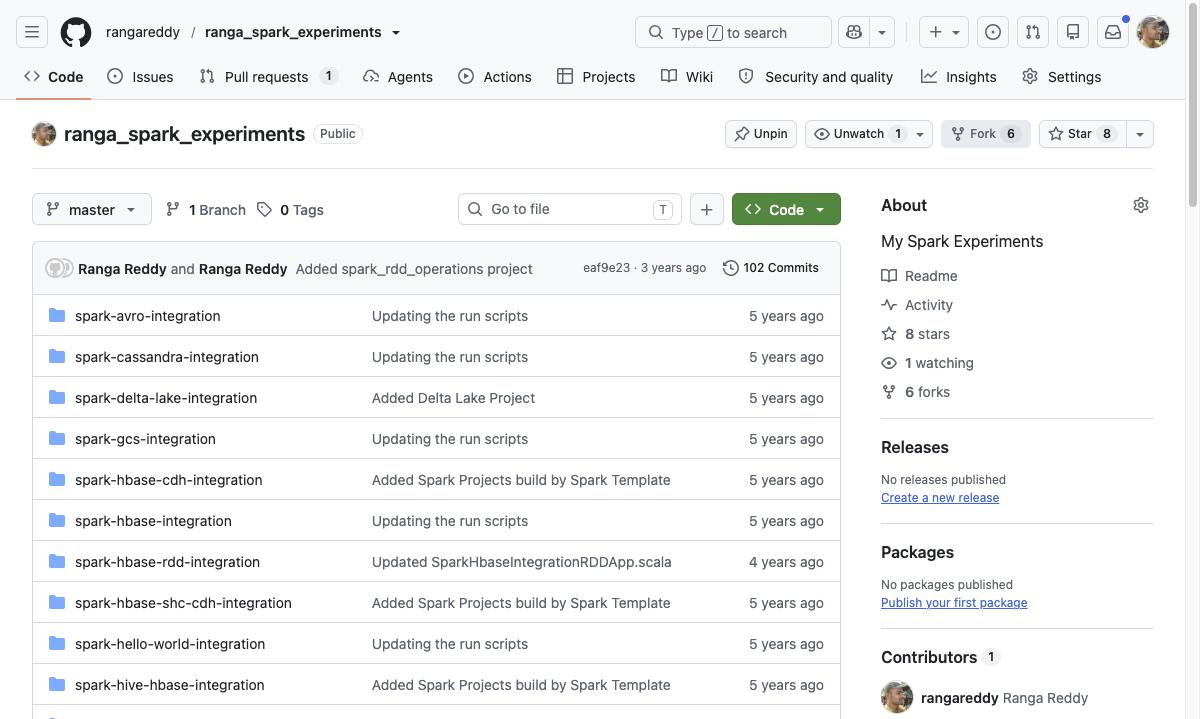
All runs use rangareddy/ranga_spark_experiments.
It is a good subject because it is awkward in the ways real repositories are:
| Property | Value | Why it matters |
|---|---|---|
| Files | 280 text files analysed by GitIngest | Large enough that a naive dump is cropped |
| Layout | 34 top-level folders, 32 of them Maven modules (each has a pom.xml), one per Spark integration |
A diagram has to summarise, not list |
| Languages | Scala 153,704 bytes, Java 41,228, Shell 23,514, Python 5,074 (GitHub languages API) | Not JavaScript, which matters for GitHubBox |
| History | 102 commits, one branch, last commit eaf9e23 |
Small enough to read, old enough to be unmaintained |
The core problem and architecture: what the URL rewrite actually does
None of these sites is magic. Each one is a web application that receives
owner/repo in the URL, fetches the repository from GitHub on the server side
(or, for github1s, in your browser), and renders a different view of it. The
rewrite is the cheapest possible interface: you already have the GitHub URL,
so the only thing you type is the part that changes.
  https://github.com/rangareddy/ranga_spark_experiments
        |
        |  swap the host, keep owner/repo
        v
  github1s.com   /rangareddy/ranga_spark_experiments   -> VS Code in the browser
  gitingest.com  /rangareddy/ranga_spark_experiments   -> one text file for an LLM
  gitdiagram.com /rangareddy/ranga_spark_experiments   -> architecture diagram
  gitmcp.io      /rangareddy/ranga_spark_experiments   -> MCP server URL
  githubbox.com  /rangareddy/ranga_spark_experiments   -> redirects to CodeSandbox
  deepwiki.com   /rangareddy/ranga_spark_experiments   -> generated wiki, if indexed
All six take the same two path segments. Only the host differs, so the habit to build is: open the repository on GitHub, then retype the host.
Three jobs, three places the work happens
The tools differ less in what they show than in where the computation runs and what they cost you.
| Tool | Job | Where the work runs | What you get | Needs sign-in |
|---|---|---|---|---|
| github1s | Read and search | Your browser, which loads a VS Code web build | A read-only VS Code workbench | No |
| GitIngest | Feed an LLM | Server | One text file: summary, tree, file contents | No |
| GitMCP | Feed an LLM, live | Server, over MCP | A URL your assistant calls as tools | No |
| GitDiagram | Understand | Server, using an LLM | A Mermaid diagram of the architecture | No |
| DeepWiki | Understand | Server, using an LLM | A wiki, after an indexing job | Email to index |
| GitHubBox | Run | CodeSandbox | A cloud dev environment | Not to open |
“Needs sign-in” is for a public repository, as observed in this run. Private repositories need tokens or accounts on most of these, and none was tried here.
The trade-off all six share
Each tool trades privacy and completeness for speed. The server-side ones receive the repository name, and GitHubBox, GitIngest and GitDiagram each run on someone else’s infrastructure, so none of them belongs anywhere near a private repository you have not cleared. The model-backed ones (GitDiagram, DeepWiki) also summarise: they read a slice of the repository, which the sections below quantify (GitDiagram reported reading 40 source files out of 280).
The alternative is the tool you already have: git clone --depth 1, then
tree, rg and your IDE. It is complete, private and offline, and it costs the
clone plus the import. The six tools win on the first minute and lose on
everything after it.
Hands-on demo: each tool, step by step, on a real repository
Every step below was run on 12 November 2026 in Chrome against the repository above, signed in to nothing but GitHub. The screenshots are from those runs, unedited apart from file size. Each tool section ends with what it did not do, because that is the part the landing pages leave out.
Tool 1: github1s, a read-only VS Code in the tab
What it is for. Browsing and searching code with a real editor’s tree, tabs and search panel, without cloning. It is the right first move when you want to read, not run.
Steps
- Open the repository on GitHub:
https://github.com/rangareddy/ranga_spark_experiments. - Edit the host in the address bar: replace
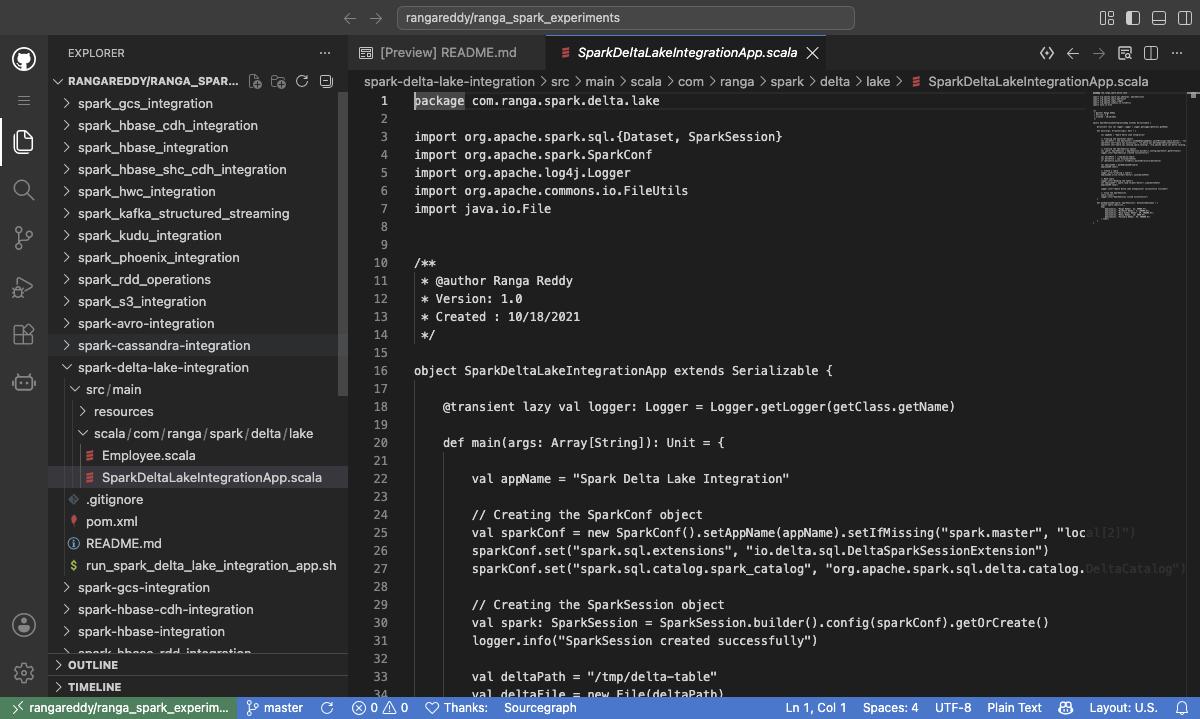
github.comwithgithub1s.com. The full URL ishttps://github1s.com/rangareddy/ranga_spark_experiments. - Wait for the workbench to load. It opens the README as a preview tab and the
whole folder tree in the Explorer. The status bar shows
master, the branch the URL resolved to.
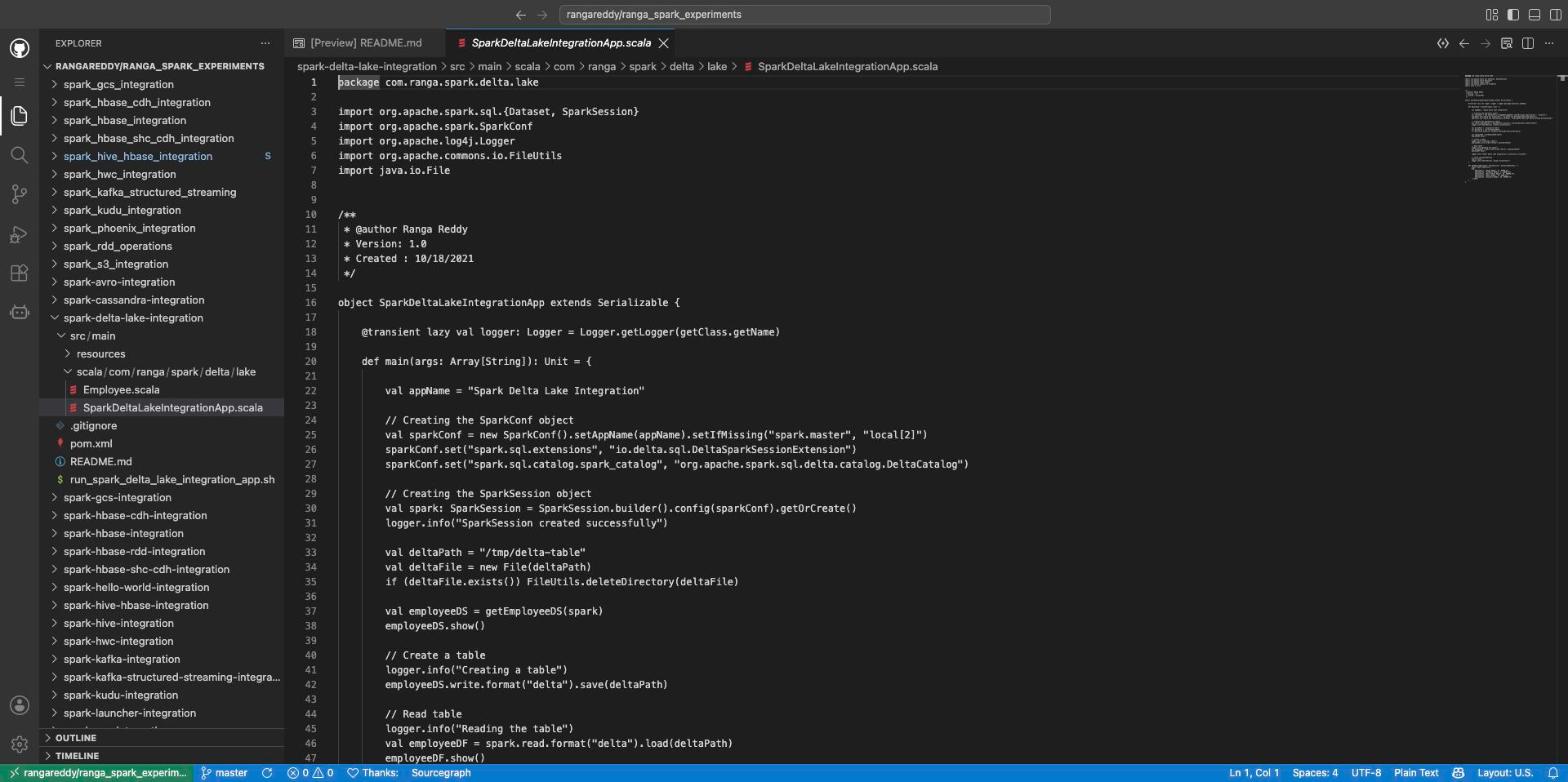
- To land on a file directly, keep the whole GitHub path and change only the host. This opens the Delta Lake example:
https://github1s.com/rangareddy/ranga_spark_experiments/blob/master/spark-delta-lake-integration/src/main/scala/com/ranga/spark/delta/lake/SparkDeltaLakeIntegrationApp.scala
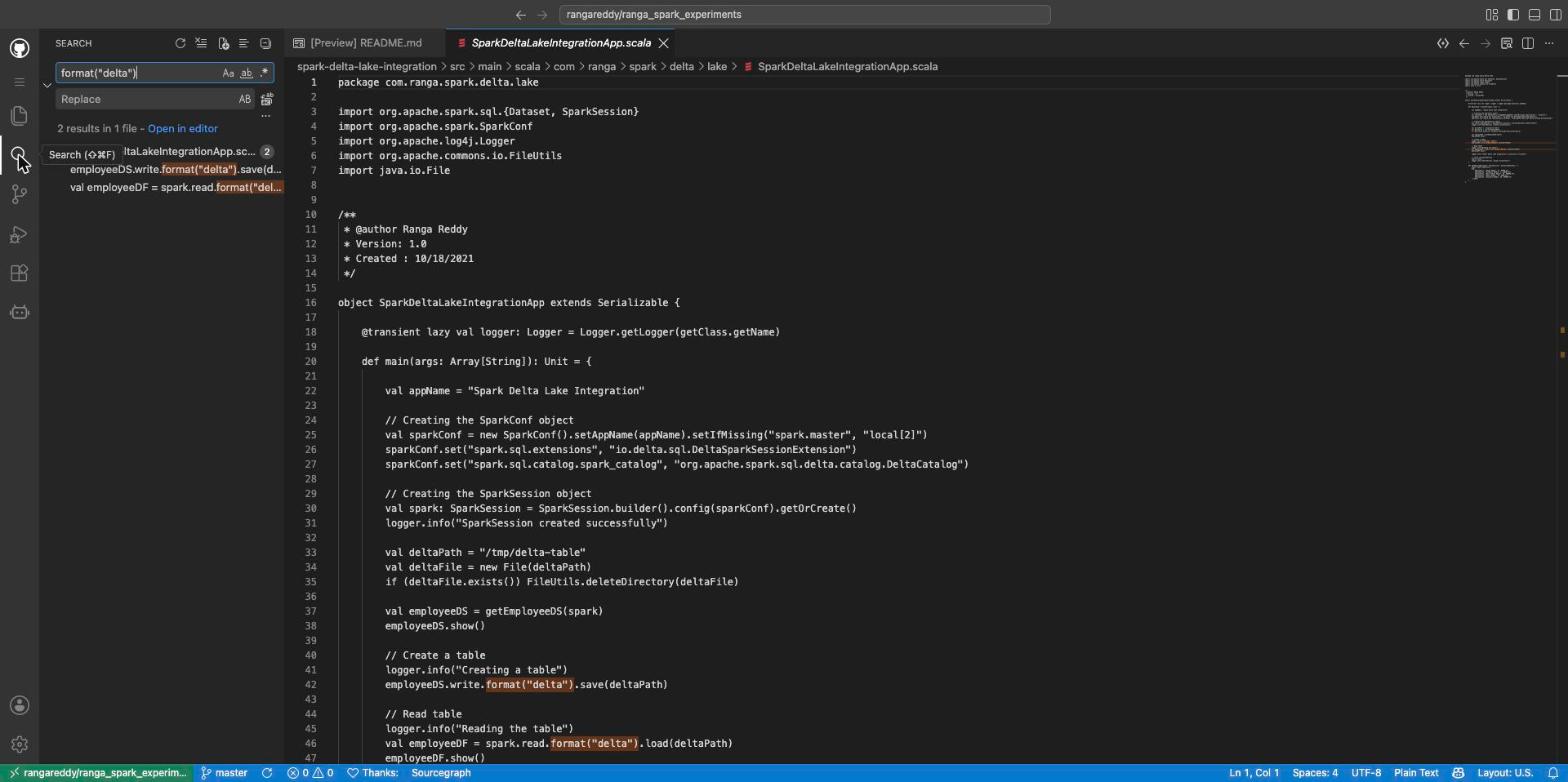
- Search across the repository. Click the magnifier in the activity bar, or
press
Cmd+Shift+Fon macOS (Ctrl+Shift+Felsewhere), and typeformat("delta"). The panel reported 2 results in 1 file, and both matches are highlighted in the open editor.
Where it stops
- No syntax highlighting for Scala. The status bar showed
Plain Textfor the.scalafile. Navigation and search work; colour does not. - Read-only. The Search view has a Replace box, but this is a viewer for a public repository. There is nothing to run, build or debug.
- A “Leave site?” prompt. After I used Search, Chrome asked for confirmation before navigating away from the page. It is a browser prompt from the editor page, not data loss, because nothing can be saved.
Tool 2: GitIngest, the whole repository as one prompt
What it is for. Pasting a repository into an LLM chat. It produces a summary, a directory tree and the file contents as a single text document.
Steps
- Open
https://gitingest.com/rangareddy/ranga_spark_experiments. The path is the sameowner/repo, so the page starts processing immediately. - Wait for the spinner. This run took under half a minute for 280 files.
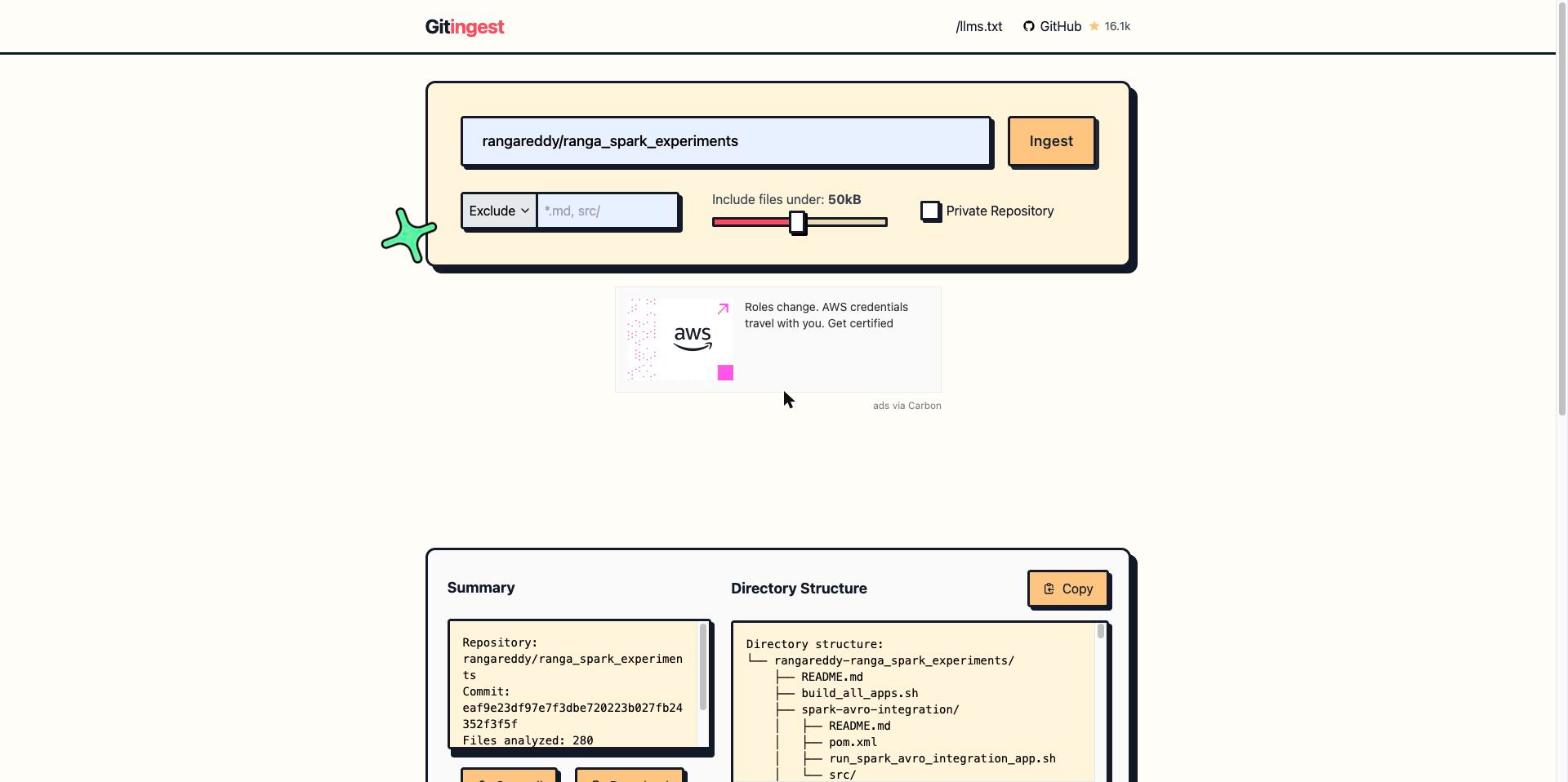
- Read the Summary panel. For this repository it reported:
Repository: rangareddy/ranga_spark_experiments
Commit: eaf9e23df97e7f3dbe720223b027fb24352f3f5f
Files analyzed: 280

Estimated tokens: 173.5k
- Use the controls above the result before you ingest, not after. The form has
an Exclude (or Include) pattern box such as
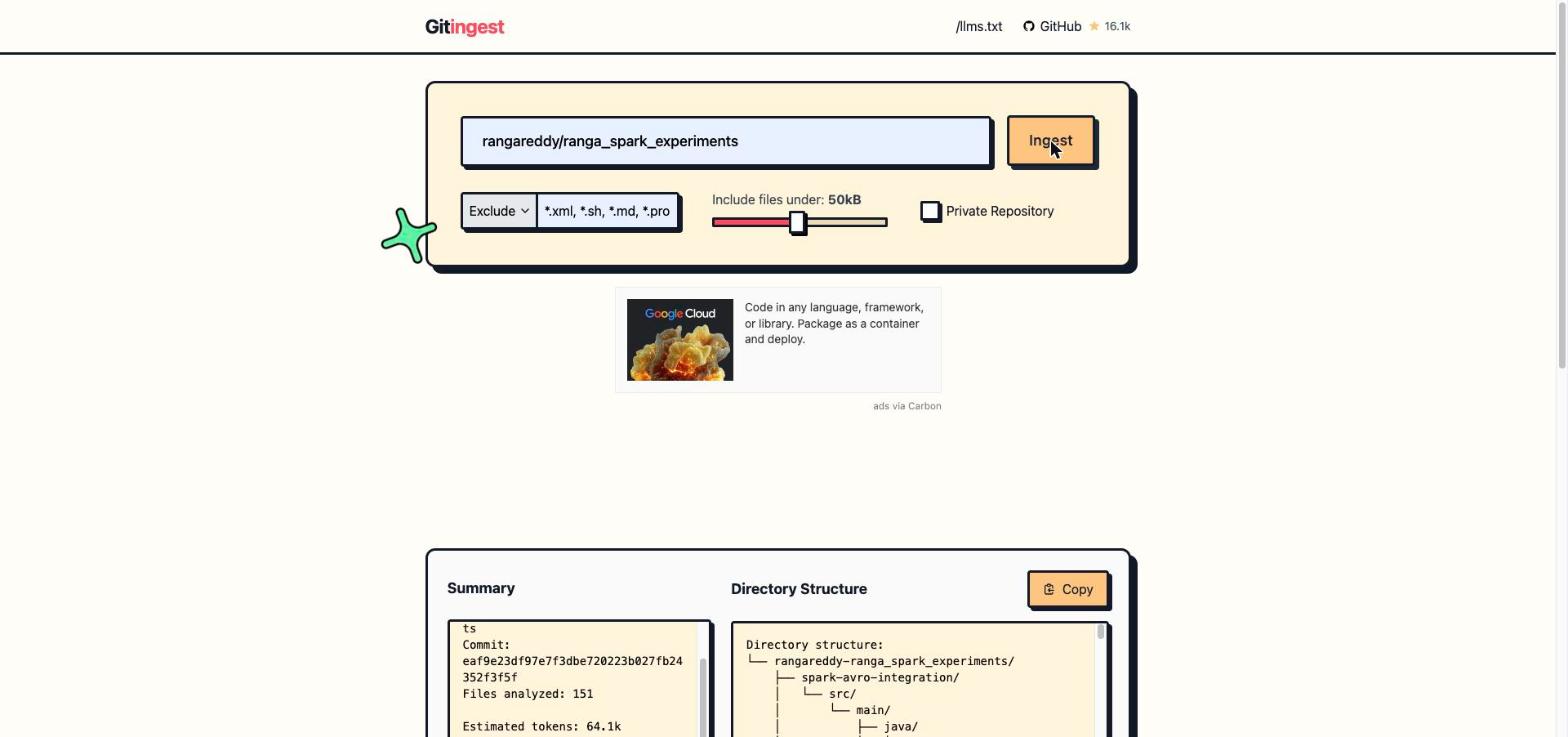
*.md, src/, an Include files under slider that defaults to 50 kB, and a Private Repository checkbox. Typing*.xml, *.sh, *.md, *.propertiesinto the Exclude box and clicking Ingest again took the result from 280 files and 173.5k estimated tokens to 151 files and 64.1k tokens, with the same commit.
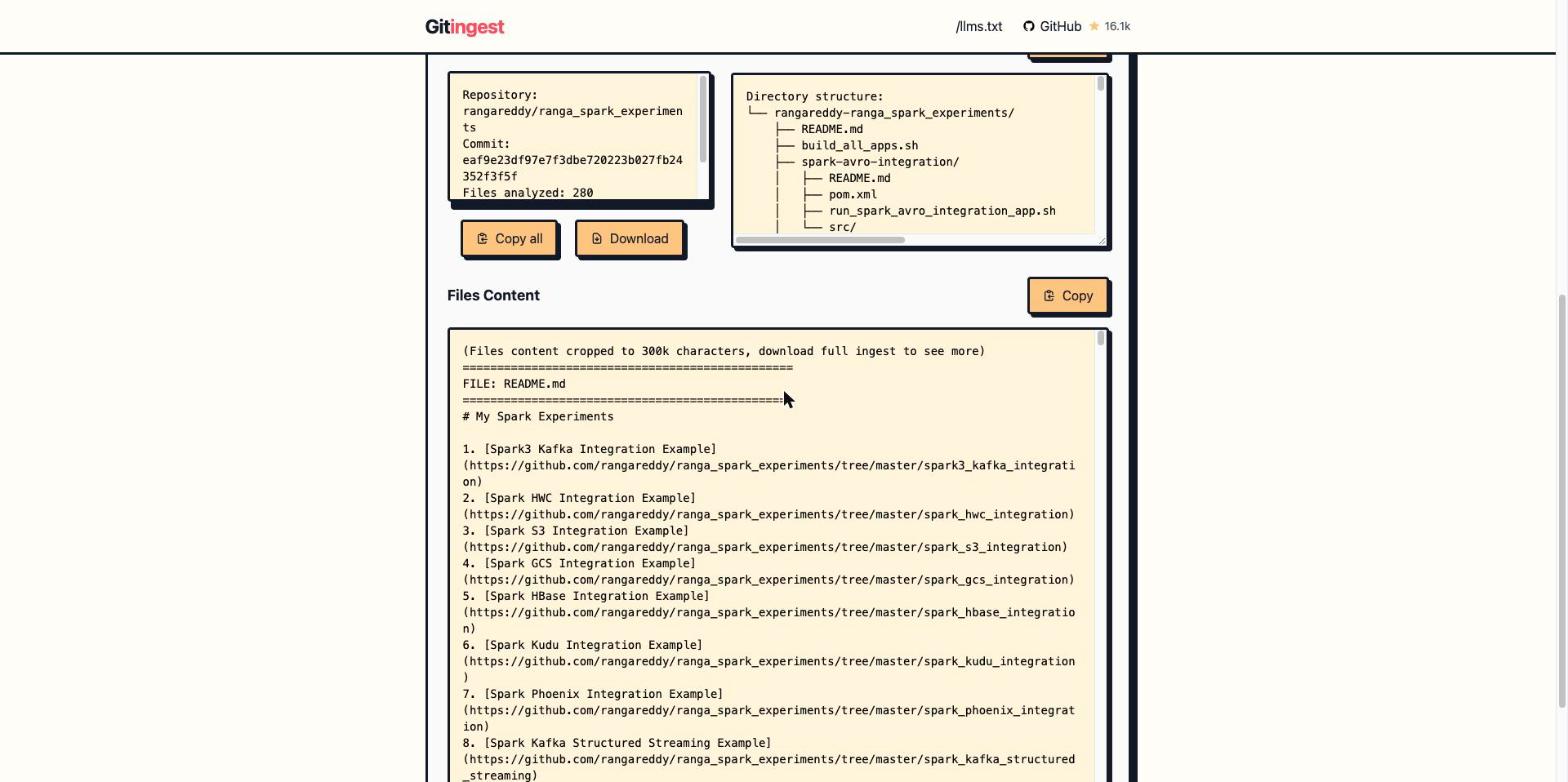
- Click Copy all to put the document on the clipboard, or Download to save it as a file. Paste it into a chat with the question you actually have, for example “Which modules write to Kafka and which read from it?”
Where it stops
- The on-page view is cropped. The panel begins with
(Files content cropped to 300k characters, download full ingest to see more). The 173.5k-token estimate is for the whole repository, so only Download gives you everything. - 173.5k tokens does not fit everywhere. It is a large prompt even for long-context models. Exclude patterns are not optional for a repository this size.
- A snapshot, not a live view. The summary pins commit
eaf9e23. A later push is not in the document you copied.
Tool 3: GitDiagram, an architecture diagram from the file tree
What it is for. The first ninety seconds with an unfamiliar repository: what are the parts and how do they connect.
Steps
- Open
https://gitdiagram.com/rangareddy/ranga_spark_experiments. - Watch the progress panel. It shows Understanding the architecture with a
timer and an Info line,
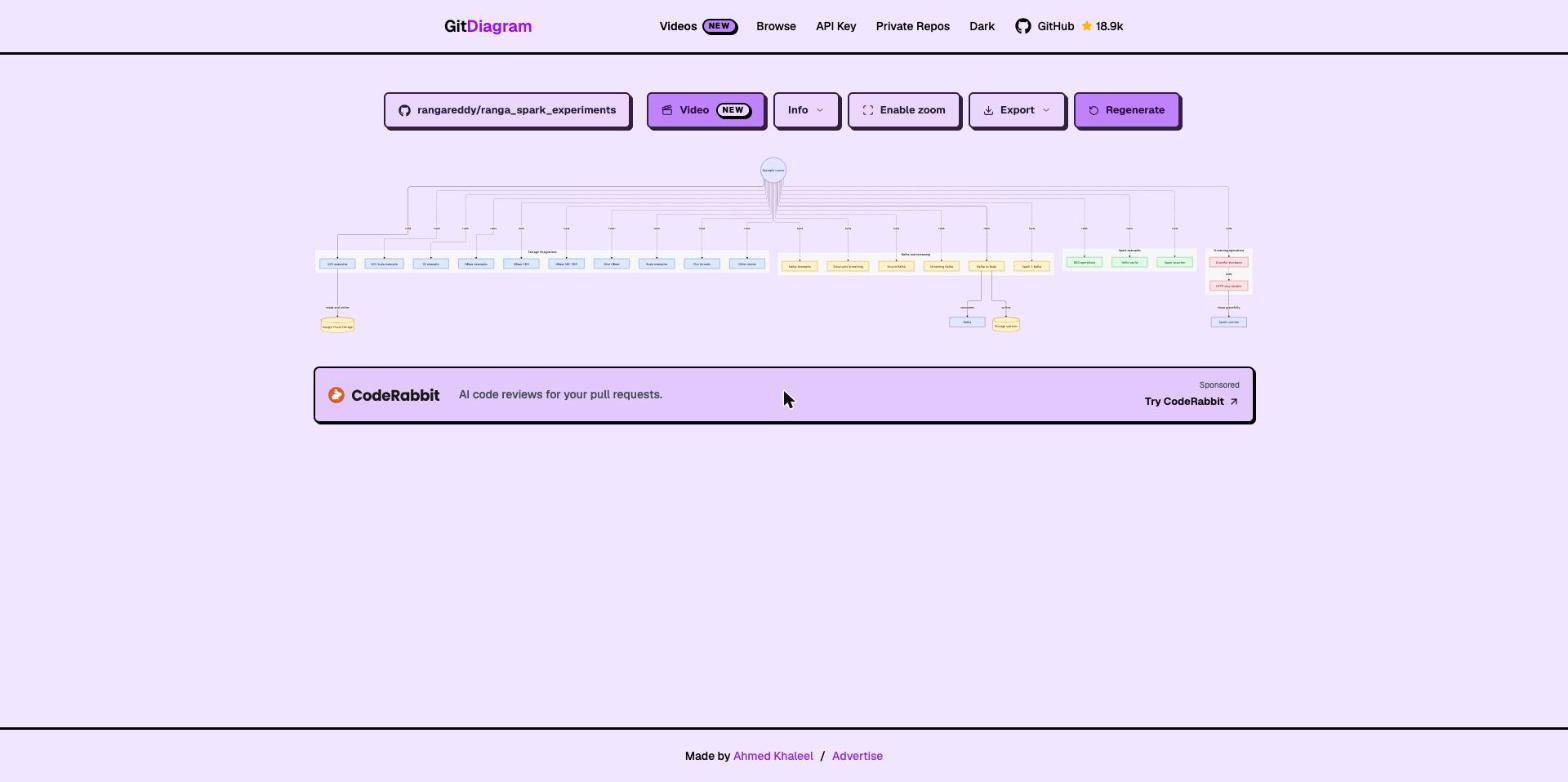
40 source files read. The diagram appeared after roughly half a minute. - The first render fits the whole diagram into the page. For this repository it is too wide to read:
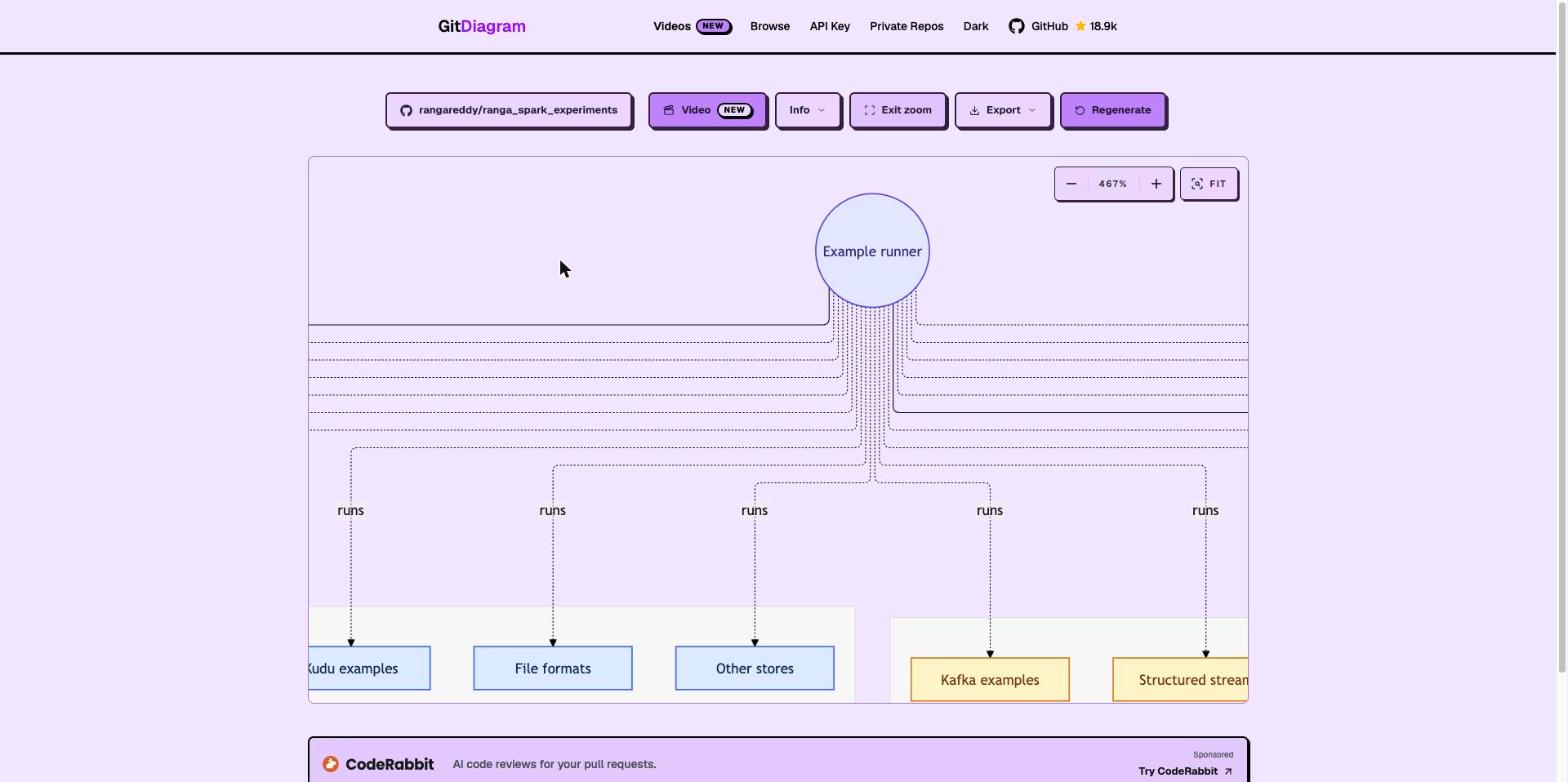
- Click Enable zoom. The diagram becomes pannable and zoomable (the first
view opened at 467%), with
-,+and FIT controls. Scroll and drag to read a cluster:
- The toolbar also has Export and Regenerate. For use in your own
notes, add
.mdto the URL:
https://gitdiagram.com/rangareddy/ranga_spark_experiments.md
That returned 200 with text/markdown, about 15 KB, containing an
Overview, the diagram as a Mermaid block, a Components list with links to
source files, and Connections. It is built for pasting into an agent’s
context instead of screenshotting the page.
Where it stops
- It reads a sample. Forty files out of 280. Its own markdown says it is generated “from its file tree, README and a sample of source files” and that it “is an AI-made overview: check details against the source.”
- It invents hubs. The top node,
Example runner, fans out to every cluster. This repository is a set of independent examples, and the generated overview itself says each is “independently initiated”. The hub is the model’s way to draw a tree, not a program in the repo. Read diagrams like this as a table of contents, not a call graph. - Wide repositories shrink. Thirty-two sibling modules produce a diagram that only works zoomed. A repository with a deeper structure would read better than a flat monorepo of samples.
Tool 4: GitMCP, the repository as a tool your assistant can call
What it is for. Instead of pasting a snapshot, give an AI assistant a URL that it queries on demand, so it reads current files rather than a stale dump.
Steps
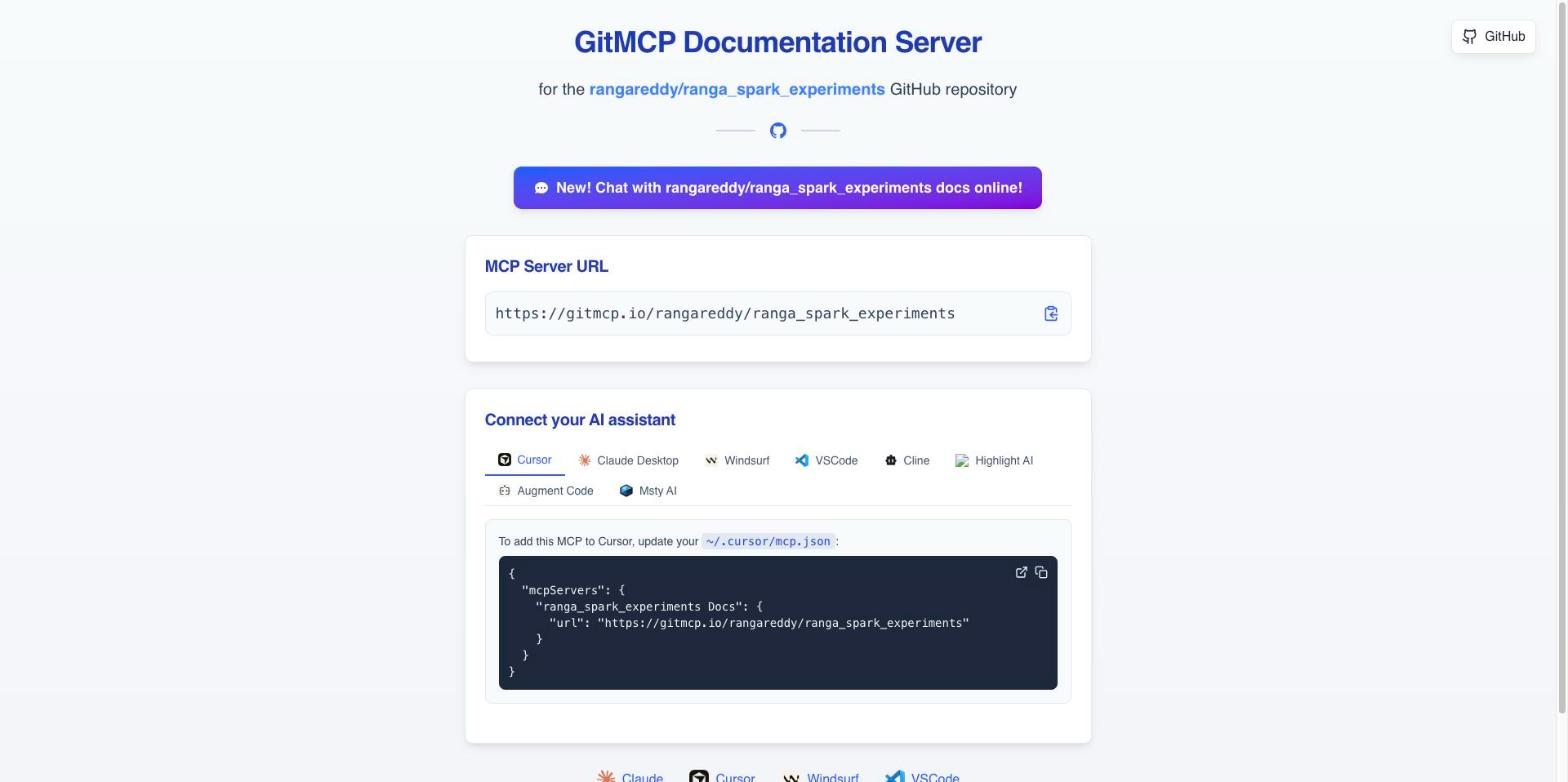
- Open
https://gitmcp.io/rangareddy/ranga_spark_experiments. The page is a setup guide titled GitMCP Documentation Server, with the server URL:
https://gitmcp.io/rangareddy/ranga_spark_experiments
- Pick your client from the tabs: Cursor, Claude Desktop, Windsurf, VSCode,
Cline, Highlight AI, Augment Code or Msty AI. For Cursor, add this to
~/.cursor/mcp.json:
{
  "mcpServers": {
    "ranga_spark_experiments Docs": {
      "url": "https://gitmcp.io/rangareddy/ranga_spark_experiments"
    }
  }
}
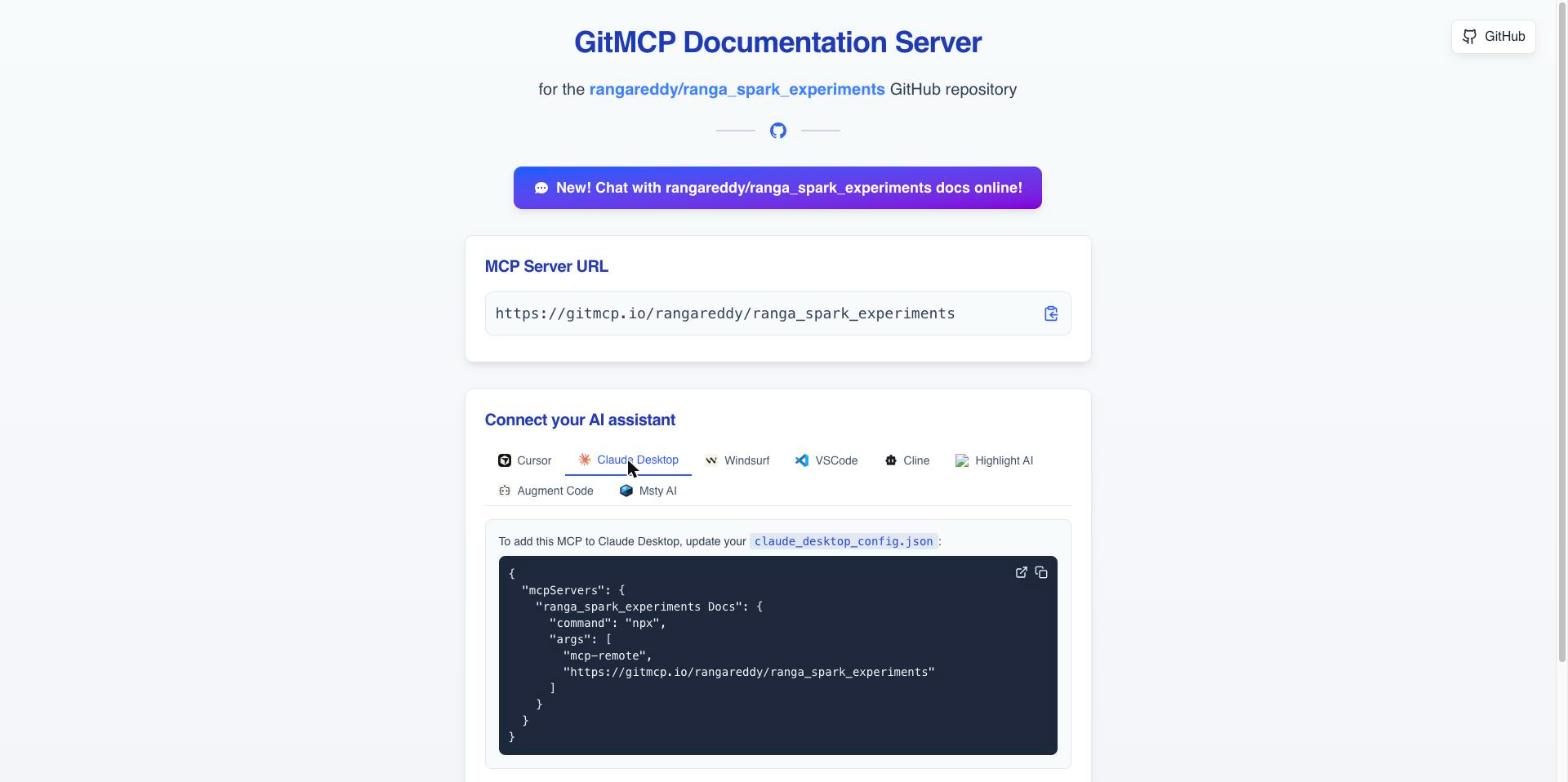
- For Claude Desktop the page gives a different shape, because that client
starts a local process and bridges to the remote server with
mcp-remote. Add this toclaude_desktop_config.json:
{
  "mcpServers": {
    "ranga_spark_experiments Docs": {
      "command": "npx",
      "args": [
        "mcp-remote",
        "https://gitmcp.io/rangareddy/ranga_spark_experiments"
      ]
    }
  }
}
- Restart the client and ask a question that needs the repository, such as “In ranga_spark_experiments, how does the graceful shutdown example stop a streaming job?”
Where it stops
- Not run end to end in this post. The configuration above is exactly what the page shows. I did not connect an assistant to the server or list its tools, so what the assistant does with the URL is not claimed here.
- Claude Desktop needs Node.
npx mcp-remotemeans a local Node.js install, which cancels some of the “no install” appeal for that client. - Editing the config file is the install. A remote MCP URL means the assistant sends your questions, and what it fetches, to a third-party server.
Tool 5: GitHubBox, a running dev environment, for the right repo
What it is for. Opening a repository as an editable, runnable project in CodeSandbox, which suits JavaScript and Node projects.
Steps
- Open
https://githubbox.com/rangareddy/ranga_spark_experiments. - It redirects to
https://codesandbox.io/p/sandbox/github/rangareddy/ranga_spark_experiments, shows “Fetching details…”, then opens the editor. It opened without a sign-in, with a Sign In button still available.
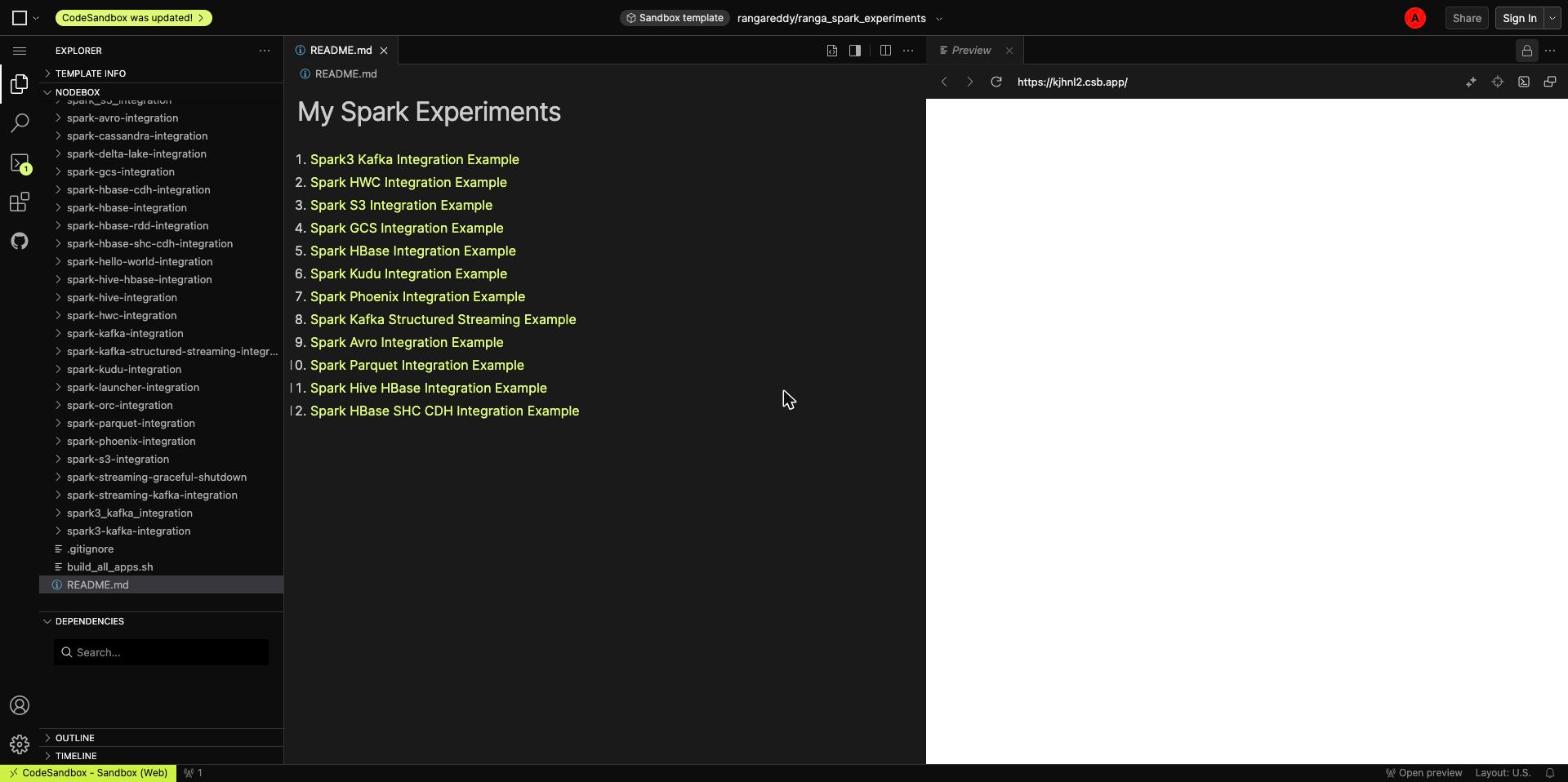
Where it stops, and this one stopped. The preview pane is blank. The
template label reads nodebox, a Node runtime in the browser, and this
repository is Scala and Java built with Maven: no package.json, nothing for a
Node sandbox to start. It is a useful negative result. GitHubBox is for
JavaScript repositories, and nothing in this post is evidence that it works for
anything else. I did not test it on a Node repository.
Tool 6: DeepWiki, a generated wiki, if someone has indexed it
What it is for. An LLM-written wiki of a repository, with pages by topic.
Steps
- Open
https://deepwiki.com/rangareddy/ranga_spark_experiments. - For this repository the page showed Repository Not Indexed: “This repository hasn’t been indexed yet”, with the estimate “Indexing typically takes 2-10 minutes”.
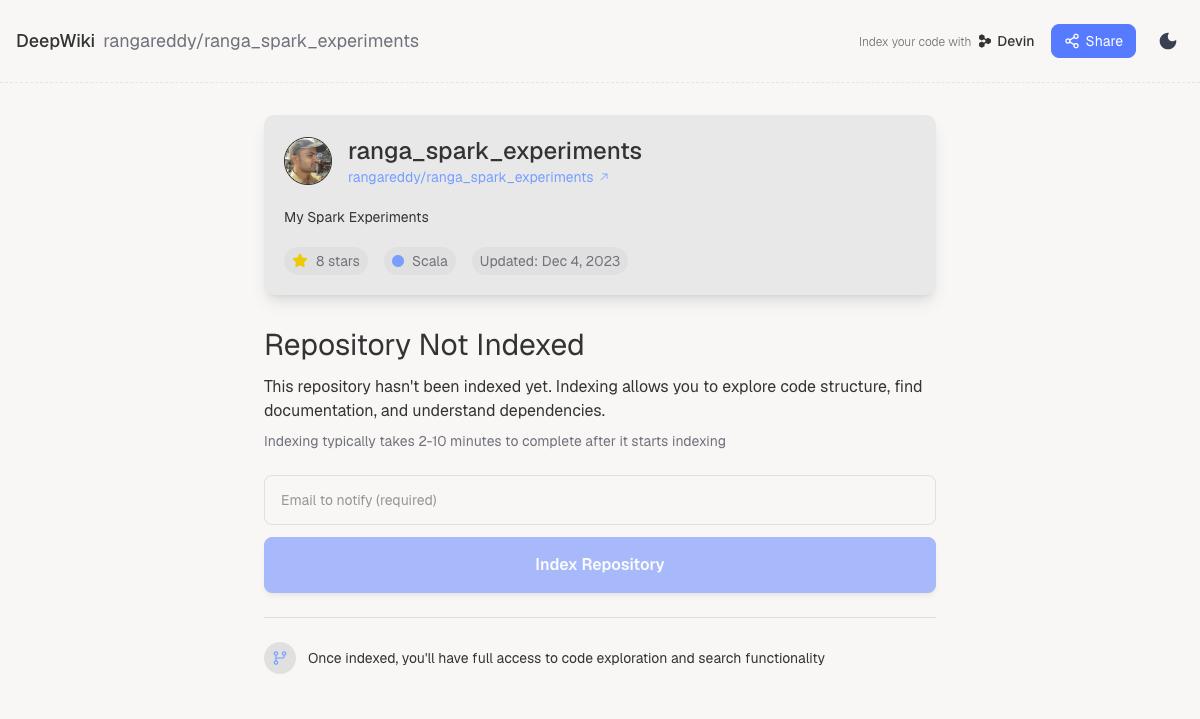
- Indexing requires an email to notify (required) and a click on Index Repository. I stopped here. Submitting someone’s email address to a third-party service is not part of a read-only demonstration, so the wiki itself is not covered in this post.
Where it stops. It does not work on first visit for a repository nobody has indexed, and the index step has a cost in personal data. For well-known projects that are already indexed it is the lowest-effort tool of the six, but I have not shown that here.
Real-world scenarios and production failures
These tools are for reading, so “production failure” here means the moment a workflow built on one of them gives a wrong answer or quietly stops working. Each case below was observed in this run unless it says otherwise.
Failure 1: the prompt is bigger than the model can use
The GitIngest summary for the unfiltered repository says Estimated tokens: 173.5k.
Pasting that into a chat either fails the length limit or, worse, fits and
leaves little room for the answer. The page does not stop you. It crops its own
preview to 300k characters and leaves the decision with you.
The fix is to cut before copying, not after. Excluding build files, shell
scripts, Markdown and properties files removed 129 of 280 files and cut the
estimate from 173.5k to 64.1k tokens at the same commit. Mind what you removed:
that exclude list also drops the pom.xml files, so a question about
dependencies now has no evidence to read.
| Run | Files | Estimated tokens |
|---|---|---|
| Defaults (50 kB file limit) | 280 | 173.5k |
Exclude *.xml, *.sh, *.md, *.properties |
151 | 64.1k |
Failure 2: the diagram says something the repository does not
GitDiagram’s top node is Example runner, with a labelled runs edge to every
cluster. Read at face value it says one entry point launches all the examples.
The same tool’s text overview says the opposite: “Each example is independently
initiated.” Both statements came out of one generation.
The root cause is structural. A diagram needs a root, a flat collection of 32 independent modules does not have one, and the model supplies a hub. The tool also states it read 40 files, so any behaviour that lives in the other 240 is a guess from names. Treat the diagram as an index of where to look, then confirm in the source (github1s is the quickest way to do that).
Failure 3: the same URLs refuse a script
All of these loaded in the browser. Requested from a shell with curl, the
same hosts answered differently:
URL (path /rangareddy/ranga_spark_experiments) |
Browser | curl status |
|---|---|---|
githubbox.com |
Redirected to CodeSandbox and opened | 403 |
deepwiki.com |
“Repository Not Indexed” page | 429 |
uithub.com |
Not opened in the browser | 401 |
gitmcp.io |
Setup page | 200 |
gitingest.com |
Result page | 200 |
gitdiagram.com |
Result page | 200 |
The page-level 200 for GitIngest, GitDiagram and GitMCP only proves that a
page was served. I did not trace how each one fetches its results, so a bare
curl of the page is not shown here to be a way to automate them. If you want
repeatable output in CI, use the repository’s own tooling: git clone --depth 1
and a local packer, not these sites. The one exception observed is GitDiagram’s
.md endpoint, which returned the generated text over plain curl with a 200.
Failure 4: a stale snapshot treated as current
GitIngest pins the commit in its summary (eaf9e23...). Anything pushed after
that is not in your document, and nothing in the pasted text tells the model so.
If you are asking an assistant about a fast-moving repository, put the commit
hash into the prompt and refresh the dump before a long session. This repository
last changed in December 2023, so staleness did not bite here, and I did not
test a repository that changes daily.
Failure 5: what you paste and what you sign up for
- Everything included is sent to the model. GitIngest includes every file under the size limit that your pattern does not exclude. If a repository has a committed credential in a config file, it is in the dump. Scan or exclude before copying. This is a general risk with any dump tool, not something I found in this repository.
- Private repositories. GitIngest has a Private Repository checkbox and GitDiagram has API Key and Private Repos entries in its header. I did not test either, and handing a private repository’s code to a free third-party service is a decision for your security team, not a URL trick.
- DeepWiki asks for an email. To index a repository you must give an address. The post stopped there on purpose.
- Ads and sponsors. GitIngest shows Carbon ads and GitDiagram a sponsor banner. This is how free tools pay for the servers that read your repository, and a reason to keep them off pages with sensitive context.
Failure 6: wrong tool for the repository
GitHubBox is the clean example. For this Scala and Java repository, the editor opened and the preview was empty, which looks like an error on your side, not a mismatch. The test before you open any of these tools is one question about the repository: what is its main language, and what do I want out of it?
| If the repository is | Reach for | Skip |
|---|---|---|
| JavaScript or Node, and you want to run it | GitHubBox | Nothing, but expect to wait for installs |
| Any language, and you want to read it | github1s | GitHubBox |
| Any language, and you want to ask an LLM | GitIngest for a one-off, GitMCP for repeated use | Pasting the unfiltered dump |
| Large, unfamiliar, and you want the shape | GitDiagram, then verify in github1s | Trusting the hub node |
| Popular open source project | DeepWiki, if already indexed | Indexing someone else’s repo with your email |
Optimisation, tuning knobs and best practices
The tools have few settings, so the tuning is mostly about what you decide before you open them and what you do with the output afterwards.
Pick the tool by the question, not by the novelty
  What do you want to know?
        |
        +-- "Where is X, and how is it written?" ---------> github1s
        |                                                    (read, search)
        +-- "What are the parts and how do they connect?" -> GitDiagram
        |                                                    (then verify in github1s)
        +-- "Answer questions about it, once" ------------> GitIngest
        |                                                    (scope with excludes first)
        +-- "Answer questions about it, repeatedly" ------> GitMCP
        |                                                    (the assistant fetches on demand)
        +-- "Does it run?" (Node/JS only) ----------------> GitHubBox
        +-- "A wiki for a well-known project" ------------> DeepWiki
                                                             (only if already indexed)
Walk the diagram top to bottom. The first two branches need no AI at all for the answer: github1s is plain browsing. The AI-backed branches (GitIngest, GitMCP, GitDiagram, DeepWiki) are where you should check the result.
A pipeline that uses three of them
For an unfamiliar repository, in this order:
- GitDiagram for the shape. Open the
.mdversion if you want to paste the overview and component list into your notes. Write down the two or three clusters that matter to you. - github1s to confirm. Open one file from each cluster and read it. This
is where the
Example runnerhub gets caught. - GitIngest, scoped for the deep question. Exclude everything outside the clusters you picked, so the token count matches the question.
- GitMCP if you will keep asking. A configured MCP URL beats re-pasting a dump every session, and does not go stale the way a pinned dump does. (Configuration shown above; not exercised end to end in this post.)
Scope before you paste
GitIngest’s controls are the only real tuning surface in the set.
| Control | Default seen | What it does | Use it when |
|---|---|---|---|
| Exclude / Include pattern | empty | Glob patterns, comma separated, e.g. *.md, src/ |
Always, for anything over a few dozen files |
| Include files under | 50 kB | Skips larger files | Generated or data files dominate |
| Private Repository | off | Checkbox for private repositories | Not tested here |
Measured on this repository, one exclude list changed the result like this:
| Exclude list | Files | Estimated tokens |
|---|---|---|
| None | 280 | 173.5k |
*.xml, *.sh, *.md, *.properties |
151 | 64.1k |
Patterns worth trying, as starting points and not measured here: exclude test
folders when the question is about production code, exclude *.json and *.csv
for data-heavy repositories, and use Include mode to keep only one module’s
directory. Verify the file count after each change, because a pattern that
matches more than you meant removes the evidence for your question.
Check what you are about to send
Before pasting a dump anywhere, run two local commands on a shallow clone. They cost almost nothing and they are the check the web tools do not give you:
git clone --depth 1 https://github.com/rangareddy/ranga_spark_experiments
cd ranga_spark_experiments
git ls-files | wc -l
grep -rIn --exclude-dir=.git -E 'AKIA|password *=|secret' .
On this repository that printed 313 tracked files, and the grep produced a
handful of hits that were all configuration key names and placeholders: Hadoop
fs.s3a.secret.key settings that read the value from a variable, a usage
string with the literal arguments ranga_aws_access_key ranga_aws_secret_key,
and a spark.datasource.hive.warehouse.password=hive line in a run script. No
real credential. That outcome is the point of the exercise: a pattern search
finds names, so a person has to triage it, and it is quicker to do that on a
terminal than after the text is in a chat.
The file counts differ by tool and the post did not reconcile them: git
ls-files says 313, GitIngest analysed 280, and 151 after excludes. Different
tools count binary files, ignored files and size limits differently. Compare
counts within a tool, not across tools.
Prompt template for a dump
A pasted repository answers better when the prompt says what the text is.
Below is a snapshot of github.com/<owner>/<repo> at commit <sha>,
filtered to <what you kept>. Answer only from this text. If the answer is
not in it, say which file you would need. Quote file paths.

Question: <your question>
The commit hash comes from the Summary panel (eaf9e23... here). It tells the
assistant, and your future self, which snapshot the answer is about. The
“which file you would need” line is the cheap guard against a cropped or
filtered dump producing a confident answer from missing evidence.
Cost and trade-offs against a local clone
| Browser tools (this post) | git clone --depth 1 plus local tools |
|
|---|---|---|
| Setup | None | Network fetch and disk |
| Disk used | None | 1,812 KB for this repository, of which 304 KB is .git |
| Completeness | Sampled (GitDiagram read 40 files) or cropped (GitIngest preview at 300k characters) | Everything tracked |
| Privacy | The repository name and content go to a third party | Stays on your machine |
| Repeatable in CI | Not shown to work (see Failure 3) | Yes |
| Freshness | A snapshot, or live through GitMCP | git pull |
| Cost | Free, with ads or sponsors | Free |
For this 313-file repository the clone is 1,812 KB on disk, with a 304 KB .git. The browser tools do not save you bytes at
this size. They save you the decision to set anything up, which matters for a
repository you will open once and does not matter for one you will work in.
Timings are left out on purpose: they depend on the network and the day.
Summary and key takeaways
- The trick is the same in every case. Open the repository on GitHub, then
retype the host.
github1s.com,gitingest.com,gitdiagram.com,gitmcp.io,githubbox.comanddeepwiki.comall takeowner/repoafter it. - Match the tool to the question. Reading and searching: github1s. Shape of an unfamiliar repository: GitDiagram. One-off questions to an LLM: GitIngest. Repeated questions: GitMCP. Running a JavaScript project: GitHubBox.
- Scope before you paste. One exclude list took the test repository from 280 files and 173.5k estimated tokens to 151 files and 64.1k.
- Verify the AI-generated views. GitDiagram read 40 of 280 files and drew a hub node the repository does not have. Use it as a table of contents and confirm in the source.
- Know what did not work. GitHubBox showed a blank preview for a Maven project, DeepWiki had not indexed the repository and asks for an email, and GitMCP was configured from its page but not run end to end here.
- Do not use these on private code unless cleared. The server-side tools run on someone else’s infrastructure.
- For anything repeatable, clone. A shallow clone of this repository is 1,812 KB on disk, runs offline, and scripts cleanly.
References
- github1s, the VS Code web viewer for GitHub repositories
- GitIngest, which turns a repository into a prompt-ready text file
- GitDiagram, which generates an architecture diagram and a Markdown overview
- GitMCP, which serves a repository as a remote MCP endpoint
- GitHubBox, which opens a repository in CodeSandbox
- DeepWiki, which hosts generated wikis for indexed repositories
- The test repository,
rangareddy/ranga_spark_experiments - Model Context Protocol for what an MCP server and client are
Trademarks
GitHub is a trademark of GitHub, Inc. Visual Studio Code is a trademark of Microsoft Corporation. CodeSandbox, Cursor, Claude and DeepWiki are trademarks of their respective owners. Apache Spark, Apache Kafka, Apache Hive and Apache Maven are either registered trademarks or trademarks of The Apache Software Foundation in the United States and other countries.
Found this useful?
These posts and tools are free. If one saved you an afternoon, you can buy me a coffee.
Comments
Questions, corrections and reviews are welcome. Sign in with GitHub to post; comments are stored in this site's public GitHub Discussions.