What's new in Apache Spark 4.3: stateful real-time streaming, JSON_TABLE and history tracking
Spark 4.3 new features, tested: stateful real-time streaming, Auto CDC with history, JSON_TABLE, ASOF JOIN, VARIANT editing and more. Each feature has a status, a source ticket, a sample with its printed output, and a plain note on what needs a flag or a connector.
- Before you start
- 1. Stateful real-time mode [Advanced]
- 2. Auto CDC with SCD Type 2 [Advanced]
- 3. JSON_TABLE [Intermediate]
- 4. UNNEST in the FROM clause [Beginner]
- 5. ASOF JOIN [Intermediate]
- 6. VARIANT editing functions [Intermediate]
- 7. BIN BY [Intermediate]
- 8. TIME(p) and nanosecond timestamps [Intermediate]
- 9. DataFrame.zip [Beginner]
- 10. Single-task execution for small queries [Intermediate]
- Smaller additions worth knowing
- Version lineage
- Flags at a glance
- Settings and costs
- When these features bite
- Run it yourself
- Upgrade notes for teams moving to 4.3
- Known limitations in this release
- Cheat sheet
- Key takeaways
- Further reading
- Trademarks
Spark 4.3 changes what a streaming query can do and what a SQL query can say. Stateful queries, such as running counts and de-duplication, now run under the real-time trigger. SQL gains standard answers to three old workarounds: reading JSON as rows, matching each row to the closest earlier row, and keeping the history of a changing record. This post is for data engineers and streaming platform teams on Spark 4.x. You will learn what ten features do, the syntax, what a real run printed, and which ones need a flag or a connector first. All four releases side by side are in the Spark 4.x features-by-release post.
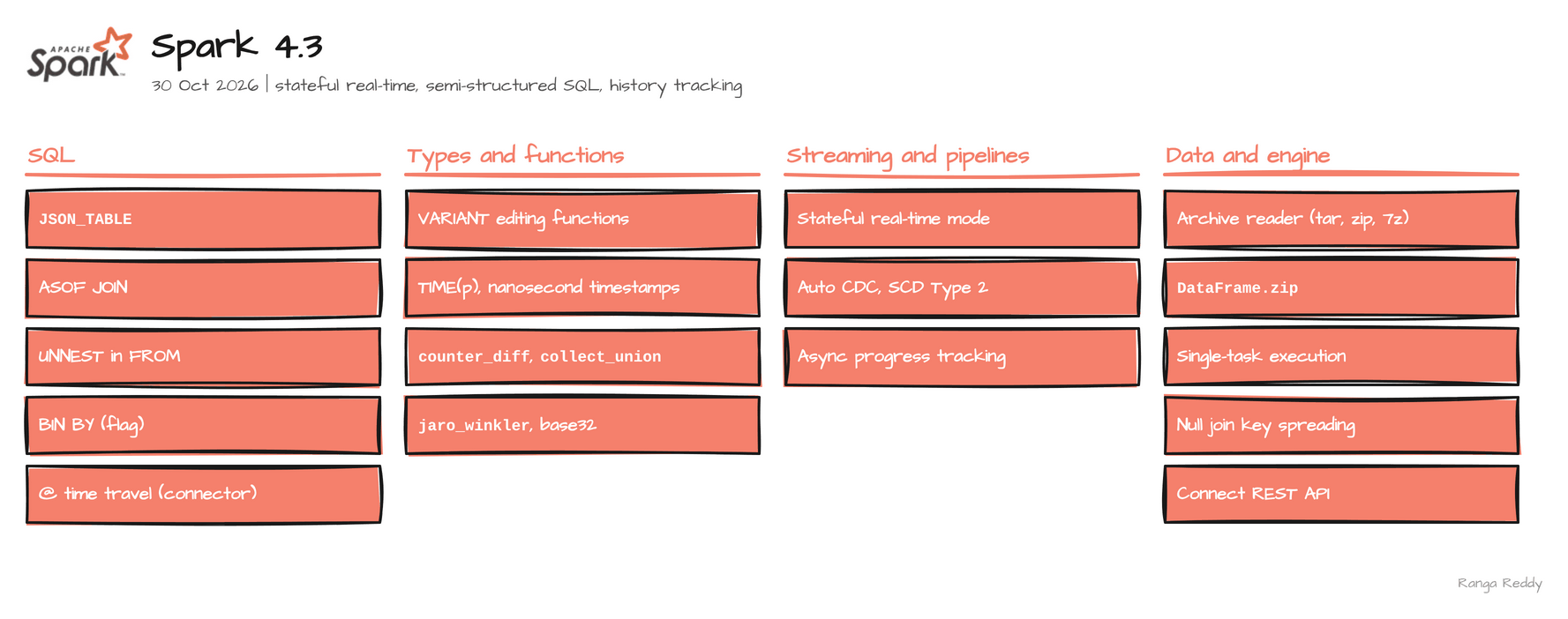 Everything in Spark 4.3.
Verified execution. Every sample in this post ran on Spark 4.3.0, on the
apache/spark:4.3.0-python3image or the plain release tarball, in November 2026. Each feature carries a Status line: Ran means the printed output is real, behind a flag names the setting, and needs a connector means the engine defines the syntax and a table format has to implement it. Where I could not run something, it is labelled listed and its limits are in Known limitations. The runnable files are in ranga-spark4-examples underspark-4.3/.
Before you start
What you need
| Need | Detail |
|---|---|
| Java | 17. The runs used Temurin 17.0.20 |
| Python, for PySpark | 3.11 or newer for the 4.3 tarball. Python 3.10 support was dropped in this release |
| Spark | The apache/spark:4.3.0-python3 image, or the 4.3.0 release tarball (535 MB) |
| Kafka | A broker, for feature 1 only |
| A catalog with row-level operations | For feature 2 only, for example an Apache Iceberg table |
The smallest check that you are on the release you think you are on is
00_hello_world.sql. Run it first. It printed:
4.3.0 98bc0212c94705434471627068f41e374ccab143
If it prints another version, an older SPARK_HOME in your shell is winning. Start with env -u SPARK_HOME.
Glossary
| Term | Meaning |
|---|---|
| Micro-batch | Structured Streaming’s default: the stream is run as a series of small batch jobs |
| Real-time mode | A streaming mode where long-lived tasks process records as they arrive, with no batch boundary |
| Shuffle | Moving data between stages so that rows with the same key meet on the same task |
| Task slot | One unit of parallelism on an executor. Real-time mode needs a free slot for every task |
| CDC | Change data capture: a feed of inserts, updates and deletes from a table |
| SCD | Slowly changing dimension. Type 1 overwrites old values; Type 2 keeps every version as a row |
| VARIANT | The Spark type for semi-structured data such as JSON, encoded once in binary |
| As-of join | A join that matches each row to the closest earlier row on the other side |
Try this first
A three-step path if you are new to these features. Each step is small and none needs Kafka or a connector.
- Confirm the version. Run the hello-world file above.
- Run one function. Try
UNNESTon an array, orvariant_setin feature 6. - Flip one flag and run one join. Set
spark.sql.join.asofJoin.enabledand run theASOF JOINsample.
1. Stateful real-time mode [Advanced]
Since: 4.3.0 · Status: Ran (needs a Kafka broker) · Source:
SPARK-58635,SPARK-58508,SPARK-57228,SPARK-57141,SPARK-58263Lineage: stateless queries in 4.1.0, stateful queries in 4.3.0.
What it is
Structured Streaming normally cuts a stream into small batches, called micro-batches, and
runs one job per batch. Real-time mode replaces that with long-lived tasks that process
records as they arrive. Spark 4.1 shipped it for stateless queries. 4.3 adds streaming
aggregation (SPARK-58635), dropDuplicates (SPARK-58508) and Scala or Java
transformWithState (SPARK-57228), the operators that keep state between records, and
removes the @Experimental marker (SPARK-57281).
Why it matters
This means you can keep a running count or de-duplicate a Kafka topic and see each update as the record lands, instead of waiting for the end of a batch.
Under the hood,
the stages of a query run at the same time, joined by a pipelined shuffle
(StreamingShuffleManager, SPARK-57141) in which a downstream task reads while the
upstream task is still writing, and the scheduler admits the stage group only when slots are free for all of its tasks,
failing fast otherwise, and fails the group as one unit (SPARK-58263). That is why the
cluster needs a free task slot for every task in every stage.
Sample code
Runnable file: 07_stateful_real_time_mode.scala.
// needs a Kafka broker
// set spark.sql.shuffle.partitions to a number of free slots
val counts = spark.readStream.format("kafka")
  .option("kafka.bootstrap.servers", "kafka:29092")
  .option("subscribe", "rtm43_demo3").option("startingOffsets", "latest").load()
  .select(col("value").cast("string").alias("word"))
  .groupBy("word").count()

// the real-time trigger replaces the micro-batch trigger
counts.writeStream.format("console").outputMode("update")
  .option("checkpointLocation", "/tmp/rtm43_ckpt3")
  .trigger(Trigger.RealTime("5 seconds")).start()
Producing a, b, a, a printed a 1, a 2, a 3 and b 1 in one batch, so each
update is emitted as it happens, not once per key at the end. The default 200 shuffle
partitions on a two-core session failed with CONCURRENT_SCHEDULER_INSUFFICIENT_SLOT:
it needed 201 slots and 2 were free.
When to use it
Use it when stateful queries on Kafka where a result should appear as each record lands, and you can reserve a task slot per task. Skip it when micro-batch latency is fine, the query needs Python or an ASOF JOIN, or the cluster is small. Common beginner mistake: leaving spark.sql.shuffle.partitions at 200 on a small cluster, which fails with CONCURRENT_SCHEDULER_INSUFFICIENT_SLOT.
Constraints from the documentation
These are stated in the 4.3 real-time mode guide; I did not run them.
- Output and checkpoint. The output mode must be
update, or the query fails withSTREAMING_REAL_TIME_MODE.OUTPUT_MODE_NOT_SUPPORTED. AcheckpointLocationis required. - Sources and sinks. Kafka is the only source; the built-in
ratesource is not supported. Sinks are Kafka,foreach, console and memory, andforeachBatchis not supported. - Not supported. Stream-stream joins,
flatMapGroupsWithState, session windows, PySparktransformWithState, range partitioning and Adaptive Query Execution. - Sizing. Count the source’s reader tasks plus the stateful operator’s shuffle tasks. A 10-partition Kafka topic feeding an aggregation with 5 shuffle partitions needs at least 15 cores, and the guide advises one real-time query per cluster.
- The trigger duration is a checkpoint interval, not a latency target, and it must be at least
spark.sql.streaming.realTimeMode.minBatchDuration, 5,000 ms by default. - Delivery. Processing is exactly-once, but the built-in Kafka sink is at-least-once.
- Reported latency. The vendor’s 4.3 announcement reports P99 end-to-end latencies of 136 ms for
dropDuplicates, 139 ms for a window aggregation and 141 ms fortransformWithState, from benchmarks tracked inSPARK-58884, which has fix version 4.4.0. It gives no hardware or method, and I did not measure latency.
Visual
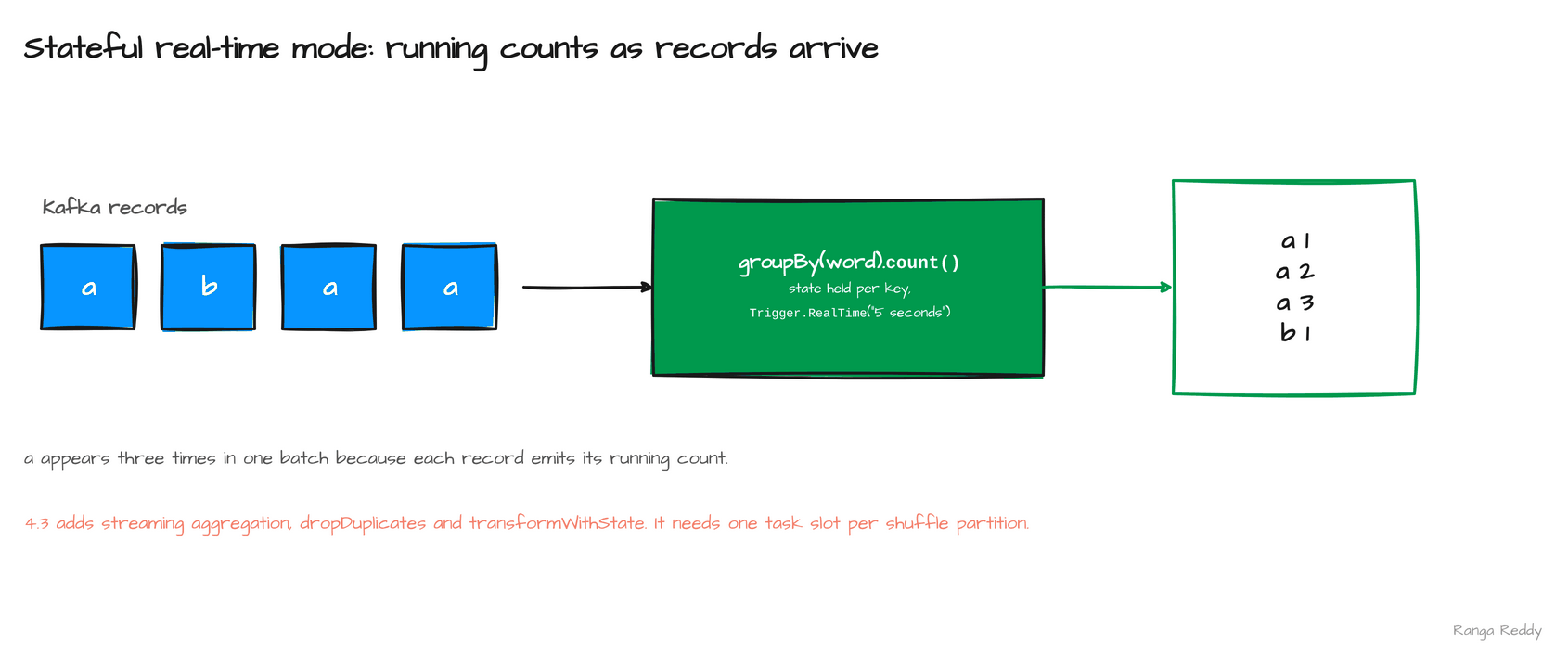 Records on the left, running counts on the right, with no batch boundary in between.
2. Auto CDC with SCD Type 2 [Advanced]
Since: 4.3.0 · Status: Ran to the error only; needs a connector · Source:
SPARK-58321,SPARK-58261Lineage: Auto CDC with SCD Type 1 in 4.2 (
SPARK-56249), SCD Type 2 and its SQL syntax in 4.3.
What it is
Change data capture (CDC) is a feed of inserts, updates and deletes from a source
table. Auto CDC applies that feed to a target table inside a Declarative Pipeline, the
4.1 framework in which you declare datasets and Spark derives the run order. A slowly
changing dimension (SCD) says what happens to old values. Type 1 overwrites them, so
only the latest row per key survives. Type 2, new in 4.3 (SPARK-58321), keeps every
version as a row bounded by __START_AT and __END_AT.
Why it matters
This means you can keep the full history of a customer or product record with one
declaration instead of hand-written MERGE logic.
Under the hood, Spark applies each
micro-batch to the target as a MERGE, so the target must be a table whose connector
implements Data Source V2 row-level operations. On a default Parquet table the syntax
parses and the flow then fails with AUTOCDC_TARGET_DOES_NOT_SUPPORT_MERGE. The 4.3
documentation points to lakehouse connectors such as Apache Iceberg. I did not run a
pipeline against an Iceberg catalog, so the success path is not shown here. Version
note: SCD Type 1 came in 4.2 (SPARK-56249), Type 2 and its SQL syntax in 4.3
(SPARK-58261).
Sample code
Runnable file: 08_auto_cdc_scd2.sql.
-- target must support row-level operations, such as an Iceberg table
CREATE STREAMING TABLE customers_history
FLOW AUTO CDC
FROM STREAM(cdc_events)
KEYS (id)
APPLY AS DELETE WHEN op = 'DELETE'
SEQUENCE BY version
COLUMNS * EXCEPT (op)
STORED AS SCD TYPE 2;
When to use it
Use it when you need the history of a dimension record and your table format supports row-level operations. Skip it when the target is a plain Parquet table, or you only need the latest row, which is SCD Type 1. Common beginner mistake: pointing the flow at a Parquet table and expecting it to run; it fails with AUTOCDC_TARGET_DOES_NOT_SUPPORT_MERGE.
Visual
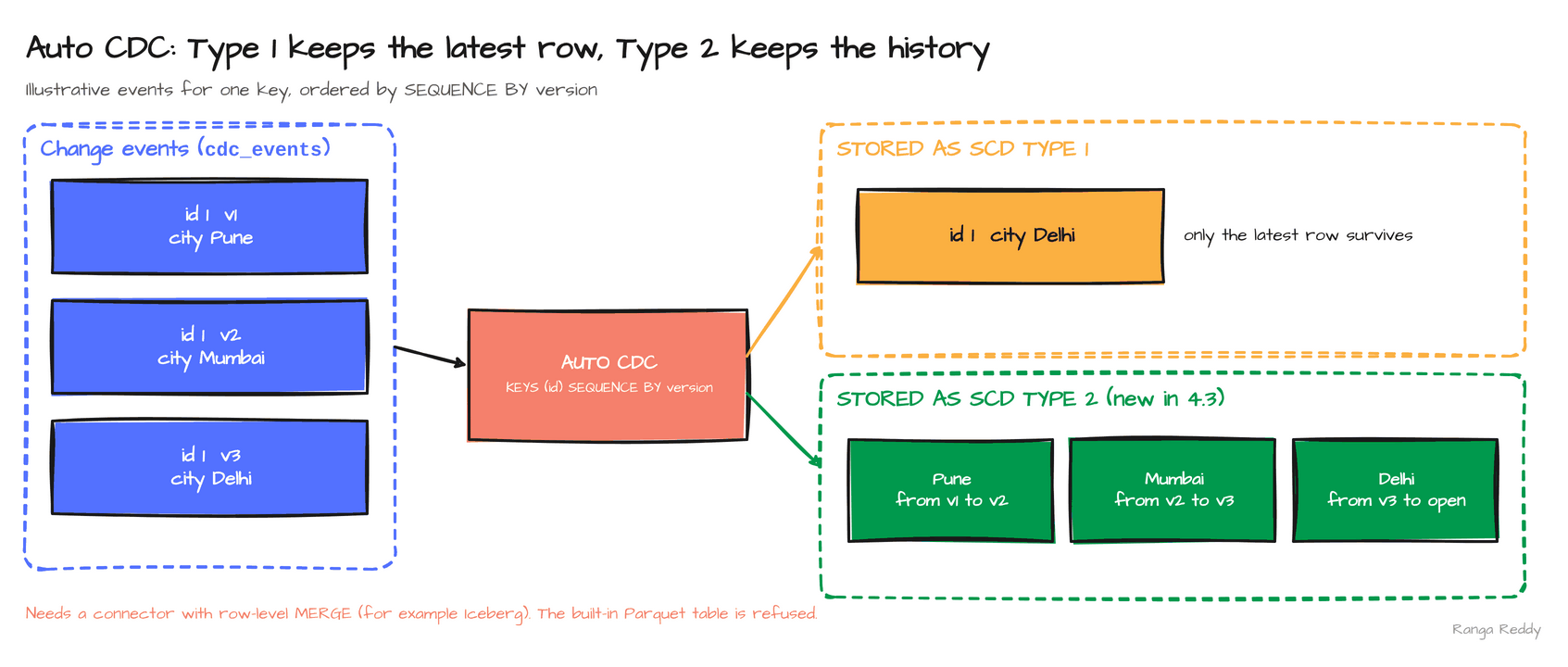 Three events for one key: Type 1 keeps the last, Type 2 keeps all three with their ranges.
3. JSON_TABLE [Intermediate]
Since: 4.3.0 · Status: Ran; flat form only · Source:
SPARK-58366
What it is
JSON_TABLE is the SQL-standard function that turns a JSON document into rows and typed
columns (SPARK-58366). You give it a path that selects the repeating part of the
document, then a COLUMNS list that maps paths to column names and types. It is the
construct that Oracle, DB2 and MySQL queries use, so it is the one a migrated query
already contains.
Why it matters
This means you can read a JSON string with one declarative query instead of chaining
from_json with a schema, then explode.
Under the hood, FOR ORDINALITY adds a
1-based row number, EXISTS PATH returns a boolean for whether a path is present, and
the function takes a column through LATERAL, so it works over a whole table of
documents. With rows {"id":10,"opt":1} and {"id":20}, a hasOpt BOOLEAN EXISTS PATH '$.opt'
column returned true and then false. Only the flat form is supported in 4.3.0: NESTED PATH columns are not, so a
document nested more than one array deep still needs two steps.
Sample code
Runnable file: 01_json_table.sql.
-- seq counts the rows; id and name are typed columns read by path
SELECT t.* FROM JSON_TABLE(
  '{"items":[{"id":1,"n":"a"},{"id":2,"n":"b"}]}',
  '$.items[*]'
  COLUMNS (
    seq  FOR ORDINALITY,
    id   INT    PATH '$.id',
    name STRING PATH '$.n'
  )
) AS t;
-- 1  1  a
-- 2  2  b
*
When to use it
Use it when you read JSON arrays into rows, or you are migrating a query that already uses JSON_TABLE. Skip it when the document nests arrays more than one level deep; NESTED PATH is not supported, so split it into two steps. Common beginner mistake: expecting NESTED PATH columns to work.
Visual
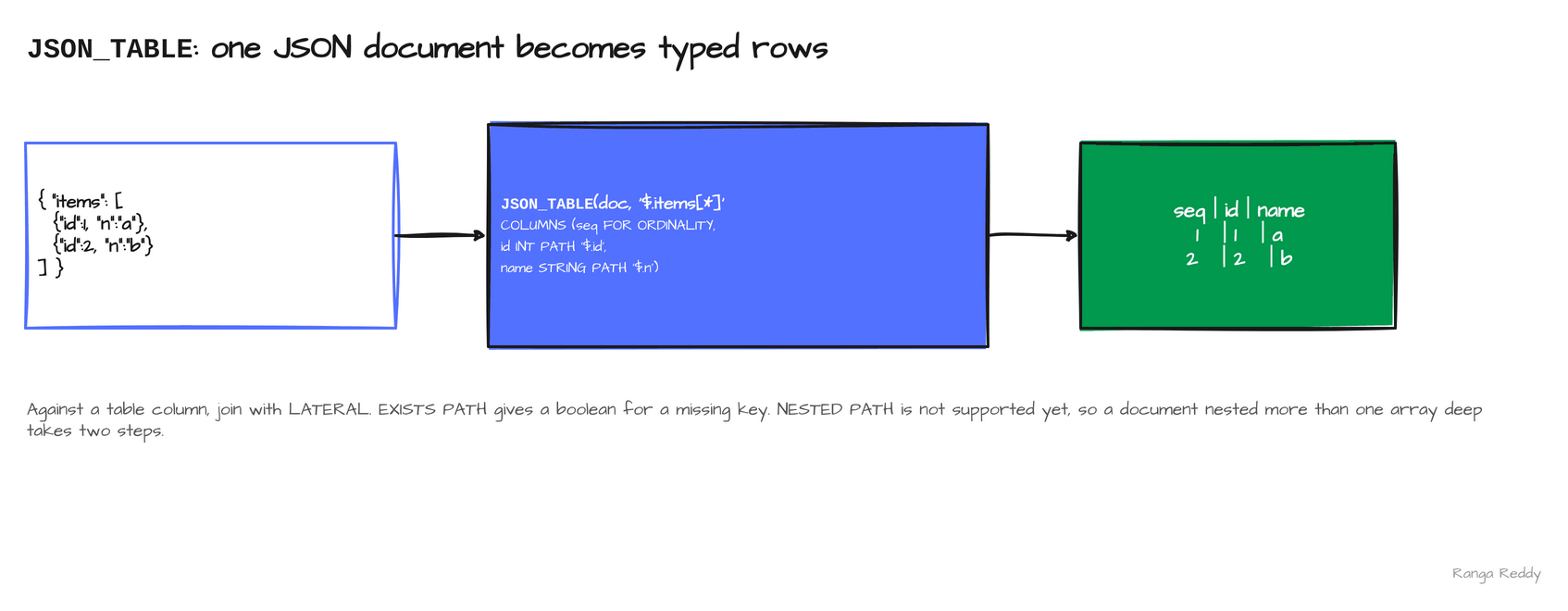 One document on the left, two typed rows on the right.
4. UNNEST in the FROM clause [Beginner]
Since: 4.3.0 · Status: Ran · Source:
SPARK-58419
What it is
An array column holds several values in one row. UNNEST expands it into one row per
value, and in 4.3 it works directly in the FROM clause (SPARK-58419). Before this,
the same result came from explode or LATERAL VIEW, which are Spark-specific.
UNNEST is the ANSI form, so it reads the same as in other engines. explode and LATERAL VIEW still work, so
nothing has to be migrated; the gain is portability. A typical use is flattening an order’s
line items into one row per item before you aggregate them.
Why it matters
This means you can port array-flattening queries from PostgreSQL or Trino with much less rewriting.
Under the hood, listing several arrays expands them in parallel, and the
shorter ones are padded with NULL to the length of the longest. WITH ORDINALITY adds
the position of each value, and a LATERAL reference lets the array come from a column
of the same query.
Sample code
Runnable file: 03_unnest.sql.
-- two arrays of different length expand in parallel, the shorter padded with NULL
SELECT * FROM UNNEST(array(1,2), array(10,20,30)) AS t(a, b);
-- 1     10
-- 2     20
-- NULL  30

-- with the position of each value
SELECT * FROM UNNEST(array('a','b')) WITH ORDINALITY AS t(value, pos);
-- a  1
-- b  2
*
When to use it
Use it when you want array expansion that reads the same as in other SQL engines. Skip it when existing explode code works and portability is not a goal; nothing has to be migrated. Common beginner mistake: forgetting that the shorter of several arrays is padded with NULL, and that positions start at 1, where posexplode starts at 0.
Visual
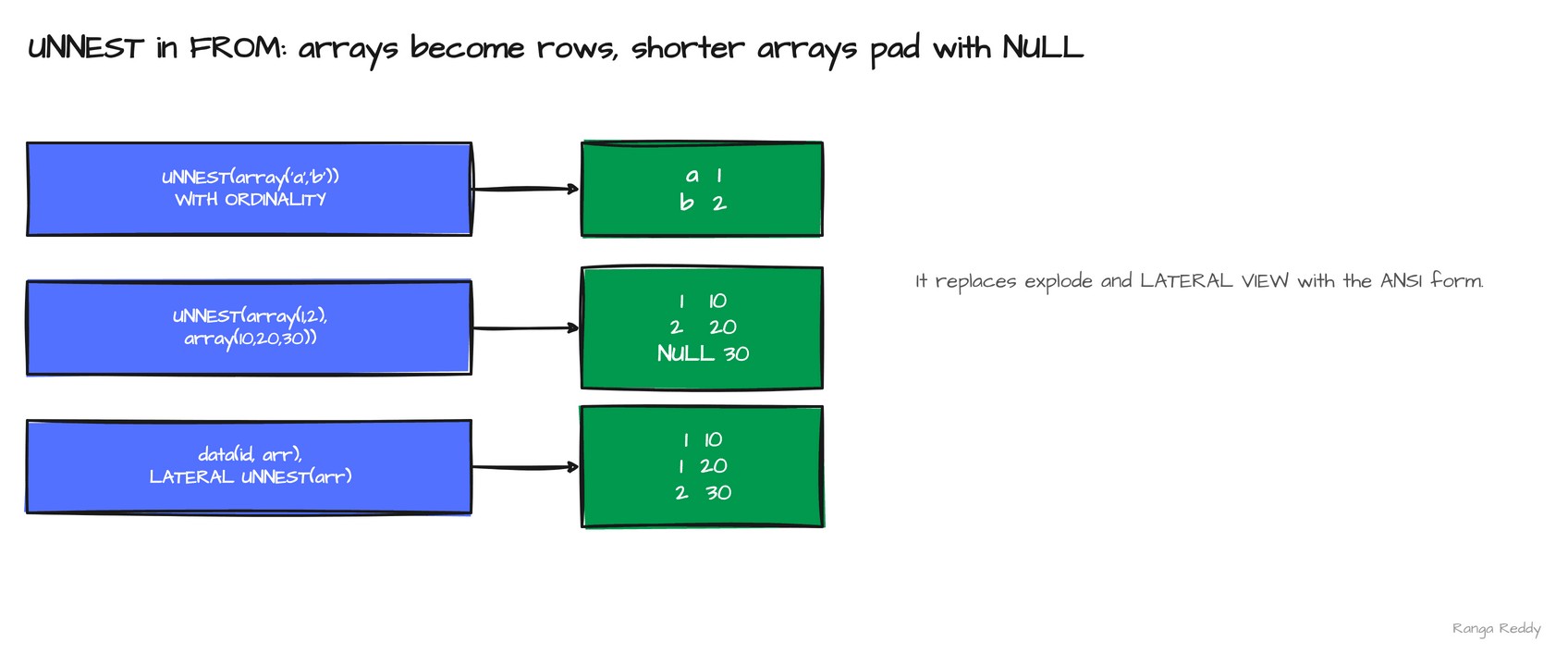 The three forms: with ordinality, two arrays padded to the longer, and lateral over a column.
5. ASOF JOIN [Intermediate]
Since: 4.3.0 · Status: Ran, behind a flag · Source:
SPARK-58092,SPARK-58124,SPARK-56887
What it is
An as-of join matches each row on the left with the closest earlier row on the right: the
quote in force when a trade happened, or the price list valid on an order date
(SPARK-58092). A MATCH_CONDITION states the time comparison, and an ON clause
states the key that must be equal. Without it you write a window function and a join,
and you have to get the tie-breaking right yourself.
Why it matters
This means you can attach reference data to events by time with one join, which is the shape of most time-series enrichment.
Under the hood, the SQL form executes as a sort-merge
join (SPARK-58124), backed by a dedicated operator (SPARK-56887).
It is behind spark.sql.join.asofJoin.enabled, default false; with the flag off the
statement fails at parse time with UNSUPPORTED_FEATURE.ASOF_JOIN. Only INNER and
LEFT OUTER are supported, and real-time mode does not support it. In the sample, the
AAPL trade at 10:00:20 takes the 10:00:10 quote, not the 10:00:00 one, because the join
picks the closest earlier row, not the first match.
Sample code
Runnable file: 02_asof_join.sql.
SET spark.sql.join.asofJoin.enabled = true;
-- each trade takes the latest quote at or before its timestamp
SELECT t.id, t.sym, t.ts, q.ts AS quote_ts, q.bid
FROM trades t ASOF JOIN quotes q
  MATCH_CONDITION (t.ts >= q.ts)
  ON t.sym = q.sym
ORDER BY t.id;
-- 1  AAPL  10:00:05  10:00:00  100.0
-- 2  AAPL  10:00:20  10:00:10  101.0
-- 3  MSFT  10:00:07  10:00:06  200.0
When to use it
Use it when you enrich events with the latest reference row at or before each event time. Skip it when you need an outer join other than LEFT OUTER, or the query runs in real-time mode. Common beginner mistake: running it without the flag; the statement fails at parse time with UNSUPPORTED_FEATURE.ASOF_JOIN.
Visual
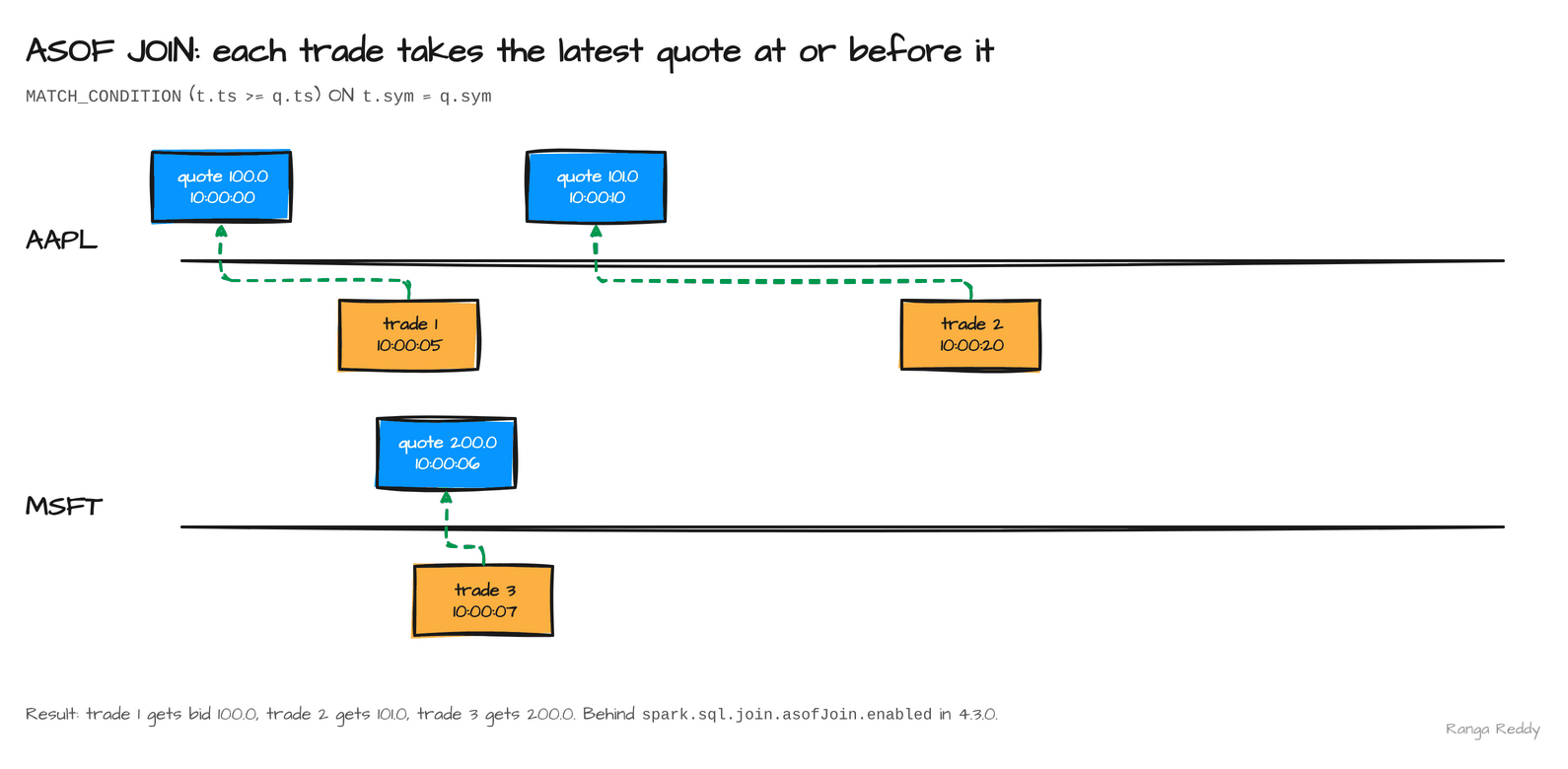 Three trades matched to the quotes in force at the time: 100.0, 101.0 and 200.0.
6. VARIANT editing functions [Intermediate]
Since: 4.3.0 · Status: Ran · Source:
SPARK-57804Lineage:
VARIANTin 4.0, generally available in 4.1, editing functions in 4.3.
What it is
VARIANT is the Spark type for semi-structured data such as JSON, stored in a binary
encoding so it is parsed once. Before 4.3 you could read a variant but not change it
without rebuilding the whole value. Five functions now return a new variant with a path
set, inserted, deleted or appended to (SPARK-57804 and others).
Why it matters
This means you can patch one field in a JSON payload inside SQL, without a round trip through a struct schema.
Under the hood, every function returns a new value, because
variants are immutable. variant_set and variant_insert differ on an existing key:
set replaces it and insert raises VARIANT_DUPLICATE_KEY. The try_ forms
(try_variant_set and others) return NULL instead of raising, which is the safer choice
for dirty data.
Inserting into an array shifts the later elements right: variant_insert at $[1] on
["a","b","c"] with z gives ["a","z","b","c"], and variant_array_append adds to the end. variant_strip_nulls removes null fields and null array elements, so {"a":1,"b":null,"c":[1,null]} becomes {"a":1,"c":[1]}.
Sample code
Runnable file: 04_variant_editing.sql.
-- set a new key
SELECT variant_set(parse_json('{"a":1,"tags":["x"]}'), '$.b', 3);
-- {"a":1,"b":3,"tags":["x"]}

-- delete two paths in one call
SELECT variant_delete(parse_json('{"a":1,"b":2,"items":[1,2,3]}'), '$.a', '$.items[0]');
-- {"b":2,"items":[2,3]}

-- remove null fields and null array elements
SELECT variant_strip_nulls(parse_json('{"a":1,"b":null,"c":[1,null]}'));
-- {"a":1,"c":[1]}
When to use it
Use it when you patch a field in a JSON payload that has no fixed schema. Skip it when the shape is fixed and a typed column or struct would do; typed columns are easier to filter and document. Common beginner mistake: using variant_insert on a key that already exists, which raises VARIANT_DUPLICATE_KEY. Use variant_set to replace.
Visual
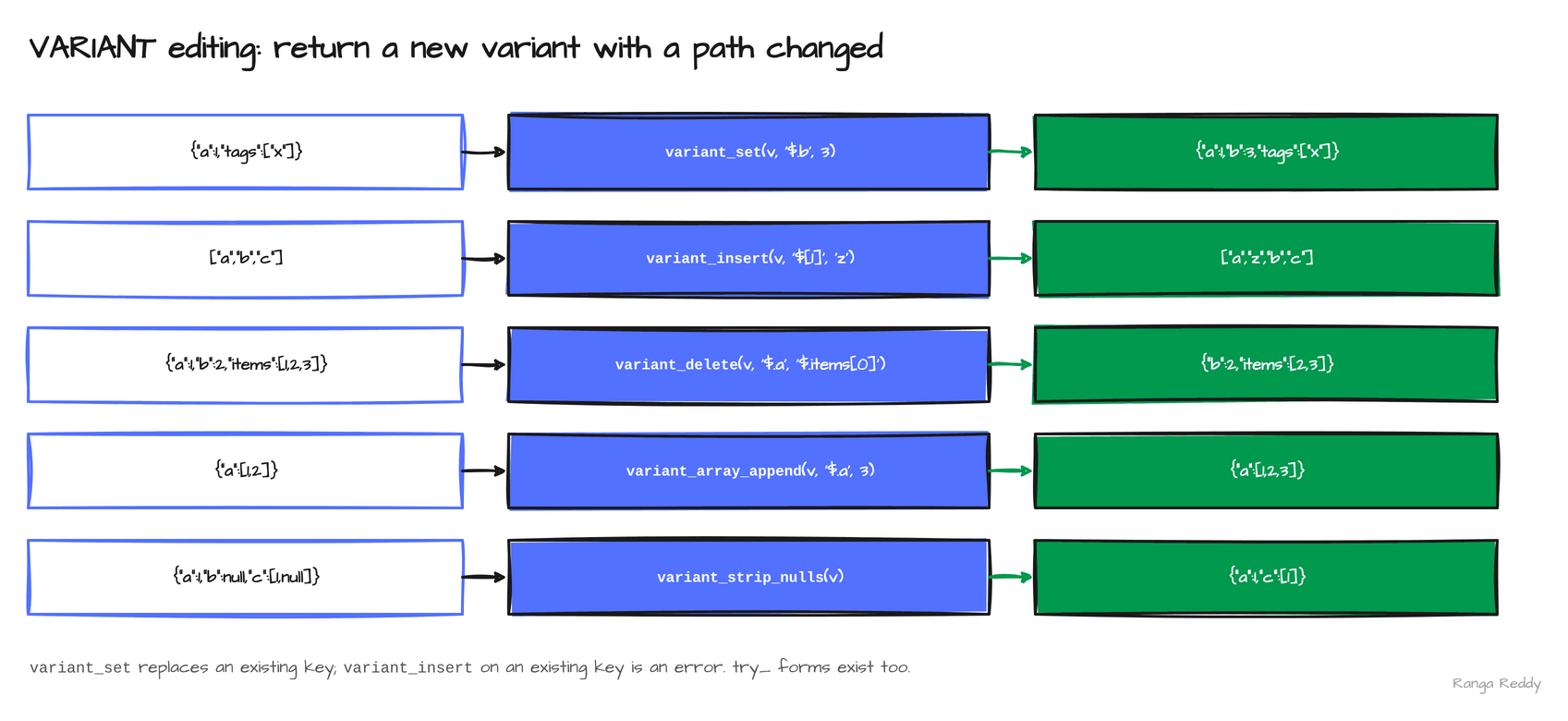 Five functions, each taking a variant and returning an edited copy.
7. BIN BY [Intermediate]
Since: 4.3.0 · Status: Ran, behind a flag · Source:
SPARK-57133,SPARK-58003
What it is
BIN BY spreads a measure over fixed-width time bins in proportion to how much of each
interval falls inside each bin (SPARK-57133). A call that runs from 10:00 to 10:25 and
costs 100 becomes 40, 40 and 20 across three ten-minute bins. That is the usual step
before charting usage per interval. Without it, the work is a join to a calendar table
plus overlap arithmetic.
Why it matters
This means you can turn start and end timestamps into per-interval figures with one clause.
Under the hood, it is a relation operator with its own physical execution
(SPARK-58003), and it is behind spark.sql.binByRelationOperator.enabled, default
false. The two range columns must be TIMESTAMP or TIMESTAMP_NTZ: an INT column
fails with BIN_BY_RANGE_TYPE_MISMATCH. The grammar also takes ALIGN TO to set the bin
origin. Use it for a quantity that accrues over the interval, such as cost, bytes or
minutes of usage. DISTRIBUTE UNIFORM names the columns to share out evenly across the
bins, and BIN_START AS and BIN_END AS name the two bin-boundary columns it adds.
Sample code
Runnable file: 09_bin_by.sql.
SET spark.sql.binByRelationOperator.enabled = true;
-- cost is spread over the 10-minute bins each call overlaps
SELECT id, bin_start, bin_end, cost
FROM calls
BIN BY (RANGE started TO ended BIN WIDTH INTERVAL 10 MINUTES DISTRIBUTE UNIFORM (cost)
        BIN_START AS bin_start BIN_END AS bin_end)
ORDER BY id, bin_start;
-- 1  10:00  10:10  40.0
-- 1  10:10  10:20  40.0
-- 1  10:20  10:30  20.0
-- 2  10:00  10:10  15.0   (10:05 to 10:15 costs 30: five minutes in each bin)
-- 2  10:10  10:20  15.0
When to use it
Use it when a measure accrues over an interval, such as cost, bytes or minutes of usage, and you want it per time bin. Skip it when you are counting events rather than spreading an amount, or the range columns are not timestamps. Common beginner mistake: passing integer range columns, which fails with BIN_BY_RANGE_TYPE_MISMATCH.
Visual
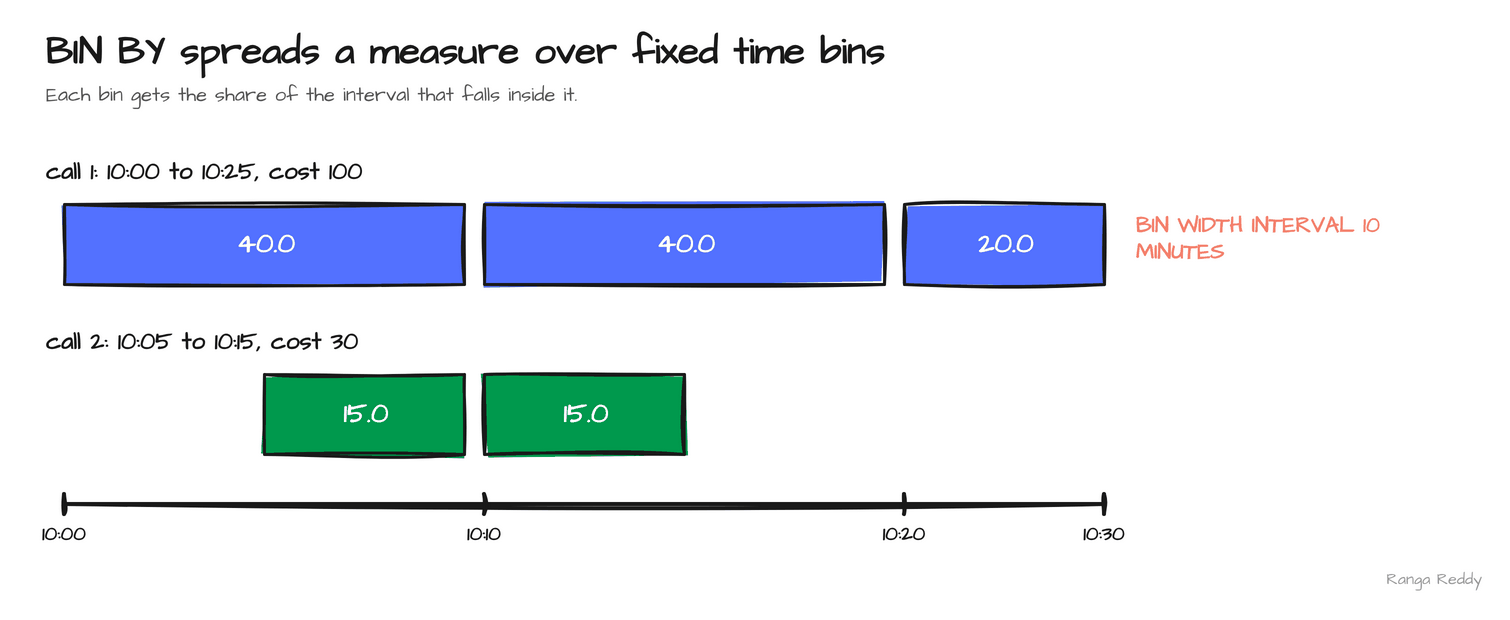 Each bin gets the share of the interval that falls inside it.
8. TIME(p) and nanosecond timestamps [Intermediate]
Since: 4.3.0 · Status: Ran, behind flags; nanosecond timestamps are a preview · Source:
SPARK-57551,SPARK-56876
What it is
TIME(p) is a time-of-day type with a precision p up to nine digits, which is
nanoseconds (SPARK-57551). TIMESTAMP_NTZ(p) and TIMESTAMP_LTZ(p) do the same for
timestamps, with and without a time zone, for p from 7 to 9 (SPARK-56876). Spark’s
default timestamp keeps microseconds, six digits, so a nanosecond value is silently
shortened unless you ask for the wider type.
Why it matters
This means you can keep the precision that trading systems, sensors and some databases produce, instead of rounding it away on ingest.
Under the hood, both families are behind
flags: spark.sql.timeType.enabled for TIME, and spark.sql.timestampNanosTypes.enabled,
which the release notes call a preview, for the timestamps. Without the first,
CAST(... AS TIME(9)) fails with UNSUPPORTED_TIME_TYPE. In this release the Python
client could not materialise a TIMESTAMP_NTZ(9) result: selecting the column raised
CANNOT_PARSE_DATATYPE, which is why the sample casts to a string. The release also threads TIME through the
built-in sources: schema inference in CSV, JSON and XML, the JDBC source, and predicate
pushdown to ORC (SPARK-57572, SPARK-57555, SPARK-57571).
Sample code
Runnable file: 05_time_and_nanosecond_types.sql.
SET spark.sql.timeType.enabled = true;
SET spark.sql.timestampNanosTypes.enabled = true;
-- the cast to STRING keeps all nine digits
SELECT CAST(CAST('2026-11-01 10:00:00.123456789' AS TIMESTAMP_NTZ(9)) AS STRING);
-- 2026-11-01 10:00:00.123456789

-- the default timestamp keeps only microseconds
SELECT CAST('2026-11-01 10:00:00.123456789' AS TIMESTAMP_NTZ);
-- 2026-11-01 10:00:00.123456
When to use it
Use it when your source produces nanosecond precision, such as trading or sensor data, and you must keep it. Skip it when microseconds are enough; the default timestamp is simpler and already supported everywhere. Common beginner mistake: casting to the default TIMESTAMP_NTZ and expecting nanoseconds, which are cut to six digits, or selecting a TIMESTAMP_NTZ(9) column from Python.
Visual
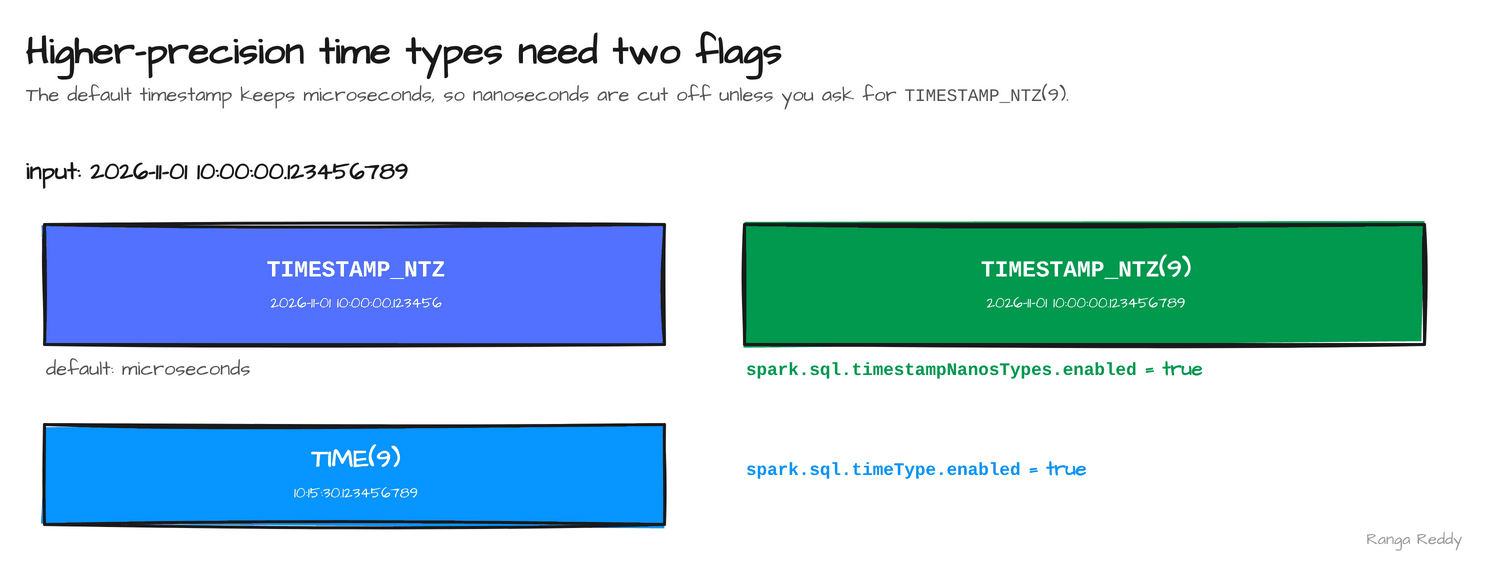 The default type cuts at six digits; the nine-digit types need their flags.
9. DataFrame.zip [Beginner]
Since: 4.3.0 · Status: Ran · Source:
SPARK-55886,SPARK-57247
What it is
DataFrame.zip appends the columns of a second DataFrame to the first, row by row, with no join key
(SPARK-55886). Spark Connect has it too (SPARK-57247). A DataFrame is a table of rows in Spark. The
normal way to combine two of them is a join on a key. zip is for the case where there is no key
and the two DataFrames line up by position, such as attaching a derived column that you computed in a
separate step.
Why it matters
This means you can add a computed column from a second step without inventing a join key. Under the hood
the pairing is positional, so it relies on both sides keeping the same rows in the same order. The Scaladoc
says the other DataFrame must derive from the same source as the receiver, which holds in the sample,
where the second DataFrame is computed from the first. Zipping with an unrelated spark.range(3)
also ran here, because both sides were the same range. I did not test two sources with different
partitioning, which is where a positional pairing is not safe. If you need a guarantee, join on a key.
Sample code
Runnable file: 11_dataframe_zip.scala.
val a = spark.range(3).toDF("id")
// b is computed from a, so the two line up row for row
val b = a.selectExpr("id * 10 AS tenfold")
a.zip(b).show()
// +---+-------+
// | id|tenfold|
// +---+-------+
// |  0|      0|
// |  1|     10|
// |  2|     20|
// +---+-------+
When to use it
Use it when the second DataFrame is derived from the first and you want its columns alongside.
Skip it when the two come from independent sources or are partitioned differently; join on a key
instead. Common beginner mistake: assuming zip matches rows by a key. It matches by position.
Visual
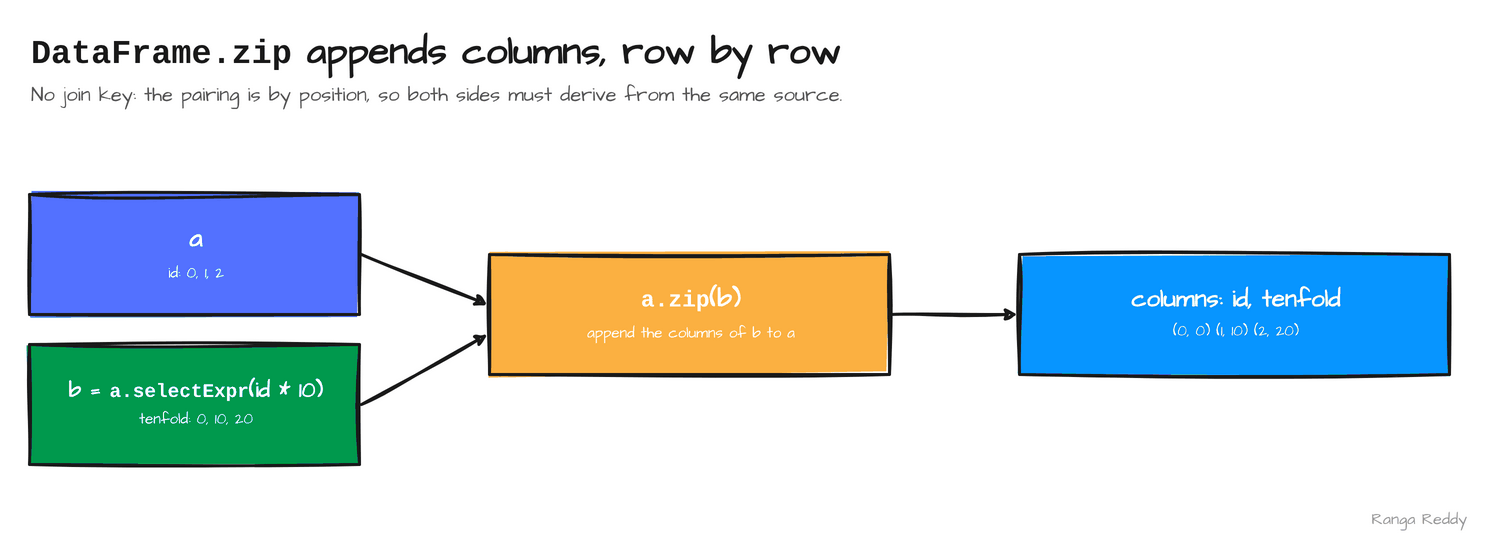 The columns of
b are appended to a, row by row, with no key.
10. Single-task execution for small queries [Intermediate]
Since: 4.3.0 · Status: Ran, behind a flag · Source:
SPARK-57851
What it is
Spark plans every query for large data: aggregates and sorts are separated by shuffles, which move rows between
tasks. For a query over a handful of rows, those shuffles cost more than the work. Single-task execution
(SPARK-57851), part of the effort the 4.3 announcement calls Project Feather, lets an eligible small query run in
one task and skip the shuffles. It is opt-in, behind spark.sql.optimizer.singleTaskExecution.enabled, and it
changes the physical plan, not the result.
Why it matters
This means a small query, such as a lookup or a test over a tiny table, no longer pays for the full distributed plan.
Under the hood, with the flag off the sample’s plan was LocalTableScan, HashAggregate, Exchange,
HashAggregate, Exchange, Sort. With the flag on it was LocalTableScan, HashAggregate, Sort: both
Exchange steps were gone, the query ran as one stage with one task, and the result was the same, [eu,40.0]
and [us,25.0]. The vendor’s announcement says an eligible local relation holds up to 1,000 rows and an eligible
file scan reads one small non-empty file; I tested only a four-row local relation, so I cannot confirm those
limits. Opt in per session, not cluster-wide, because a query that grows past the limits needs the normal plan.
Sample code
Runnable file: 13_single_task_execution.scala.
val query = "SELECT region, sum(amount) AS total FROM orders GROUP BY region ORDER BY region"
// orders is a four-row local relation: (1,'eu',10.0), (2,'us',20.0), (3,'eu',30.0), (4,'us',5.0)
// operators(sql) lists the operator names in EXPLAIN FORMATTED; see the runnable file
println("OFF " + operators(query))
spark.conf.set("spark.sql.optimizer.singleTaskExecution.enabled", "true")
println("ON  " + operators(query))
// OFF LocalTableScan > HashAggregate > Exchange > HashAggregate > Exchange > Sort
// ON  LocalTableScan > HashAggregate > Sort
When to use it
Use it when a session runs many tiny queries, such as tests or lookups over small tables. Skip it when the data can grow; the normal distributed plan is what you want then. Common beginner mistake: expecting a speed-up on a large table. The flag does nothing for data beyond the eligibility limits, and I made no timing measurement.
Visual
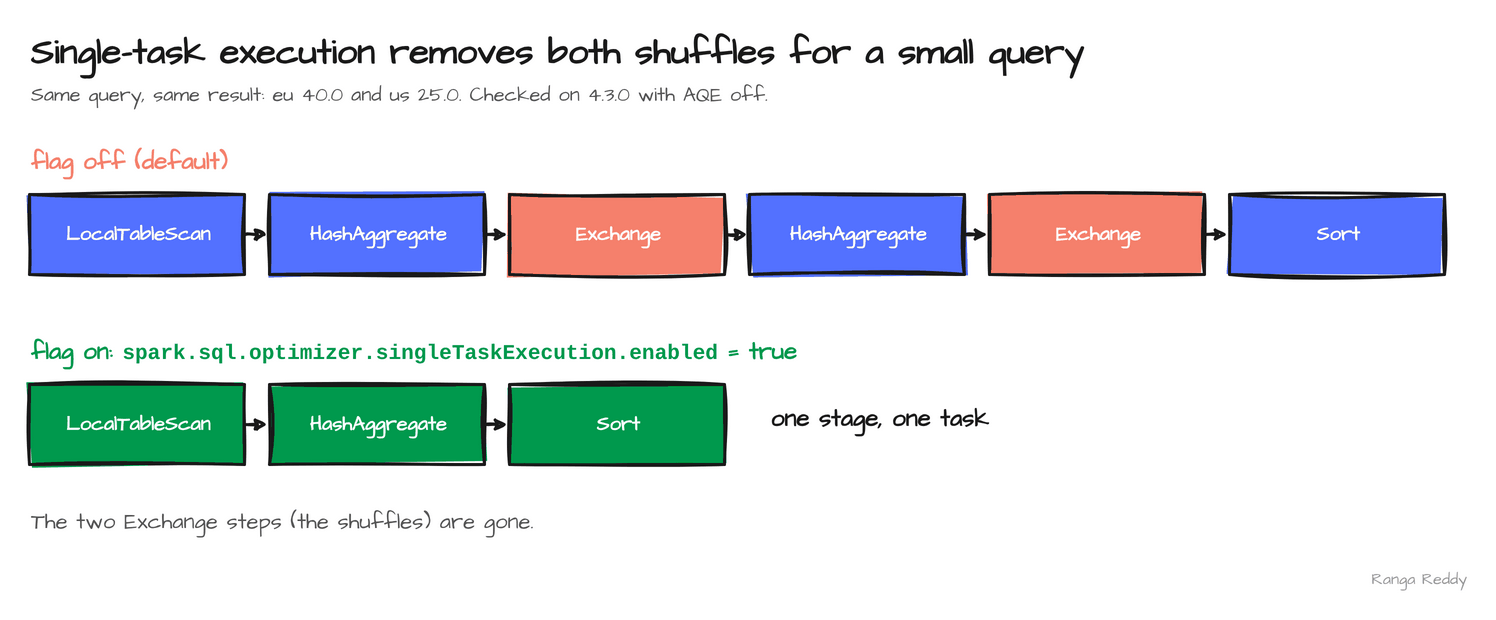 The two shuffles disappear for an eligible small query.
Smaller additions worth knowing
| Feature | What it does | Status |
|---|---|---|
Archive reader (SPARK-57135 and others) |
Reads the entries of a tar or zip as files, with spark.sql.files.archive.reader.enabled=true. A tar holding two CSVs returned three rows. With the flag off, count(*) on the same tar returned 4 and raised no error |
Ran, behind a flag |
New functions (SPARK-56820, SPARK-57253, SPARK-58399, SPARK-58295) |
counter_diff, collect_union, jaro_winkler_similarity, to_base32 and from_base32 |
Ran |
Arrow-native Dataset caching (SPARK-57268) |
Opt-in caching with compression and column statistics, set with the static spark.sql.cache.serializer |
Listed, behind a flag |
Local Connect server reuse (SPARK-57787) |
Reuse a persistent local Connect server for faster PySpark startup, with SPARK_LOCAL_CONNECT_REUSE=1; the announcement calls it experimental |
Listed |
Connect REST endpoints (SPARK-57941) |
GET /api/v1/applications/<appId>/connect/sessions returned a session with sessionId, userId, startTimestamp, finishTimestamp, totalExecution and totalTime. /connect/operations exists but returned an empty list in my run |
Ran partly |
Connect operation IDs (SPARK-58547) |
Trace a request end to end | Listed |
@ time travel on table names (SPARK-57421, SPARK-58012) |
Read a table at a version or timestamp | Listed, needs a connector |
Connect JDBC driver complex types (SPARK-57380) |
Return ARRAY, MAP and STRUCT through the Connect JDBC driver |
Listed |
SQLContext wrapper on Connect (SPARK-57021) |
Old SQLContext code runs against a Connect session |
Listed |
Security and UI hardening (SPARK-58054, SPARK-59319, SPARK-59508) |
A Content-Security-Policy header by default, an opt-in restricted SQL execution mode, and a restricted unpickle serializer for the Python client | Listed |
Experimental transpiling of simple Python UDFs (SPARK-55206) |
Turns simple UDFs such as len() into Catalyst expressions, behind spark.sql.experimental.optimizer.transpilePyUDFs |
Listed, experimental |
Version lineage
Several 4.3 features finish an arc that began earlier. Read the 4.3 column as what changed since 4.2.
| Feature | 4.0 | 4.1 | 4.2 | 4.3 |
|---|---|---|---|---|
VARIANT |
Introduced (SPARK-45827) |
Generally available, colon paths (SPARK-54454, SPARK-52494) |
none in the headlines | Editing functions (SPARK-57804) |
| Real-time mode | none | Stateless, Scala, Kafka (SPARK-53736) |
PySpark trigger (SPARK-54660) |
Stateful: aggregation, dropDuplicates, transformWithState (SPARK-58635) |
| Change data and history | none | Declarative Pipelines (SPARK-51727) |
CHANGES clause, Auto CDC SCD Type 1 (SPARK-55668, SPARK-56249) |
Auto CDC SCD Type 2 (SPARK-58321) |
| Time-series SQL | none | none | time_bucket (SPARK-56594) |
ASOF JOIN, BIN BY (SPARK-58092, SPARK-57133) |
| Small data | none | none | none | Single-task execution, Arrow caching (SPARK-57851, SPARK-57268) |
| Spark Connect | Lightweight Python client | JDBC driver (SPARK-53484) |
GetStatus API (SPARK-55606) |
REST endpoints (SPARK-57941) |
| Python UDFs | Python UDTFs | Arrow UDF decorators (SPARK-52214) |
Arrow-optimized UDFs on by default (SPARK-54555) |
Experimental transpiling (SPARK-55206) |
Flags at a glance
A feature that parses is not a feature that is on. Every feature in this post that is off by default:
| Feature | Config key | Default | What it enables |
|---|---|---|---|
ASOF JOIN |
spark.sql.join.asofJoin.enabled |
false |
The ASOF JOIN ... MATCH_CONDITION syntax |
BIN BY |
spark.sql.binByRelationOperator.enabled |
false |
The BIN BY relation operator |
TIME(p) |
spark.sql.timeType.enabled |
off | The TIME type |
| Nanosecond timestamps | spark.sql.timestampNanosTypes.enabled |
off, preview | TIMESTAMP_NTZ(9) and TIMESTAMP_LTZ(9) |
| Archive reader | spark.sql.files.archive.reader.enabled |
false |
Reading the entries of a tar or zip as files |
| Single-task execution | spark.sql.optimizer.singleTaskExecution.enabled |
false |
Running eligible small queries in one task, without shuffles |
| Arrow cache prefetch | spark.sql.execution.arrow.cache.prefetch.enabled |
false |
Prefetching the next batch of a compressed Arrow cache |
Settings and costs
| Setting | Default | What to set it to |
|---|---|---|
spark.sql.streaming.realTimeMode.minBatchDuration |
5000 ms (from the docs) |
The shortest allowed real-time trigger duration |
spark.sql.shuffle.partitions |
200 |
For real-time mode, the number of task slots the cluster can run at once. At 200 on a two-slot session the query failed, needing 201 slots with 2 free |
| Feature | Cost to plan for |
|---|---|
| Stateful real-time mode | One free task slot per task across all stages, held for the life of the query |
| Auto CDC | Each micro-batch is a MERGE, so the target must support row-level operations |
BIN BY |
One output row per bin an interval overlaps. In the sample, a 25-minute call over 10-minute bins produced three rows |
| Archive reader | A silent wrong result if the flag is forgotten: a two-file tar returned 4 rows and no error |
| Nanosecond types | Behind flags, and not yet readable by the Python client |
When these features bite
Each item is a failure hit during the runs, with the text it produced, so you can grep for it. Every item is also an anchor, so you can link to one error.
[AUTOCDC_TARGET_DOES_NOT_SUPPORT_MERGE]. The engine defines STORED AS SCD TYPE 2, but a Parquet target has no row-level operations. The same shape applies to @ time travel. Fix: Check that your connector implements the feature.
[UNSUPPORTED_FEATURE.ASOF_JOIN]. ASOF JOIN is behind a flag. Fix: spark.sql.join.asofJoin.enabled=true.
[UNSUPPORTED_TIME_TYPE]. TIME(p) is behind a flag. Fix: spark.sql.timeType.enabled=true.
[FEATURE_NOT_ENABLED] for nanosecond timestamps. A preview feature, off by default. Fix: spark.sql.timestampNanosTypes.enabled=true.
CANNOT_PARSE_DATATYPE ... timestamp_ntz(9). The Python client cannot materialise a nanosecond timestamp column. Fix: CAST(... AS STRING) before collecting.
[BIN_BY_RANGE_TYPE_MISMATCH]. The BIN BY range columns must be TIMESTAMP or TIMESTAMP_NTZ. Fix: Cast the range columns.
[VARIANT_DUPLICATE_KEY]. variant_insert on a key that already exists. Fix: Use variant_set, or the try_ form that returns NULL.
count(*) is 4 on a tar of two CSVs, and no error. The archive reader is off by default, so the tar is read as plain CSV text. Fix: spark.sql.files.archive.reader.enabled=true.
STREAMING_REAL_TIME_MODE.OUTPUT_MODE_NOT_SUPPORTED, STREAMING_REAL_TIME_MODE.INPUT_STREAM_NOT_SUPPORTED and INVALID_STREAMING_REAL_TIME_MODE_TRIGGER_INTERVAL. Real-time mode needs the update output mode, a Kafka source and a trigger of at least 5,000 ms. These come from the documentation, not from a run. Fix: Use update, read from Kafka, and set the trigger to 5 seconds or more.
[CONCURRENT_SCHEDULER_INSUFFICIENT_SLOT] ... needs 201 concurrent task slots ... only 2 are currently free. Every stage of a real-time query runs at once, so the cluster needs a free slot for each task. The default 200 shuffle partitions on a small session cannot fit. Fix: Set spark.sql.shuffle.partitions to what the cluster can run at once.
Run it yourself
The samples ran on apache/spark:4.3.0-python3 and on the 4.3.0 release tarball (535 MB, Scala
2.13.18) with Java 17. The tarball declares Python 3.11 or newer, the highest floor of the four
releases. If you run it locally, start it with env -u SPARK_HOME, because an older SPARK_HOME
in the shell wins and silently runs the wrong Spark. The download script and the SQL runner are in
RUNNING_ON_TARBALLS.md. The BIN BY, archive reader and DataFrame.zip examples run with
spark-sql -f and spark-shell -i on the tarball.
Single-task execution. 13_single_task_execution.scala prints the plan with the flag off and on. Hello world. 00_hello_world.sql printed 4.3.0 and the build hash. Before and after. 12_before_after.sql runs the from_json and posexplode forms next to JSON_TABLE and UNNEST.
SQL. smoke/smoke43.sql printed this on 4.3.0:
JSON_TABLE         1 1 a   /   2 2 b
UNNEST             1 10   /   2 20   /   NULL 30
variant_set        {"a":1,"b":3,"tags":["x"]}
ASOF JOIN          1 10:00:00 100.0   /   2 10:00:10 101.0
TIME(9)            time(9)
Stateful real-time mode against Kafka. It reads from a broker on localhost:9092, which the
datalake-playground publishes with the all profile. The Kafka source is not in the tarball, so
add it with --packages org.apache.spark:spark-sql-kafka-0-10_2.13:4.3.0, run on local[6], and set
spark.sql.shuffle.partitions small enough that every stage can run at once. Feed
tarball/rtm43.scala on standard input. It printed the counts a 1, 2
and 3 and b 1 in one batch, and finished with exception=None.
git clone https://github.com/rangareddy/datalake-playground.git
cd datalake-playground
PROFILE=all SPARK_VERSION=3.5.9 sh run_datalake.sh start
sh run_datalake.sh status
Upgrade notes for teams moving to 4.3
Behaviour changes to test before you upgrade. The first rows come from the 4.3 release notes; the rest come from the official SQL and PySpark migration guides, which list more.
| Change | What to do | Source |
|---|---|---|
| Python 3.10 support is dropped, and the minimum NumPy is 1.23.2 | Check the Python version on every image | SPARK-56889, SPARK-56928 |
mapInPandas functions must return a strict iterator |
A function that returned a list or another iterable can fail at run time | SPARK-58601 |
spark.rdd.compress, the web UI Content-Security-Policy header and, on Kubernetes, useDriverPodIP and no privilege escalation are on by default |
Recheck RDD sizes, UI embedding and pod security settings | SPARK-57723, SPARK-58054 |
ceil and floor raise overflow errors in ANSI mode |
Test numeric code near the limits | SPARK-58052 |
GROUP BY GROUPING SETS (()) over empty input returns one row |
spark.sql.analyzer.lowerEmptyGroupingSetToGlobalAggregate.enabled=false restores no rows. The ticket’s fix version is 4.3.0, but the SQL migration guide lists the change under 4.1 to 4.2, so test on your version |
SPARK-57775 |
Whole-stage code generation for UNION is on by default |
Expect a plan difference if you compare plans | SPARK-56805 |
replaceHashWithSortAgg and combineAdjacentAggregation default to true |
Set both spark.sql.execution.* flags to false to restore |
SQL migration guide |
The adaptive rule DynamicJoinSelection is now DemoteBroadcastHashJoin; shuffled-hash preference moved to spark.sql.adaptive.convertSortMergeJoinToShuffledHashJoin.enabled. MergeSubplans moved packages |
Excluding the old rule names silently does nothing; use the new names | SQL migration guide |
percentile, percentile_cont and median can differ in the last ULP |
Loosen exact comparisons | SQL migration guide |
Non-deterministic filters such as rand() are no longer pushed to Data Source V2 sources |
None; Spark evaluates them after the scan | SQL migration guide |
hash() and xxhash64 include the days field of CalendarInterval |
Hash values over intervals change, so rebuild anything keyed on them | SQL migration guide |
HAVING is evaluated before window functions when the select list has a generator such as explode |
Recheck queries that mix them | SQL migration guide |
Dataset.observe counts only the last successful attempt of each task |
spark.sql.legacy.observeMetricsAggregateAllAttempts=true restores |
SQL migration guide |
foreachBatch on Spark Connect receives the correct session |
Code that relied on the old session can break | SPARK-44462 |
Spark Connect session errors now carry SQLSTATE 08003, not HY000 |
Match on 08003 or class 08 |
SQL migration guide |
Declarative Pipelines honours spark.sql.caseSensitive, and all flows into one table must agree on it |
Set the same value on every flow, or spark.sql.caseSensitive=true |
SQL migration guide |
Connector availability
Check this before the engine. As of 18 November 2026, on Maven Central: Apache Iceberg publishes
iceberg-spark-runtime for Spark 4.0 and 4.1 only (1.12.0), and Apache Hudi publishes hudi-spark4.0-bundle and
hudi-spark4.1-bundle only (1.2.1); neither has an artifact for Spark 4.2 or 4.3. The latest delta-spark_2.13,
4.4.1, is built against Spark 4.2.0, with none built against 4.3. Spark’s own Kafka connector for 4.3.0 exists.
A lakehouse stack therefore has to stay on 4.1 or wait for those releases.
Adopt now or wait for 4.3.1?
As of 18 November 2026, 4.3.0 is the latest release and spark.apache.org lists no 4.3.1. The versioning policy makes 4.3.0 the first quarterly feature release, gives feature releases a 6-month maintenance window, and plans 4.5.0 as the 4.x long-term-support release with 18 months. It also lists a 4.4 branch cut on 16 November 2026 and a first release candidate by 7 December 2026. 4.3.0 shipped without preview builds, so it has had the least outside testing, and the first patch release is where early corrections land. My recommendation, a judgement and not a measurement: evaluate on a test cluster now, and move production to the first patch release, unless a feature in this post, such as stateful real-time mode, is the reason you are upgrading. If you run Iceberg, Hudi or Delta, the connector availability above decides first.
Known limitations in this release
- Auto CDC SCD Type 2. I did not run it against a catalog that supports row-level operations, so only the
AUTOCDC_TARGET_DOES_NOT_SUPPORT_MERGEfailure on Parquet is shown, not a successful history. - Nanosecond timestamps. The Python client could not materialise a
TIMESTAMP_NTZ(9)result (CANNOT_PARSE_DATATYPE), so results must be cast to a string. - Syntax gaps.
JSON_TABLEhas noNESTED PATH, and the vendor announcement says theJSON_VALUE,JSON_EXISTSandJSON_QUERYfollow-on work is on a separate timeline.ASOF JOINsupports onlyINNERandLEFT OUTER, and not in real-time mode. - Real-time mode. The constraints listed under feature 1 come from the documentation, and I did not benchmark latency. The vendor’s reported figures are attributed, not reproduced.
- Single-task execution. I tested one four-row local relation. The eligibility limits are from the vendor’s announcement.
- Spark Connect. I found the REST endpoints and read a live session from
/connect/sessions, but my client attempts did not complete a query, so I did not capture an operations payload. Operation IDs, the JDBC complex types, theSQLContextwrapper and@time travel are listed from the release notes, not run.
Cheat sheet
| Feature | Syntax | Needs |
|---|---|---|
| Stateful real-time mode | .trigger(Trigger.RealTime("5 seconds")) |
Kafka; free task slots |
| Auto CDC SCD Type 2 | CREATE STREAMING TABLE t FLOW AUTO CDC FROM STREAM(s) KEYS (id) SEQUENCE BY v STORED AS SCD TYPE 2 |
A connector with row-level operations |
JSON_TABLE |
JSON_TABLE(doc, '$.items[*]' COLUMNS (id INT PATH '$.id')) |
Nothing |
UNNEST |
FROM UNNEST(arr) WITH ORDINALITY AS t(value, pos) |
Nothing |
ASOF JOIN |
a ASOF JOIN b MATCH_CONDITION (a.ts >= b.ts) ON a.k = b.k |
A flag |
VARIANT editing |
variant_set(v, '$.b', 3), variant_delete(v, '$.a') |
Nothing |
BIN BY |
BIN BY (RANGE s TO e BIN WIDTH INTERVAL 10 MINUTES DISTRIBUTE UNIFORM (m)) |
A flag |
TIME(p), nanoseconds |
CAST(x AS TIME(9)), TIMESTAMP_NTZ(9) |
Flags |
| Single-task execution | spark.conf.set("spark.sql.optimizer.singleTaskExecution.enabled", "true") |
A flag; small queries only |
DataFrame.zip |
a.zip(b) |
Nothing |
Key takeaways
- Streaming: real-time mode now covers stateful queries. Budget a free task slot per task across all stages, and set the shuffle partition count to match.
- History tracking: Auto CDC SCD Type 2 keeps every version of a record, but only on a target that supports row-level operations. Test your connector before you plan around it.
- Nested data:
JSON_TABLE,UNNESTand theVARIANTediting functions replace mostfrom_jsonandexplodechains with standard SQL. - Time series:
ASOF JOINandBIN BYput enrichment and interval allocation in one clause each, and both are off until you set their flags. - Small queries: single-task execution removes both shuffles for an eligible small query; it is behind a flag, and I measured the plan, not the time.
- Read the flags:
TIME, nanosecond timestamps,ASOF JOIN,BIN BYand the archive reader all default to off. A feature that parses is not a feature that is on.
Further reading
- Spark 4.3.0 release notes, the source of every ticket number above
- Real-time mode in the Structured Streaming guide, the source of the constraints under feature 1
- The versioning policy, for the quarterly cadence and maintenance windows
- The vendor’s 4.3 announcement, the source of the reported latency and Feather eligibility figures
JSON_TABLE,ASOF JOINandUNNESTin the SQL reference- Spark Declarative Pipelines programming guide for Auto CDC and its target requirements
SPARK-58635, streaming aggregation in real-time mode- Spark 4.x features by release for all four releases side by side, and Structured Streaming internals for the state and checkpoints behind real-time mode
Trademarks
Apache Spark, Apache Kafka, Apache Iceberg, Apache Parquet and Apache are either registered trademarks or trademarks of The Apache Software Foundation in the United States and other countries. The Apache Software Foundation does not endorse this post.
Found this useful?
These posts and tools are free. If one saved you an afternoon, you can buy me a coffee.
Comments
Questions, corrections and reviews are welcome. Sign in with GitHub to post; comments are stored in this site's public GitHub Discussions.