Apache Iceberg on Spark: the complete cheat sheet
One page to keep open while you work, in PySpark on a Hive catalog: the snapshot tree, catalogs, hidden partitioning, row-level operation modes, format versions, metadata tables, time travel, branches and WAP, schema evolution, the twenty procedures, maintenance and migration, with the property and default for each.
- 1. History and major releases
- 2. Introduction, key features and architecture
- 3. Getting started: session and CRUD
- 4. Catalogs
- 5. File layout
- 7. Row-level operations: copy-on-write and merge-on-read
- 8. Format versions, deletion vectors and row lineage
- 9. Supported data types
- 10. Metadata tables
- 11. Reads: time travel and incremental
- 12. Branches, tags and write-audit-publish
- 13. Schema evolution
- 14. Write options and table properties
- 15. Sorting, clustering and file sizing
- 16. Maintenance
- 17. Procedures
- 18. Rollback
- 19. Concurrency
- 20. Change data: the changelog view
- 21. Streaming writes
- 22. Migrating a Hive table to Iceberg
- 23. Diagnosing a table
- 24. Clean up
- Summary and key takeaways
- References
- Trademarks
TL;DR
- Iceberg describes a table as an immutable tree: a catalog pointer to
metadata.json, which names a snapshot, which points at a manifest list, which points at manifests, which list data files. The catalog’s compare-and-swap on that pointer is what makes a commit atomic.- Every example on this page is PySpark, run end to end against a Hive Metastore catalog named
iceberg_db, with tables in theiceberg_schemadatabase. Where PySpark has no API (DDL,CALLprocedures), the Python callsspark.sql().- The default that surprises everyone:
write.delete.mode,write.update.modeandwrite.merge.modeall default tocopy-on-write. And a merge-on-readDELETEthat removes every row of a file writes no delete file at all; it drops the file from the snapshot.- Four failures you will meet on a Hive catalog, all reproduced below: a column reorder rejected by the Metastore as
CommitStateUnknownException,CALLarguments that must be literals, changelog scans that refuse delete files, andsnapshottables that refusePURGE.- New tables are format version 2 by default; version 3 brings deletion vectors and row lineage. Format version 4 code exists but is not for production tables.
Most Iceberg questions are not conceptual. You know you want a merge-on-read
DELETE, you know roughly what expire_snapshots does, and what you need is the
exact option name, whether its default will surprise you, and what the Hive
Metastore will do to your ALTER TABLE. That is what this page is for.
It is organised for lookup. Each section leads with a table of keys, options or procedures, then the PySpark that uses them, then the output that PySpark produced. Every Python block on the page is part of one script that ran end to end on Spark 3.5.9 with Iceberg 1.12.0 against the datalake-playground stack: Hive Metastore as the catalog, MinIO as S3. Run the blocks in order in one session and they reproduce the outputs shown.
Diagrams captioned Adapted from the Apache Iceberg documentation are my own redrawings of figures in the project’s site assets, © The Apache Software Foundation, used under the Apache License 2.0; the rest are my own. Where a claim is specific to a version, the version is named.
1. History and major releases
| Date | Milestone |
|---|---|
| 2018-11-16 | Entered the Apache incubator as a table format for large, slow-moving tabular data |
| 2018-12-10 | Software grant agreement filed |
| 2019-06-23 | The specification moved to git and the ASF site, making the format itself the deliverable |
| 2020-05-20 | Graduated to a Top-Level Project, the same day as Apache Hudi |
| 2021-01-26 | 0.11.0, the line where Spark 3 support and row-level operations matured |
| 2022-10-17 | 1.0.0, the format declared stable |
| 2023-10-04 | 1.4.0, new tables get zstd Parquet compression written into their properties |
| 2025-02-13 | 1.8.0 |
| 2026-05-19 | 1.11.0 |
| 2026-09-29 | 1.12.0, the current release and the one this page runs |
| Line | What it brought |
|---|---|
| 0.x | The snapshot tree, hidden partitioning, partition and schema evolution, format version 2 with position and equality deletes, the first Spark and Flink integrations |
| 1.0 to 1.3 | API stability, rewrite_data_files and the maintenance procedure surface, branches and tags, Puffin statistics files |
| 1.4 to 1.7 | The REST catalog spec maturing, view support, changelog scans, broader engine adoption |
| 1.8 to 1.11 | Format version 3 with deletion vectors and row lineage, format version 4 groundwork, compute_table_stats and compute_partition_stats, rewrite_table_path |
| 1.12 | Geospatial types, Hilbert clustering in the Spark 4.1 module, Flink equality-delete conversion, V4 plumbing, and two removals: Spark 3.4 and position deletes with row data |
The pattern to notice is that the specification is the project, and engine integrations follow it. That is why an Iceberg table written by Spark is readable by Trino or Snowflake without a translation step, and why “which format version” is a more useful question than “which library version”.
2. Introduction, key features and architecture
Apache Iceberg is an open table format for large analytic tables. It sits above the file formats (Parquet, ORC, Avro) and below the engines, and replaces the Hive model of “a table is a directory, and the Metastore tracks its partitions” with a tree of immutable metadata files that lists every data file explicitly. Planning reads that metadata instead of listing storage, which is why it scales to tables of millions of files on object stores.
| Feature | What you get |
|---|---|
| ACID commits | Serialisable commits through an atomic swap of one catalog pointer; readers always see a complete snapshot |
| Hidden partitioning | Partition by a transform of a column (days(started_at)); queries filter on the column and prune automatically |
| Partition evolution | Change the partition spec without rewriting data; old files keep their old spec |
| Schema evolution | Add, drop, rename, reorder and widen columns, tracked by column ID, with no data rewrite |
| Row-level operations | UPDATE, DELETE, MERGE as copy-on-write or merge-on-read, per operation |
| Time travel and refs | Read any retained snapshot; branches and tags name snapshots; write-audit-publish stages commits |
| Metadata tables | Snapshots, files, manifests, partitions and more, queryable as ordinary tables |
| Multi-engine | Spark, Flink, Trino, Presto, Hive, Snowflake, BigQuery, DuckDB and others read and write the same table |
When Iceberg fits, and when it does not
| Good fit | Poor fit |
|---|---|
| Large analytic tables on object storage, queried by more than one engine | OLTP and single-row point lookups at low latency |
| Tables that need row-level changes: GDPR deletes, CDC, corrections | Sub-second freshness on small, hot data |
| Replacing Hive-managed Parquet or ORC tables and their partition listings | Tiny datasets, where a plain file is simpler |
| Streaming and batch writers on the same table | Workloads needing record-key upserts with an index, where Hudi’s design is closer |
What ACID means here
| Property | How Iceberg provides it |
|---|---|
| Atomicity | A commit is one compare-and-swap of the catalog’s pointer to metadata.json; it either moves or it does not |
| Consistency | Every snapshot is a complete, self-describing list of files; there is no partially written state to read |
| Isolation | Readers pin a snapshot for the life of a query; writers use optimistic concurrency and retry on conflict |
| Durability | Data and metadata files are written before the pointer moves, and are never mutated afterwards |
The metadata tree
| Concept | Example | Description |
|---|---|---|
| Catalog pointer | Hive Metastore, REST, Glue, JDBC, Nessie | Holds the single pointer to the current metadata.json. Provides the atomic compare-and-swap that makes a commit a commit |
| Table metadata | metadata/00006-fdc4....metadata.json |
Schema, partition specs, sort orders, properties, snapshot log and the current snapshot id. Rewritten in full on every commit |
| Snapshot | snapshot id 8319571333500096884 |
The complete set of data files at one point in time. Immutable, and readable for as long as retention keeps it |
| Manifest list | metadata/snap-8319571333500096884-1-7c8f....avro |
One per snapshot. Lists its manifests, with partition ranges so whole manifests are skipped at plan time |
| Manifest | metadata/7c8f4421-....-m0.avro |
Lists data or delete files with partition values, record counts and per-column bounds |
| Data file | data/city_id=sf/started_at_day=2026-09-15/00000-2-....parquet |
The rows. The directory layout is for humans; partition values come from the manifest |
| Delete file | position deletes, equality deletes, or a Puffin deletion vector | How a row is removed without rewriting its data file, under merge-on-read |
 catalog (Hive Metastore)
   table iceberg_schema.trips ─── metadata_location ───┐
                                                        ▼
                              00006-....metadata.json
                              schemas, specs, sort orders,
                              snapshots, current-snapshot-id
                                        │
                                        ▼  current snapshot
                              snap-<id>-1-<uuid>.avro   (manifest list)
                                 │                 │
                                 ▼                 ▼
                          <uuid>-m0.avro     <uuid>-m1.avro   (manifests)
                           │        │               │
                           ▼        ▼               ▼
                       data file  delete file    data file
Read it top down. The Metastore stores only metadata_location for the table.
That file names the current snapshot, whose manifest list names the manifests,
which name the files. A commit writes new files bottom up and finally swaps the
pointer, so nothing a reader is using is ever changed.
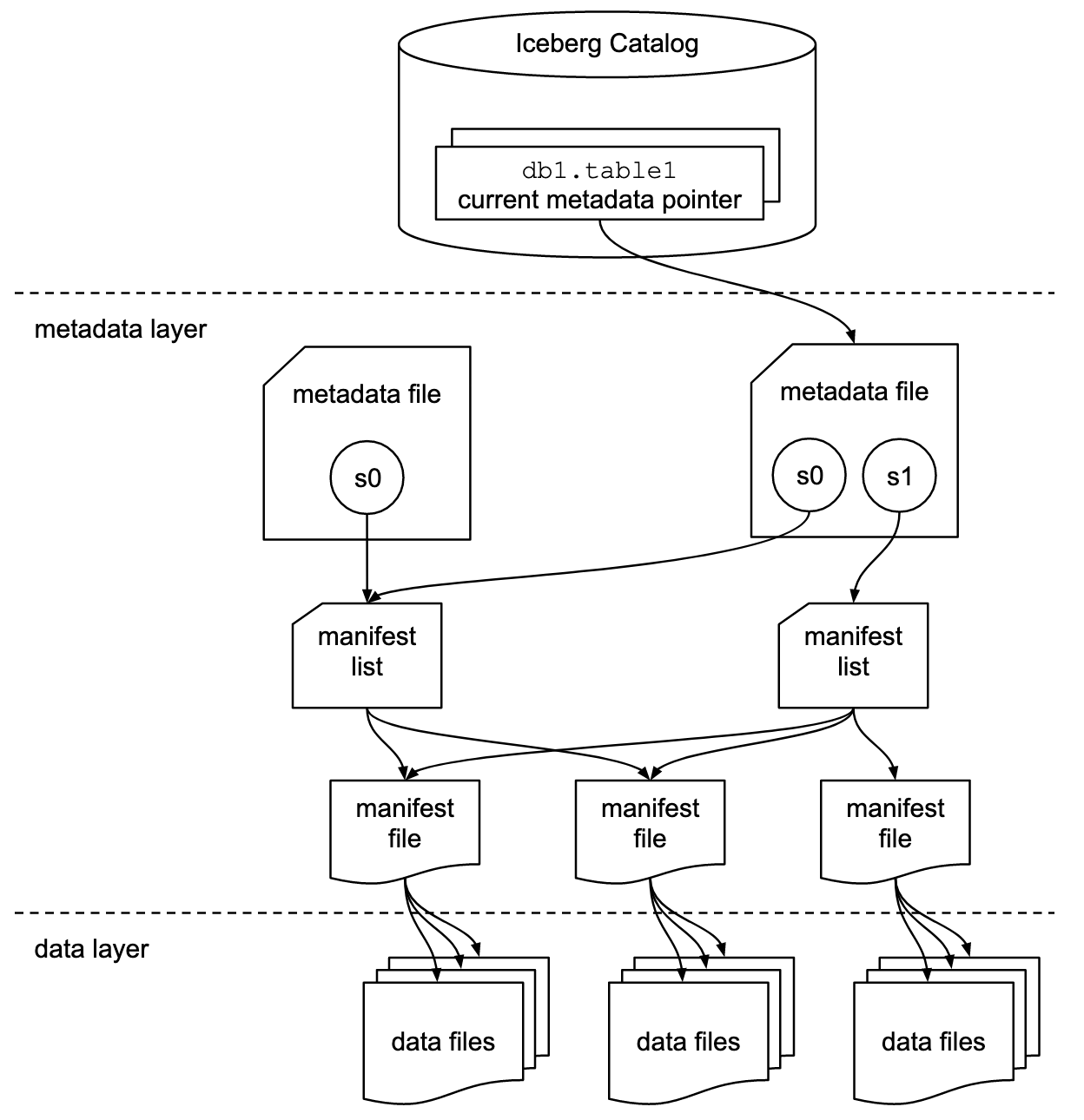
Adapted from the Apache Iceberg documentation.
Sharing is the part worth noticing. A commit that adds one file writes a new manifest and a new manifest list, but reuses every manifest that did not change, which is why snapshot history costs metadata rather than data.
FileContent
enumerates what a manifest entry can describe: DATA, POSITION_DELETES,
EQUALITY_DELETES, DATA_MANIFEST and DELETE_MANIFEST.
Planning is a sequence of prunes, and each step reads metadata, not data:
 query with a filter
   │
   ▼  manifest list: skip whole manifests by partition range
   ▼  manifests:     skip files by partition value
   ▼  column bounds: skip files by per-column min and max
   ▼  the files actually scanned
3. Getting started: session and CRUD
Start the stack, then submit scripts to spark-master with the 1.12.0 runtime.
The stack ships Iceberg 1.11.0 on its classpath; --packages pulls 1.12.0 from
Maven Central instead, and was checked to resolve inside the container.
git clone https://github.com/rangareddy/datalake-playground.git
cd datalake-playground
SPARK_VERSION=3.5.9 sh run_datalake.sh start
sh run_datalake.sh status

docker cp iceberg_cheat_sheet.py spark-master:/tmp/
docker exec spark-master bash -c '$SPARK_HOME/bin/spark-submit --master "local[2]" \
  --driver-memory 2g \
  --conf spark.eventLog.enabled=false \
  --packages org.apache.iceberg:iceberg-spark-runtime-3.5_2.12:1.12.0 \
  /tmp/iceberg_cheat_sheet.py'
The session. iceberg_db is a SparkCatalog backed by the Hive Metastore, and
spark_catalog is wrapped in SparkSessionCatalog so the same session can read
plain Hive tables and convert them in place with migrate (section 22). Every
later block runs in this session.
from datetime import datetime, timedelta
from decimal import Decimal

from pyspark.sql import SparkSession
from pyspark.sql import functions as F

spark = (
    SparkSession.builder.appName("iceberg-cheat-sheet")
    .config("spark.sql.extensions",
            "org.apache.iceberg.spark.extensions.IcebergSparkSessionExtensions")
    .config("spark.serializer", "org.apache.spark.serializer.KryoSerializer")
    # The Iceberg catalog: Hive Metastore for the pointer, MinIO for the files
    .config("spark.sql.catalog.iceberg_db", "org.apache.iceberg.spark.SparkCatalog")
    .config("spark.sql.catalog.iceberg_db.type", "hive")
    .config("spark.sql.catalog.iceberg_db.uri", "thrift://hive-metastore:9083")
    .config("spark.sql.catalog.iceberg_db.warehouse", "s3a://warehouse/iceberg_db")
    # The session catalog, wrapped so migrate() can convert Hive tables in place
    .config("spark.sql.catalog.spark_catalog", "org.apache.iceberg.spark.SparkSessionCatalog")
    .config("spark.sql.catalog.spark_catalog.type", "hive")
    .config("spark.sql.catalog.spark_catalog.uri", "thrift://hive-metastore:9083")
    .getOrCreate()
)
spark.sparkContext.setLogLevel("ERROR")

NS = "iceberg_db.iceberg_schema"
TRIPS = f"{NS}.trips"
Create the namespace and the table. In the Hive catalog a namespace is a Hive
database, so iceberg_db.iceberg_schema.trips is catalog, database, table.
spark.sql(f"CREATE NAMESPACE IF NOT EXISTS {NS}")
spark.sql(f"DESCRIBE NAMESPACE {NS}").show(truncate=False)

trip_schema = ("trip_id STRING, rider_id STRING, fare_amount DECIMAL(10,2), "
               "started_at TIMESTAMP, city_id STRING")

trips = spark.createDataFrame([
    ("trip-1001", "rider-8814f2", Decimal("24.50"), datetime(2026, 9, 15, 8, 12, 4), "sf"),
    ("trip-1002", "rider-33c9a1", Decimal("11.75"), datetime(2026, 9, 15, 8, 19, 47), "sf"),
    ("trip-1003", "rider-5b07de", Decimal("38.20"), datetime(2026, 9, 15, 9, 2, 11), "nyc"),
], trip_schema)

(trips.writeTo(TRIPS)
      .using("iceberg")
      .partitionedBy(F.col("city_id"), F.days("started_at"))
      .tableProperty("format-version", "2")
      .createOrReplace())

spark.table(TRIPS).orderBy("trip_id").show(truncate=False)
+--------------+---------------------------------+
|info_name     |info_value                       |
+--------------+---------------------------------+
|Catalog Name  |iceberg_db                       |
|Namespace Name|iceberg_schema                   |
|Location      |s3a://warehouse/iceberg_schema.db|
|Owner         |root                             |
+--------------+---------------------------------+
The namespace landed under the Metastore’s warehouse
(s3a://warehouse/iceberg_schema.db), not under the catalog’s warehouse
setting. With a Hive catalog, check DESCRIBE NAMESPACE rather than assuming
where tables will be written.
Insert, update, delete and merge. Appends use the DataFrameWriterV2 API; Spark
3.5 has no DataFrame API for row-level changes, so those are SQL through
spark.sql(). Iceberg has no record key: MERGE states its own matching
condition and plans a join to find the files.
more_trips = spark.createDataFrame([
    ("trip-1004", "rider-8814f2", Decimal("19.00"), datetime(2026, 9, 16, 7, 45, 0), "sf"),
], trip_schema)
more_trips.writeTo(TRIPS).append()

spark.sql(f"UPDATE {TRIPS} SET fare_amount = 27.00 WHERE trip_id = 'trip-1001'")
spark.sql(f"DELETE FROM {TRIPS} WHERE trip_id = 'trip-1002'")

trip_updates = spark.createDataFrame([
    ("trip-1003", "rider-5b07de", Decimal("40.00"), datetime(2026, 9, 15, 9, 2, 11), "nyc"),
    ("trip-1005", "rider-77aa10", Decimal("15.25"), datetime(2026, 9, 16, 8, 0, 30), "nyc"),
], trip_schema)
trip_updates.createOrReplaceTempView("trip_updates")
spark.sql(f"""
    MERGE INTO {TRIPS} t
    USING trip_updates s ON t.trip_id = s.trip_id
    WHEN MATCHED THEN UPDATE SET *
    WHEN NOT MATCHED THEN INSERT *
""")

spark.table(TRIPS).orderBy("trip_id").show(truncate=False)
+---------+------------+-----------+-------------------+-------+
|trip_id  |rider_id    |fare_amount|started_at         |city_id|
+---------+------------+-----------+-------------------+-------+
|trip-1001|rider-8814f2|27.00      |2026-09-15 08:12:04|sf     |
|trip-1003|rider-5b07de|40.00      |2026-09-15 09:02:11|nyc    |
|trip-1004|rider-8814f2|19.00      |2026-09-16 07:45:00|sf     |
|trip-1005|rider-77aa10|15.25      |2026-09-16 08:00:30|nyc    |
+---------+------------+-----------+-------------------+-------+
The two overwrite forms of DataFrameWriterV2:
| Method | What it replaces |
|---|---|
append() |
Nothing. Adds files |
overwritePartitions() |
Every partition present in the DataFrame (dynamic overwrite) |
overwrite(condition) |
Rows matching the condition, replaced by the DataFrame’s rows |
create(), replace(), createOrReplace() |
The table definition. createOrReplace keeps the snapshot history |
# Replace only the partitions present in the DataFrame
sf_day = spark.createDataFrame([
    ("trip-1004", "rider-8814f2", Decimal("21.00"), datetime(2026, 9, 16, 7, 45, 0), "sf"),
], trip_schema)
sf_day.writeTo(TRIPS).overwritePartitions()

# Replace the rows matching a filter with the DataFrame's rows
sf_day.writeTo(TRIPS).overwrite(F.col("trip_id") == "trip-1004")

print(spark.table(TRIPS).count())
Every write above is one snapshot. The snapshots metadata table shows them,
with the summary map that records what each one did:
(spark.table(f"{TRIPS}.snapshots")
      .select("snapshot_id", "parent_id", "operation",
              F.col("summary")["added-records"].alias("added"),
              F.col("summary")["deleted-records"].alias("deleted"))
      .orderBy("committed_at")
      .show(truncate=False))
+-------------------+-------------------+---------+-----+-------+
|snapshot_id        |parent_id          |operation|added|deleted|
+-------------------+-------------------+---------+-----+-------+
|4766940029422470389|NULL               |overwrite|3    |NULL   |
|3301295445529337807|4766940029422470389|append   |1    |NULL   |
|4768974671173887072|3301295445529337807|overwrite|2    |2      |
|8492043421144724649|4768974671173887072|overwrite|1    |2      |
|3382514700473039758|8492043421144724649|overwrite|2    |1      |
|3801921629215633518|3382514700473039758|overwrite|1    |1      |
|2692714369025615020|3801921629215633518|overwrite|1    |1      |
+-------------------+-------------------+---------+-----+-------+
The first snapshot is an overwrite, not an append, because
createOrReplace() commits as a replace. The copy-on-write UPDATE and
DELETE are overwrites too: each one rewrote whole files, which is why
deleted counts rows that were rewritten, not just rows removed.
4. Catalogs
The catalog is not optional. Nothing inside the table says which metadata.json
is current, so commit atomicity is a property of the catalog, not of the format.
| Catalog | Session config | Notes |
|---|---|---|
| Hive | type=hive, uri=thrift://... |
Stores metadata_location as a table parameter; takes a Metastore lock per commit (engine.hive.lock-enabled, default true). Used on this page |
| REST | type=rest, uri=https://... |
The catalog spec other engines implement, and the portable choice. Polaris, Unity, Gravitino and Nessie serve it |
| Glue | type=glue, io-impl=org.apache.iceberg.aws.s3.S3FileIO |
AWS Glue Data Catalog. Optimistic locking on the Glue table version |
| JDBC | type=jdbc, uri=jdbc:postgresql://... |
Any relational database holds the pointer |
| Nessie | type=nessie, uri=..., ref=main |
Git-like, catalog-level branches across tables |
| Hadoop | type=hadoop, warehouse=... |
Filesystem only. Relies on atomic rename, so not safe for concurrent writers on S3 |
| Session catalog | spark_catalog set to SparkSessionCatalog |
Wraps the built-in catalog so Iceberg and non-Iceberg tables share one namespace. Needed for migrate |
The same catalog as a Python dictionary, which is how most jobs carry it:
catalog_conf = {
    "spark.sql.catalog.iceberg_db": "org.apache.iceberg.spark.SparkCatalog",
    "spark.sql.catalog.iceberg_db.type": "hive",
    "spark.sql.catalog.iceberg_db.uri": "thrift://hive-metastore:9083",
    "spark.sql.catalog.iceberg_db.warehouse": "s3a://warehouse/iceberg_db",
    # REST instead:   ".type": "rest",  ".uri": "http://rest-catalog:8181"
    # Glue instead:   ".type": "glue",  ".io-impl": "org.apache.iceberg.aws.s3.S3FileIO"
}
5. File layout
List what the writes above produced in object storage. Every path is relative to the table location the Metastore reports.
jvm = spark._jvm
conf = spark._jsc.hadoopConfiguration()
location = spark.sql(f"DESCRIBE TABLE EXTENDED {TRIPS}") \
    .where("col_name = 'Location'").first()["data_type"]
fs = jvm.org.apache.hadoop.fs.Path(location).getFileSystem(conf)
files = fs.listFiles(jvm.org.apache.hadoop.fs.Path(location), True)
while files.hasNext():
    print(files.next().getPath().toString().replace(location, ""))
/data/city_id=nyc/started_at_day=2026-09-15/00000-2-954ca2c0-...-0-00002.parquet
/data/city_id=sf/started_at_day=2026-09-16/00000-6-3e56367b-...-0-00001.parquet
... 9 data files
/metadata/00000-68cff368-....metadata.json
... 7 metadata.json files, one per commit
/metadata/1e91d7ab-...-m0.avro
... 12 manifests
/metadata/snap-2692714369025615020-1-ac53de69-....avro
... 7 manifest lists, one per snapshot
The table holds 9 data files, 7 metadata.json files, 12
manifests and 7 manifest lists. There is one metadata.json per commit, numbered
00000 upward, because every commit rewrites the table metadata in full. There
is one snap-<snapshot-id>-...avro manifest list per snapshot, named after the
snapshot. And the data directory still holds files that the current snapshot no
longer references: the copy-on-write UPDATE wrote replacements, but the old
files stay until expire_snapshots removes them (section 16).
The partition directory names (started_at_day=...) are cosmetic. Readers take
partition values from the manifests and never parse paths.
6. Hidden partitioning and partition evolution
| Transform | PySpark (writeTo().partitionedBy) |
SQL (PARTITIONED BY, ADD PARTITION FIELD) |
Description |
|---|---|---|---|
| identity | F.col("city_id") |
city_id |
Partition by the value. The only transform that looks like Hive partitioning |
| year | F.years("started_at") |
years(started_at) |
One partition per year |
| month | F.months("started_at") |
months(started_at) |
One partition per month |
| day | F.days("started_at") |
days(started_at) |
One partition per day. The common choice for event tables |
| hour | F.hours("started_at") |
hours(started_at) |
One partition per hour |
| bucket | F.bucket(16, "rider_id") |
bucket(16, rider_id) |
Hash into N buckets. Spreads a high-cardinality key |
| truncate | none in PySpark 3.5 | truncate(4, postcode) |
Partition by a prefix or rounded value. SQL only from PySpark |
Hidden partitioning is the point. The writer declares days(started_at) and
the reader filters on started_at. There is no dt column to add to the schema,
no query that forgets to filter on it, and no correlation for the user to
remember.
Partition evolution changes the spec for new writes only. Existing files keep the spec they were written with, and planning prunes each spec separately:
spark.sql(f"ALTER TABLE {TRIPS} ADD PARTITION FIELD bucket(16, rider_id)")
spark.sql(f"ALTER TABLE {TRIPS} DROP PARTITION FIELD days(started_at)")
spark.sql(f"ALTER TABLE {TRIPS} ADD PARTITION FIELD hours(started_at)")

later = spark.createDataFrame([
    ("trip-1006", "rider-91c3e0", Decimal("9.80"), datetime(2026, 9, 17, 18, 5, 0), "sf"),
], trip_schema)
later.writeTo(TRIPS).append()

(spark.table(f"{TRIPS}.files")
      .select("spec_id", "partition", "record_count")
      .orderBy("spec_id")
      .show(truncate=False))
+-------+-----------------------------+------------+
|spec_id|partition                    |record_count|
+-------+-----------------------------+------------+
|0      |{sf, 2026-09-16, NULL, NULL} |1           |
|0      |{nyc, 2026-09-15, NULL, NULL}|1           |
|0      |{nyc, 2026-09-16, NULL, NULL}|1           |
|0      |{sf, 2026-09-15, NULL, NULL} |1           |
|3      |{sf, NULL, 10, 497130}       |1           |
+-------+-----------------------------+------------+
Each ALTER produced a new spec, so three changes took the table from spec 0 to
spec 3. The partition struct is the union of every field any spec has used:
old files show NULL for the bucket and hour fields they never had, and the new
file shows NULL for the dropped day field, bucket 10 and hour 497130
(hours since the epoch). Nothing was rewritten.
7. Row-level operations: copy-on-write and merge-on-read
| Concept | Property or form | Description |
|---|---|---|
| Copy-on-write | write.delete.mode, write.update.mode, write.merge.mode = copy-on-write |
Rewrites every data file containing a changed row. Reads stay plain Parquet. The default for all three |
| Merge-on-read | the same three = merge-on-read |
Writes delete files instead of rewriting data. Cheap writes; reads reconcile; something must compact |
| Position delete | file path plus row position, format version 2 | Precise and cheap to apply |
| Equality delete | column values, for example trip_id = 'trip-1001' |
No positions needed, so streaming writers (Flink) use them; readers apply the predicate more widely |
| Deletion vector | a Puffin bitmap per data file, format version 3 | At most one per data file; replaces position delete files |
| Metadata-only delete | any mode | A DELETE whose filter covers whole files drops them from the snapshot and writes nothing |
 copy-on-write (default)              merge-on-read
 DELETE one row                       DELETE one row
   │ read the data file                 │ write a position delete
   │ write a new file without it        │ (v3: a deletion vector)
   ▼                                    ▼ data file untouched
 read = plain Parquet                 read = data merged with deletes
                                        │
                                        ▼ compact later
                                      rewrite_data_files,
                                      rewrite_position_delete_files
Switch the table to merge-on-read and delete twice:
spark.sql(f"""
    ALTER TABLE {TRIPS} SET TBLPROPERTIES (
      'write.delete.mode' = 'merge-on-read',
      'write.update.mode' = 'merge-on-read',
      'write.merge.mode'  = 'merge-on-read'
    )
""")
# trip-1005 is alone in its data file, so Iceberg drops the whole file: no delete file
spark.sql(f"DELETE FROM {TRIPS} WHERE trip_id = 'trip-1005'")

# Two rows written into one file; deleting one of them needs a position delete
pair = spark.createDataFrame([
    ("trip-2001", "rider-77aa10", Decimal("8.00"), datetime(2026, 9, 17, 18, 10, 0), "nyc"),
    ("trip-2002", "rider-77aa10", Decimal("9.50"), datetime(2026, 9, 17, 18, 20, 0), "nyc"),
], trip_schema)
pair.coalesce(1).writeTo(TRIPS).append()
spark.sql(f"DELETE FROM {TRIPS} WHERE trip_id = 'trip-2001'")

(spark.table(f"{TRIPS}.delete_files")
      .select("content", "file_format", "record_count")
      .show(truncate=False))
+-------+-----------+------------+
|content|file_format|record_count|
+-------+-----------+------------+
|1      |PARQUET    |1           |
+-------+-----------+------------+
One delete file, not two. trip-1005 was the only row in its data file, so
Iceberg removed the file from the snapshot and wrote no delete file at all, even
in merge-on-read mode. trip-2001 shared a file with trip-2002, so that delete
became one position delete file (content 1) in Parquet. When you size delete
file growth, count rows deleted from files that survive, not rows deleted.
Note:
TablePropertiessetsDELETE_MODE_DEFAULT,UPDATE_MODE_DEFAULTandMERGE_MODE_DEFAULTall toRowLevelOperationMode.COPY_ON_WRITE.modeName(). Set the three together: a table that merges on read forMERGEbut copies on write forDELETEbehaves differently depending on which statement a job happened to use.
1.12 breaking change: position deletes with row data can no longer be written, and
rewrite_position_delete_filesandrewrite_table_pathfail on files that still carry it. Either upgrade the table to version 3 and rewrite the deletes as deletion vectors, or stay on version 2 and let data compaction fold them into data files.
8. Format versions, deletion vectors and row lineage
| Version | Set with | What it adds |
|---|---|---|
| v1 | format-version=1 |
Data files only. No row-level deletes |
| v2 | format-version=2 |
Position and equality delete files, sequence numbers. The default for new tables (DEFAULT_TABLE_FORMAT_VERSION = 2) |
| v3 | format-version=3 |
Deletion vectors, row lineage (_row_id, _last_updated_sequence_number), default column values, variant, unknown, nanosecond timestamps and geospatial types |
| v4 | format-version=4 |
The highest 1.12.0 accepts (SUPPORTED_TABLE_FORMAT_VERSION = 4). Implementation groundwork only |
A version 3 table with merge-on-read deletes, then its delete file and its row lineage columns:
TRIPS_V3 = f"{NS}.trips_v3"
(trips.writeTo(TRIPS_V3)
      .using("iceberg")
      .partitionedBy(F.col("city_id"))
      .tableProperty("format-version", "3")
      .tableProperty("write.delete.mode", "merge-on-read")
      .createOrReplace())
spark.sql(f"DELETE FROM {TRIPS_V3} WHERE trip_id = 'trip-1002'")

file_name = lambda c: F.element_at(F.split(c, "/"), -1)
(spark.table(f"{TRIPS_V3}.delete_files")
      .select("content", "file_format", "record_count", "content_offset",
              file_name("referenced_data_file").alias("referenced_data_file"))
      .show(truncate=False))

# Row lineage: every v3 row carries a stable id and the snapshot that last changed it
spark.table(TRIPS_V3).select("trip_id", "_row_id", "_last_updated_sequence_number") \
    .orderBy("trip_id").show(truncate=False)
+-------+-----------+------------+--------------+-------------------------------------------------------------+
|content|file_format|record_count|content_offset|referenced_data_file                                         |
+-------+-----------+------------+--------------+-------------------------------------------------------------+
|1      |PUFFIN     |1           |4             |00000-48-22743046-09cb-49de-8166-7f674b53380a-0-00001.parquet|
+-------+-----------+------------+--------------+-------------------------------------------------------------+

+---------+-------+-----------------------------+
|trip_id  |_row_id|_last_updated_sequence_number|
+---------+-------+-----------------------------+
|trip-1001|1      |1                            |
|trip-1003|0      |1                            |
+---------+-------+-----------------------------+
On version 3 the same DELETE produced a deletion vector: a PUFFIN file whose
blob is tied to exactly one data file (referenced_data_file) and located at a
byte offset inside the Puffin file (content_offset). Row lineage gives every row
a stable _row_id that survives rewrites, which is what incremental consumers use
to match rows across snapshots.
Format version only moves forward: ALTER TABLE ... SET TBLPROPERTIES
('format-version' = '3') upgrades in place, and there is no downgrade. Check
that every engine reading the table supports the version before raising it.
Important for 1.12: the release contains a lot of code labelled V4: relative paths, Parquet or Avro manifests, content-statistics structures and tracked-file builders. It is groundwork, not a supported migration path. Do not set
format-versionto 4 on production tables.
9. Supported data types
| Spark SQL | Iceberg type | Notes |
|---|---|---|
BOOLEAN |
boolean |
|
TINYINT, SMALLINT |
int |
Promoted on create |
INT |
int |
32-bit signed |
BIGINT |
long |
64-bit signed |
FLOAT |
float |
32-bit IEEE 754 |
DOUBLE |
double |
64-bit IEEE 754 |
DECIMAL(p,s) |
decimal(p,s) |
Precision up to 38 |
DATE |
date |
|
TIMESTAMP |
timestamptz |
Spark’s session-zone timestamp is stored adjusted to UTC |
TIMESTAMP_NTZ |
timestamp |
Without zone |
STRING, VARCHAR, CHAR |
string |
|
BINARY |
binary |
|
STRUCT<...> |
struct |
Nested fields get their own IDs |
ARRAY<T> |
list |
|
MAP<K,V> |
map |
|
reads as STRING |
uuid |
|
reads as BINARY |
fixed(L) |
|
| no Spark type | time |
Not readable from Spark |
Type promotion is widening only: int to long, float to double, and
decimal(p,s) to a larger precision with the same scale. Section 13 widens
DECIMAL(10,2) to DECIMAL(12,2) without rewriting a file. The version 3 types
(variant, unknown, timestamp_ns, geometry, geography) need a v3 table
and an engine that knows them; Spark 3.5 has no VARIANT type at all.
10. Metadata tables
MetadataTableType
lists sixteen. Read them with spark.table("<table>.<name>"); they are the
fastest way to understand a table you did not create.
| Metadata table | Description |
|---|---|
snapshots |
Every snapshot with its timestamp, operation and summary map. Usually the first thing to run |
history |
Which snapshot was current when, and whether it is an ancestor of the current one |
files |
Every data and delete file in the current snapshot, with partition, counts and column bounds |
data_files |
Data files only |
delete_files |
Delete files only. A growing count means merge-on-read needs compaction |
position_deletes |
The position delete records themselves |
manifests |
Manifests in the current snapshot, with added, existing and deleted file counts |
partitions |
Per-partition file and record counts. Finds skew and small-file problems |
entries |
Raw manifest entries, including their added and deleted status |
refs |
Branches and tags with their retention settings |
metadata_log_entries |
The metadata.json files written over time |
all_data_files |
Data files across every retained snapshot |
all_delete_files |
Delete files across every retained snapshot |
all_files |
All files across every retained snapshot |
all_manifests |
Manifests across every retained snapshot |
all_entries |
Manifest entries across every retained snapshot |
spark.table(f"{TRIPS}.history").show(truncate=False)
(spark.table(f"{TRIPS}.partitions")
      .select("partition", "spec_id", "record_count", "file_count")
      .show(truncate=False))
spark.table(f"{TRIPS}.manifests") \
    .select("path", "added_data_files_count", "existing_data_files_count").show(truncate=60)
print(spark.table(f"{TRIPS}.all_data_files").count(), spark.table(f"{TRIPS}.data_files").count())
+-----------------------------+-------+------------+----------+
|partition                    |spec_id|record_count|file_count|
+-----------------------------+-------+------------+----------+
|{sf, 2026-09-16, NULL, NULL} |0      |1           |1         |
|{sf, 2026-09-15, NULL, NULL} |0      |1           |1         |
|{nyc, NULL, 11, 497130}      |3      |2           |1         |
|{sf, NULL, 10, 497130}       |3      |1           |1         |
|{nyc, 2026-09-15, NULL, NULL}|0      |1           |1         |
+-----------------------------+-------+------------+----------+

19 5
The script’s last line printed 19 5: 19 data files are
reachable from some retained snapshot, but only 5 are in the current one.
The rest are the storage cost of being able to time travel.
11. Reads: time travel and incremental
Read options from
SparkReadOptions:
| Option | Example | Description |
|---|---|---|
snapshot-id |
.option("snapshot-id", first_id) |
Read an exact snapshot |
as-of-timestamp |
.option("as-of-timestamp", first_ts_ms) |
Milliseconds since the epoch; reads the snapshot current at that time |
branch |
.option("branch", "etl_wip") |
Read the head of a branch |
tag |
.option("tag", "audit-2026-q3") |
Read a tagged snapshot |
start-snapshot-id, end-snapshot-id |
incremental | Rows added by append snapshots after the start (exclusive) up to the end (inclusive) |
split-size |
.option("split-size", 268435456) |
Overrides read.split.target-size (128 MB) for this read |
streaming-skip-delete-snapshots |
true |
Lets a streaming read continue past delete snapshots instead of failing |
snaps = spark.table(f"{TRIPS}.snapshots").orderBy("committed_at").collect()
first_id = snaps[0]["snapshot_id"]
first_ts_ms = int(snaps[0]["committed_at"].timestamp() * 1000)

spark.read.option("snapshot-id", first_id).table(TRIPS).show(truncate=False)
spark.read.option("as-of-timestamp", first_ts_ms).table(TRIPS).count()
spark.sql(f"SELECT count(*) FROM {TRIPS} VERSION AS OF {first_id}").show()

# Rows appended between two snapshots (append snapshots only)
append_ids = [s["snapshot_id"] for s in snaps if s["operation"] == "append"]
(spark.read
      .option("start-snapshot-id", append_ids[0])
      .option("end-snapshot-id", append_ids[-1])
      .table(TRIPS)
      .select("trip_id").show())
+---------+------------+-----------+-------------------+-------+
|trip_id  |rider_id    |fare_amount|started_at         |city_id|
+---------+------------+-----------+-------------------+-------+
|trip-1001|rider-8814f2|24.50      |2026-09-15 08:12:04|sf     |
|trip-1002|rider-33c9a1|11.75      |2026-09-15 08:19:47|sf     |
|trip-1003|rider-5b07de|38.20      |2026-09-15 09:02:11|nyc    |
+---------+------------+-----------+-------------------+-------+

+--------+
|count(1)|
+--------+
|       3|
+--------+

+---------+
|  trip_id|
+---------+
|trip-2001|
|trip-2002|
|trip-1006|
+---------+
The first snapshot still holds the original fares and the deleted trip-1002.
The incremental read returned trip-1006, trip-2001 and trip-2002: the rows
added by the append snapshots after the first append (the start snapshot is
exclusive). Two things follow from that output. The overwrite snapshots in
between contribute nothing, because an incremental batch read covers append
snapshots only. And trip-2001 is there although section 7 deleted it: an
incremental read reports rows as they were appended, not their current state.
For row-level changes, including updates and deletes, use the changelog view in
section 20.
12. Branches, tags and write-audit-publish
| Concept | Form | Description |
|---|---|---|
| Create a tag | ALTER TABLE t CREATE TAG \audit-2026-q3` RETAIN 90 DAYS` |
An immutable name for one snapshot. Retention stops expiry removing it |
| Create a branch | ALTER TABLE t CREATE BRANCH etl_wip |
An independent line of commits over the same table |
| Write to a branch | df.writeTo("t.branch_etl_wip").append() |
The branch_ prefix routes the commit to the branch |
| Read a ref | .option("branch", ...) or .option("tag", ...) |
|
| Fast-forward | CALL iceberg_db.system.fast_forward('t', 'main', 'etl_wip') |
Move main up to the branch once validated |
| WAP by branch | write.wap.enabled=true plus spark.wap.branch |
Every write in the session lands on the branch, not main |
| WAP by id | spark.wap.id, then publish_changes |
Stage a snapshot without a branch, publish it by id |
spark.sql(f"ALTER TABLE {TRIPS} CREATE TAG `audit-2026-q3` RETAIN 90 DAYS")
spark.sql(f"ALTER TABLE {TRIPS} CREATE BRANCH etl_wip")

backfill = spark.createDataFrame([
    ("trip-0999", "rider-0f12ab", Decimal("12.00"), datetime(2026, 9, 14, 23, 50, 0), "sf"),
], trip_schema)
backfill.writeTo(f"{TRIPS}.branch_etl_wip").append()

print("main:", spark.table(TRIPS).count(),
      "etl_wip:", spark.read.option("branch", "etl_wip").table(TRIPS).count(),
      "tag:", spark.read.option("tag", "audit-2026-q3").table(TRIPS).count())

spark.sql(f"CALL iceberg_db.system.fast_forward('{TRIPS}', 'main', 'etl_wip')")
print("main after fast_forward:", spark.table(TRIPS).count())
spark.table(f"{TRIPS}.refs") \
    .select("name", "type", "snapshot_id", "max_reference_age_in_ms").show(truncate=False)
main: 5 etl_wip: 6 tag: 5
main after fast_forward: 6
+-------------+------+-------------------+-----------------------+
|name         |type  |snapshot_id        |max_reference_age_in_ms|
+-------------+------+-------------------+-----------------------+
|main         |BRANCH|9020357295685687363|NULL                   |
|etl_wip      |BRANCH|9020357295685687363|NULL                   |
|audit-2026-q3|TAG   |1220681569122237155|7776000000             |
+-------------+------+-------------------+-----------------------+
The backfill was visible on etl_wip and invisible on main until the
fast-forward, after which both refs point at the same snapshot. The tag kept its
snapshot and its 90-day retention (7,776,000,000 ms).
Write-audit-publish with a branch: the job writes normally, and the session setting decides where the commit goes.
spark.sql(f"ALTER TABLE {TRIPS} SET TBLPROPERTIES ('write.wap.enabled' = 'true')")
spark.sql(f"ALTER TABLE {TRIPS} CREATE BRANCH audit")
spark.conf.set("spark.wap.branch", "audit")

staged = spark.createDataFrame([
    ("trip-1007", "rider-1a2b3c", Decimal("30.00"), datetime(2026, 9, 18, 6, 30, 0), "nyc"),
], trip_schema)
staged.writeTo(TRIPS).append()          # lands on the audit branch, not main

spark.conf.unset("spark.wap.branch")
print("main:", spark.table(TRIPS).count(),
      "audit:", spark.read.option("branch", "audit").table(TRIPS).count())
spark.sql(f"CALL iceberg_db.system.fast_forward('{TRIPS}', 'main', 'audit')")
print("main after publish:", spark.table(TRIPS).count())
main: 6 audit: 7
main after publish: 7
13. Schema evolution
| Change | Form | Hive Metastore behaviour |
|---|---|---|
| Add column | ALTER TABLE t ADD COLUMN driver_id STRING |
Accepted |
| Add nested | ALTER TABLE t ADD COLUMN loc.postcode STRING |
Accepted |
| Rename | ALTER TABLE t RENAME COLUMN rider_id TO passenger_id |
Accepted. Metadata only; the column ID does not change |
| Widen type | ALTER TABLE t ALTER COLUMN fare_amount TYPE DECIMAL(12,2) |
Accepted. Widening only |
| Drop | ALTER TABLE t DROP COLUMN driver_id |
Accepted if no incompatible type shifts into the vacated position |
| Reorder | ALTER TABLE t ALTER COLUMN city_id AFTER passenger_id |
Rejected by default when a column of an incompatible type moves into a position |
| Required to optional | ALTER TABLE t ALTER COLUMN rider_id DROP NOT NULL |
Accepted. The reverse is not allowed |
| Schema on write | write.spark.accept-any-schema=true plus .option("merge-schema", "true") |
New DataFrame columns are added at commit |
spark.sql(f"ALTER TABLE {TRIPS} ADD COLUMN driver_id STRING")
spark.sql(f"ALTER TABLE {TRIPS} RENAME COLUMN rider_id TO passenger_id")
spark.sql(f"ALTER TABLE {TRIPS} ALTER COLUMN fare_amount TYPE DECIMAL(12,2)")
spark.sql(f"ALTER TABLE {TRIPS} DROP COLUMN driver_id")

# A reorder that moves a column over one of an incompatible type is rejected
# by a Hive Metastore running with its default settings (see the note below)
try:
    spark.sql(f"ALTER TABLE {TRIPS} ALTER COLUMN city_id AFTER passenger_id")
except Exception as e:
    print(e.java_exception.getClass().getName() if hasattr(e, "java_exception") else e)

# Let a DataFrame with a new column evolve the schema on write
spark.sql(f"ALTER TABLE {TRIPS} SET TBLPROPERTIES ('write.spark.accept-any-schema' = 'true')")
with_tip = spark.createDataFrame([
    ("trip-1008", "rider-4d5e6f", Decimal("22.00"), datetime(2026, 9, 18, 7, 0, 0), "sf", 3.5),
], "trip_id STRING, passenger_id STRING, fare_amount DECIMAL(12,2), "
   "started_at TIMESTAMP, city_id STRING, tip DOUBLE")
with_tip.writeTo(TRIPS).option("merge-schema", "true").append()

spark.table(TRIPS).printSchema()
Printed by the script:
org.apache.iceberg.exceptions.CommitStateUnknownException
root
And the cause, from the driver log:
InvalidOperationException(message:The following columns have types incompatible
with the existing columns in their respective positions :
fare_amount,started_at)
Iceberg itself allows the reorder. The Hive catalog is what rejected it: on every
commit it mirrors the schema into the Metastore’s column list, and a Metastore
running with its default
hive.metastore.disallow.incompatible.col.type.changes=true compares the old and
new lists position by position. Moving city_id (string) after passenger_id
shifts fare_amount and started_at into positions held by other types, so the
Metastore refuses, and Iceberg reports CommitStateUnknownException because it
cannot tell from the response whether its pointer moved. Here it had not: the
schema printed afterwards still has city_id after started_at.
Reorders and drops that only shift compatible types pass. A separate run dropped
a middle INT column between two STRING columns and moved a STRING column
first, and the Metastore accepted both.
Note: the fix is server-side: set
hive.metastore.disallow.incompatible.col.type.changestofalsein the Metastore’shive-site.xml. Setting it on the Spark side does not help, because the check runs inside the Metastore. Until then, treatCommitStateUnknownExceptionfrom a DDL as “re-read the table and check”, never as “retry blindly”.
The last statement added tip on write. merge-schema only takes effect when the
table allows it through write.spark.accept-any-schema. With the property unset,
Spark rejects the DataFrame before Iceberg sees it, with AnalysisException:
[INSERT_COLUMN_ARITY_MISMATCH.TOO_MANY_DATA_COLUMNS].
14. Write options and table properties
Per-write options from
SparkWriteOptions,
passed as .option(key, value) on writeTo() or writeStream:
| Option | Description |
|---|---|
write-format |
parquet, orc or avro for this write, overriding write.format.default |
target-file-size-bytes |
Overrides write.target-file-size-bytes |
distribution-mode |
none, hash or range for this write |
fanout-enabled |
Keeps a writer open per partition instead of requiring sorted input. Used in section 21 |
merge-schema |
Evolve the schema from the DataFrame (needs write.spark.accept-any-schema) |
check-nullability, check-ordering |
Validation of the DataFrame against the table schema |
isolation-level |
serializable or snapshot, for overwrite validation |
validate-from-snapshot-id |
The base snapshot for conflict validation |
snapshot-property.<key> |
Adds a custom key to the snapshot summary, for example a job id |
compression-codec, compression-level |
Per-write codec override |
delete-granularity |
file or partition grouping for position deletes |
Table properties, with defaults read from TableProperties at the
apache-iceberg-1.12.0 tag:
| Property | Default | Description |
|---|---|---|
format-version |
2 for new tables |
1 through 4 accepted at 1.12.0 |
write.format.default |
parquet |
Data file format |
write.target-file-size-bytes |
536870912 (512 MB) | What writes and compaction aim for |
write.delete.target-file-size-bytes |
67108864 (64 MB) | Target size for delete files |
write.parquet.compression-codec |
zstd on new tables |
The code fallback is gzip; since 1.4.0 new tables get zstd written into their properties |
write.parquet.row-group-size-bytes |
134217728 (128 MB) | Parquet row group size |
write.delete.mode, write.update.mode, write.merge.mode |
copy-on-write |
Row-level strategy per statement |
write.distribution-mode |
depends on the operation | none, hash or range; the shuffle before a write |
write.metadata.metrics.default |
truncate(16) |
Column-bound collection mode |
write.metadata.metrics.max-inferred-column-defaults |
100 |
Columns that get bounds by default |
write.metadata.delete-after-commit.enabled |
false |
Delete old metadata.json files after commit |
write.metadata.previous-versions-max |
100 |
Old metadata.json files kept when the above is on |
write.object-storage.enabled |
false |
Hashed path prefixes to spread object-store load |
write.wap.enabled |
false |
Allow write-audit-publish |
write.spark.accept-any-schema |
not set | Allow merge-schema writes |
commit.retry.num-retries |
4 |
Retries after a commit conflict |
commit.retry.min-wait-ms, commit.retry.max-wait-ms |
100, 60000 |
Backoff between retries |
commit.manifest.target-size-bytes |
8388608 (8 MB) | Manifest size target |
commit.manifest-merge.enabled |
true |
Merge small manifests on append |
history.expire.max-snapshot-age-ms |
432000000 (5 days) | Default age for expire_snapshots |
history.expire.min-snapshots-to-keep |
1 |
Floor for expire_snapshots |
read.split.target-size |
134217728 (128 MB) | Scan split size |
gc.enabled |
true |
Whether file deletion (expire, purge) is allowed. snapshot sets it to false |
engine.hive.lock-enabled |
true |
Hive catalog takes a Metastore lock per commit |
Object-storage paths
With write.object-storage.enabled the data path gains a hash component, which
matters on S3 and GCS where request throughput is partitioned by key prefix:
default   data/city_id=sf/started_at_day=2026-09-15/00000-2-....parquet
enabled   data/0111/0110/0011/10101101/city_id=sf/.../00000-2-....parquet
The layout stops being human-navigable, which is the trade. See running Iceberg in production.
15. Sorting, clustering and file sizing
| Concept | Form | Description |
|---|---|---|
| Write sort order | ALTER TABLE t WRITE ORDERED BY city_id, started_at |
Writers sort before writing, so column bounds are tight and more files prune |
| Locally ordered | WRITE LOCALLY ORDERED BY started_at |
Sort within each task only. Cheaper, still helps bounds |
| Distribution mode | write.distribution-mode = hash |
Shuffle by partition before writing, so each partition gets few files |
| Compact | rewrite_data_files, default binpack |
Combines small files toward the target size |
| Compact and sort | strategy => 'sort', sort_order => '...' |
Re-clusters while compacting |
| Z-order | sort_order => 'zorder(city_id, passenger_id)' |
Interleaves bits of several columns, for filters on any of them |
| Hilbert | sort_order => 'hilbert(...)' |
Added in 1.12.0 for the Spark 4.1 module only. Not in the Spark 3.5 or 4.0 procedures |
| Partial progress | options => map('partial-progress.enabled', 'true') |
Commits compaction in groups; see the warning in section 16 |
spark.sql(f"ALTER TABLE {TRIPS} WRITE ORDERED BY city_id, started_at")
spark.sql(f"ALTER TABLE {TRIPS} SET TBLPROPERTIES ('write.distribution-mode' = 'hash')")
Sorting is what makes column bounds worth having. Unsorted data gives every file a wide min and max, so bounds prune nothing and every query scans everything, however much metadata the table carries.
16. Maintenance
| Job | Procedure | Why it matters |
|---|---|---|
| Compact small files | rewrite_data_files |
Without it, planning costs more than scanning. Also folds delete files into data |
| Compact deletes | rewrite_position_delete_files |
Merge-on-read only. Bounds what readers reconcile |
| Rewrite manifests | rewrite_manifests |
Keeps planning fast once manifests multiply |
| Expire snapshots | expire_snapshots |
Reclaims storage; completes a delete for erasure purposes |
| Remove orphans | remove_orphan_files |
Reclaims files from failed writes. Always with a conservative older_than |
| Statistics | compute_table_stats |
Writes a Puffin statistics file (NDV sketches) for the optimiser |
spark.sql(f"""
    CALL iceberg_db.system.rewrite_data_files(
      table => '{TRIPS}',
      strategy => 'sort',
      sort_order => 'zorder(city_id, passenger_id)',
      options => map('rewrite-all', 'true')
    )
""").select("rewritten_data_files_count", "added_data_files_count",
            "failed_data_files_count").show()

spark.sql(f"CALL iceberg_db.system.rewrite_position_delete_files(table => '{TRIPS}')") \
    .select("rewritten_delete_files_count", "added_delete_files_count").show()
spark.sql(f"CALL iceberg_db.system.rewrite_manifests(table => '{TRIPS}')").show()

# CALL arguments are literals, so compute timestamps in Python first
now = datetime.now().strftime("%Y-%m-%d %H:%M:%S")
spark.sql(f"""
    CALL iceberg_db.system.expire_snapshots(
      table => '{TRIPS}',
      older_than => TIMESTAMP '{now}',
      retain_last => 5
    )
""").select("deleted_data_files_count", "deleted_manifest_files_count",
            "deleted_manifest_lists_count").show()

three_days_ago = (datetime.now() - timedelta(days=3)).strftime("%Y-%m-%d %H:%M:%S")
spark.sql(f"""
    CALL iceberg_db.system.remove_orphan_files(
      table => '{TRIPS}',
      older_than => TIMESTAMP '{three_days_ago}',
      dry_run => true
    )
""").show(truncate=False)

stats = spark.sql(f"CALL iceberg_db.system.compute_table_stats(table => '{TRIPS}')")
print(stats.first()["statistics_file"].split("/")[-1])
+--------------------------+----------------------+-----------------------+
|rewritten_data_files_count|added_data_files_count|failed_data_files_count|
+--------------------------+----------------------+-----------------------+
|                         8|                     8|                      0|
+--------------------------+----------------------+-----------------------+

+----------------------------+------------------------+
|rewritten_delete_files_count|added_delete_files_count|
+----------------------------+------------------------+
|                           0|                       0|
+----------------------------+------------------------+

+-------------------------+---------------------+
|rewritten_manifests_count|added_manifests_count|
+-------------------------+---------------------+
|                        6|                    1|
+-------------------------+---------------------+

+------------------------+----------------------------+----------------------------+
|deleted_data_files_count|deleted_manifest_files_count|deleted_manifest_lists_count|
+------------------------+----------------------------+----------------------------+
|                       5|                          12|                           7|
+------------------------+----------------------------+----------------------------+

+--------------------+
|orphan_file_location|
+--------------------+
+--------------------+

6929524218783314176-a5a5a944-0104-4570-bb57-943b992ac19f.stats
CALL arguments must be literals. older_than => current_timestamp() is a
parse error (mismatched input '(' expecting STRING), not a dynamic value.
Compute timestamps in Python and pass TIMESTAMP '...', as above.
Partial progress can drop a group silently. An earlier run of the same
compaction with partial-progress.enabled logged CommitFailedException: Cannot
commit: Base metadata location '...' is not same as the current table metadata
location, followed by BaseCommitService: Failure during rewrite commit process,
partial progress enabled. Ignoring. The procedure still returned
failed_data_files_count = 0, and the delete file it should have removed was
still there. With partial progress on, check the driver log or the delete_files
and files counts afterwards, not just the procedure’s result row.
Note: a deleted row stays readable through time travel until
expire_snapshotsremoves every snapshot containing it. Refs count: the tag and branches created in section 12 kept 9 snapshots alive here despiteretain_last => 5. For a right-to-erasure obligation, expiry and ref retention are part of the compliance story.
17. Procedures
SparkProcedures registers exactly twenty at 1.12.0. Call them as
CALL <catalog>.system.<name>(...) through spark.sql(); the result is a
DataFrame you can .show() or collect.
| Category | Procedure | Description |
|---|---|---|
| Snapshots | rollback_to_snapshot |
Roll the table back to a snapshot id |
| Snapshots | rollback_to_timestamp |
Roll back to whatever was current at a time |
| Snapshots | set_current_snapshot |
Point the table at any snapshot, ancestor or not |
| Snapshots | cherrypick_snapshot |
Apply one snapshot’s changes onto the current state |
| Snapshots | publish_changes |
Publish a staged (WAP id) snapshot |
| Snapshots | ancestors_of |
List the ancestors of a snapshot |
| Branches | fast_forward |
Fast-forward one branch to another |
| Maintenance | rewrite_data_files |
Compact, sort or z-order data files |
| Maintenance | rewrite_manifests |
Re-cluster and shrink manifests |
| Maintenance | rewrite_position_delete_files |
Compact position delete files |
| Maintenance | expire_snapshots |
Drop old snapshots and the files only they referenced |
| Maintenance | remove_orphan_files |
Delete files no metadata references |
| Statistics | compute_table_stats |
Table-level statistics for the optimiser |
| Statistics | compute_partition_stats |
Partition-level statistics |
| Migration | migrate |
Convert a Hive or Spark table into Iceberg in place |
| Migration | snapshot |
An Iceberg table over existing data, source untouched |
| Migration | add_files |
Add existing files to an Iceberg table without rewriting them |
| Migration | register_table |
Register an existing metadata.json in a catalog |
| Migration | rewrite_table_path |
Rewrite absolute paths in metadata, for a table that moved |
| Changelog | create_changelog_view |
A view of row changes between snapshots |
18. Rollback
current = spark.table(f"{TRIPS}.snapshots").orderBy(F.desc("committed_at")).collect()
previous_id = current[1]["snapshot_id"]
spark.sql(f"CALL iceberg_db.system.rollback_to_snapshot('{TRIPS}', {previous_id})").show()
spark.sql(f"CALL iceberg_db.system.ancestors_of('{TRIPS}')").show()
+--------------------+-------------------+
|previous_snapshot_id|current_snapshot_id|
+--------------------+-------------------+
| 6929524218783314176|3040492953851180962|
+--------------------+-------------------+

+-------------------+-------------+
|        snapshot_id|    timestamp|
+-------------------+-------------+
|3040492953851180962|1792601009732|
|1635889405502550515|1792601006857|
|2245812818867187009|1792601002014|
|9020357295685687363|1792600998457|
|1220681569122237155|1792600990862|
|7051106419554161424|1792600990003|
|2153688364195651467|1792600988924|
|6343757345190526821|1792600987521|
+-------------------+-------------+
Rollback only moves the pointer to an earlier ancestor; the rolled-back snapshot
stays in metadata until expiry. To move to a snapshot that is not an ancestor
(one from a branch, say), use set_current_snapshot instead.
19. Concurrency
| Concept | Where | Description |
|---|---|---|
| Optimistic concurrency | every commit | A writer prepares a snapshot, then swaps the catalog pointer. If another writer moved it first, the commit fails and is retried against the new base |
| Catalog atomicity | Hive, REST, Glue, JDBC, Nessie | The compare-and-swap lives in the catalog |
| Hive lock | engine.hive.lock-enabled, default true |
The Hive catalog wraps each commit in a Metastore lock |
| Retries | commit.retry.num-retries, default 4 |
With backoff from 100 ms to 60 s |
| Isolation | isolation-level write option |
serializable validates that no conflicting data was added; snapshot validates less and conflicts less |
| Filesystem caveat | type=hadoop on S3 |
No atomic swap. The table looks identical on disk but has weaker guarantees |
Two exceptions to tell apart. CommitFailedException means the commit
definitely did not happen and is safe to retry. CommitStateUnknownException
(section 13) means the catalog call failed in a way that leaves the outcome
unknown; re-read the table before doing anything else.
20. Change data: the changelog view
create_changelog_view turns the snapshots between two points into rows tagged
INSERT, DELETE, UPDATE_BEFORE and UPDATE_AFTER. With
identifier_columns, a delete and insert of the same key in one snapshot is
reported as an update pair.
# Changelog scans cannot read delete files, so use a copy-on-write table
FARES = f"{NS}.fares"
trips.select("trip_id", "fare_amount").writeTo(FARES).using("iceberg").createOrReplace()
start_id = spark.table(f"{FARES}.snapshots").first()["snapshot_id"]

spark.sql(f"UPDATE {FARES} SET fare_amount = 26.00 WHERE trip_id = 'trip-1001'")
spark.sql(f"DELETE FROM {FARES} WHERE trip_id = 'trip-1002'")

spark.sql(f"""
    CALL iceberg_db.system.create_changelog_view(
      table => '{FARES}',
      changelog_view => 'fares_changes',
      options => map('start-snapshot-id', '{start_id}'),
      identifier_columns => array('trip_id')
    )
""")
spark.sql("SELECT trip_id, fare_amount, _change_type, _change_ordinal FROM fares_changes "
          "ORDER BY _change_ordinal, trip_id").show()
+---------+-----------+-------------+---------------+
|  trip_id|fare_amount| _change_type|_change_ordinal|
+---------+-----------+-------------+---------------+
|trip-1001|      24.50|UPDATE_BEFORE|              0|
|trip-1001|      26.00| UPDATE_AFTER|              0|
|trip-1002|      11.75|       DELETE|              1|
+---------+-----------+-------------+---------------+
The first attempt pointed the view at the version 3 merge-on-read table and
failed with UnsupportedOperationException: Delete files are currently not
supported in changelog scans. The changelog scan reads data files only, so it
works on copy-on-write tables, or on merge-on-read tables only over a range with
no delete files. Compacting first is the workaround.
21. Streaming writes
EVENTS = f"{NS}.trip_events"
spark.sql(f"""
    CREATE TABLE IF NOT EXISTS {EVENTS} (event_id BIGINT, event_ts TIMESTAMP)
    USING iceberg PARTITIONED BY (hours(event_ts))
""")
query = (spark.readStream.format("rate").option("rowsPerSecond", 5).load()
              .select(F.col("value").alias("event_id"), F.col("timestamp").alias("event_ts"))
              .writeStream.format("iceberg")
              .outputMode("append")
              .trigger(processingTime="10 seconds")
              .option("checkpointLocation", "s3a://warehouse/iceberg_db/_checkpoints/trip_events")
              .option("fanout-enabled", "true")
              .toTable(EVENTS))
query.awaitTermination(35)
query.stop()
print(spark.table(EVENTS).count() > 0, spark.table(f"{EVENTS}.snapshots").count())
True 5
| Setting | Why |
|---|---|
checkpointLocation |
Holds the offsets and the last committed batch, which is what makes the sink exactly-once with Iceberg’s commit per batch |
trigger(processingTime=...) |
Each trigger is one Iceberg commit, so the interval sets the snapshot rate. Ten seconds is 8,640 snapshots a day: plan expire_snapshots and rewrite_data_files from the start |
fanout-enabled |
Removes the need to sort each micro-batch by partition before writing |
outputMode("append") |
Iceberg streaming writes support append and complete |
The 35-second run produced 5 snapshots, one per batch. That rate, not the row count, is what streaming tables have to be maintained for.
22. Migrating a Hive table to Iceberg
Three procedures, and the difference is what happens to the source table. All three reuse the existing data files.
| Procedure | Source after | Use it when |
|---|---|---|
snapshot |
Untouched and queryable | Rehearsal: test Iceberg on real data, and drop it without loss |
migrate |
Replaced in place; the original kept as <table>_backup_ |
The format is validated and the original name should become the Iceberg table |
add_files |
Untouched | You already have an Iceberg table and want existing files in it |
| Procedure | Arguments |
|---|---|
snapshot |
source_table (required), table (required), location, properties, parallelism |
migrate |
table (required), properties, drop_backup (default false), backup_table_name, parallelism |
add_files |
table (required), source_table (required), partition_filter, check_duplicate_files (default true), parallelism |
spark.sql("""
    CREATE TABLE IF NOT EXISTS spark_catalog.iceberg_schema.trips_hive (
      trip_id STRING, fare_amount DOUBLE, city_id STRING)
    USING parquet PARTITIONED BY (city_id)
""")
spark.sql("INSERT INTO spark_catalog.iceberg_schema.trips_hive VALUES "
          "('h-1', 10.0, 'sf'), ('h-2', 12.5, 'nyc')")

# 1. Rehearse: an Iceberg table over the same files, source untouched
spark.sql(f"""
    CALL iceberg_db.system.snapshot(
      source_table => 'spark_catalog.iceberg_schema.trips_hive',
      table => '{NS}.trips_hive_snap')
""").show()
print(spark.table("spark_catalog.iceberg_schema.trips_hive").count(),
      spark.table(f"{NS}.trips_hive_snap").count())

# 2. Commit: convert the Hive table in place, keeping a backup
spark.sql("CALL spark_catalog.system.migrate(table => 'iceberg_schema.trips_hive')").show()
spark.sql("SHOW TABLES IN spark_catalog.iceberg_schema").show(truncate=False)
+--------------------+
|imported_files_count|
+--------------------+
|                   2|
+--------------------+

2 2
+--------------------+
|migrated_files_count|
+--------------------+
|                   2|
+--------------------+

+--------------+------------------+-----------+
|namespace     |tableName         |isTemporary|
+--------------+------------------+-----------+
|iceberg_schema|trips             |false      |
|iceberg_schema|trips_v3          |false      |
|iceberg_schema|fares             |false      |
|iceberg_schema|trip_events       |false      |
|iceberg_schema|trips_hive_backup_|false      |
|iceberg_schema|trips_hive_snap   |false      |
|iceberg_schema|trips_hive        |false      |
|              |fares_changes     |true       |
|              |trip_updates      |true       |
+--------------+------------------+-----------+
migrate is called on spark_catalog, not on iceberg_db: it converts a table
in the session catalog, which is why the session in section 3 wraps
spark_catalog in SparkSessionCatalog. The backup kept the Metastore’s
lower-case form, trips_hive_backup_.
Four things worth knowing before running migrate on anything that matters.
The data is not rewritten, so the layout you had is the layout you get. A
Hive table of many small files becomes an Iceberg table of many small files.
Plan a rewrite_data_files pass afterwards.
Partitioning carries across as identity transforms, because that is what a
Hive directory layout means. To move to days(started_at), add the partition
field afterwards; older files keep their original spec.
A snapshot table does not own its files. It is created with
gc.enabled=false, and DROP TABLE ... PURGE on it fails with Cannot purge
table: GC is disabled (deleting files may corrupt other tables). Drop it without
PURGE.
Stop the writers first. These procedures capture the current file list, so a
job still writing to the Hive table during migrate can leave files no Iceberg
snapshot references.
23. Diagnosing a table
spark.sql(f"""
    SELECT count(*) AS files, round(sum(file_size_in_bytes) / 1024 / 1024, 2) AS mb
    FROM {TRIPS}.files
""").show()
spark.sql(f"SELECT count(*) AS snapshots, min(committed_at) AS oldest FROM {TRIPS}.snapshots").show()
spark.sql(f"SELECT count(*) AS delete_files FROM {TRIPS}.delete_files").show()
+-----+----+
|files|  mb|
+-----+----+
|    8|0.01|
+-----+----+

+---------+--------------------+
|snapshots|              oldest|
+---------+--------------------+
|        9|2026-10-21 16:43:...|
+---------+--------------------+

+------------+
|delete_files|
+------------+
|           0|
+------------+
| Symptom | Where to look | Likely cause |
|---|---|---|
| Planning slower than the scan | files count, manifests count |
Too many small files, or manifests never rewritten |
| Storage grows faster than data | snapshots count, refs |
Snapshots never expired, or a ref retaining them |
| Merge-on-read reads slowing | delete_files count |
Deletes accumulating. Compact |
| Filters do not prune | files column bounds, the plan |
Unsorted data. Declare a write order and compact with sort |
| One partition dominates | partitions ordered by file_count |
Skew, or the wrong transform granularity |
CommitFailedException |
Concurrent writers | Expected under contention; retried automatically, up to commit.retry.num-retries |
CommitStateUnknownException on DDL |
Hive catalog | The Metastore rejected the mirrored schema (section 13). Re-read before retrying |
mismatched input '(' expecting STRING |
A CALL |
A function used as a procedure argument. Pass a literal |
Delete files are currently not supported in changelog scans |
create_changelog_view |
Merge-on-read table with delete files in range |
Cannot purge table: GC is disabled |
DROP ... PURGE |
A snapshot table, or gc.enabled=false |
LOCATION_ALREADY_EXISTS creating a Hive table |
A previous run’s directory | The managed table’s directory survived its drop. Remove it, or pick a new name |
| Deleted row still visible | snapshots, refs |
Time travel reaches a snapshot that still holds it |
24. Clean up
Drop everything the page created, then the directories that are not table files.
ns_location = spark.sql(f"DESCRIBE NAMESPACE {NS}") \
    .where("info_name = 'Location'").first()["info_value"]

for t in ["trips", "trips_v3", "fares", "trip_events"]:
    spark.sql(f"DROP TABLE IF EXISTS {NS}.{t} PURGE")
# A snapshot table has gc.enabled=false: its files belong to the source, so no PURGE
spark.sql(f"DROP TABLE IF EXISTS {NS}.trips_hive_snap")
spark.sql("DROP TABLE IF EXISTS spark_catalog.iceberg_schema.trips_hive_backup_")
spark.sql("DROP TABLE IF EXISTS spark_catalog.iceberg_schema.trips_hive PURGE")
spark.sql(f"DROP NAMESPACE IF EXISTS {NS}")

# Remove what is not a table file: the Hive directories and the stream checkpoint
Path = spark._jvm.org.apache.hadoop.fs.Path
for leftover in [ns_location, "s3a://warehouse/iceberg_db"]:
    path = Path(leftover)
    path.getFileSystem(spark._jsc.hadoopConfiguration()).delete(path, True)
print("done")
Summary and key takeaways
The catalog is part of the table. Commit atomicity, where the namespace lives, and which schema changes are allowed all come from the catalog. On a Hive catalog, the Metastore’s own column checks apply to Iceberg DDL.
Defaults to remember. Copy-on-write for all three row-level operations,
format version 2, 512 MB target files, zstd on new tables, 4 commit retries,
5-day snapshot age. Set merge-on-read for all three operations together or not
at all.
Count what the metadata tables show, not what the procedures return. The
compaction result row hid a skipped commit group; the delete_files count did
not. Three queries (files, snapshots, delete_files) answer most “why is
this table slow” questions.
Plan for 1.12.0 specifically. Spark 3.4 support and position deletes with row data are gone. Hilbert clustering is Spark 4.1 only. The V4 code is to watch, not to use.
References
- Iceberg table specification for snapshots, manifests, delete files and format versions
- Spark procedures for every
CALLargument - Spark configuration for catalog wiring and read and write options
- Spark writes for
DataFrameWriterV2, merge-schema and streaming TableProperties.javafor every property and its default- Apache Iceberg 1.12.0 release notes for the complete changelog
- Apache Hudi on Spark: the complete cheat sheet for the same reference treatment of Hudi
- Copy-on-write or merge-on-read for the delete modes measured side by side
- Streaming into Iceberg for triggers, checkpoints and snapshot growth
- CDC into Iceberg for delete-file accumulation under MERGE
- Migrating Hive tables to Iceberg for
snapshotandmigrate - Running Iceberg in production for file sizing and the maintenance schedule
- A local Iceberg playground for a MinIO and REST catalog environment
Trademarks
Apache Iceberg, Apache Spark, Apache Flink, Apache Hive, Apache Parquet, Apache ORC, Apache Avro, Apache Hudi, Apache Polaris (incubating), Apache Gravitino and Apache are either registered trademarks or trademarks of The Apache Software Foundation in the United States and other countries. Delta Lake is a trademark of the Linux Foundation. AWS Glue and Amazon S3 are trademarks of Amazon.com, Inc. or its affiliates.
Found this useful?
These posts and tools are free. If one saved you an afternoon, you can buy me a coffee.