What's new in Apache Spark 4.1: declarative pipelines, procedural SQL and real-time mode
Spark 4.1 new features, tested on 4.1.3: Declarative Pipelines, SQL scripting, recursive CTEs, real-time mode and more. Each feature has a status, a source ticket, a sample with its printed output, and a plain note on what needs a flag, a package or a connector.
- Before you start
- 1. Spark Declarative Pipelines [Intermediate]
- 2. Real-time mode for stateless queries [Advanced]
- 3. SQL scripting [Beginner]
- 4. Recursive common table expressions [Intermediate]
- 5. VARIANT generally available, with colon paths [Beginner]
- 6. Parameter markers anywhere [Beginner]
- 7. Sketch functions [Intermediate]
- 8. Arrow-native Python UDFs and UDTFs [Intermediate]
- Smaller additions worth knowing
- Version lineage
- Flags at a glance
- Settings and costs
- When these features bite
- Run it yourself
- Upgrade notes for teams moving to 4.1
- Known limitations in this release
- Cheat sheet
- Key takeaways
- Further reading
- Trademarks
Spark 4.1 changes how you describe work to Spark. A pipeline becomes a set of declared datasets whose order Spark derives. SQL gains scripts, loops and recursion, so logic that lived in a Python driver can move into a query. And Structured Streaming gets a real-time trigger for low-latency, stateless queries. This post is for data engineers who build pipelines and for streaming teams who want to know what the real-time trigger covers. You will learn what eight features do, the syntax, what a real run printed, and where each one stops. All four releases side by side are in the Spark 4.x features-by-release post.
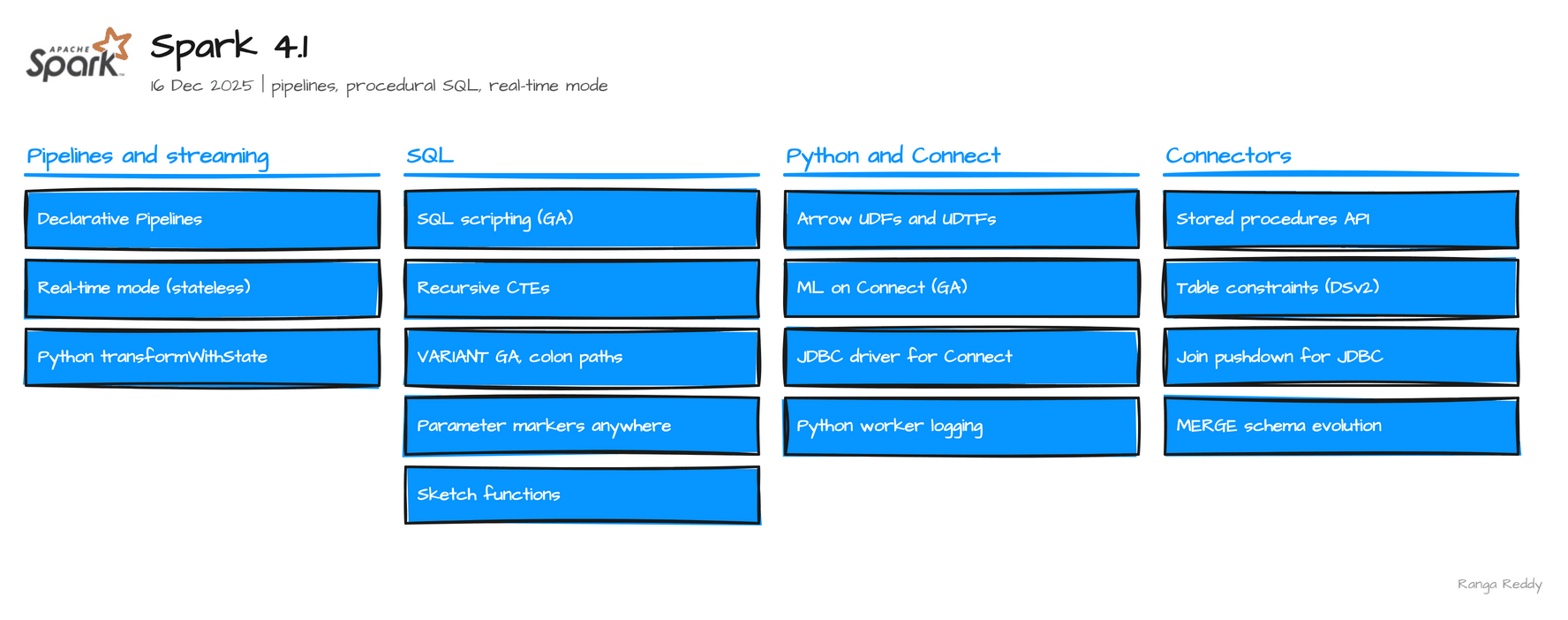 Everything in Spark 4.1.
Verified execution. Every sample in this post ran on Spark 4.1.3, on the
apache/spark:4.1.3-python3image, in November 2026. Real-time mode and the parameter markers also ran on the 4.1.4 tarball. Each feature carries a Status line: Ran means the printed output is real, behind a flag names the setting, and needs a connector means the engine defines the syntax and a table format has to implement it. Where I could not run something, it is labelled listed and its limits are in Known limitations. The runnable files are in ranga-spark4-examples underspark-4.1/.
Before you start
What you need
| Need | Detail |
|---|---|
| Java | 17. The runs used the image’s Java 17 |
| Python, for PySpark | 3.10 or newer for the 4.1 tarball. Python 3.9 fails with a TypeError in a Python worker |
| Spark | The apache/spark:4.1.3-python3 image, or the 4.1.4 release tarball (546 MB) |
pyarrow |
For feature 8. The official image does not include it |
| Pipeline packages | For feature 1: pyyaml, grpcio, grpcio-status, protobuf, googleapis-common-protos and zstandard, or pip install pyspark[pipelines] |
| Kafka | A broker, for feature 2 only |
The smallest check that you are on the release you think you are on is
00_hello_world.sql. Run it first. It printed:
4.1.3 77bbf77e86ad48f58b5dfbc6ac882b3e70cf1989
If it prints another version, an older SPARK_HOME in your shell is winning. Start with env -u SPARK_HOME.
Glossary
| Term | Meaning |
|---|---|
| Declarative pipeline | A set of datasets, each defined by a query, whose run order Spark derives from their references |
| Materialized view | A dataset whose result Spark computes and stores |
| Micro-batch | Structured Streaming’s default: the stream is run as a series of small batch jobs |
| Real-time mode | A streaming mode where long-lived tasks process records as they arrive, with no batch boundary |
| Recursive CTE | A named subquery that refers to itself, used to walk hierarchies and graphs |
| Parameter marker | A :name placeholder in SQL whose value is passed separately |
| Sketch | A small summary of a large set that answers an approximate question |
| Arrow | The columnar in-memory format Spark uses to move data between the JVM and Python |
Try this first
A three-step path if you are new to these features. None of it needs Kafka, pyarrow or extra packages.
- Confirm the version. Run the hello-world file above.
- Run one query. Count to five with the recursive CTE.
- Run one script. Try the
WHILEloop in SQL scripting.
1. Spark Declarative Pipelines [Intermediate]
Since: 4.1.0 · Status: Ran; the official image needs extra Python packages · Source:
SPARK-51727Lineage: Auto CDC flows arrive in pipelines in 4.2 (SCD Type 1,
SPARK-56249) and 4.3 (SCD Type 2,SPARK-58321).
What it is
A pipeline is a set of datasets, each defined by a query, where some read others. Declarative
Pipelines lets you state those datasets and leave the run order, parallelism and retries to
Spark (SPARK-51727). A project is a spark-pipeline.yml file plus a folder of Python or SQL
files, and you run it with the spark-pipelines command. A materialized view is a dataset
whose result Spark computes and stores.
Why it matters
This means you can write each table as a query and stop hand-ordering the steps. Under the
hood, Spark builds a graph from the references between datasets, which is why orders ran
before revenue_by_region in the run log: the SQL view reads it, and nothing in the files
says so. spark-pipelines dry-run checks syntax, analysis and cycles without writing
anything. The CLI works through Spark Connect, and the official image lacks the Python
packages it needs: the first run fails with ModuleNotFoundError: No module named 'yaml'.
Install pyyaml grpcio grpcio-status protobuf googleapis-common-protos zstandard, or use
pip install pyspark[pipelines].
Sample code
Runnable files: 07_declarative_pipelines.
# transformations/orders.py: a materialized view defined in Python
from pyspark import pipelines as dp
from pyspark.sql import DataFrame, SparkSession
spark = SparkSession.active()

@dp.materialized_view
def orders() -> DataFrame:
    return spark.sql("SELECT * FROM VALUES (1,'eu',10.0D),(2,'us',20.0D),"
                     "(3,'eu',30.0D),(4,'us',5.0D) AS t(id, region, amount)")
-- transformations/revenue.sql: reads orders, so it runs after it
CREATE MATERIALIZED VIEW revenue_by_region AS
SELECT region, sum(amount) AS total, count(*) AS orders
FROM orders GROUP BY region;
spark-pipelines dry-run   # syntax, analysis and cycle errors, nothing written
spark-pipelines run       # eu 40.0 over 2 orders, us 25.0 over 2
When to use it
Use it when you have related datasets whose run order you would rather derive than write. Skip it when the pipeline mixes many engines, where an external orchestrator is the better fit, or you need a custom schedule. Common beginner mistake: running spark-pipelines on the official image without installing its Python packages; the first run fails with ModuleNotFoundError: No module named 'yaml'.
Visual
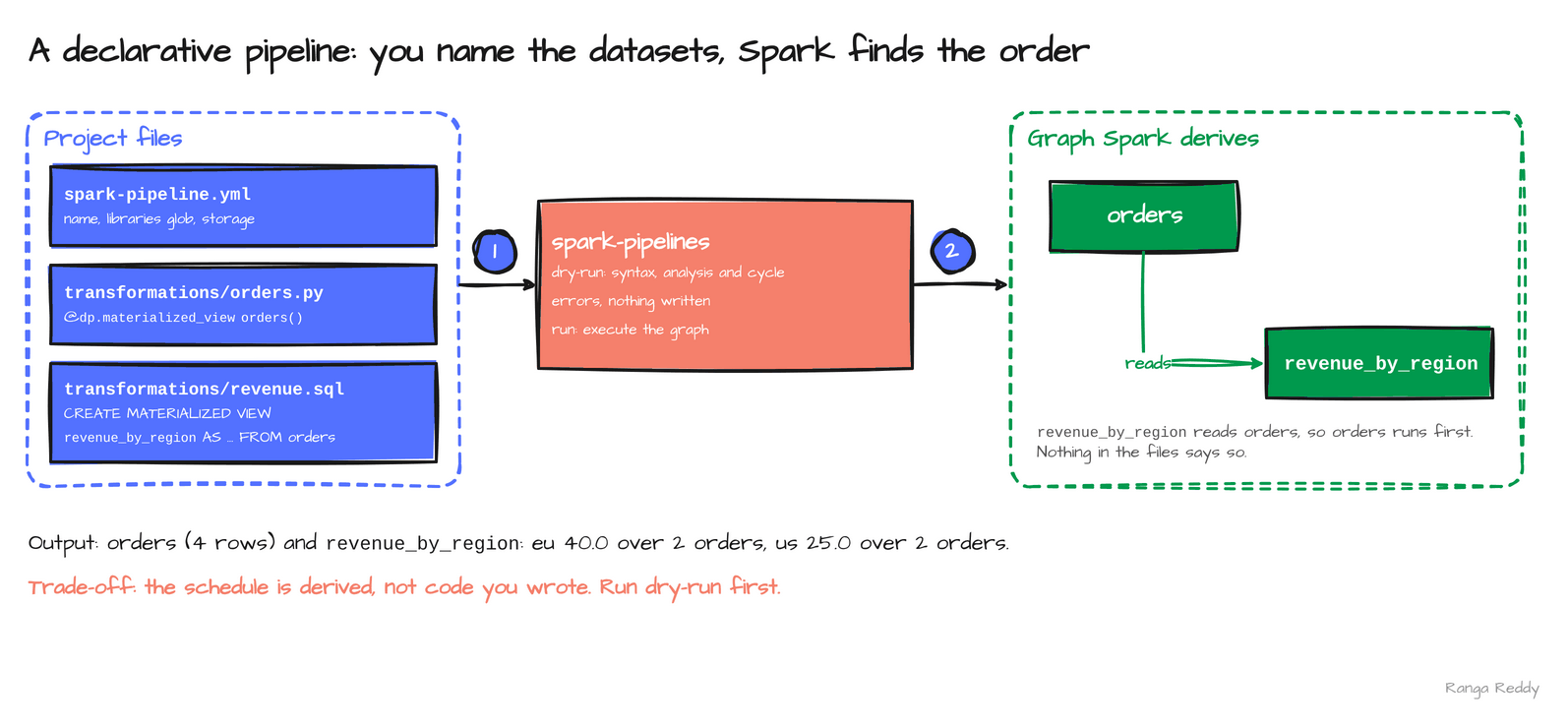 Nothing in the files states the order; Spark reads it from the dependency.
2. Real-time mode for stateless queries [Advanced]
Since: 4.1.0 · Status: Ran (needs a Kafka broker) · Source:
SPARK-53736Lineage: stateless queries in 4.1.0, a PySpark trigger in 4.2 (
SPARK-54660), stateful queries in 4.3.0.
What it is
Structured Streaming normally cuts a stream into micro-batches and runs a job per batch.
Real-time mode runs the query as long-lived tasks that process records as they arrive
(SPARK-53736). You choose it with a trigger. In 4.1 it supports stateless queries only,
such as a filter or a projection, in Scala, with Kafka as the source. The supported sinks
are console, memory, foreach and Kafka.
Why it matters
This means you can cut the wait between a record landing and a result appearing for queries that keep no state.
Under the hood, the supported sources, sinks and operators are
a short allowlist, and anything outside it is rejected. Python does not accept the trigger
on 4.1.3: trigger(realTime="5 seconds") raised TypeError: DataStreamWriter.trigger() got
an unexpected keyword argument 'realTime', which matches the release note’s “Scala
stateless support”. Stateful queries, such as counts, wait for 4.3. I make no latency claim
here: the run showed messages hello, real and time coming out as HELLO, REAL and
TIME in a single batch, and I did not benchmark it.
Sample code
Runnable file: 08_real_time_mode.scala.
import org.apache.spark.sql.streaming.Trigger
import org.apache.spark.sql.functions._
// needs a Kafka broker
val out = spark.readStream.format("kafka")
.option("kafka.bootstrap.servers", "kafka:29092")
.option("subscribe", "rtm_demo_in2").option("startingOffsets", "latest").load()
.select(upper(col("value").cast("string")).alias("v"))
// the real-time trigger replaces the micro-batch trigger
val q = out.writeStream.format("console").outputMode("update")
.trigger(Trigger.RealTime("5 seconds")).start()
When to use it
Use it when a stateless Scala query on Kafka needs results as records arrive. Skip it when the query keeps state, which waits for 4.3, uses Python, or reads from a source other than Kafka. Common beginner mistake: calling trigger(realTime=...) from Python, which raises a TypeError in 4.1.
Constraints and reported latency
The first four items come from the 4.3 real-time mode guide, for the stateless queries that arrived in 4.1.0, and the last from the vendor’s 4.1 announcement. I did not run them.
- Output and checkpoint. The output mode must be
update, and acheckpointLocationis required. - Sources and sinks. Kafka is the only source. Sinks are Kafka,
foreach, console and memory, andforeachBatchis not supported. - Stateless operators. Projections, filters, a
unionof distinct sources, and stream-static joins whose static side is broadcast. - Sizing. Each input partition gets a long-running task, so a 10-partition topic needs at least 10 cores. The trigger duration is a checkpoint interval, with a 5,000 ms minimum by default, not a latency target.
- Reported latency. The announcement reports p99 latencies “in the single-digit milliseconds range” for stateless workloads. It gives no hardware, workload or method, and I did not measure latency, so treat it as a vendor claim.
Visual
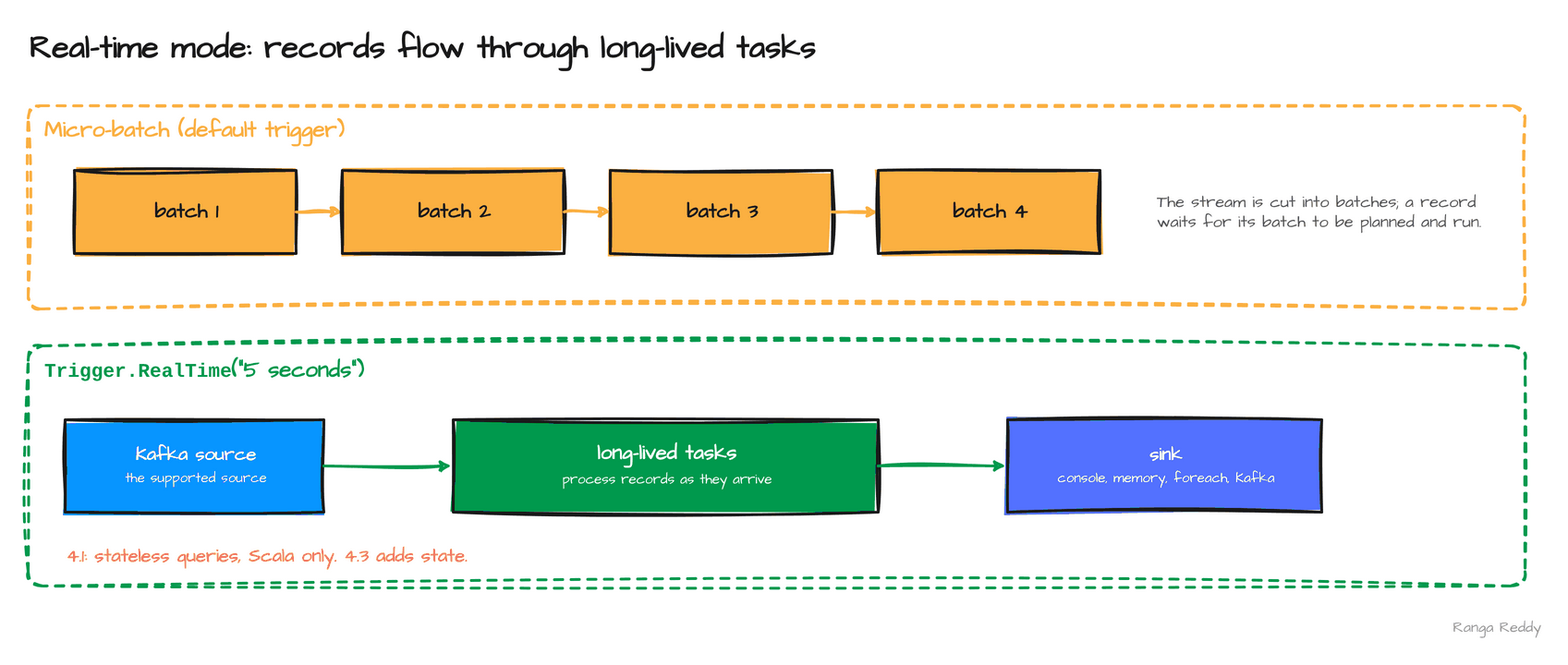 Micro-batches wait for a boundary; long-lived tasks pass records through as they arrive.
3. SQL scripting [Beginner]
Since: 4.1.0 · Status: Ran · Source:
SPARK-54499,SPARK-53621,SPARK-52998Lineage: cursors arrive in 4.2, behind flags (
SPARK-54759).
What it is
A SQL script is a BEGIN ... END block that can declare variables, loop, branch and handle
errors, and runs as a single statement (SPARK-54499). It moves logic that used to live in a
Python driver into SQL that an analyst can read. Spark 4.1 enables it by default, so
spark.sql.scripting.enabled is true.
Why it matters
This means a multi-step job, such as a loop that builds a total or a block that recovers from an error, can be one SQL statement instead of a program.
Under the hood, a script returns the
result of its last query, which is what spark.sql hands back. An error handler is declared
with DECLARE EXIT HANDLER FOR <condition>, and a FOR loop can iterate over a query result.
The release also adds CONTINUE HANDLER support (SPARK-53621) and several variables in one
DECLARE (SPARK-52998), though CONTINUE HANDLER sits behind an internal flag, spark.sql.scripting.continueHandlerEnabled, that read false on 4.1.3 and is still off in 4.3.0,
which the 4.2 post shows with cursors.
Sample code
Runnable file: 01_sql_scripting.sql.
BEGIN
DECLARE total INT DEFAULT 0;
DECLARE i INT DEFAULT 1;
WHILE i <= 5 DO
SET total = total + i;
SET i = i + 1;
END WHILE;
SELECT total, i;
END;
-- 15, 6
BEGIN
DECLARE result DOUBLE DEFAULT 0;
DECLARE EXIT HANDLER FOR DIVIDE_BY_ZERO
BEGIN
SET result = -1;
SELECT 'caught divide by zero' AS status, result;
END;
SET result = 1 / 0;
END;
-- caught divide by zero, -1.0
When to use it
Use it when a multi-step job, such as a loop or an error handler, can live in one SQL statement. Skip it when a set-based query does the job. Common beginner mistake: expecting a CONTINUE handler to work. Its flag, spark.sql.scripting.continueHandlerEnabled, read false on 4.1.3.
Visual
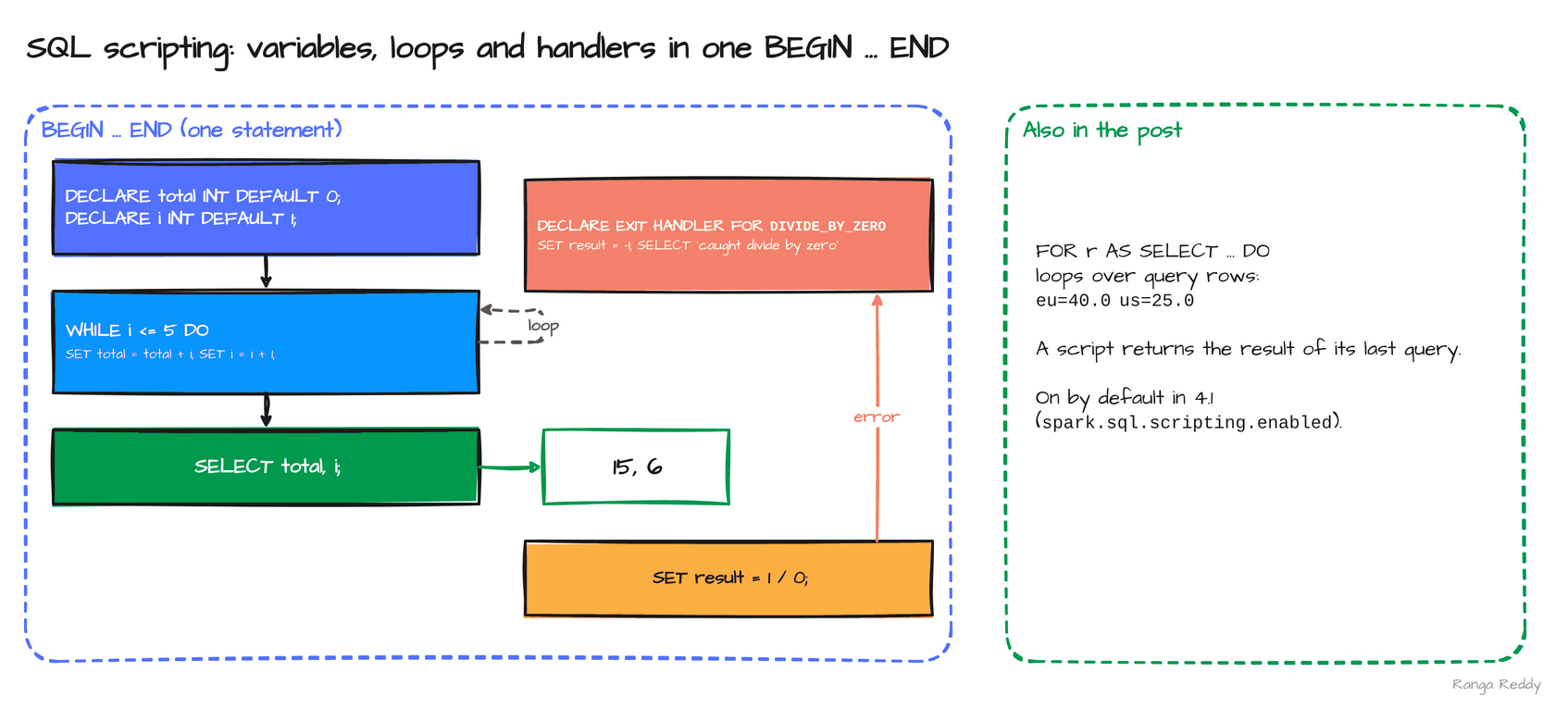 A loop that returns 15 and 6, and a handler that catches the divide by zero.
4. Recursive common table expressions [Intermediate]
Since: 4.1.0 · Status: Ran · Source:
SPARK-24497
What it is
A common table expression (CTE) is a named subquery introduced with WITH. A recursive one
refers to itself: it starts from a base query and repeatedly applies a step to the previous
result until the step returns nothing (SPARK-24497). That is how SQL walks a hierarchy, such
as an org chart, or a graph, and before 4.1 it needed a loop in application code.
Why it matters
This means you can answer “who reports to whom, at every level” in one query, inside the engine.
Under the hood, the base query runs first, then the recursive part runs against the
rows the previous pass produced, joined to the source table, so the number of passes equals the
depth of the hierarchy. The WHERE condition in the recursive part is the stop rule. Without one, Spark
stops the query at 100 levels with RECURSION_LEVEL_LIMIT_EXCEEDED, and the error shows a
MAX RECURSION LEVEL clause to raise the limit. I checked this on 4.1.3. A four-level org chart walked from the root, where
boss IS NULL, returned ceo 0, vp 1, dir 2 and mgr 3: one row per level. The sample
below counts to five.
Sample code
Runnable file: 02_recursive_cte.sql.
WITH RECURSIVE t(n) AS (
SELECT 1 -- the base case
UNION ALL
SELECT n + 1 FROM t WHERE n < 5 -- the step, and the stop rule
) SELECT n FROM t;
-- 1, 2, 3, 4, 5
When to use it
Use it when you walk a hierarchy or a graph, such as an org chart. Skip it when the data is flat, or a join does the job. Common beginner mistake: leaving out the stop rule; the query ends at 100 levels with RECURSION_LEVEL_LIMIT_EXCEEDED.
Visual
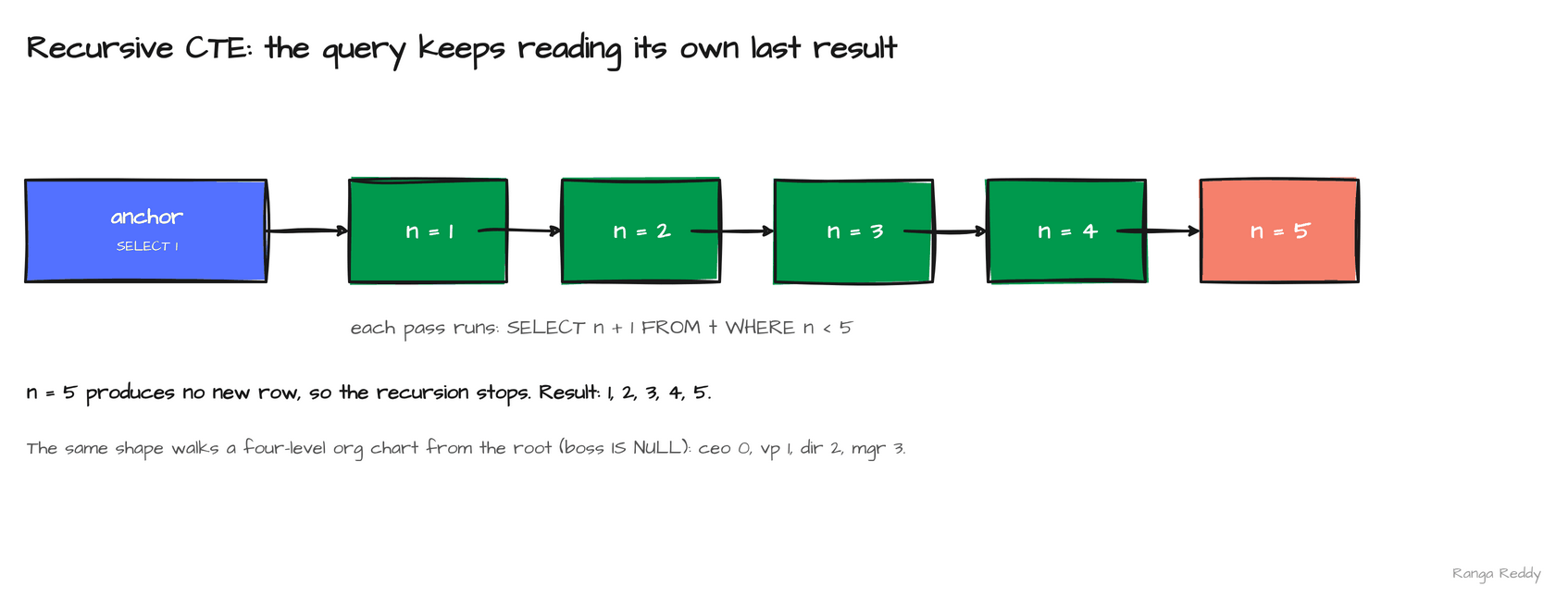 The base row seeds the recursion, and each pass adds one until
n reaches 5.
5. VARIANT generally available, with colon paths [Beginner]
Since: 4.1.0 · Status: Ran · Source:
SPARK-54454,SPARK-52494,SPARK-53659,SPARK-54410Lineage:
VARIANTin 4.0 (SPARK-45827), generally available with colon paths in 4.1, editing functions in 4.3 (SPARK-57804).
What it is
VARIANT is the Spark type for semi-structured data such as JSON, stored in a binary encoding
that is parsed once instead of on every read. 4.1 declares it generally available and on by
default (SPARK-54454), and adds a shorthand to read a field: v:path, with ::type to cast
the result (SPARK-52494). Version note: VARIANT arrived in 4.0 and gained editing
functions in 4.3.
Why it matters
This means you can read a JSON field without a schema and without get_json_object. Under
the hood, a path that does not exist returns NULL, and a field can hold a different type in
each row, which a typed column could not. schema_of_variant reports each row’s own type. In
the sample, n is a number in one row and a string in the other. The release also adds
shredding, which stores frequently read fields as separate Parquet columns for faster reads,
and Parquet support for the Variant logical type (SPARK-53659, SPARK-54410). I did not run
shredding.
Sample code
Runnable file: 03_variant_colon_paths.sql.
-- ev(v VARIANT) holds two rows:
-- {"user":"a","n":3,"tags":["x","y"]}
-- {"user":"b","n":"x"}
SELECT v:user::string AS user,
v:tags[0]::string AS first_tag,
schema_of_variant(v:n) AS n_type
FROM ev ORDER BY 1;
-- a x BIGINT
-- b NULL STRING
Before 4.1, a field needed variant_get with a path and a type:
SELECT variant_get(v, '$.user', 'string') AS user,
variant_get(v, '$.tags[0]', 'string') AS first_tag
FROM ev ORDER BY 1;
-- a x
-- b NULL
It returns the same rows as the colon form. Both are in 09_before_after.sql.
When to use it
Use it when JSON arrives with a changing shape and you read fields by path. Skip it when the shape is fixed and typed columns would be simpler. Common beginner mistake: using colon paths on a 4.0 cluster, which fails with PARSE_SYNTAX_ERROR; there, use variant_get.
Visual
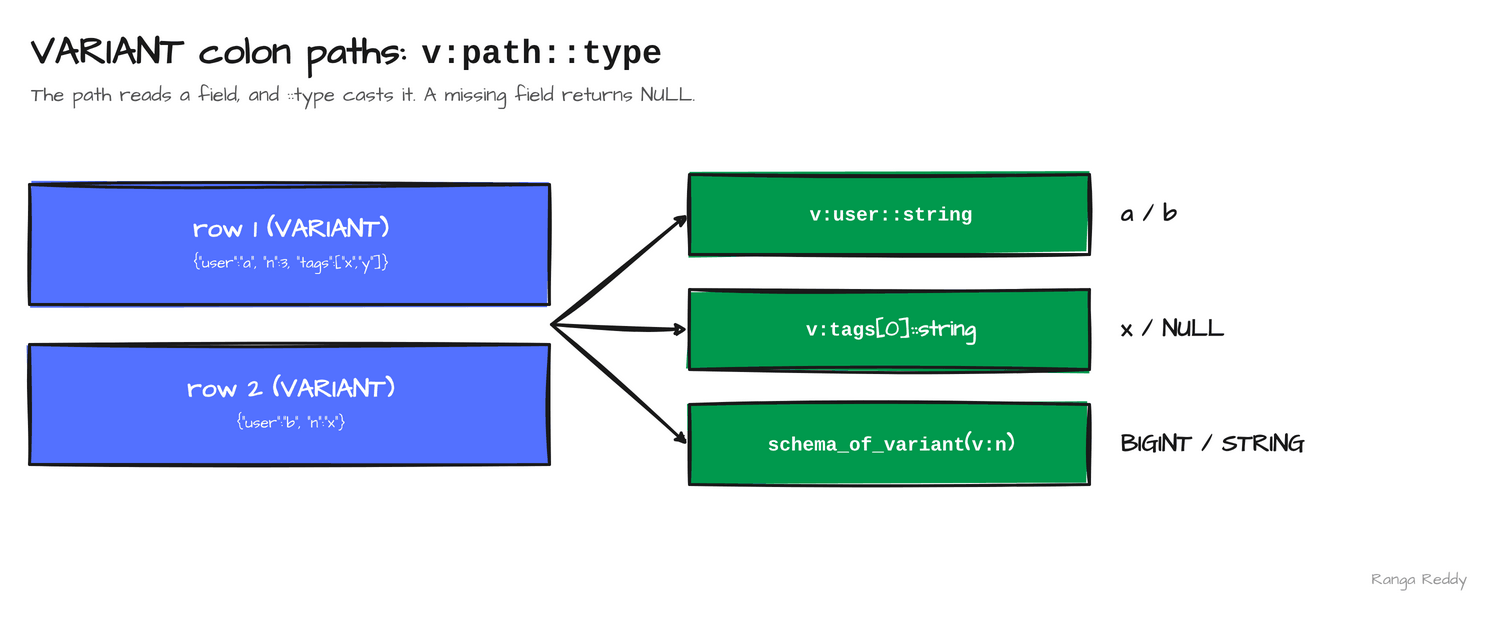 One path expression, applied to two rows whose
n field has different types.
6. Parameter markers anywhere [Beginner]
Since: 4.1.0 · Status: Ran · Source:
SPARK-53573Lineage: parameterized SQL through
sql()in PySpark in 4.0 (SPARK-41666), markers nearly anywhere in 4.1.
What it is
A parameter marker is a :name placeholder in a SQL string whose value you pass separately,
so application code never has to splice a value into the text. Markers worked in a few
expression positions before. In 4.1 a pre-parser substitutes them nearly anywhere
(SPARK-53573): a LIMIT, an identifier through IDENTIFIER(:t), and a default inside a
script.
Why it matters
This means you can build a query from user input without string concatenation, which is the source of SQL injection.
Under the hood, the substitution happens before parsing, so a marker
can stand where only a literal would normally fit, including a table name. The values go in as
the args argument of spark.sql. The sample returned the first two rows of orders, and the
script printed 42 after adding 1 to the start value of 41. The 4.0 release notes already list
parameterized SQL through sql() in PySpark (SPARK-41666), so 4.1 widens where a marker is
allowed, not whether markers exist.
Sample code
Runnable file: 05_parameter_markers.py.
# the table name and the limit are parameters, not spliced text
spark.sql("SELECT * FROM IDENTIFIER(:t) ORDER BY id LIMIT :n",
args={"t": "orders", "n": 2})
# (1, eu, 10.0), (2, us, 20.0)
# a marker inside a script
spark.sql("""BEGIN
DECLARE x INT DEFAULT :start;
SET x = x + 1;
SELECT x;
END""", args={"start": 41}) # 42
When to use it
Use it when a value comes from user input or application code and must not be spliced into SQL text. Skip it when the value is a constant of the query itself. Common beginner mistake: building the SQL string with an f-string anyway; markers keep the value out of the text.
Visual
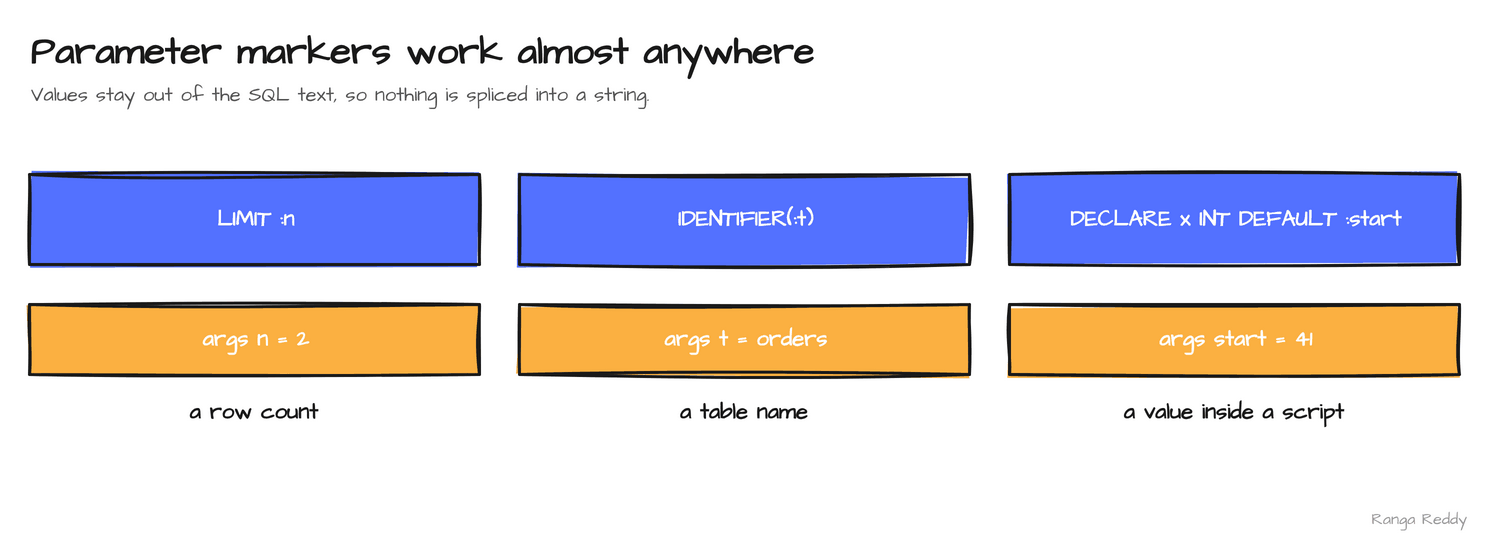 A row count, a table name and a script default, all passed as arguments.
7. Sketch functions [Intermediate]
Since: 4.1.0 · Status: Ran · Source:
SPARK-52515,SPARK-54199,SPARK-52407,SPARK-52588Lineage: native Tuple sketches and Tuple/Theta set operations in 4.2 (
SPARK-54179,SPARK-55558).
What it is
A sketch is a small summary of a large set that answers an approximate question. 4.1 adds
approx_top_k for the most frequent items (SPARK-52515), KLL sketches for quantiles
(SPARK-54199) and Theta sketches for distinct counts and set operations (SPARK-52407).
They are aggregates that can be stored in a column and merged later.
Why it matters
This means you can roll daily summaries up into a weekly one without reading the raw data again.
Under the hood, a sketch trades exactness for size: the median of 1 to 1000 is about 500 and the 99th percentile about 990, and the sketch returned slightly different values from run to run. On 4.1.3 alone the same query gave 497, 499, 500 and 501 for the median and 989 or 990 for the 99th percentile, depending on how many cores the run used and between identical runs. 4.3.0 gave 499 or 500 and 989 or 990. The variation comes from the run, not the release, so assert a tolerance on sketch results in tests, not an exact value.
approx_top_k also comes in accumulate, estimate and combine forms (SPARK-52588, SPARK-52515),
which is what lets its state be stored and merged.
Sample code
Runnable file: 04_sketch_functions.sql.
-- the two most frequent pages
SELECT approx_top_k(page, 2) FROM clicks;
-- [{item: a, count: 3}, {item: b, count: 2}]
-- merge two theta sketches, then estimate the distinct count
SELECT theta_sketch_estimate(theta_union_agg(s)) FROM (
SELECT theta_sketch_agg(x) s FROM VALUES (1),(2),(3) AS a(x)
UNION ALL
SELECT theta_sketch_agg(x) FROM VALUES (3),(4) AS b(x));
-- 4
When to use it
Use it when you want approximate rollups that can be stored and merged later. Skip it when you need an exact answer. Common beginner mistake: asserting an exact sketch value in a test. The median varied from 497 to 501 across runs of the same query.
Visual
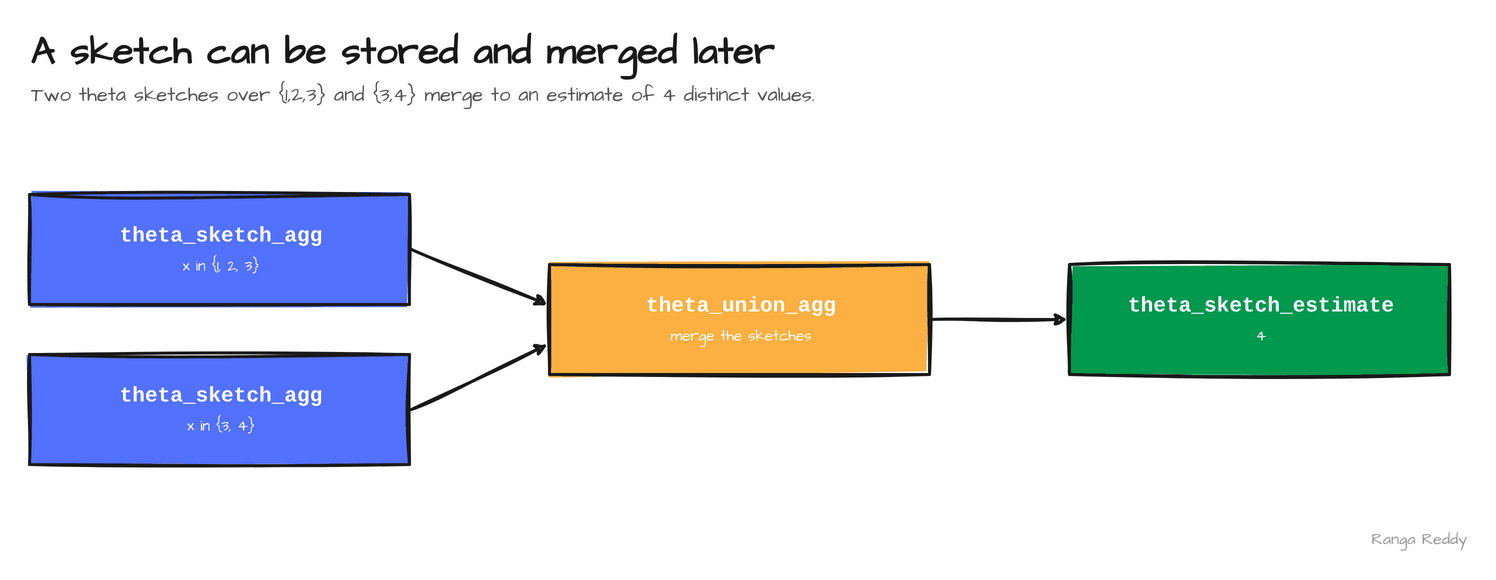 Merge two sketches, then estimate: the shared value 3 is counted once.
8. Arrow-native Python UDFs and UDTFs [Intermediate]
Since: 4.1.0 · Status: Ran; needs
pyarrow· Source:SPARK-52214,SPARK-52979Lineage: Arrow-optimized Python UDFs become the default in 4.2 (
SPARK-54555).
What it is
A user-defined function (UDF) is Python code that Spark calls per batch of rows. A
user-defined table function (UDTF) returns several rows per call. 4.1 adds @arrow_udf and
@arrow_udtf (SPARK-52214, SPARK-52979), which hand the function whole PyArrow arrays
instead of converting to pandas first. Arrow is the columnar in-memory format Spark already
uses to move data between the JVM and Python.
Why it matters
This means a vectorised function stays vectorised: it computes over an array with PyArrow kernels, with no per-value Python loop and no pandas copy.
Under the hood, the data crosses
from the JVM as Arrow batches either way, and the saving is the conversion to a pandas
Series. The sample multiplies an amount column by 1.18. The function needs the pyarrow
package. The release also adds Iterator[pandas.DataFrame] support in applyInPandas
(SPARK-53614), UDT input and output in Arrow-optimized UDFs (SPARK-51619), yielding scalar
values from an Arrow UDTF (SPARK-52934), and Arrow compression for pandas UDFs (SPARK-54226).
Sample code
Runnable file: 06_arrow_udf.py.
import pyarrow as pa, pyarrow.compute as pc
from pyspark.sql.functions import arrow_udf, col
# the function receives and returns a whole PyArrow array
@arrow_udf("double")
def with_tax(amount: pa.Array) -> pa.Array:
return pc.multiply(amount, 1.18)
df.select("id", with_tax(col("amount")).alias("gross")).show()
# 1 11.799999999999999
# 2 23.599999999999998
When to use it
Use it when a numeric or columnar function can run on whole PyArrow arrays. Skip it when the logic is row by row. Common beginner mistake: forgetting to install pyarrow, which the official image does not include.
Visual
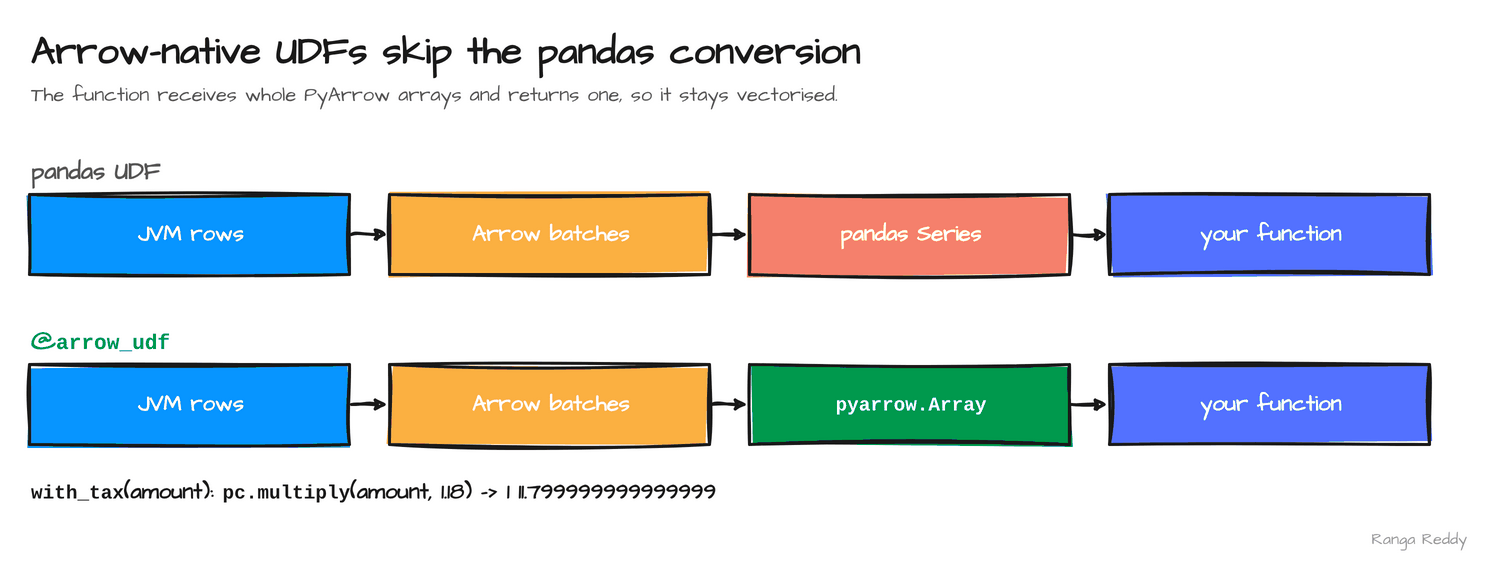 The Arrow-native path drops the pandas Series step.
Smaller additions worth knowing
These are in the release notes and were not run here.
| Feature | What it does | Status |
|---|---|---|
Spark ML on Connect, generally available for Python (SPARK-51236) |
Run pyspark.ml against a Spark Connect server |
Listed |
JDBC driver for Spark Connect (SPARK-53484) |
Connect from JDBC clients through the Connect protocol | Listed |
| Connect transport improvements | zstd-compressed protobuf plans, chunked Arrow result streaming, no 2 GB limit on local relations | Listed |
Python worker logging (SPARK-53975) and python_worker_logs() |
Query the logs of Python workers | Listed |
Stored procedures API for catalogs (SPARK-44167) |
An API for catalogs to expose stored procedures | Listed, needs a connector |
Table constraints (SPARK-51207) and MERGE INTO schema evolution (SPARK-54274) |
Data Source V2 features that a connector implements | Listed, needs a connector |
Join pushdown for Oracle, Postgres, MySQL and SQL Server (SPARK-52823 and others) |
Send a join to the database instead of reading both sides | Listed |
Python transformWithState (SPARK-51814) |
A row-based API for custom stateful streaming in Python | Listed |
Version lineage
Several 4.1 features start an arc that later releases continue. Read the 4.1 column as what this release added.
| Feature | 4.0 | 4.1 | 4.2 | 4.3 |
|---|---|---|---|---|
VARIANT |
Introduced (SPARK-45827) |
Generally available, colon paths (SPARK-54454, SPARK-52494) |
none in the headlines | Editing functions (SPARK-57804) |
| Real-time mode | none | Stateless, Scala, Kafka (SPARK-53736) |
PySpark trigger (SPARK-54660) |
Stateful: aggregation, dropDuplicates, transformWithState (SPARK-58635) |
| Pipelines | none | Declarative Pipelines (SPARK-51727) |
Auto CDC SCD Type 1 (SPARK-56249) |
Auto CDC SCD Type 2 (SPARK-58321) |
| SQL scripting | Session variables (SPARK-42849) |
Generally available, CONTINUE HANDLER behind a flag (SPARK-54499, SPARK-53621) |
Cursors, behind flags (SPARK-54759) |
none in the headlines |
| Recursion and parameters | Parameterized SQL in PySpark (SPARK-41666) |
Recursive CTEs, markers anywhere (SPARK-24497, SPARK-53573) |
none | none |
| Sketches | none | approx_top_k, KLL, Theta (SPARK-52515, SPARK-54199, SPARK-52407) |
Tuple sketches (SPARK-54179) |
none |
| Python UDFs | Python UDTFs (SPARK-43797) |
Arrow UDF decorators (SPARK-52214, SPARK-52979) |
Arrow-optimized UDFs on by default (SPARK-54555) |
Experimental transpiling (SPARK-55206) |
Flags at a glance
A feature that parses is not a feature that is on. In 4.1 the gates are few:
| Feature | Config key | Default | What it controls |
|---|---|---|---|
| SQL scripting | spark.sql.scripting.enabled |
true (read on 4.1.3) |
BEGIN ... END scripts. On by default in 4.1 |
CONTINUE handlers |
spark.sql.scripting.continueHandlerEnabled |
false, internal, since 4.1.0 (read on 4.1.3) |
CONTINUE exception handlers |
| Real-time allowlist | spark.sql.streaming.realTimeMode.allowlistCheck |
true |
Rejects operators and sinks outside the real-time allowlist |
Declarative Pipelines, recursive CTEs, VARIANT colon paths, parameter markers, the sketch functions and the Arrow UDFs have no flag.
Settings and costs
| Setting | Default seen | What it does |
|---|---|---|
spark.sql.streaming.realTimeMode.minBatchDuration |
5000ms |
Lower bound for the real-time batch duration |
spark.sql.pipelines.maxFlowRetryAttempts |
2 |
Retries for a failing pipeline flow |
| Feature | Cost to plan for |
|---|---|
| Declarative Pipelines | The execution graph is derived, not written. Run spark-pipelines dry-run first to catch syntax, analysis and cycle errors without writing data |
| Sketch functions | Approximate answers that differ from run to run, so assert a tolerance |
| Real-time mode | Stateless Scala queries on Kafka only, inside a short allowlist |
When these features bite
Each item is a failure hit during the runs, with the text it produced, so you can grep for it. Every item is also an anchor, so you can link to one error.
ModuleNotFoundError: No module named 'yaml' from spark-pipelines. The CLI needs pyyaml and runs over Spark Connect, so it also needs grpcio and its companions. Fix: Install them, or pip install pyspark[pipelines].
TypeError: DataStreamWriter.trigger() got an unexpected keyword argument 'realTime'. Real-time mode has no Python trigger in 4.1. Fix: Use the Scala or Java API.
STREAMING_REAL_TIME_MODE.OPERATOR_OR_SINK_NOT_IN_ALLOWLIST. RealTimeModeAllowlist, with spark.sql.streaming.realTimeMode.allowlistCheck defaulting to true, accepts the Kafka source and the console, memory, foreach and Kafka sinks. Fix: Stay inside the allowlist. This row is from the source and the documentation, not from a run.
[RECURSION_LEVEL_LIMIT_EXCEEDED]. A recursive CTE with no stop rule hits the default limit of 100 levels (checked on 4.1.3). Fix: Add a stop condition, or raise it with MAX RECURSION LEVEL.
TypeError: unsupported operand type(s) ... 'type' and 'type' from a Python worker. The 4.1 tarball declares Python 3.10 or newer, and Python 3.9 cannot run it. Fix: Use a newer interpreter.
Run it yourself
The samples ran on apache/spark:4.1.3-python3 and on the 4.1.4 release tarball (546 MB, Scala
2.13.17) with Java 17. The tarball declares Python 3.10 or newer, so a stock Python 3.9 cannot
run its PySpark examples. The download script and the SQL runner are in
RUNNING_ON_TARBALLS.md.
Hello world. 00_hello_world.sql printed 4.1.3 and the build hash. Before and after. 09_before_after.sql runs variant_get next to the colon path.
SQL. smoke/smoke41.sql printed this on 4.1.4:
scripting          15 | 6
recursive CTE      1, 2, 3, 4, 5
colon path         a x BIGINT   /   b NULL STRING
approx_top_k       [a,3], [b,2]
Parameter markers need bound arguments, so they go through the Scala API rather than a SQL file.
This ran on the 4.1.4 tarball and printed P1 (the two eu rows), P2 (the first two rows of
orders) and P3 (42):
spark.sql("CREATE OR REPLACE TEMP VIEW orders AS SELECT * FROM VALUES " +
  "(1,'eu',10.0D),(2,'us',20.0D),(3,'eu',30.0D),(4,'us',5.0D) AS t(id,region,amount)")

println("P1 " + spark.sql("SELECT * FROM orders WHERE region = :r ORDER BY id",
  Map("r" -> "eu")).collect().mkString(" "))
println("P2 " + spark.sql("SELECT * FROM IDENTIFIER(:t) ORDER BY id LIMIT :n",
  Map("t" -> "orders", "n" -> 2)).collect().mkString(" "))
println("P3 " + spark.sql("BEGIN DECLARE x INT DEFAULT :start; SET x = x + 1; SELECT x; END",
  Map("start" -> 41)).collect().mkString(" "))
sys.exit(0)
Arrow UDF. It needs Python 3.10 or newer, which the image has, and pyarrow, which it does not.
Install pyarrow into a folder you mount, then run
tarball/arrow_udf.py:
mkdir pylib
docker run --rm -v "$PWD":/work -w /work apache/spark:4.1.3-python3 \
  pip install --target /work/pylib pyarrow pandas
docker run --rm -v "$PWD":/work -w /work -e PYTHONPATH=/work/pylib \
  apache/spark:4.1.3-python3 \
  /opt/spark/bin/spark-submit --master 'local[2]' arrow_udf.py
Declarative Pipelines. The three project files are in section 1. The CLI also needs pyyaml,
grpcio, grpcio-status, protobuf, googleapis-common-protos and zstandard. Install them into
pylib the same way, then run from the project folder. The run log shows orders planned and run
before revenue_by_region.
docker run --rm -v "$PWD/..":/work -w /work/sdp -e PYTHONPATH=/work/pylib \
  apache/spark:4.1.3-python3 /opt/spark/bin/spark-pipelines run
Real-time mode against Kafka. The script reads from a broker on localhost:9092, which the
datalake-playground publishes with the all profile. The Kafka source is not in the tarball, so add it
with --packages org.apache.spark:spark-sql-kafka-0-10_2.13:4.1.4 and feed
tarball/rtm41.scala on standard input. It printed HELLO for the first
message and REAL and TIME in the same batch, and finished with exception=None.
git clone https://github.com/rangareddy/datalake-playground.git
cd datalake-playground
PROFILE=all SPARK_VERSION=3.5.9 sh run_datalake.sh start
sh run_datalake.sh status
Upgrade notes for teams moving to 4.1
Behaviour changes to test before you upgrade. The first rows come from the 4.1 release notes; the rest come from the official SQL and PySpark migration guides.
| Change | What to do | Source |
|---|---|---|
| Python 3.9 is dropped; the minimums are Python 3.10, PyArrow 15.0.0 and pandas 2.2.0 | Check the Python environment on every image | SPARK-52561, SPARK-52928 |
| ANSI mode is on by default for the pandas API on Spark | Test operations that returned a quiet result; compute.ansi_mode_support controls it |
SPARK-53295 |
BinaryType maps to Python bytes everywhere |
spark.sql.execution.pyspark.binaryAsBytes=false restores bytearray |
SPARK-53696 |
convertToArrowArraySafely is on, so a lossy Arrow conversion raises |
Set spark.sql.execution.pandas.convertToArrowArraySafely=false to restore |
SPARK-52904 |
| Arrow-optimized UDFs accept user-defined types, and drop an unnecessary pandas conversion, which changes type coercion | spark.sql.execution.pythonUDF.arrow.legacy.fallbackOnUDT=true and the legacy.execution.pythonUDF.pandas.conversion.enabled settings restore |
PySpark migration guide |
DataFrame.__getitem__ on Spark Connect no longer validates column names eagerly |
PYSPARK_VALIDATE_COLUMN_NAME_LEGACY=1 restores |
PySpark migration guide |
| The Parquet reader no longer treats a struct as null when all requested fields are missing | spark.sql.legacy.parquet.returnNullStructIfAllFieldsMissing=true restores |
SQL migration guide |
The Thrift Server returns a 1-based ORDINAL_POSITION |
spark.sql.legacy.hive.thriftServer.useZeroBasedColumnOrdinalPosition=true restores |
SQL migration guide |
| Double-quote escaping follows the SQL standard | Recheck string literals that contain quotes | SPARK-52545 |
The S3 magic committer is used for all S3 buckets, and spark.checkpoint.compress is on |
Recheck write paths and checkpoint sizes | SPARK-47618, SPARK-52174 |
Adopt now or wait?
4.1.0 shipped on 16 December 2025 and has had four patch releases since, 4.1.1 to 4.1.4, the latest on 27 October
- The versioning policy gives a feature release a 6-month
maintenance window, but 4.1.4 arrived ten months after 4.1.0, so read the window as a minimum. As of 18 November
2026, 4.1 is also the newest line for which Apache Iceberg (1.12.0), Apache Hudi (1.2.1) and Delta Lake (4.1.0) all
publish Spark artifacts on Maven Central, which makes it the practical target for a lakehouse stack. My recommendation,
a judgement and not a measurement: adopt the latest patch, 4.1.4, and try Declarative Pipelines on one pipeline with
dry-runbefore you commit a team to it.
Known limitations in this release
- Real-time mode. It covers stateless Scala queries on Kafka only, and Python has no trigger. I ran one query with three messages and made no latency measurement; the constraints and the vendor’s latency claim under feature 2 come from documentation, not from a run.
- Declarative Pipelines. I ran a materialized view in Python and one in SQL. Streaming tables, flows and Auto CDC were not run, and the official image needs extra Python packages first.
- Sketches. Results vary from run to run and with the core count, so no exact value is safe to assert.
- Listed only. Spark ML on Connect, the JDBC driver, the transport changes, stored procedures, table constraints, join pushdown and Python
transformWithStateare from the release notes, not run.
Cheat sheet
| Feature | Syntax | Needs |
|---|---|---|
| Declarative Pipelines | spark-pipelines dry-run, then spark-pipelines run; @dp.materialized_view or CREATE MATERIALIZED VIEW v AS ... |
The pipeline Python packages |
| Real-time mode | .trigger(Trigger.RealTime("5 seconds")) |
Scala, Kafka, a stateless query |
| SQL scripting | BEGIN DECLARE x INT DEFAULT 0; WHILE x < 5 DO SET x = x + 1; END WHILE; END; |
Nothing |
| Recursive CTE | WITH RECURSIVE t(n) AS (SELECT 1 UNION ALL SELECT n + 1 FROM t WHERE n < 5) SELECT n FROM t |
A stop rule |
VARIANT colon path |
v:user::string |
Nothing |
| Parameter markers | spark.sql("SELECT ... LIMIT :n", args={"n": 2}) |
Nothing |
| Sketches | approx_top_k(page, 2), theta_sketch_agg(x) |
Nothing |
| Arrow UDF | @arrow_udf("double") |
pyarrow |
Key takeaways
- Pipelines: Declarative Pipelines derives the run order from references between datasets. Install the CLI’s Python packages before the first run.
- Streaming: real-time mode covers stateless Scala queries on Kafka. It is the first release of a feature that grows in 4.3, so treat it as narrow.
- SQL as a language: scripts and recursive CTEs move loops and hierarchies out of driver code and into queries.
- Semi-structured data:
VARIANTis generally available, and colon paths make reading a field a one-liner. - Test tolerance, not equality: sketch results shift from run to run, so assert a range.
Further reading
- Spark 4.1.0 release notes, the source of every ticket number above
- Spark Declarative Pipelines programming guide for the project spec and the CLI
SPARK-51727, the Declarative Pipelines proposal, andSPARK-53736, real-time mode- What’s new in Apache Spark 4.2 and 4.3 for the releases after this one
- Spark 4.x features by release for all four releases side by side
- Real-time mode in the 4.3 Structured Streaming guide, and the vendor’s 4.1 announcement, the sources of the constraints and the reported latency
- The versioning policy, for the maintenance windows
Trademarks
Apache Spark, Apache Kafka, Apache Parquet, Apache Arrow and Apache are either registered trademarks or trademarks of The Apache Software Foundation in the United States and other countries. The Apache Software Foundation does not endorse this post.
Found this useful?
These posts and tools are free. If one saved you an afternoon, you can buy me a coffee.
Comments
Questions, corrections and reviews are welcome. Sign in with GitHub to post; comments are stored in this site's public GitHub Discussions.