What's new in Apache Spark 4.0: ANSI mode by default, VARIANT and a far more expressive SQL
Spark 4.0 new features, tested on 4.0.5: ANSI mode by default, VARIANT, pipe syntax, SQL UDFs, collation and more. Each feature has a status, a source ticket, a sample with its printed output, and a plain note on what to check before you upgrade from 3.x.
- Before you start
- 1. ANSI mode on by default [Beginner]
- 2. VARIANT [Intermediate]
- 3. SQL pipe syntax [Beginner]
- 4. SQL user-defined functions [Intermediate]
- 5. Session variables [Beginner]
- 6. String collation [Intermediate]
- 7. The built-in XML data source [Beginner]
- 8. The Python Data Source API and Python UDTFs [Advanced]
- 9. GROUP BY on maps and DESCRIBE … AS JSON [Intermediate]
- 10. transformWithState and the state data source [Advanced]
- 11. Polymorphic Python UDTFs [Intermediate]
- 12. Named and unnamed parameter markers [Beginner]
- Smaller additions worth knowing
- Version lineage
- Flags at a glance
- Settings and costs
- When these features bite
- Run it yourself
- Upgrade notes for teams moving from 3.x to 4.0
- Known limitations in this release
- Cheat sheet
- Key takeaways
- Further reading
- Trademarks
Spark 4.0 is a break with the past and a step forward in the same release. The baseline
moves to Scala 2.13 and Java 17, ANSI mode becomes the default so bad data stops a job
instead of turning into NULL, and SQL grows the pieces it was missing: a type for JSON,
user-defined functions, variables, collations and a top-to-bottom query syntax. This post is
for engineers who are meeting Spark 4 for the first time and for teams planning a migration
from 3.x. You will learn what twelve features do, the syntax, what a real run printed, and
what to check before you upgrade. All four releases side by side are in
the Spark 4.x features-by-release post.
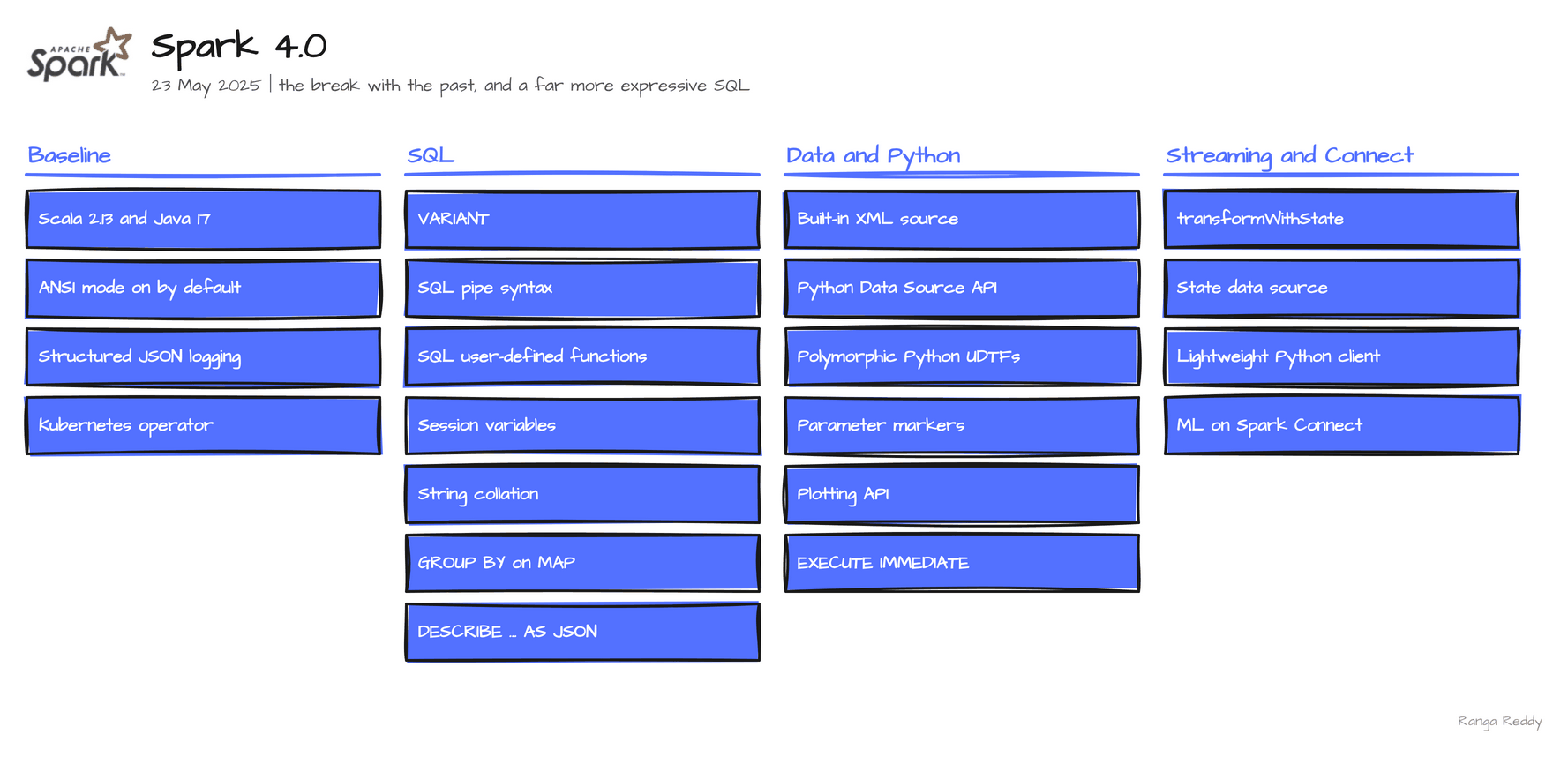 Everything in Spark 4.0.
Verified execution. Every sample in this post ran on Spark 4.0.5, on the
apache/spark:4.0.5-python3image, in November 2026. Each feature carries a Status line: Ran means the printed output is real, behind a flag names the setting, and needs a connector means the engine defines the syntax and a table format has to implement it. Where I could not run something, it is labelled listed and its limits are in Known limitations. The runnable files are in ranga-spark4-examples underspark-4.0/.
Scala 2.13 and Java 17 are themselves the baseline change: Scala 2.12 and JDK 8 and 11 are gone, covered in the release history post.
Before you start
What you need
| Need | Detail |
|---|---|
| Java | 17, the baseline for 4.0. JDK 8 and 11 are no longer supported |
| Scala | 2.13. Every jar your jobs depend on needs a Scala 2.13 build |
| Python, for PySpark | 3.9 or newer for the 4.0 tarball, which is the lowest floor of the four releases |
| Spark | The apache/spark:4.0.5-python3 image, or the 4.0.5 release tarball (523 MB) |
pyarrow and pandas |
For features 8 and 10. The official image does not include them |
protobuf and the gRPC packages |
For feature 10: pip install protobuf grpcio grpcio-status googleapis-common-protos |
| The RocksDB state store | For feature 10: set spark.sql.streaming.stateStore.providerClass to RocksDBStateStoreProvider |
plotly |
Only to try the plotting API in the smaller additions |
The smallest check that you are on the release you think you are on is
00_hello_world.sql. Run it first. It printed:
4.0.5 b472a3aa3c4b71b5a6ff068ef396f757bd662e59
If it prints another version, an older SPARK_HOME in your shell is winning. Start with env -u SPARK_HOME.
Glossary
| Term | Meaning |
|---|---|
| ANSI mode | Spark follows the SQL standard for errors: a bad cast or a divide by zero raises instead of returning NULL |
try_ function |
A variant such as try_cast that returns NULL on bad input instead of raising |
| UDF | User-defined function: a function you write yourself |
| UDTF | User-defined table function: returns several rows per call |
| Collation | A rule for how strings compare and sort, such as case-insensitive |
| Session variable | A typed value that lives for the session, set with DECLARE and SET VAR |
| VARIANT | The Spark type for semi-structured data such as JSON, encoded once in binary |
rowTag |
The XML element that the XML reader treats as one row |
Try this first
A three-step path if you are new to 4.0. None of it needs pyarrow.
- Confirm the version. Run the hello-world file above.
- See the default that changed. Run a bad
CAST, then the same withtry_cast. - Run one query. Write a query top to bottom with pipe syntax.
1. ANSI mode on by default [Beginner]
Since: 4.0.0 · Status: Ran · Source:
SPARK-44444Lineage: ANSI mode is also on by default for the pandas API on Spark in 4.1 (
SPARK-53295).
What it is
ANSI mode makes Spark follow the SQL standard for errors. Before 4.0, an invalid cast and a
divide by zero both returned NULL, silently, and the job stayed green. With ANSI mode on,
both fail loudly (SPARK-44444), and the error message names the function that tolerates the
bad value. Data you used to lose without noticing now stops the job.
Why it matters
This means a typo in a numeric column becomes an error you can see, not a NULL that flows
into a report.
Under the hood, the setting is spark.sql.ansi.enabled, now true. The error
classes are CAST_INVALID_INPUT and DIVIDE_BY_ZERO, and each message points at the try_
variant, try_cast or try_divide, which returns NULL on purpose. This is the change most
likely to turn a green pipeline red. Run your own data through it before the upgrade, and use
the try_* functions where NULL was the intended answer. Setting spark.sql.ansi.enabled to
false brings the old behaviour back: I confirmed on 4.0.5 that the bad cast and the divide by zero
both return NULL again.
Sample code
Runnable file: 01_ansi_mode.sql.
SET spark.sql.ansi.enabled;          -- true

SELECT CAST('abc' AS INT);           -- CAST_INVALID_INPUT: use `try_cast` to tolerate it
SELECT try_cast('abc' AS INT);       -- NULL
SELECT 1/0;                          -- DIVIDE_BY_ZERO: use `try_divide` to tolerate it
SELECT try_divide(1, 0);             -- NULL
Before 4.0, with ANSI off, both mistakes returned NULL and the job stayed green. Setting the flag to false shows it:
SET spark.sql.ansi.enabled=false;
SELECT CAST('abc' AS INT), 1/0;   -- NULL  NULL
SET spark.sql.ansi.enabled=true;
Both forms are in 11_before_after.sql.
When to use it
Use it when you want bad data to stop a job instead of turning into NULL. Skip it when a pipeline depends on NULL for bad values; use try_cast and try_divide there, and spark.sql.ansi.enabled=false only as a stopgap. Common beginner mistake: upgrading without testing real data. This is the change most likely to turn a green pipeline red.
Visual
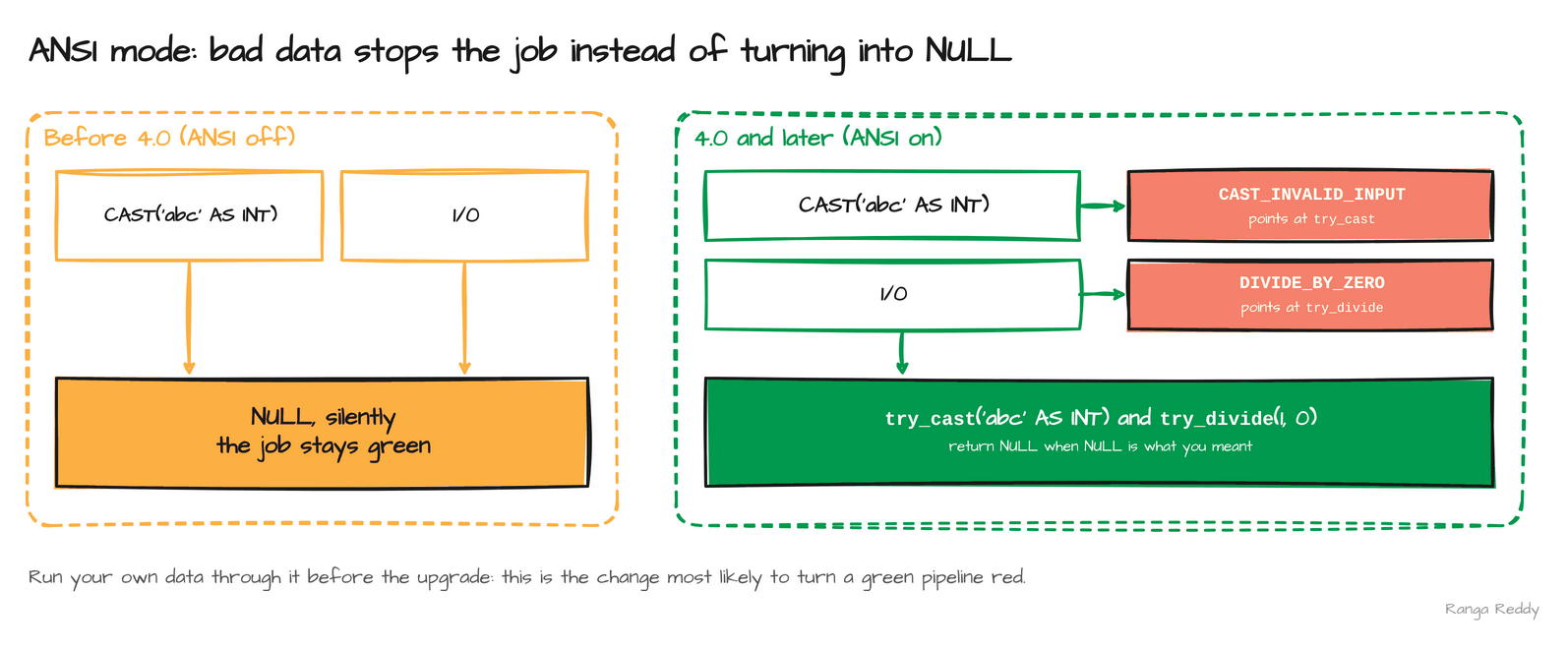 Off: silent
NULL. On: an error, with a try_ function for when you want NULL.
2. VARIANT [Intermediate]
Since: 4.0.0 · Status: Ran · Source:
SPARK-45827,SPARK-49451Lineage:
VARIANTin 4.0, generally available with colon paths in 4.1 (SPARK-54454,SPARK-52494), editing functions in 4.3 (SPARK-57804).
What it is
VARIANT (SPARK-45827) holds a semi-structured value, such as JSON, in an encoded binary
form. A query reads a path out of it without re-parsing text and without a fixed schema up
front. The alternative was a STRING column and get_json_object on every read, which parses
the whole text each time. You create one with parse_json, read it with variant_get, and
inspect it with schema_of_variant.
Why it matters
This means you can land JSON whose shape changes and still query it by path, without writing a schema first.
Under the hood, parse_json encodes the text once, and every later read walks
the binary structure. schema_of_variant reports the shape it found, such as
OBJECT<a: BIGINT, b: ARRAY<BIGINT>>. Version note: this is the 4.0 form of the type. The
v:field colon shorthand is not in 4.0: the same statement fails on 4.0.5 with
PARSE_SYNTAX_ERROR ... at or near ':', and it works from 4.1, where VARIANT is also
generally available. Editing functions arrive in 4.3. The 4.0 release also lets parse_json
accept duplicate keys (SPARK-49451).
Sample code
Runnable file: 02_variant.sql.
-- encode the JSON text once
SELECT parse_json('{"a":1,"b":[1,2,3],"c":{"d":"x"}}') AS v;
-- {"a":1,"b":[1,2,3],"c":{"d":"x"}}

-- read a path and cast the result
SELECT variant_get(parse_json('{"a":1,"b":[1,2,3]}'), '$.b[1]', 'int');   -- 2

SELECT schema_of_variant(parse_json('{"a":1,"b":[1,2,3]}'));
-- OBJECT<a: BIGINT, b: ARRAY<BIGINT>>
Before 4.0, JSON lived in a STRING column and get_json_object returned a string every time:
SELECT typeof(get_json_object('{"a":1,"b":[1,2,3]}', '$.b[1]'));                       -- string
SELECT typeof(variant_get(parse_json('{"a":1,"b":[1,2,3]}'), '$.b[1]', 'int'));        -- int
When to use it
Use it when JSON arrives with a changing shape and you read fields by path. Skip it when the shape is fixed and typed columns would be simpler to filter and document. Common beginner mistake: expecting the v:field colon shorthand in 4.0. It fails with PARSE_SYNTAX_ERROR; use variant_get, or move to 4.1.
Visual
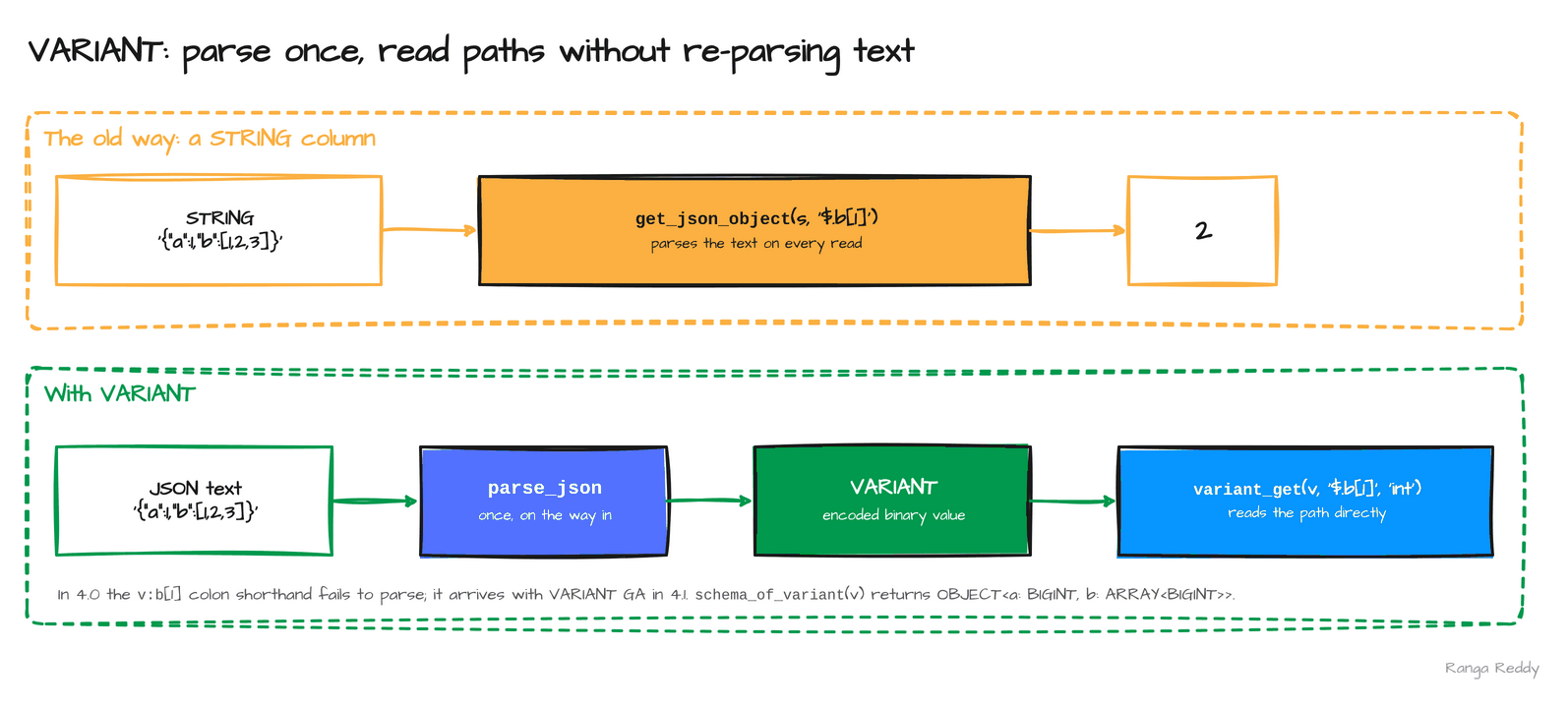 A string is re-parsed on every read; a variant is encoded once.
3. SQL pipe syntax [Beginner]
Since: 4.0.0 · Status: Ran · Source:
SPARK-49555Lineage: 4.2 adds aggregate functions and
GROUP BYin a pipeSELECT(SPARK-54292) and|as an alternative to|>(SPARK-51518).
What it is
Pipe syntax (SPARK-49555) lets a query read top to bottom, one step per |>, instead of
inside-out. A normal query starts with SELECT, which names the result before you have said
where it comes from. A piped query starts with FROM and then transforms the rows one step at a
time: WHERE, AGGREGATE, EXTEND, SELECT, ORDER BY, LIMIT. It is the same logical
plan, written in the order you think it.
Why it matters
This means a long query is easier to read, review and extend, because adding a step is adding a line, not wrapping what you had in a subquery.
Under the hood, it is a different way to write a query, not a different
engine: for the first sample, EXPLAIN showed the same physical operators in the same order as
the conventional SELECT ... GROUP BY ... ORDER BY form (a scan, a two-stage hash aggregate
with an exchange, then an exchange and a sort), checked on 4.0.5. AGGREGATE carries the GROUP BY inside the step, and
EXTEND adds a computed column while keeping the existing ones. The two samples below return the
total per region above a threshold, and the first two rows with a doubled amount.
Sample code
Runnable file: 03_pipe_syntax.sql.
FROM orders
|> WHERE amount > 5
|> AGGREGATE sum(amount) AS total GROUP BY region
|> ORDER BY total DESC;
-- eu  40.0
-- us  20.0

FROM orders |> EXTEND amount * 2 AS doubled |> SELECT id, doubled |> LIMIT 2;
-- 1  20.0
-- 2  40.0
Before 4.0, the same query read inside-out, with the aggregation named before the filter that precedes it:
SELECT region, sum(amount) AS total FROM orders WHERE amount > 5
GROUP BY region ORDER BY total DESC;
-- eu  40.0
-- us  20.0
When to use it
Use it when a long query is easier to read top to bottom, one step per line. Skip it when the query is short and already clear. Common beginner mistake: expecting a performance change. For the first sample, EXPLAIN showed the same physical operators as the conventional form.
Visual
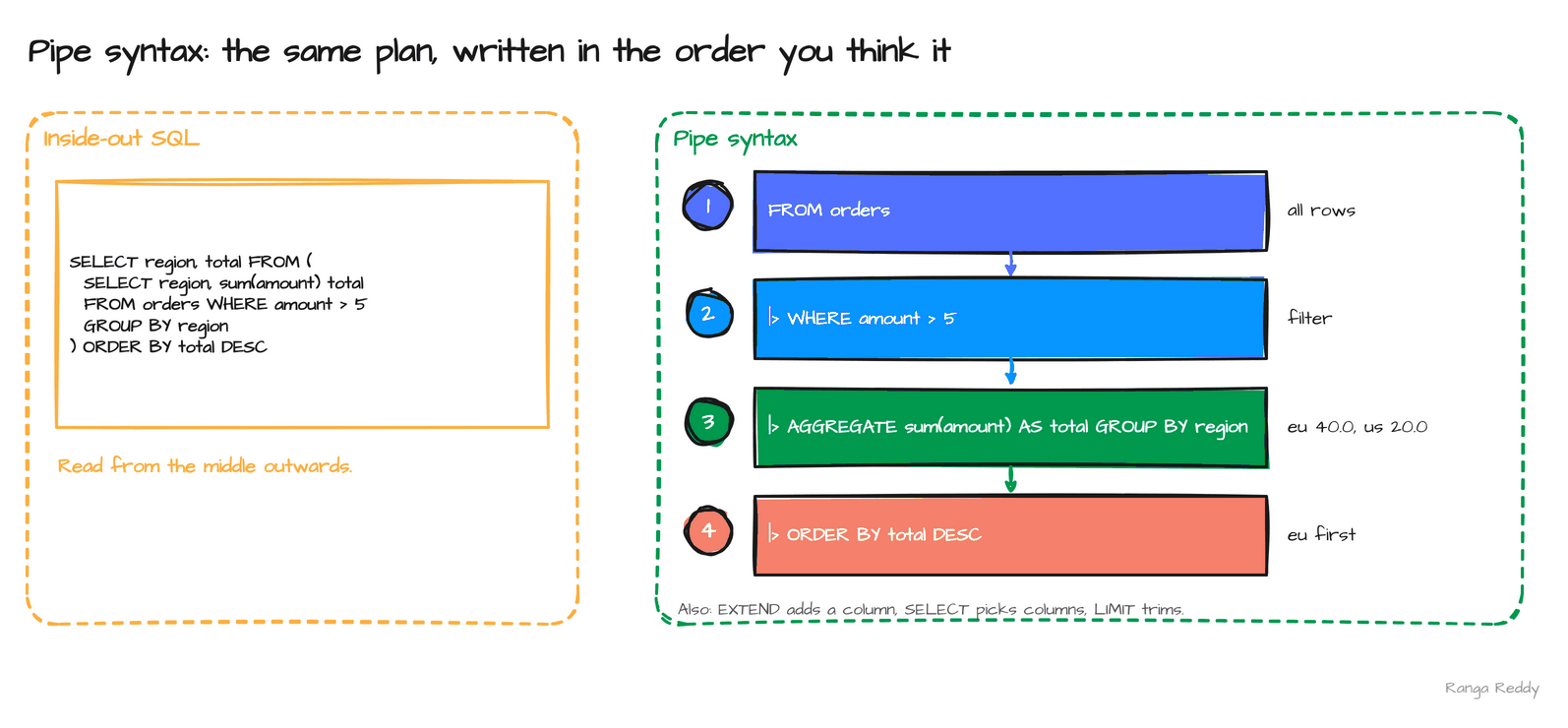 The same query, inside-out on the left and top to bottom on the right.
4. SQL user-defined functions [Intermediate]
Since: 4.0.0 · Status: Ran · Source:
SPARK-46057Lineage: 4.2 adds
DESCRIBE FUNCTIONfor SQL UDFs (SPARK-56883) and a default collation for them (SPARK-55528).
What it is
A user-defined function (UDF) is a function you write yourself. In 4.0 you can write one in SQL
(SPARK-46057), either scalar, returning one value, or table-valued, returning rows. You
declare it with CREATE FUNCTION, give it a return type, and put the body after RETURN.
Before this, a custom function meant Python, Scala or Java code and a deployed artifact.
Why it matters
This means analysts can package a calculation, such as a tax rule, without leaving SQL. Under
the hood, the body is SQL, so the optimiser can see through it and inline it into the calling
query, which a Python or Scala UDF does not allow, because its code is opaque to Spark. A
temporary function lives for the session, and a persistent one is stored in a catalog. The
table-valued form returns a TABLE (...) and is used in the FROM clause. Version note: 4.2
adds DESCRIBE FUNCTION for SQL UDFs and a default collation for them, which the
4.2 post lists.
Sample code
Runnable file: 04_sql_udf.sql.
-- a scalar function
CREATE TEMPORARY FUNCTION add_tax(x DOUBLE) RETURNS DOUBLE RETURN x * 1.18;
SELECT id, add_tax(amount) AS gross FROM orders;        -- 1  11.799999999999999 ...

-- a table-valued function
CREATE TEMPORARY FUNCTION big_orders(min_amt DOUBLE)
  RETURNS TABLE (id INT, amount DOUBLE)
  RETURN SELECT id, amount FROM orders WHERE amount >= min_amt;
SELECT * FROM big_orders(20.0);                          -- (2, 20.0), (3, 30.0)
When to use it
Use it when a reusable calculation can be written in SQL, so the optimiser can see through it. Skip it when the logic needs Python or Scala libraries. Common beginner mistake: forgetting RETURNS TABLE (...) for a table-valued function, and calling it in the FROM clause as if it were scalar.
Visual
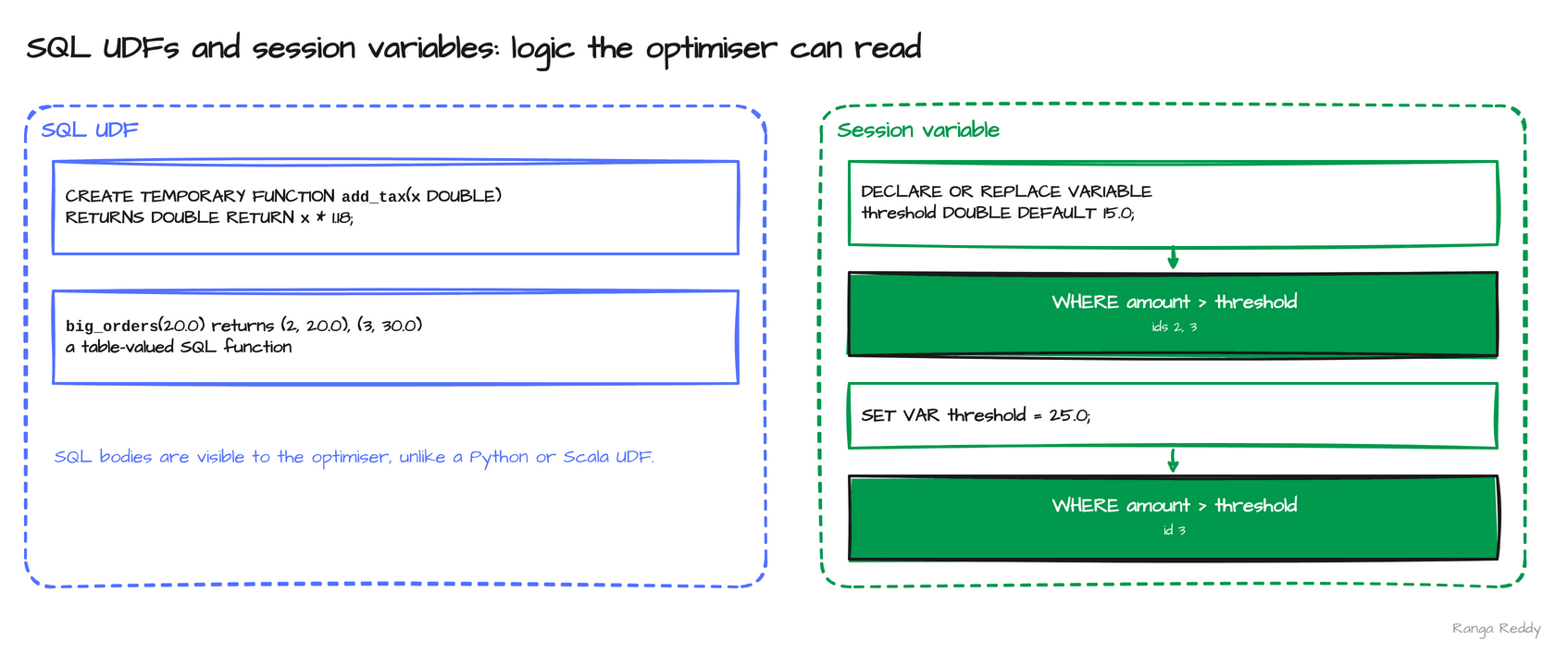 A scalar and a table-valued SQL function, beside the session variable of the next section.
5. Session variables [Beginner]
Since: 4.0.0 · Status: Ran · Source:
SPARK-42849Lineage: SQL scripting, which builds on variables, is enabled by default in 4.1 (
SPARK-54499);spark.sql.scripting.enabledreadfalseon 4.0.5.
What it is
A session variable is a typed value that lives for the session (SPARK-42849). You create it
with DECLARE, change it with SET VAR, and use it anywhere an expression is allowed. It is
the typed alternative to splicing a value into SQL text, which is how most injection bugs and
most quoting bugs begin.
Why it matters
This means you can state a threshold once and reuse it across several queries, then change it in one place.
Under the hood, the variable has a declared type, and an assignment is cast to it:
SET VAR threshold = 'abc' failed with CAST_INVALID_INPUT on 4.0.5 because 'abc' cannot become a
DOUBLE. DECLARE OR REPLACE makes a script safe to rerun. In the
sample, amount > threshold returns ids 2 and 3 at 15.0 and only id 3 after SET VAR threshold =
25.0. Session variables are also the first building block of SQL scripting, which Spark 4.1
turns on by default, and of the parameter markers that 4.1 extends. See the
4.1 post for both.
Sample code
Runnable file: 05_session_variables.sql.
-- a typed, session-scoped variable
DECLARE OR REPLACE VARIABLE threshold DOUBLE DEFAULT 15.0;
SELECT id FROM orders WHERE amount > threshold; -- 2, 3
-- change it once, and every later query sees the new value
SET VAR threshold = 25.0;
SELECT id FROM orders WHERE amount > threshold; -- 3
When to use it
Use it when a threshold or setting is reused across several queries in one session. Skip it when the value must outlive the session. Common beginner mistake: assigning a value of the wrong type. An assignment is cast to the declared type, so 'abc' into a DOUBLE fails with CAST_INVALID_INPUT.
Visual
On the right: the variable threshold filters to ids 2 and 3, then to id 3 after SET VAR.
6. String collation [Intermediate]
Since: 4.0.0 · Status: Ran · Source:
SPARK-46830Lineage: schema-level collation in 4.1 (
SPARK-52219),SHOW COLLATIONSin 4.2 (SPARK-49543).
What it is
A collation is a rule for how strings compare and sort: case-insensitive, accent-aware, or by a
locale (SPARK-46830). Before collations, case-insensitive matching meant wrapping both sides
in lower(), and has to be remembered on every query. With a collation,
the comparison itself changes. UTF8_LCASE ignores case, and UNICODE_CI is a case-insensitive
Unicode comparison.
Why it matters
This means 'Apple' = 'apple' can be true when you say so, and a count(DISTINCT ...) over
names that differ only in case counts them once.
Under the hood, a column or an expression
carries its collation as part of its type, and collation(expr) returns its name: x COLLATE
UNICODE_CI reports SYSTEM.BUILTIN.UNICODE_CI. The default is still binary comparison, so
nothing changes until you ask. In the sample, four names, Ana, ana, ANA and Bob, drop
from four distinct values to two under UTF8_LCASE. Later releases extend this: 4.1 adds
schema-level collation, and 4.2 adds a SHOW COLLATIONS command.
Sample code
Runnable file: 06_string_collation.sql.
SELECT 'Apple' = 'apple';                                -- false
SELECT 'Apple' COLLATE UTF8_LCASE = 'apple';             -- true
SELECT collation('x' COLLATE UNICODE_CI);                -- SYSTEM.BUILTIN.UNICODE_CI

-- values: 'Ana', 'ana', 'ANA', 'Bob'
SELECT count(DISTINCT n COLLATE UTF8_LCASE) FROM names;  -- 2
Before 4.0, case-insensitive matching meant wrapping both sides in lower():
SELECT lower('Apple') = lower('apple');         -- true
SELECT 'Apple' COLLATE UTF8_LCASE = 'apple';    -- true
When to use it
Use it when you compare or count strings case-insensitively. Skip it when binary comparison is what you want, which is the default. Common beginner mistake: assuming the default changed. Nothing changes until you add COLLATE.
Visual
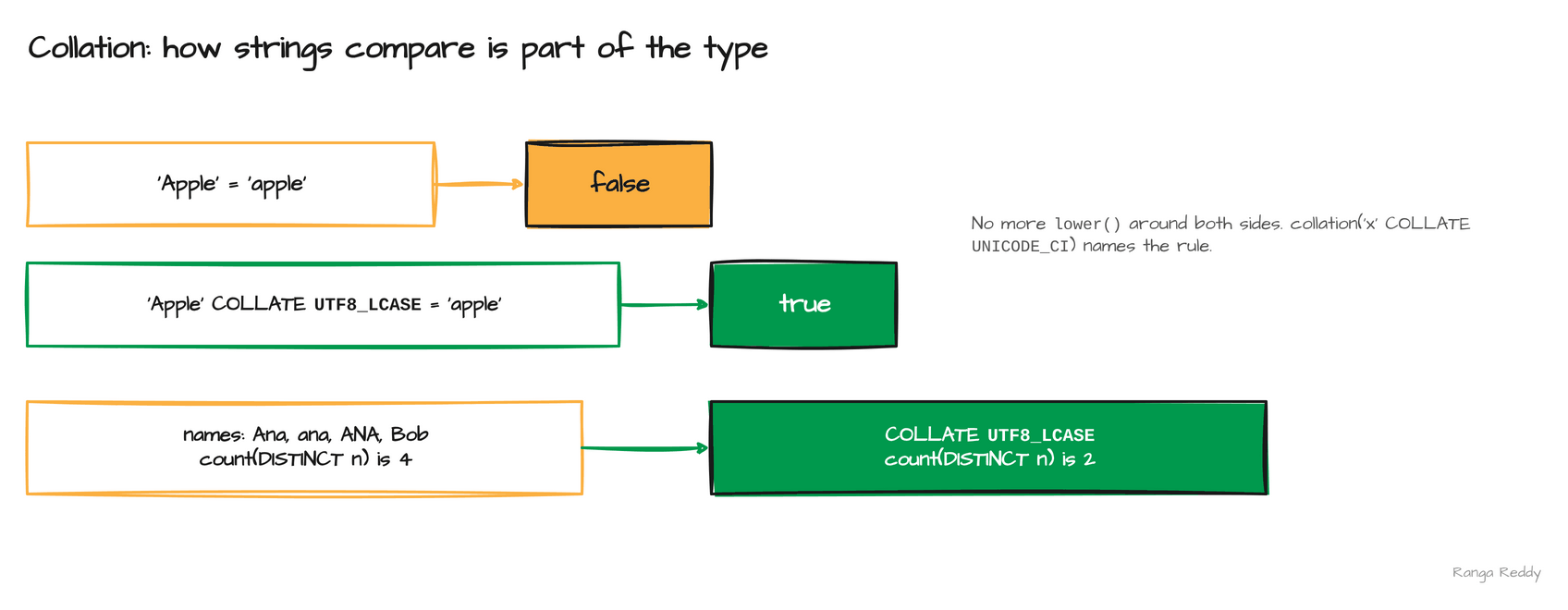 The default compares bytes;
UTF8_LCASE ignores case.
7. The built-in XML data source [Beginner]
Since: 4.0.0 · Status: Ran · Source:
SPARK-44265,SPARK-44753
What it is
Spark 4.0 reads and writes XML without the old external package (SPARK-44265). Two things come
with it. A data source, spark.read.format("xml"), with a rowTag option that names the element
to treat as one row. And functions for XML held in a string column: from_xml parses it into a
struct, to_xml writes one back, and schema_of_xml infers the schema.
Why it matters
This means XML feeds, such as vendor files or a legacy message queue, load as a DataFrame with no extra dependency to manage in every cluster.
Under the hood, the source infers a schema from
the elements it finds, and the functions let you do the same inside a query on a column. In the
samples, <p><name>Ana</name><age>30</age></p> becomes {name: Ana, age: 30}, and the
inferred schema is STRUCT<age: BIGINT, name: STRING>, with the fields in alphabetical order in this run. A file
with two <person> elements read with rowTag person returned the rows (30, 'Ana') and
(41, 'Bob'). The 4.0 release notes list the XML reader and writer for PySpark and Spark
Connect as well.
Sample code
Runnable file: 07_xml_functions.sql.
-- parse an XML string into a struct
SELECT from_xml('<p><name>Ana</name><age>30</age></p>', 'name STRING, age INT');
-- {name: Ana, age: 30}

SELECT schema_of_xml('<p><name>Ana</name><age>30</age></p>');
-- STRUCT<age: BIGINT, name: STRING>
# read files, one <person> element per row
df = spark.read.format("xml").option("rowTag", "person").load("/tmp/xmlin")
# age: long, name: string  ->  (30, 'Ana'), (41, 'Bob')
When to use it
Use it when you load XML feeds or parse XML held in a string column. Skip it when the data is already JSON or Parquet. Common beginner mistake: forgetting the rowTag option, which names the element that becomes one row.
Visual
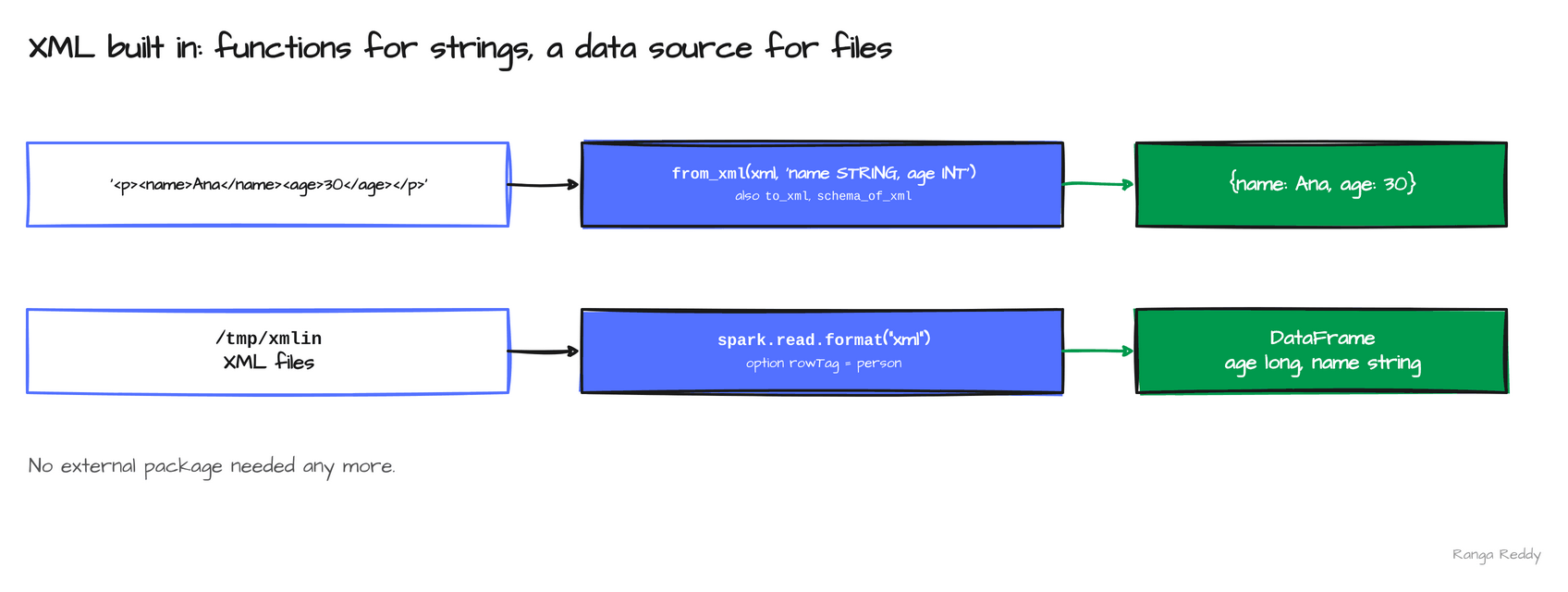 An XML string becomes a struct; XML files become a DataFrame.
8. The Python Data Source API and Python UDTFs [Advanced]
Since: 4.0.0 · Status: Ran; needs
pyarrow· Source:SPARK-44076,SPARK-43797Lineage: filter pushdown for Python data sources in 4.1 (
SPARK-51271), admission control for Python streaming readers in 4.2 (SPARK-55304).
What it is
You can write a data source in plain Python, register it, and read it by name, including from
SQL (SPARK-44076). A Python user-defined table function (UDTF, SPARK-43797) returns several
rows per input row. A data source is two small classes: a DataSource that names it and gives
its schema, and a DataSourceReader whose read method yields rows. A UDTF is a class with an
eval method that yields tuples.
Why it matters
This means you can read from an API or a custom format in a few lines of Python, with no Scala connector to build and ship.
Under the hood, Python workers run the reader, and data moves
through Arrow, so the pyarrow package must be installed. On the official image both features
fail until it is: the data source worker raises ModuleNotFoundError: No module named
'pyarrow'. The sample source named counter produced the rows n=1..4 with square=1,4,9,16,
and the split_words UDTF turned spark four point zero into four rows with their lengths. The
4.0 release also adds polymorphic UDTFs, whose output schema is decided at call time, which I did
not run.
Sample code
Runnable file: 09_python_data_source.py.
from pyspark.sql.datasource import DataSource, DataSourceReader
class CounterDataSource(DataSource):
@classmethod
def name(cls): return "counter"
def schema(self): return "n INT, square INT"
def reader(self, schema): return CounterReader(self.options)
class CounterReader(DataSourceReader):
def __init__(self, options): self.limit = int(options.get("limit", 3))
def read(self, partition):
for i in range(1, self.limit + 1):
yield (i, i * i)
spark.dataSource.register(CounterDataSource) # needs pyarrow
spark.read.format("counter").option("limit", 4).load().show() # n=1..4
from pyspark.sql.functions import udtf
@udtf(returnType="word: string, length: int")
class SplitWords:
def eval(self, text: str):
for w in text.split():
yield (w, len(w))
spark.udtf.register("split_words", SplitWords)
spark.sql("SELECT * FROM split_words('spark four point zero')").show() # spark 5, four 4, ...
When to use it
Use it when a custom source can be a few lines of Python, with no Scala connector to build. Skip it when a JVM connector already exists, or the source is performance-critical. Common beginner mistake: running without pyarrow; the worker raises ModuleNotFoundError: No module named 'pyarrow'.
Visual
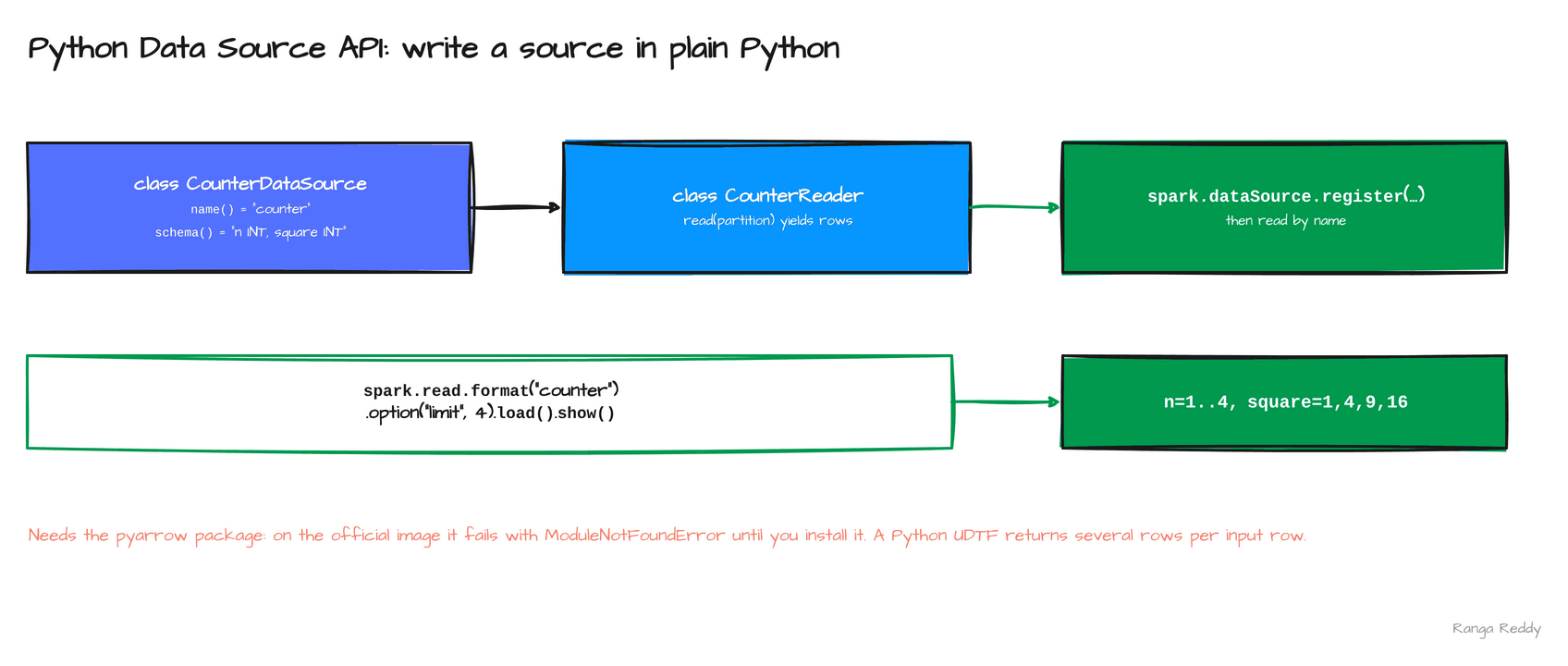 Two classes, one registration call, and the source is readable by name.
9. GROUP BY on maps and DESCRIBE … AS JSON [Intermediate]
Since: 4.0.0 · Status: Ran · Source:
SPARK-47430,SPARK-50541
What it is
Before 4.0 a MAP column could not be a grouping key. In 4.0 it groups directly (SPARK-47430), so a
query can count rows by the whole map. A MAP holds key and value pairs in one column. A second 4.0
addition is DESCRIBE ... AS JSON (SPARK-50541), which returns a table description as one JSON
document instead of a text layout, so a script can parse it instead of scraping the output.
Why it matters
This means you can group on a map without first turning it into a string, and read table metadata from code.
Under the hood, grouping works but comparing two maps with = does not:
map(1,'a') = map(1,'a') fails with DATATYPE_MISMATCH.INVALID_ORDERING_TYPE, so a join on a map
column is still not available. The JSON description carries the table name, the catalog, the
namespace, the schema and the columns with their types, including the collation of a string column,
and more fields beyond what the sample shows. Both statements ran on 4.0.5 and gave the same output
as on 4.3.0.
Sample code
Runnable file: 10_group_by_map_describe_json.sql.
-- a MAP column can be a grouping key
SELECT m, count(*) AS n
FROM VALUES (map('k', 1)), (map('k', 1)), (map('k', 2)) AS t(m)
GROUP BY m ORDER BY n;
-- {"k":2} 1
-- {"k":1} 2
CREATE TABLE people (id INT, name STRING) USING parquet;
-- the table description as one JSON document
DESCRIBE EXTENDED people AS JSON;
-- {"table_name":"people","catalog_name":"spark_catalog","namespace":["default"], ...}
When to use it
Use it when you count or aggregate by a map column, or a script needs table metadata as JSON. Skip it
when you need to compare or join on maps, which is still not available. Common beginner mistake: using =
on two maps; it fails with INVALID_ORDERING_TYPE. Group on the map instead.
Visual
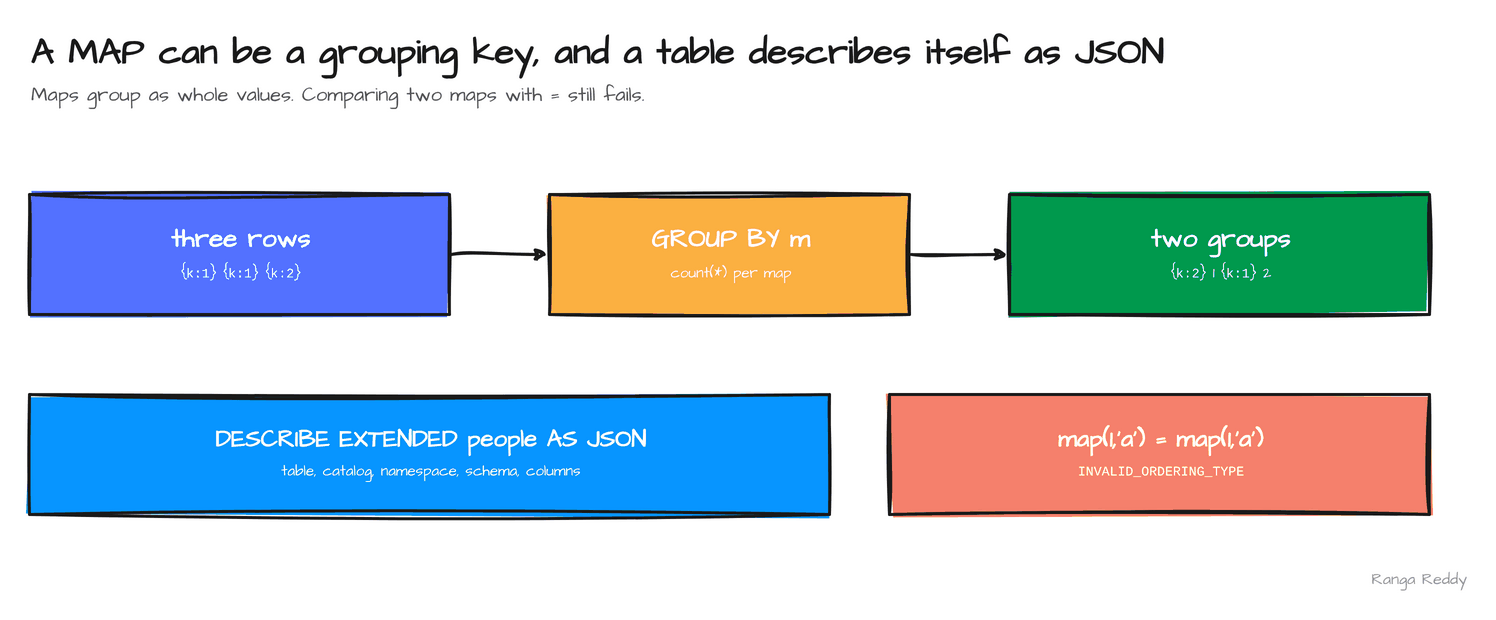 Maps group as whole values, and the table description comes back as one JSON document.
10. transformWithState and the state data source [Advanced]
Since: 4.0.0 · Status: Ran; needs the RocksDB state store and
protobuf· Source:SPARK-46815,SPARK-45511,SPARK-46865,SPARK-47553Lineage: a row-based Python API in 4.1 (
SPARK-51814), stateful queries under the real-time trigger in 4.3, for Scala and Java only (SPARK-57228).
What it is
Structured Streaming remembers information per key between micro-batches, such as a running count. That
memory is called state. transformWithState (SPARK-46815) lets you write the logic yourself as a stateful
processor: a class with an init method that declares typed state variables, a handleInputRows method
that receives the rows for one key, and a close method. It exists in Scala, Java and Python, where the
Python form is transformWithStateInPandas. The state data source (SPARK-45511) reads that state back
as a table with spark.read.format("statestore").
Why it matters
This means you can keep custom per-key logic and inspect its state with a query instead of guessing.
Under the hood, a processor’s state variables are stored as separate column families, which only the
RocksDB state store supports. On the default provider the query fails with
UNSUPPORTED_FEATURE.STATE_STORE_MULTIPLE_COLUMN_FAMILIES. The Python runner also needs protobuf and the
gRPC packages: without protobuf the query fails with STREAMING_PYTHON_RUNNER_INITIALIZATION_FAILURE and
an ImportError for descriptor. In the run, a rate source produced the keys 0, 1 and 2, and after
40 seconds each key held a count of 78, in the output and in the state data source. The count depends on how
long the query ran. Reading state before any batch has committed fails with STDS_COMMITTED_BATCH_UNAVAILABLE.
Sample code
Runnable file: 12_transform_with_state.py.
# needs RocksDBStateStoreProvider as the state store, and pip install protobuf grpcio
class CountProcessor(StatefulProcessor):
def init(self, handle):
schema = StructType([StructField("value", IntegerType())])
self.count = handle.getValueState("count", schema)
def handleInputRows(self, key, rows, timerValues):
total = self.count.get()[0] if self.count.exists() else 0
for pdf in rows:
total += len(pdf)
self.count.update((total,))
yield pd.DataFrame({"id": [key[0]], "count": [total]})
def close(self): pass
counts = stream.groupBy("id").transformWithStateInPandas(statefulProcessor=CountProcessor(),
outputStructType="id STRING, count INT", outputMode="Update", timeMode="None")
state = spark.read.format("statestore").option("stateVarName", "count").load(checkpoint)
# [('0', 78), ('1', 78), ('2', 78)] from both the output and the state data source
When to use it
Use it when a streaming query needs custom per-key logic, such as running counts, sessions or timers, and you
want to inspect the state. Skip it when a plain groupBy(...).count() does the job. Common beginner
mistake: running it on the default state store, which fails with STATE_STORE_MULTIPLE_COLUMN_FAMILIES.
Visual
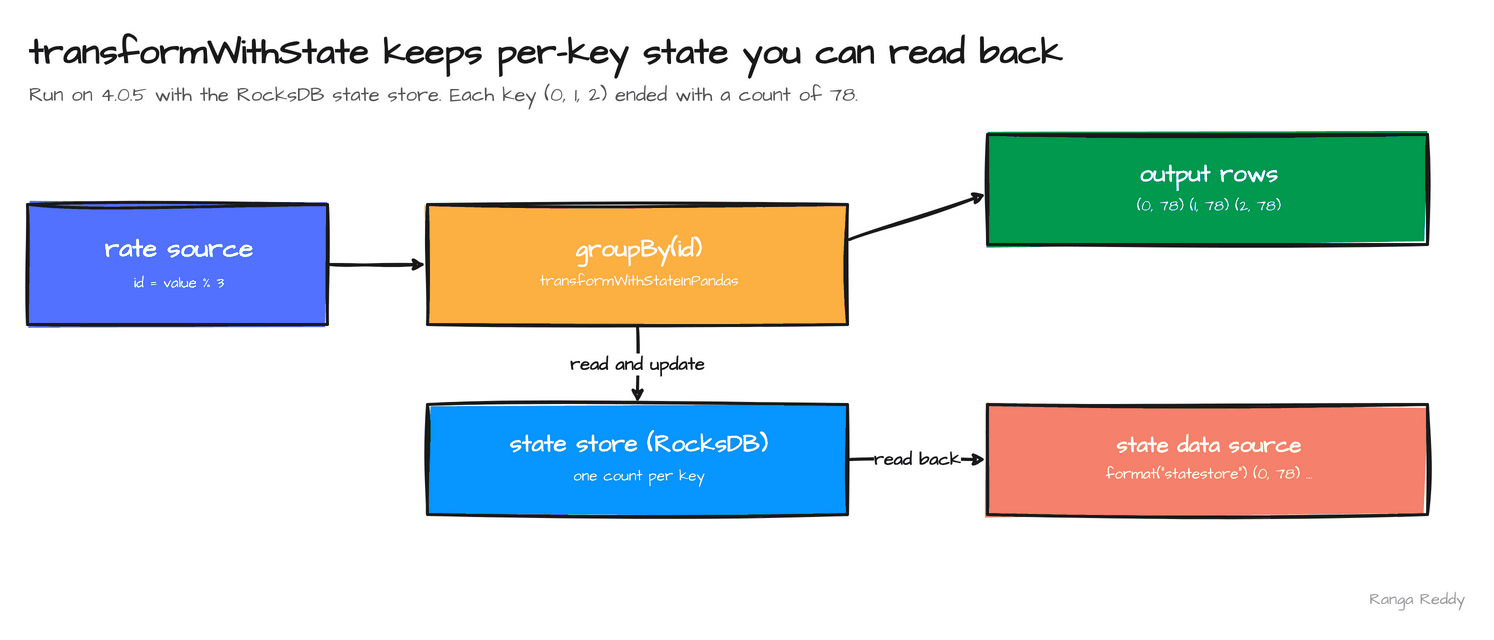 The same per-key counts appear in the output and in the state data source.
11. Polymorphic Python UDTFs [Intermediate]
Since: 4.0.0 · Status: Ran · Source:
SPARK-43797Lineage: Arrow-optimized UDTFs in 4.1 (
SPARK-52979), and regular Python UDTFs are Arrow-optimized by default from 4.2, per the PySpark migration guide.
What it is
A user-defined table function (UDTF) returns several rows per call. Normally you declare its output columns up
front with returnType, so the schema is fixed when you define the function. A polymorphic UDTF instead defines
a static analyze method that receives the argument types and returns the output schema, so one function can
serve different inputs. Python UDTFs arrived in 4.0 (SPARK-43797), and the 4.0 announcement names the
analyze form polymorphic UDTFs.
Why it matters
This means you can write one generic table function, such as an echo or an unpivot, instead of one per type.
Under the hood, analyze runs when Spark plans the query. It receives an AnalyzeArgument that carries the
argument’s dataType, and it returns an AnalyzeResult holding the schema. In the run, one class returned
struct<c1:int> for echo(5) and struct<c1:string> for echo('x'). Without analyze, the schema is fixed
at definition time, so a function that works over many types needs one UDTF per type. You call the function from
SQL after spark.udtf.register, the same way as any other table function.
Sample code
Runnable file: 13_pyspark_extras.py.
@udtf
class Echo:
@staticmethod
def analyze(a: AnalyzeArgument) -> AnalyzeResult:
# the output column takes the type of the argument
return AnalyzeResult(StructType().add("c1", a.dataType))
def eval(self, a):
yield (a,)
spark.udtf.register("echo", Echo)
spark.sql("SELECT * FROM echo(5)") # struct<c1:int>, row (5)
spark.sql("SELECT * FROM echo('x')") # struct<c1:string>
When to use it
Use it when one table function should work over several input types. Skip it when the output schema is
fixed, where returnType is simpler. Common beginner mistake: assuming the schema is fixed: the same class
returned c1 int for echo(5) and c1 string for echo('x').
Visual
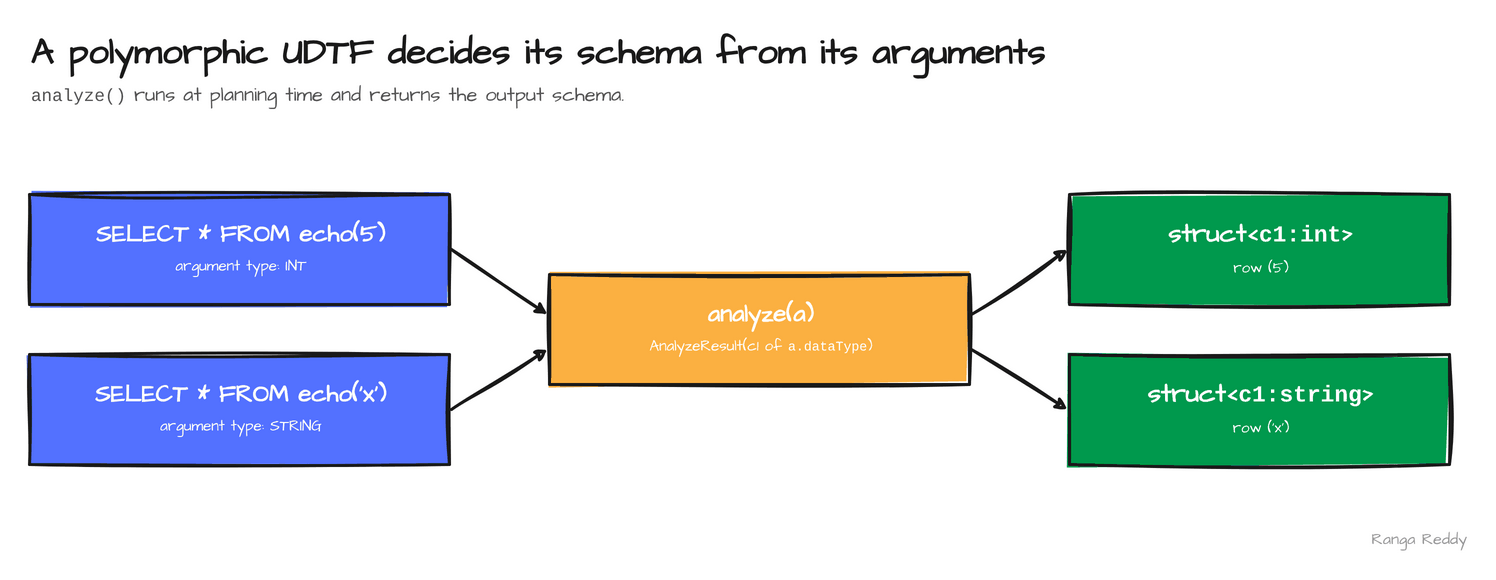
analyze turns the argument type into the output schema.
12. Named and unnamed parameter markers [Beginner]
Since: 4.0.0 · Status: Ran · Source:
SPARK-41666Lineage: markers are allowed nearly anywhere, including identifiers, from 4.1 (
SPARK-53573).
What it is
A parameter marker is a placeholder in a SQL string whose value you pass separately, so application code never
splices a value into the text. Spark 4.0 supports two forms through spark.sql(..., args=...) in PySpark
(SPARK-41666). A named marker is written :name and bound from a dictionary. An unnamed marker is written
? and bound from a list, in order. Both exist to replace string formatting, which is the usual source of
SQL injection and quoting bugs.
Why it matters
This means you can build a query from user input without concatenating strings.
Under the hood, the values are
bound separately from the statement, so a value never becomes SQL text. In the run, SELECT :a + :b with
{a: 1, b: 2} and SELECT ? + ? with [1, 2] both returned 3. A value that looks like an attack,
x'; DROP TABLE t; --, came back unchanged as a plain string. In 4.0 a marker stands where a literal value
would. Spark 4.1 widens that to identifiers and other positions, which the
4.1 post covers.
Sample code
Runnable file: 13_pyspark_extras.py.
# named: a dictionary, matched by key
spark.sql("SELECT :a + :b AS s", args={"a": 1, "b": 2}) # 3
# unnamed: a list, matched by position
spark.sql("SELECT ? + ? AS s", args=[1, 2]) # 3
# a value that looks like SQL stays a value
spark.sql("SELECT :s AS s", args={"s": "x'; DROP TABLE t; --"}) # x'; DROP TABLE t; --
When to use it
Use it when a value comes from user input or application code. Skip it when the value is a constant of the query itself. Common beginner mistake: building the SQL string with an f-string anyway, which puts the value into the text. Markers keep it out.
Visual
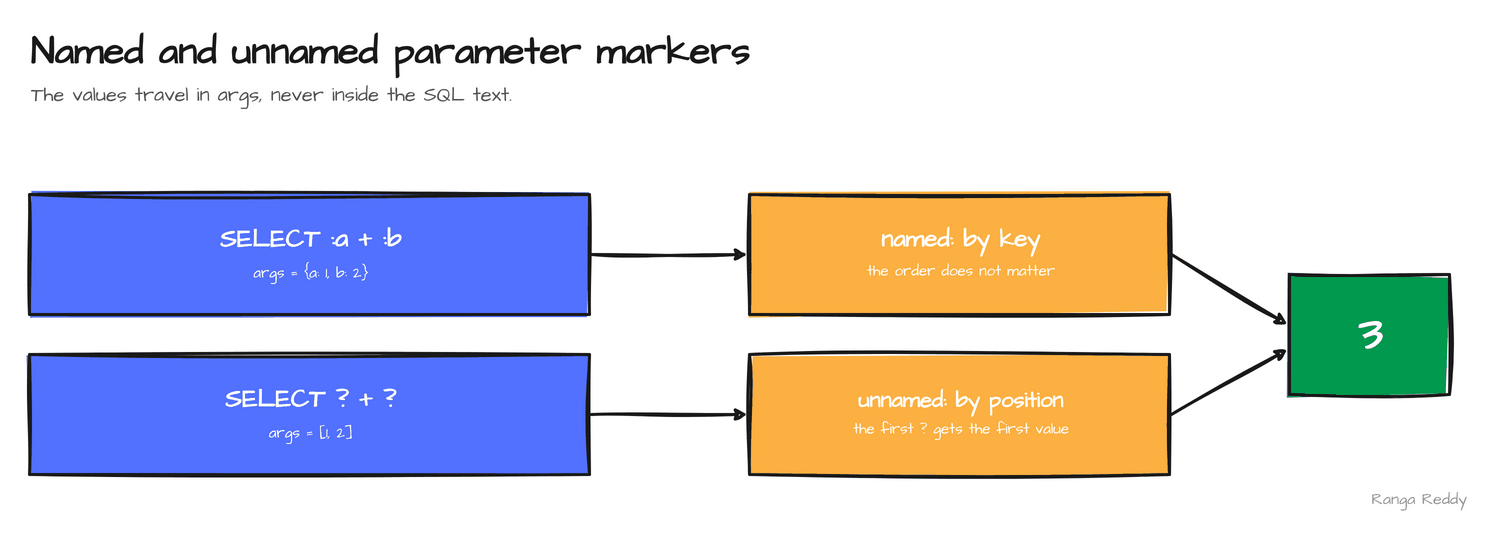 Named markers bind by key, unnamed markers bind by position.
Smaller additions worth knowing
| Feature | What it does | Status |
|---|---|---|
EXECUTE IMMEDIATE (SPARK-46246) |
Runs a SQL string with bound parameters: EXECUTE IMMEDIATE 'SELECT count(*) FROM orders WHERE amount > ?' USING 8 returned 3 |
Ran on 4.0.5 |
Lightweight Python client and spark.api.mode |
The pyspark-client package, whose 4.0.0 source archive is 1.5 MB on PyPI, and a setting to turn Spark Connect on |
Listed |
Structured JSON logging (SPARK-47240) |
Machine-readable driver and executor logs, enabled with spark.log.structuredLogging.enabled per the 4.0 announcement. The official image logs plain text, so I did not see JSON output |
Listed |
Spark Kubernetes operator (SPARK-45923), Java 21 support |
Run Spark applications as Kubernetes custom resources | Listed |
PySpark plotting API (SPARK-49530) |
df.plot.bar(x="k", y="v") returned a Plotly Figure. It needs plotly installed, and I did not render the figure |
Ran |
| Unified PySpark UDF profiling | One profiler for Python UDFs | Listed |
| Spark ML on Connect | pyspark.ml over a Connect server |
Listed |
Version lineage
Several 4.0 features start an arc that later releases continue. Read the 4.0 column as what this release added.
| Feature | 4.0 | 4.1 | 4.2 | 4.3 |
|---|---|---|---|---|
VARIANT |
Introduced (SPARK-45827) |
Generally available, colon paths (SPARK-54454, SPARK-52494) |
none in the headlines | Editing functions (SPARK-57804) |
| Procedural SQL | Session variables, SQL UDFs (SPARK-42849, SPARK-46057); scripting flag off |
SQL scripting generally available (SPARK-54499) |
Cursors, behind flags (SPARK-54759) |
none in the headlines |
| Pipe syntax | Introduced (SPARK-49555) |
none | Aggregates and GROUP BY in a pipe SELECT, | alias (SPARK-54292, SPARK-51518) |
none |
| String collation | Introduced (SPARK-46830) |
Schema-level collation (SPARK-52219) |
SHOW COLLATIONS (SPARK-49543) |
none |
| Streaming state | transformWithState, state data source (SPARK-46815, SPARK-45511) |
Python row-based transformWithState (SPARK-51814) |
Stable source names, state snapshot repair (SPARK-54909, SPARK-54121) |
Stateful real-time mode, Scala and Java (SPARK-57228) |
| Python extensibility | Data Source API, UDTFs (SPARK-44076, SPARK-43797) |
Filter pushdown for Python data sources, Arrow UDFs (SPARK-51271, SPARK-52214) |
Arrow-optimized UDFs on by default (SPARK-54555) |
Experimental transpiling (SPARK-55206) |
| ANSI mode | On by default (SPARK-44444) |
On for the pandas API on Spark (SPARK-53295) |
none | none |
Flags at a glance
A feature that parses is not a feature that is on. In 4.0 the gates that matter are three:
| Feature | Config key | Default | What it controls |
|---|---|---|---|
| ANSI mode | spark.sql.ansi.enabled |
true (read on 4.0.5) |
Invalid casts and divide by zero raise. Set false to restore the old NULL results |
| SQL scripting | spark.sql.scripting.enabled |
false (read on 4.0.5) |
BEGIN ... END scripts. A script fails to parse until it is on; 4.1 turns it on by default |
transformWithState |
spark.sql.streaming.stateStore.providerClass |
The HDFS-backed provider; set RocksDBStateStoreProvider |
The multiple column families that transformWithState needs |
VARIANT, pipe syntax, SQL UDFs, session variables, collation, the XML source and the Python Data Source API have no flag in 4.0.
Settings and costs
Defaults the 4.0 release notes list as changed. I read the first row in the runs; the rest are from the notes, not read.
| Setting | Default in 4.0 | Source |
|---|---|---|
spark.sql.ansi.enabled |
true |
Read on 4.0.5 |
spark.eventLog.rolling.enabled |
true |
Release notes, SPARK-45771 |
spark.ui.prometheus.enabled |
true |
Release notes, SPARK-46886 |
spark.shuffle.service.db.backend |
ROCKSDB |
Release notes, SPARK-45351 |
| Feature | Cost to plan for |
|---|---|
| ANSI mode | The change most likely to turn a green pipeline red. Test your real data before the upgrade |
| Python data source and UDTFs | pyarrow must be installed on every node that runs a Python worker |
| Scala 2.13 and Java 17 | Every jar the jobs depend on needs a Scala 2.13 build |
When these features bite
Each item is a failure hit during the runs, with the text it produced, so you can grep for it. Every item is also an anchor, so you can link to one error.
[UNSUPPORTED_FEATURE.STATE_STORE_MULTIPLE_COLUMN_FAMILIES]. transformWithState stores each state variable as its own column family, and the default HDFS-backed state store does not support that. Fix: Set spark.sql.streaming.stateStore.providerClass to org.apache.spark.sql.execution.streaming.state.RocksDBStateStoreProvider.
[STREAMING_PYTHON_RUNNER_INITIALIZATION_FAILURE] with ImportError: cannot import name 'descriptor' from 'google.protobuf'. The Python runner for transformWithStateInPandas needs protobuf and the gRPC packages, which the official image lacks. Fix: pip install protobuf grpcio grpcio-status googleapis-common-protos.
[CAST_INVALID_INPUT], [DIVIDE_BY_ZERO]. ANSI mode is on by default, so work that silently produced NULL now stops. The message names the fix. Fix: Use try_cast and try_divide where NULL was the intended answer. spark.sql.ansi.enabled=false restores the old behaviour for the session.
[PARSE_SYNTAX_ERROR] ... at or near ':'. VARIANT colon paths do not exist in 4.0, so a job written on 4.1 breaks on a 4.0 cluster at the first statement. Fix: Not a flag: use 4.1 or later, or variant_get.
ModuleNotFoundError: No module named 'pyarrow' from the Python data source worker. The official image has no pyarrow. Fix: Install pyarrow and pandas.
[DATATYPE_MISMATCH.INVALID_ORDERING_TYPE] on map(...) = map(...). A MAP can be a grouping key in 4.0, but two maps cannot be compared with =. Fix: Group on the map; do not join on it.
Run it yourself
The samples ran on apache/spark:4.0.5-python3 and on the plain 4.0.5 release tarball (523 MB,
Scala 2.13.16) with Java 17. This is the one release whose tarball runs the PySpark examples on
a stock Python 3.9, because its Requires-Python is 3.9 or newer; the later releases need 3.10 or
3.11. The download and checksum script, and the runner for SQL files, are in
RUNNING_ON_TARBALLS.md.
Hello world. 00_hello_world.sql printed 4.0.5 and the build hash. Before and after. 11_before_after.sql runs pipe syntax, collation, VARIANT and ANSI mode next to their older forms.
Streaming and Python. 12_transform_with_state.py needs the RocksDB state store and the protobuf and gRPC packages. 13_pyspark_extras.py covers the parameter markers, the polymorphic UDTF and the plotting API, and needs plotly. Both ran on apache/spark:4.0.5-python3.
SQL. smoke/smoke40.sql runs the headline features in one pass. On
4.0.5 it printed:
try_cast           NULL
variant_get        2
pipe syntax        eu 40.0, us 20.0
SQL UDF            1 11.799999999999999 ... 4 5.8999999999999995
session variable   2, 3
collation          true
from_xml           [Ana,30]
Python data source and UDTF. Create a virtual environment with pyarrow and pandas, point
PYTHONPATH at the tarball’s python folder and its py4j zip, and run
tarball/datasource_udtf.py. It ran with pyarrow 21.0.0 and
pandas 2.3.3, and printed the four counter rows, the two rows with n > 1, and the four words
from split_words.
python3 -m venv venv && venv/bin/pip install pyarrow pandas
SH=~/spark-4.x/spark-4.0.5-bin-hadoop3
env -i HOME="$HOME" PATH=/usr/bin:/bin JAVA_HOME="$JAVA" SPARK_HOME="$SH" \
  PYTHONPATH="$SH/python:$(ls $SH/python/lib/py4j-*.zip)" SPARK_LOCAL_IP=127.0.0.1 \
  PYSPARK_PYTHON=venv/bin/python venv/bin/python datasource_udtf.py
Upgrade notes for teams moving from 3.x to 4.0
Behaviour changes to test before you upgrade. The first rows are the ones I verified; the rest come from the official SQL and PySpark migration guides, which list many more.
| Change | What to do | Source |
|---|---|---|
| Scala 2.13 and JDK 17 are the baseline; Scala 2.12 and JDK 8 and 11 are gone | Rebuild every jar for Scala 2.13 | SPARK-45314, SPARK-45315 |
| ANSI mode is on by default | Test your data; use try_*; spark.sql.ansi.enabled=false restores NULL (verified) |
SPARK-44444 |
CREATE TABLE without USING uses spark.sql.sources.default, not Hive |
spark.sql.legacy.createHiveTableByDefault=true |
SQL migration guide |
ORC default compression is zstd, not snappy |
spark.sql.orc.compression.codec=snappy |
SQL migration guide |
Inner CTEs take precedence (ctePrecedencePolicy is CORRECTED) |
spark.sql.legacy.ctePrecedencePolicy=EXCEPTION or LEGACY |
SQL migration guide |
Timestamp parse failures raise CANNOT_PARSE_TIMESTAMP in ANSI mode, NULL otherwise |
spark.sql.legacy.timeParserPolicy=EXCEPTION |
SQL migration guide |
! is no longer accepted as NOT in expr ! IN (...) and similar |
spark.sql.legacy.bangEqualsNot=true, or write NOT |
SQL migration guide |
| JDBC type mappings changed for Postgres, MySQL, Oracle, SQL Server and DB2 | Per-database spark.sql.legacy.*Mapping.enabled settings, listed in the guide |
SQL migration guide |
| Hive metastore versions before 2.0.0 are unsupported | Upgrade the metastore | SQL migration guide |
| Python 3.8 dropped; pandas 2.0.0, NumPy 1.21 and PyArrow 11.0.0 are the minimums | Upgrade the Python environment | SPARK-47993, SPARK-50657 |
Many pandas API on Spark removals (iteritems, append, mad, Int64Index) and compute.ops_on_diff_frames on by default |
Run your pandas-on-Spark code first | PySpark migration guide |
from pyspark.sql.functions import * no longer exports DataFrame, Column or StructType |
Import them from pyspark.sql or pyspark.sql.types |
PySpark migration guide |
| A map column’s schema is inferred from all key-value pairs, not the first | spark.sql.pyspark.legacy.inferMapTypeFromFirstPair.enabled=true |
PySpark migration guide |
spark.eventLog.rolling.enabled, spark.ui.prometheus.enabled and a RocksDB shuffle-service store are on by default |
Recheck log and metrics setups | SPARK-45771, SPARK-46886, SPARK-45351 |
Adopt now or wait?
4.0.0 shipped on 23 May 2025 and has had five patch releases, 4.0.1 to 4.0.5, the latest on 27 October 2026. The versioning policy gives a major release a 6-month maintenance window and plans 4.5.0 as the 4.x long-term-support release with 18 months, yet 4.0.5 shipped about 17 months after 4.0.0, so read the window as a minimum, not as an end date. My recommendation, a judgement and not a measurement: if you are leaving 3.x, move to the latest patch, 4.0.5, or go straight to a later line if your connectors allow it. The Scala 2.13, Java 17 and ANSI changes arrive here, and every later release builds on them.
Known limitations in this release
- XML. I ran
from_xml,schema_of_xmland a file read withrowTag. Writing XML was not run. - Python data source and UDTFs. I ran a batch reader, a plain UDTF and a polymorphic one. The streaming and writer interfaces were not run.
- transformWithState. I ran the Python form with one value state per key. Timers, TTL, list and map state and the Scala and Java forms were not run, and the counts in the sample depend on how long the query ran.
- ANSI mode. I tested invalid casts and divide by zero. Other ANSI behaviours, such as overflow, were not run.
- Listed only. Unified UDF profiling, the lightweight Python client, structured JSON logging, ML on Connect and the Kubernetes operator are from the release notes, not run. The plotting API was run only as far as getting a figure back.
Cheat sheet
| Feature | Syntax | Needs |
|---|---|---|
| ANSI mode | try_cast(x AS INT), try_divide(a, b) |
Nothing; spark.sql.ansi.enabled=false restores NULL |
VARIANT |
parse_json(s), variant_get(v, '$.b[1]', 'int') |
Nothing |
| Pipe syntax | FROM t |> WHERE x > 5 |> AGGREGATE sum(x) AS s GROUP BY k |
Nothing |
| SQL UDF | CREATE FUNCTION f(x DOUBLE) RETURNS DOUBLE RETURN x * 1.18 |
Nothing |
| Session variable | DECLARE OR REPLACE VARIABLE v DOUBLE DEFAULT 15.0; SET VAR v = 25.0 |
Nothing |
| Collation | 'Apple' COLLATE UTF8_LCASE = 'apple' |
Nothing |
| XML | from_xml(s, 'name STRING'), spark.read.format("xml").option("rowTag", "person") |
Nothing |
| Python data source | spark.dataSource.register(MySource) |
pyarrow |
| Stateful streaming | groupBy(k).transformWithStateInPandas(statefulProcessor=P(), outputStructType=..., outputMode="Update", timeMode="None") |
RocksDB state store, protobuf |
| State data source | spark.read.format("statestore").option("stateVarName", "count").load(checkpoint) |
A committed batch |
| Polymorphic UDTF | @staticmethod def analyze(a): return AnalyzeResult(schema) |
Nothing |
| Parameter markers | spark.sql("SELECT :a + ?", args=...): a dictionary for :a, a list for ? |
Nothing |
GROUP BY on a map |
SELECT m, count(*) FROM t GROUP BY m |
Nothing |
| Table description as JSON | DESCRIBE EXTENDED t AS JSON |
Nothing |
Key takeaways
- Baseline: Scala 2.13 and Java 17 are required. Start with your dependency tree.
- Errors: ANSI mode turns silent
NULLs into errors. It is the change most likely to break a working pipeline, so test it first. - SQL: pipe syntax, SQL functions, session variables and collations let you write more in SQL and less in driver code.
- Semi-structured data:
VARIANTand the built-in XML source read nested data by path, with no schema declared first. - Python: the Data Source API and UDTFs let you extend Spark in Python, and both need
pyarrowinstalled. Polymorphic UDTFs and parameter markers make table functions and queries safer to reuse. - Streaming:
transformWithStategives you per-key state you can read back, but it needs the RocksDB state store andprotobuf, and each missing piece fails with its own error.
Further reading
- Spark 4.0.0 release notes, the source of every ticket number above
- ANSI compliance in the SQL reference, for the exact error behaviour
SPARK-44444, ANSI mode on by default, andSPARK-49555, SQL pipe syntax- Every Apache Spark release, and the problem each one was built to solve for removals, changed defaults and upgrade risks
- What’s new in Apache Spark 4.1, 4.2 and 4.3 for the releases after this one
- Spark 4.x features by release for all four releases side by side
Trademarks
Apache Spark, Apache Kafka, Apache Parquet, Apache Arrow and Apache are either registered trademarks or trademarks of The Apache Software Foundation in the United States and other countries. The Apache Software Foundation does not endorse this post.
Found this useful?
These posts and tools are free. If one saved you an afternoon, you can buy me a coffee.
Comments
Questions, corrections and reviews are welcome. Sign in with GitHub to post; comments are stored in this site's public GitHub Discussions.