Apache Hudi on Spark: the complete cheat sheet
One page to keep open while you work: table types, file layout, the timeline, writer properties, key generators, query types, indexes, the metadata table, concurrency, schema evolution, table services, procedures and tuning, with the config key and default for each.
- 1. History and major releases
- 2. Introduction, key features and architecture
- 3. Getting started: shell and CRUD
- 4. Table types: Copy-on-Write and Merge-on-Read
- 5. File layout and internal columns
- 6. Critical writer properties
- 7. The timeline
- 8. Supported data types
- 9. Write operations
- 10. Key generators
- 11. Query types
- 12. Indexes
- 13. The metadata table
- 14. Concurrency control
- 15. Schema evolution
- 16. Table services
- 17. Migrating a Hive table to Hudi
- 18. SQL procedures
- 19. Savepoints and restore
- 20. Catalog integration
- 21. Writer interfaces
- 22. Hudi Streamer
- 23. Tuning
- 24. Diagnosing a table
- 25. Best practices
- Conclusion
- References
- Trademarks
TL;DR
- This is a reference, not a tutorial. Every section is a lookup: the config key, its default, and the one sentence that tells you whether you want it.
- The three properties frozen at table creation are the table type, the record key and the key generator. Everything else a later job can change, so get those three right first.
- Two merge-mode keys exist and they are not duplicates.
hoodie.record.merge.modeis the table property;hoodie.write.record.merge.modeis the writer-side option.- Hudi layers four concurrency controls: snapshot isolation across all processes, MVCC between writers and table services, and OCC or NBCC between writers.
- Defaults worth memorising:
hoodie.index.typeresolves toSIMPLEon Spark,hoodie.compact.inlineisfalse,hoodie.clean.commits.retainedis10, andhoodie.parquet.max.file.sizeis 120 MB.
Most Hudi questions are not conceptual. You know you want an upsert keyed by
order_id, you know roughly what compaction does, and what you actually need is
the exact spelling of a config key and whether its default is going to surprise
you. That is what this page is for.
It is organised for lookup rather than for reading front to back. Each section stands alone, leads with a table of keys and defaults, and shows the PySpark and Spark SQL forms side by side where both exist. The table of contents above is the fastest way in.
Diagrams captioned Adapted from the Apache Hudi documentation are my own redrawings of figures in the project’s docs, © The Apache Software Foundation, used under the Apache License 2.0; the rest are my own. Where a claim is specific to a version, the version is named.
1. History and major releases
| Date | Milestone |
|---|---|
| 2016 | The project dates from late 2016, built around applying a continuous stream of changes to a data lake efficiently |
| 2019-01-17 | Entered the Apache incubator |
| 2020-05-20 | Graduated to a Top-Level Project, the same day as Apache Iceberg |
| 2021-08-24 | 0.9.0 |
| 2022-08-16 | 0.12.0 |
| 2023-09-27 | 0.14.0, table version 6, and the first record index |
| 2024-12-10 | 1.0.0, table version 8 and the v2 timeline layout |
| 2026-05-23 | 1.2.0, table version 9, the current release |
| Line | What it brought |
|---|---|
| 0.x, early | The timeline, file groups and file slices, Copy-on-Write and Merge-on-Read, incremental queries, the bloom and simple indexes |
| 0.7 to 0.11 | The metadata table (on by default from 0.7.0), multi-modal indexing, clustering, the bucket index, schema-on-read evolution |
| 0.12 to 0.15 | The record index (0.14.0), non-blocking concurrency work, CDC queries, partition TTL, table version 6 |
| 1.0 | Table version 8, the timeline moved to .hoodie/timeline/ with an LSM-tree archive, record merge modes replacing payload classes, non-blocking concurrency control |
| 1.1 to 1.2 | Table version 9, the partition-scoped record index (1.1.0), secondary and expression indexes, the VECTOR, BLOB and VARIANT types and a Lance base file format (1.2.0) |
The line to notice is the 1.0 boundary. It changed the on-disk timeline layout, so a 0.x reader cannot understand a 1.x timeline directory. Everything else in the 1.x line is additive, and the config renames all kept their old spellings as registered alternatives.
2. Introduction, key features and architecture
Apache Hudi (Hadoop Upserts Deletes and Incrementals) is a transactional data lakehouse platform that brings ACID semantics, record-level mutations and incremental processing to data lakes. It is built on an immutable, versioned timeline of file slices stored in open formats (Apache Parquet, Apache Avro), so batch and streaming workloads run over the same physical dataset without copying data.
The timeline is the centre of the design: an ordered log of every event that has
happened, or is happening, against a table. Each write produces a new instant, a
commit on Copy-on-Write and a deltacommit on Merge-on-Read, recording the
file slices and the active schema. A reader then picks a query type, which is
simply a rule for which instants and file slices to resolve. That is why the five
query types are projections over one timeline rather than five separate engines.
| Feature | What you get |
|---|---|
| ACID and MVCC | Atomic writes with multi-version concurrency control; readers see a consistent committed snapshot without taking locks |
| Record-level upsert and delete | Merge by key. Copy-on-Write rewrites base files, Merge-on-Read appends delta logs |
| Pluggable indexing | Map record keys to file groups through BLOOM, GLOBAL_BLOOM, SIMPLE, GLOBAL_SIMPLE, BUCKET, RECORD_LEVEL_INDEX, GLOBAL_RECORD_LEVEL_INDEX, INMEMORY or FLINK_STATE |
| Schema tracking | Versioned history under .hoodie/.schema/; add, reorder, drop, rename and promote types |
| Self-managing services | Compaction, cleaning, clustering, archival and partition TTL, inline or async |
| Incremental processing | Incremental and CDC queries pull only what changed since an instant, in place of full-table recomputation |
| Time travel | Query the table as of any retained past instant |
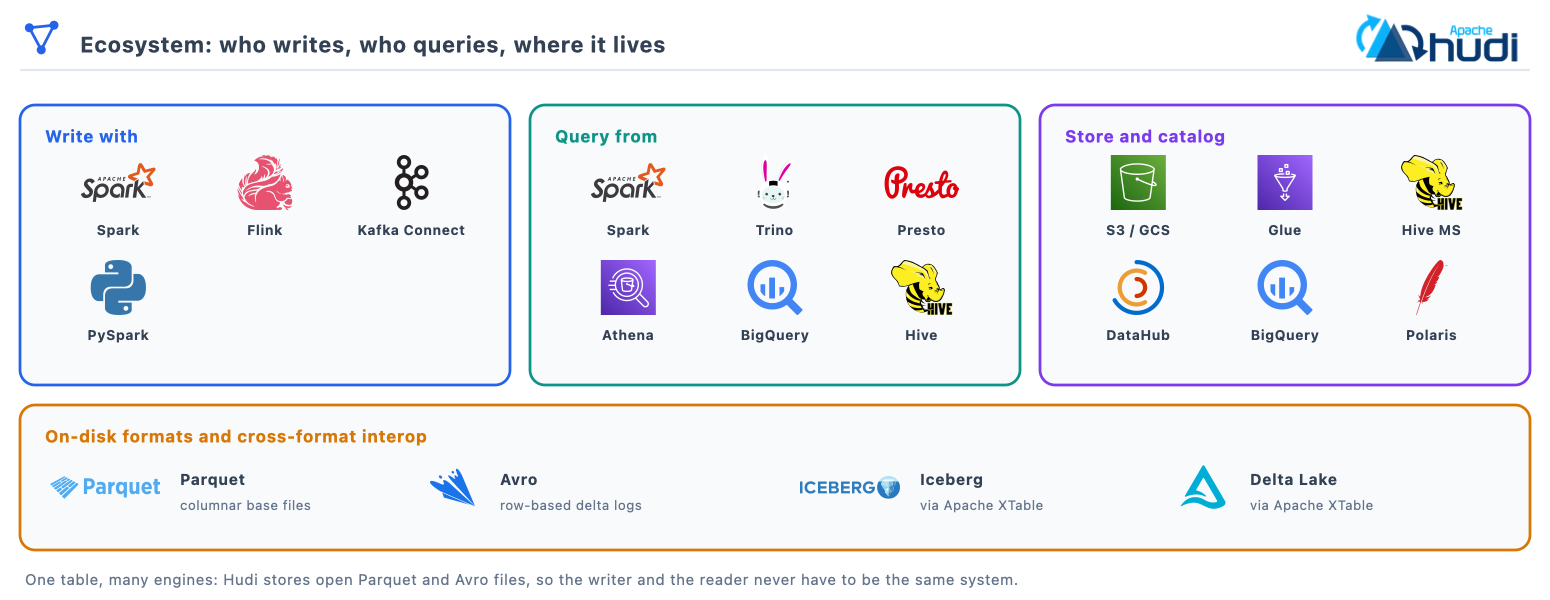
| Multi-engine interop | Write with Spark, Flink, Java or Kafka Connect; query from Spark, Trino, Presto, Athena and more |
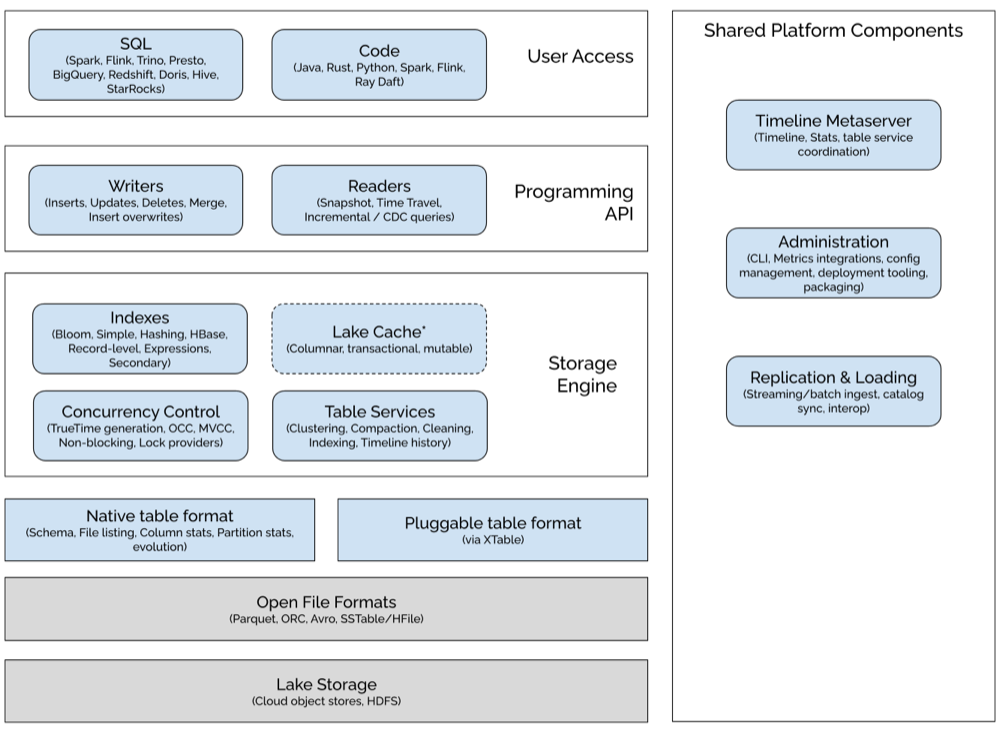
Hudi is a table format plus a set of services, not an engine. Writers, readers and catalogs plug into the same physical table, which is what lets one copy of the data serve batch ETL, streaming ingestion and interactive SQL.
3. Getting started: shell and CRUD
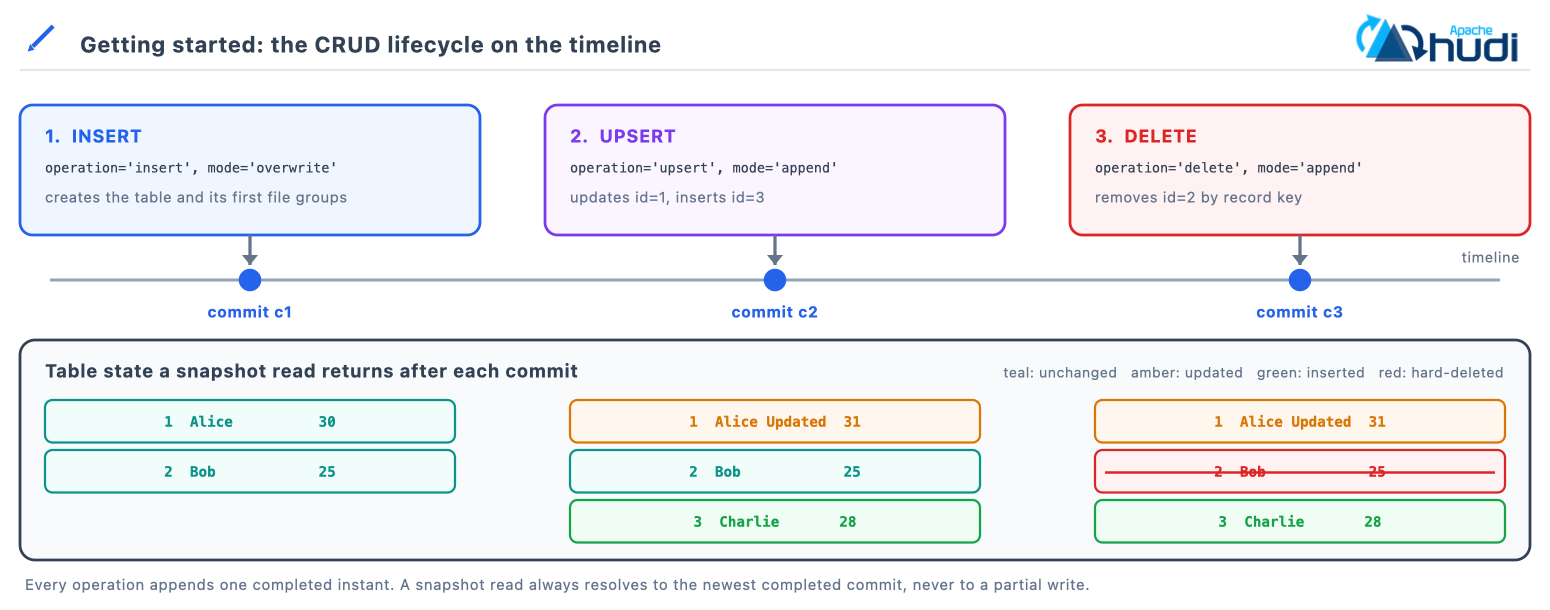
Each of the three write operations below lands exactly one completed instant on the timeline, and the snapshot read that follows returns the state that instant produced.
export SPARK_VERSION=3.5
export HUDI_VERSION=1.2.0
export SCALA_VERSION=2.12

pyspark --master "local[2]" \
  --packages org.apache.hudi:hudi-spark$SPARK_VERSION-bundle_$SCALA_VERSION:$HUDI_VERSION \
  --conf 'spark.serializer=org.apache.spark.serializer.KryoSerializer' \
  --conf 'spark.sql.catalog.spark_catalog=org.apache.spark.sql.hudi.catalog.HoodieCatalog' \
  --conf 'spark.sql.extensions=org.apache.spark.sql.hudi.HoodieSparkSessionExtension' \
  --conf 'spark.kryo.registrator=org.apache.spark.HoodieSparkKryoRegistrar'
Swap pyspark for spark-sql and the same four --conf flags give you the SQL
shell used throughout this page.
base_path = 'file:///tmp/hudi_crud_demo'
table_name = 'hudi_crud_table'

hudi_options = {
    'hoodie.table.name': table_name,
    'hoodie.datasource.write.recordkey.field': 'id',
    'hoodie.datasource.write.precombine.field': 'dt',
    'hoodie.datasource.write.partitionpath.field': 'dt',
    'hoodie.datasource.write.keygenerator.class': 'org.apache.hudi.keygen.SimpleKeyGenerator'
}
cols = ['id', 'name', 'age', 'balance', 'dt']

# CREATE / INSERT
inserts_df = spark.createDataFrame(
    [(1, 'Alice', 30, 1000.50, '2024-01-15'), (2, 'Bob', 25, 2500.00, '2024-01-16')], cols)

inserts_df.write.format('hudi').options(**hudi_options) \
    .option('hoodie.datasource.write.operation', 'insert').mode('overwrite').save(base_path)

# READ (snapshot)
spark.read.format('hudi').load(base_path).show()

# UPDATE / UPSERT
updates_df = spark.createDataFrame(
    [(1, 'Alice Updated', 31, 1500.75, '2024-01-15'), (3, 'Charlie', 28, 3000.0, '2024-01-17')], cols)

updates_df.write.format('hudi').options(**hudi_options) \
    .option('hoodie.datasource.write.operation', 'upsert').mode('append').save(base_path)

# DELETE (hard delete by key)
deletes_df = spark.createDataFrame([(2, '', 0, 0.0, '2024-01-16')], cols)

deletes_df.write.format('hudi').options(**hudi_options) \
    .option('hoodie.datasource.write.operation', 'delete').mode('append').save(base_path)
The same lifecycle in Spark SQL:
CREATE TABLE hudi_crud_table (
  id BIGINT, name STRING, age INT, balance DOUBLE, dt STRING
) USING hudi
PARTITIONED BY (dt)
LOCATION 'file:///tmp/hudi_crud_demo_sql'
TBLPROPERTIES (primaryKey = 'id', orderingFields = 'dt');

INSERT INTO hudi_crud_table (id, name, age, balance, dt) VALUES
  (1, 'Alice', 30, 1000.50, '2024-01-15'),
  (2, 'Bob',   25, 2500.00, '2024-01-16');

SELECT * FROM hudi_crud_table;

UPDATE hudi_crud_table SET balance = 1500.75, age = 31 WHERE id = 1;

DELETE FROM hudi_crud_table WHERE id = 2;
Note:
hoodie.datasource.write.precombine.fieldis deprecated in 1.2.0 and still works, becauseDataSourceOptions.ORDERING_FIELDSresolves to it. The table property is nowhoodie.table.ordering.fields, spelledorderingFieldsin SQL, withhoodie.table.precombine.fieldkept as an alias.
4. Table types: Copy-on-Write and Merge-on-Read
The table type is set once at create time and fixes the write-cost against read-cost trade-off.
Choosing a table type:
  Streaming or CDC ingestion, frequent updates?  -> MoR
  Batch loads, read-heavy BI, simple operations? -> CoW
  Unsure? -> Start with CoW; move hot write paths to MoR when write latency hurts.
Copy-on-Write stores data in columnar files only (Parquet). Updates rewrite the affected base files synchronously, producing new file slices while readers keep snapshot isolation.
Merge-on-Read combines columnar and row-based formats (Parquet and Avro). Updates append to Avro log files, merged with the base files during snapshot reads or at compaction.
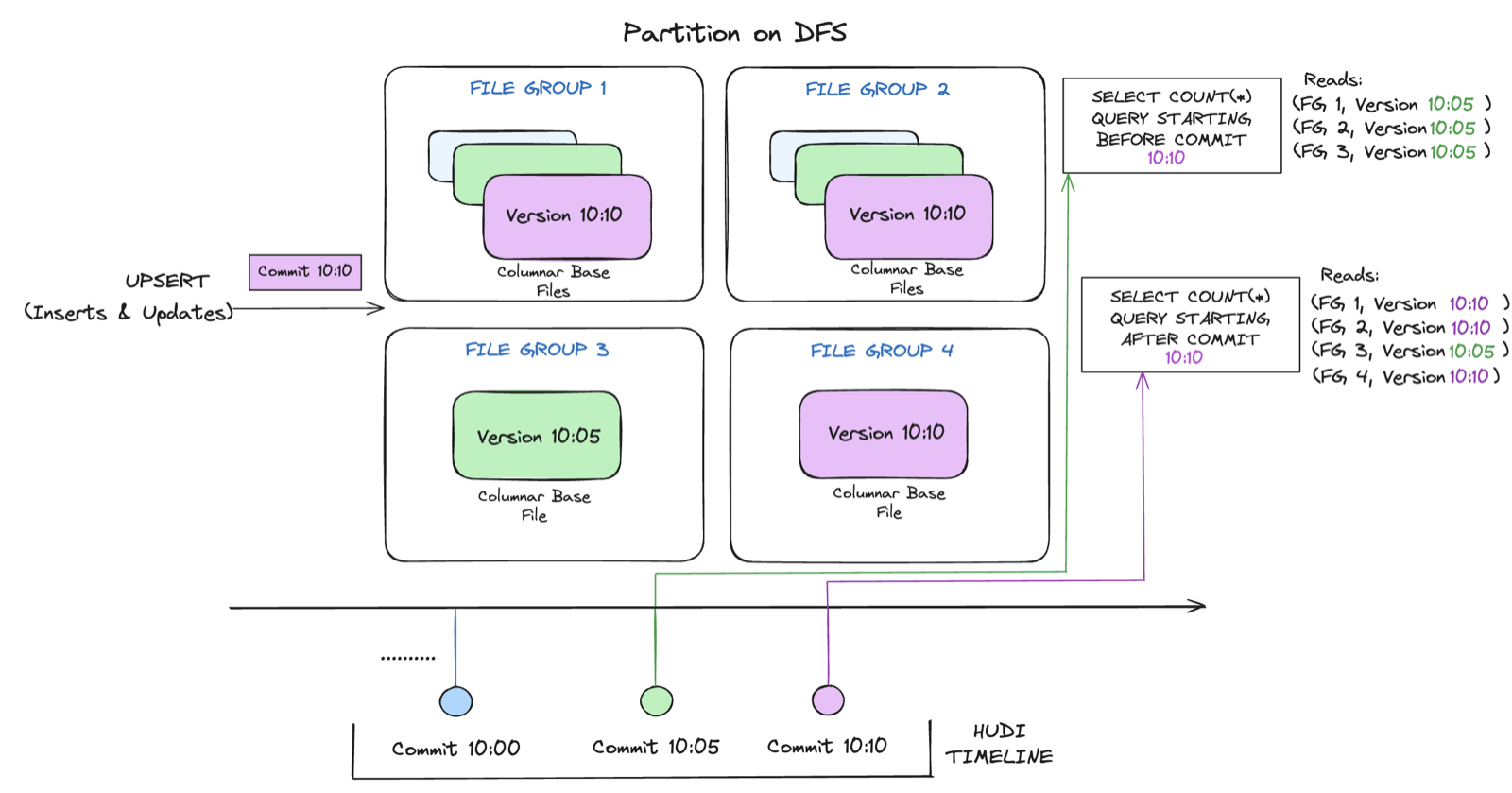
Adapted from the Apache Hudi documentation.
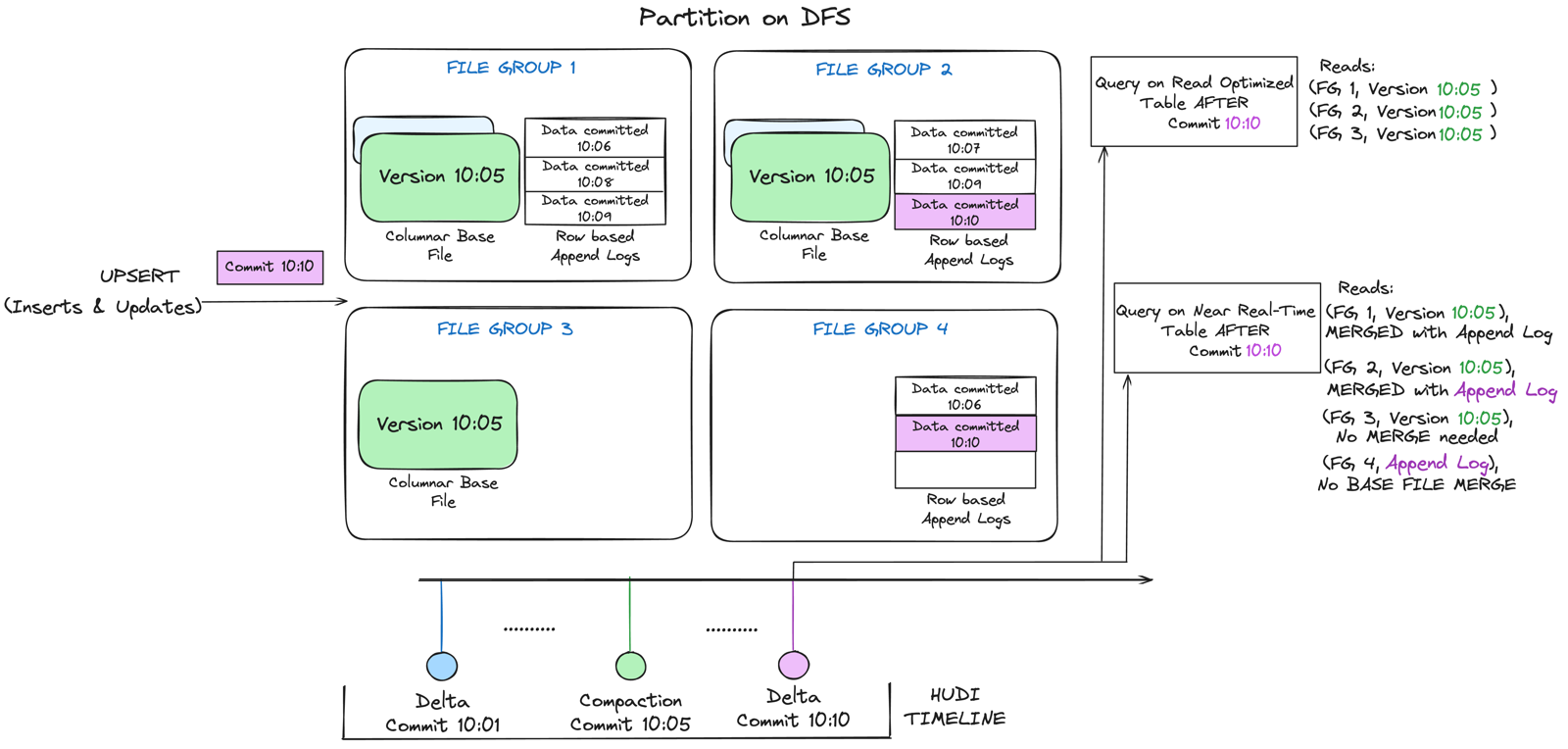
Adapted from the Apache Hudi documentation.
| Concept | Example | Description |
|---|---|---|
| Copy-on-Write | type = 'cow', or 'hoodie.datasource.write.table.type': 'COPY_ON_WRITE' |
Every upsert rewrites the affected base Parquet file. No log files. Fast reads, slower writes. The default |
| Merge-on-Read | type = 'mor', or 'hoodie.datasource.write.table.type': 'MERGE_ON_READ' |
Updates append to Avro log files, merged at read time or at compaction. Fast writes, reads pay a merge, compaction to operate |
Dimension by dimension:
| Dimension | Copy-on-Write | Merge-on-Read |
|---|---|---|
| Write cost | High: rewrites the whole base file | Low: appends to a delta log |
| Write amplification | Full file rewrite per update batch | Append-only until compaction |
| Read cost | Low: clean columnar files | Medium: base plus log merge |
| Data freshness | Batch refresh cadence | Near real-time, minutes |
| Background work | Cleaning only | Compaction plus cleaning |
| Operational complexity | Low | Higher: compaction to manage |
| Best for | BI dashboards, dimension tables, SCD | Kafka CDC, streaming, corrections |
| File format on disk | Parquet or ORC only | Parquet base plus Avro log files |
hudi_options = {
    'hoodie.datasource.write.table.type': 'COPY_ON_WRITE',   # or MERGE_ON_READ
}
In SQL the same choice is type = 'cow' or type = 'mor' in TBLPROPERTIES.
5. File layout and internal columns
A table splits into partitions, each partition holds file groups (the unit of update), and each file group holds file slices: successive versions of the same records, each a base Parquet file plus the delta logs written against it.
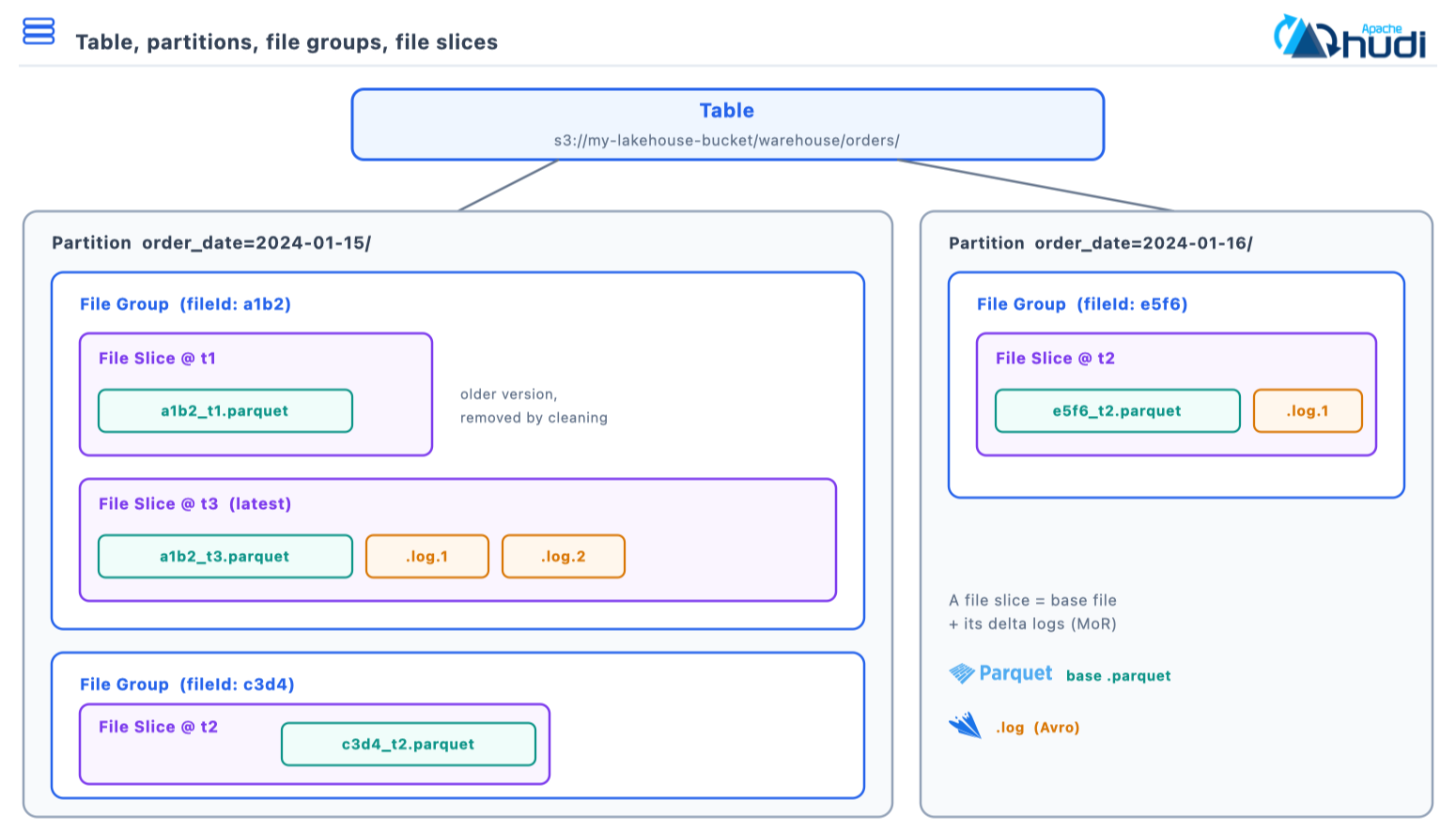
| Concept | Example | Description |
|---|---|---|
| Partition | order_date=2024-01-15/ |
A storage subdirectory holding one or more file groups. Enables partition pruning |
| File group | 8f3a1c92-4f1e-...-0 |
All file slices sharing a stable file ID within one partition. The unit of update. A key never leaves its file group |
| File slice | base file plus 0..N log files at one instant | One version of a file group’s data. The newest slice is the current data |
| Base file | 8f3a1c92-...-0_0-24-1893_20260915090000123.parquet |
Columnar Parquet holding merged records. Written on every commit for CoW, at compaction for MoR |
| Delta log | .8f3a1c92-...-0_20260915090000123.log.1_0-31-2104 |
Append-only Avro file of inserts, updates and deletes on MoR. Leading dot hides it from a plain listing. Merged at read time |
| Instant | 20260915090000123 |
A point on the timeline, yyyyMMddHHmmssSSS, identifying one action. The handle used by incremental reads and time travel |
| Metadata table | .hoodie/metadata/ |
An internal Hudi MoR table holding file listings and indexes. Removes the object-store LIST from planning |
A Merge-on-Read file group accumulates log files against one base file, and compaction folds them into the next slice. Before:
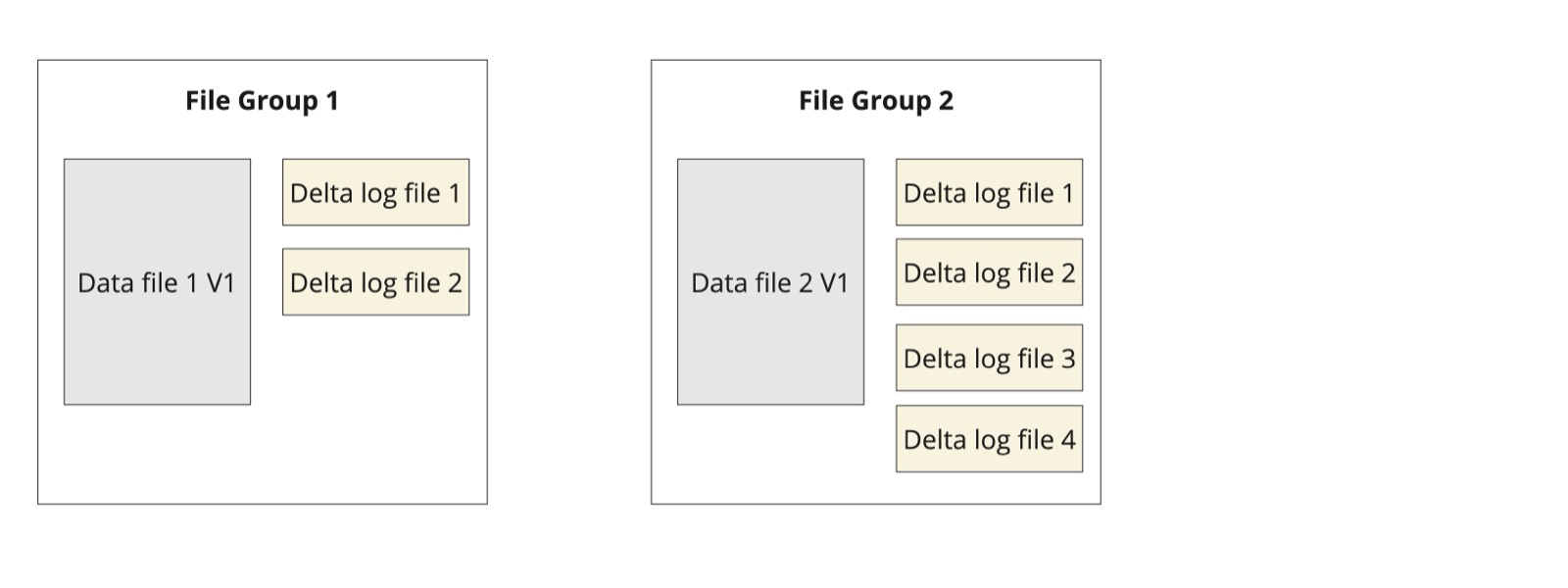
Adapted from the Apache Hudi documentation.
And after compaction, where the merged result becomes the base file of a new slice:
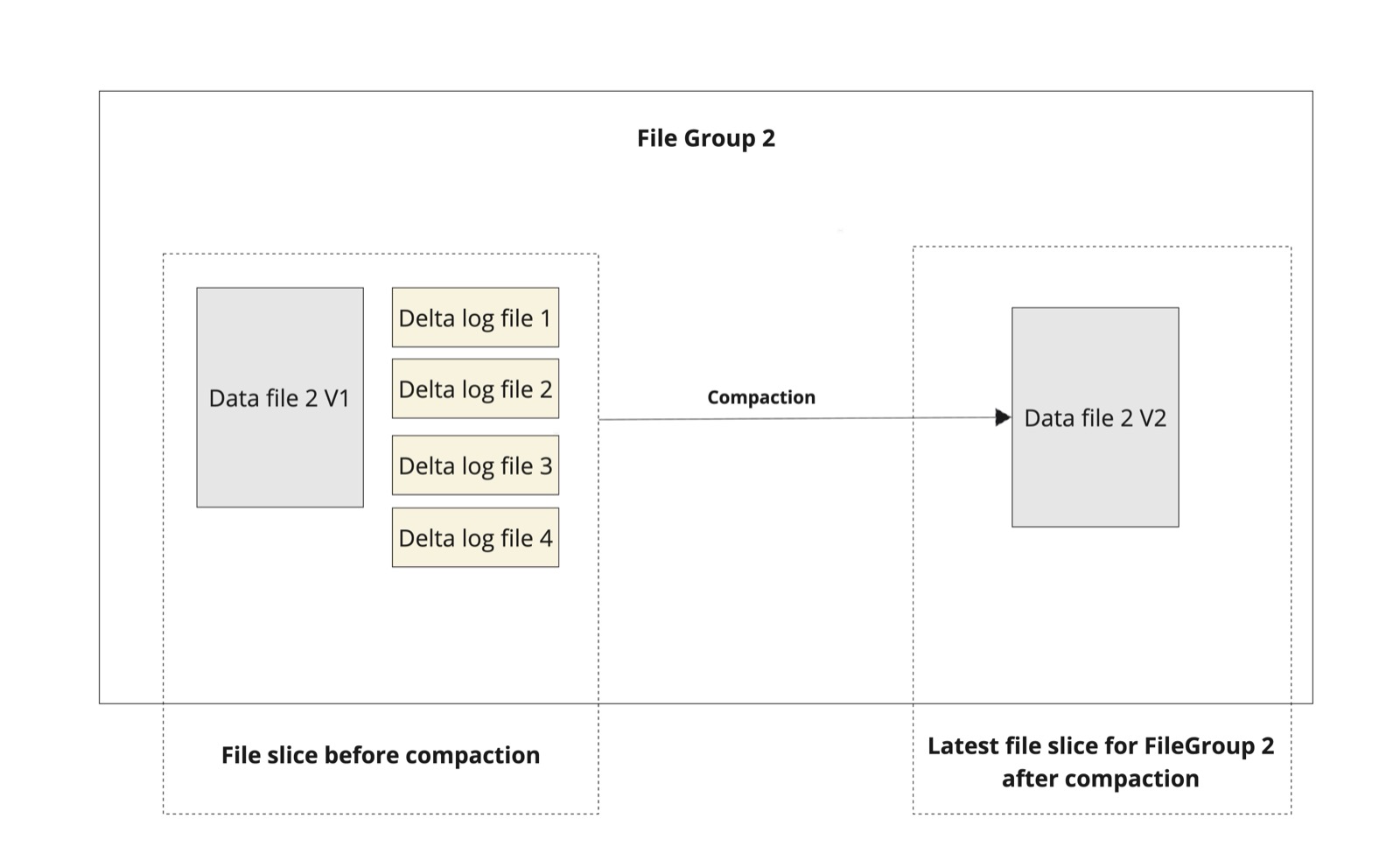
Adapted from the Apache Hudi documentation.
| Internal column | Meaning |
|---|---|
_hoodie_record_key |
Record key |
_hoodie_partition_path |
Partition path |
_hoodie_commit_time |
Commit instant time the record was written |
_hoodie_file_name |
Base file the record lives in |
_hoodie_commit_seqno |
Ordering sequence number within a commit |
6. Critical writer properties
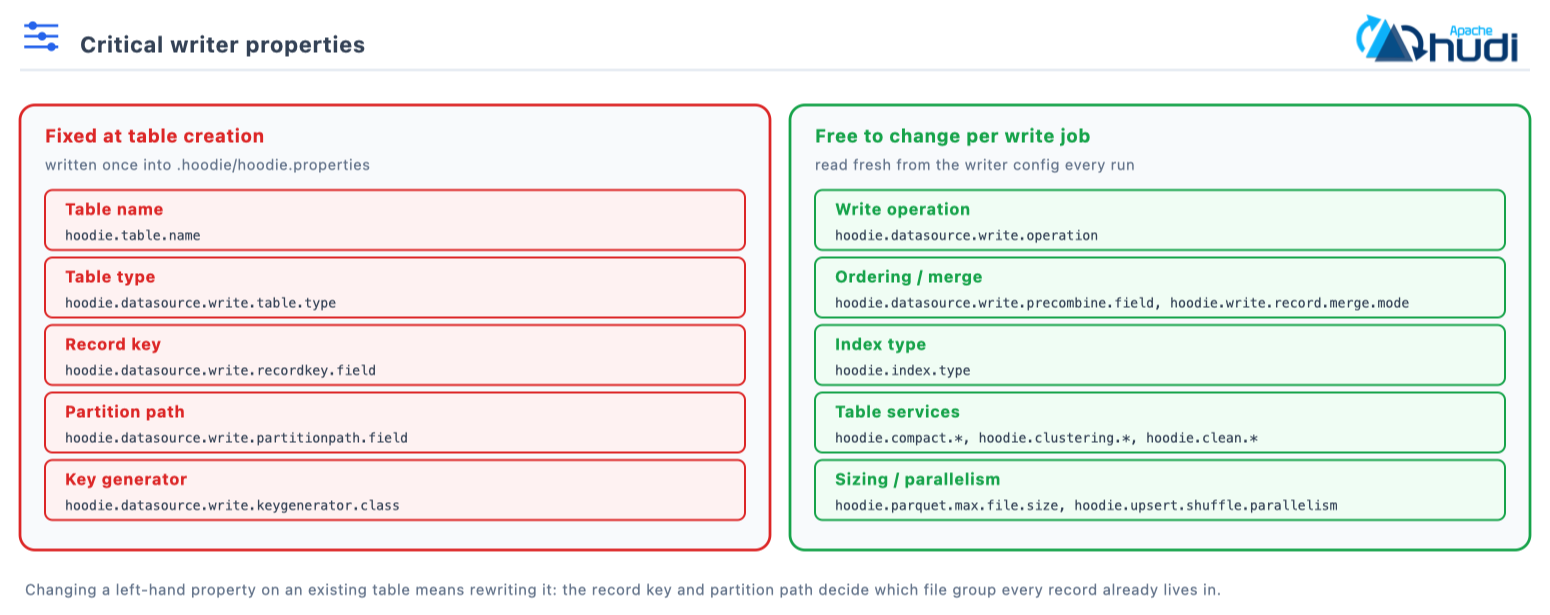
Record key, partition path and key generator are fixed at table creation and
persisted in .hoodie/hoodie.properties. Changing them later means rewriting the
table, so the useful split is between what is frozen and what the next job is
free to change.
| Property | Config key | Default | Role |
|---|---|---|---|
| Table name | hoodie.table.name |
required | Identifies the table across writers and catalogs |
| Table type | hoodie.datasource.write.table.type |
COPY_ON_WRITE |
Fixes write against read cost |
| Record key | hoodie.datasource.write.recordkey.field |
none, must be set | Record identity; drives upsert and delete matching |
| Ordering field | hoodie.datasource.write.precombine.field |
none | Tie-breaker column; largest value wins for a shared key |
| Partition path | hoodie.datasource.write.partitionpath.field |
none, unpartitioned | Physical layout; enables partition pruning |
| Key generator | hoodie.datasource.write.keygenerator.class |
SimpleKeyGenerator |
Derives record key and partition path from columns |
| Write operation | hoodie.datasource.write.operation |
upsert |
upsert, insert, bulk_insert, delete, insert_overwrite and more |
hudi_options = {
    'hoodie.table.name': 'orders',
    'hoodie.datasource.write.table.type': 'MERGE_ON_READ',      # fixed at creation
    'hoodie.datasource.write.recordkey.field': 'order_id',      # record identity
    'hoodie.datasource.write.precombine.field': 'updated_at',   # latest version wins
    'hoodie.datasource.write.partitionpath.field': 'order_date',
    'hoodie.datasource.write.keygenerator.class': 'org.apache.hudi.keygen.SimpleKeyGenerator',
    'hoodie.datasource.write.operation': 'upsert',
}
Note: Record key uniqueness is scoped per partition with a local index and table-wide with a global index. Pick the index type to match how your keys behave, not the other way round.
The two merge-mode keys are not duplicates, and this catches people. Merge
semantics in 1.x are set by RecordMergeMode, which is exposed twice:
hoodie.record.merge.mode is the table property in HoodieTableConfig, and
hoodie.write.record.merge.mode is the writer option in HoodieWriteConfig.
Both arrived in 1.0.0 and both take EVENT_TIME_ORDERING, COMMIT_TIME_ORDERING
or CUSTOM. Neither carries a static default: the documented behaviour is
EVENT_TIME_ORDERING when an ordering field is set and COMMIT_TIME_ORDERING
when it is not. This replaces the legacy payload classes such as
OverwriteWithLatestAvroPayload.
The two built-in modes differ only in which column decides the winner. Event-time ordering compares the ordering field, so a late-arriving record with an older value loses:
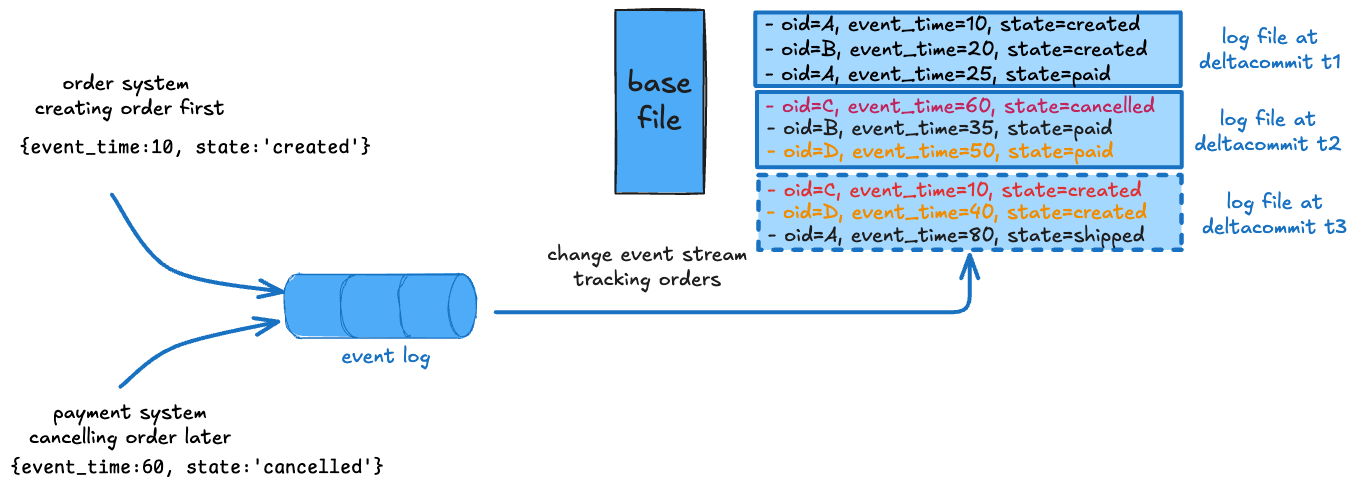
Adapted from the Apache Hudi documentation.
Commit-time ordering compares the instant instead, so the newest write always wins:
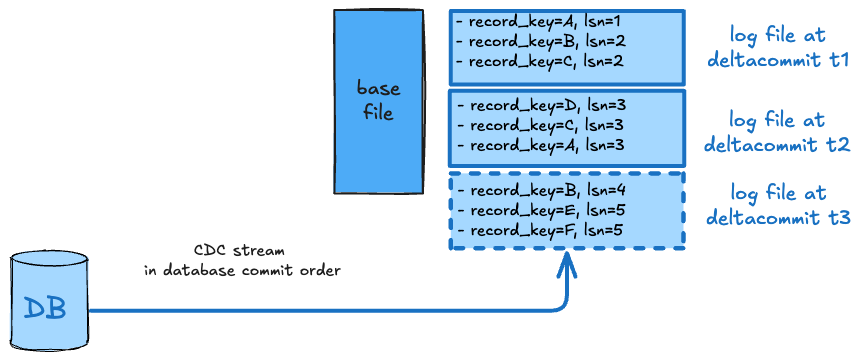
Adapted from the Apache Hudi documentation.
7. The timeline
The timeline under .hoodie/timeline/ (table version 8 and later; directly under
.hoodie/ on 0.x) is the ordered log of every action on a table. An instant is
identified by its instant time, an action and a state.
Instant time is a monotonic yyyyMMddHHmmssSSS timestamp that totally orders all
actions. It is the handle incremental reads and time-travel queries use.
Every action moves through requested, then inflight, then completed. Only
completed instants are visible to queries, which is what makes a commit atomic.
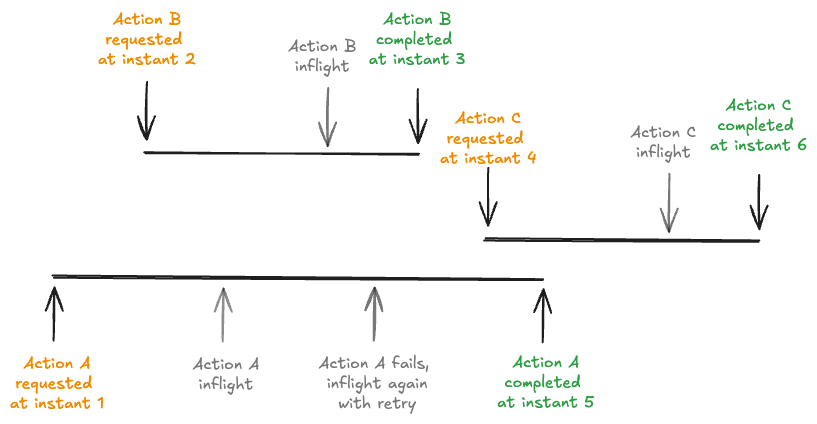
Adapted from the Apache Hudi documentation.
Once instants age out of the active timeline they are archived rather than deleted. Hudi 1.x stores that history as an LSM tree, so the archived timeline stays queryable without keeping every instant in the active set:
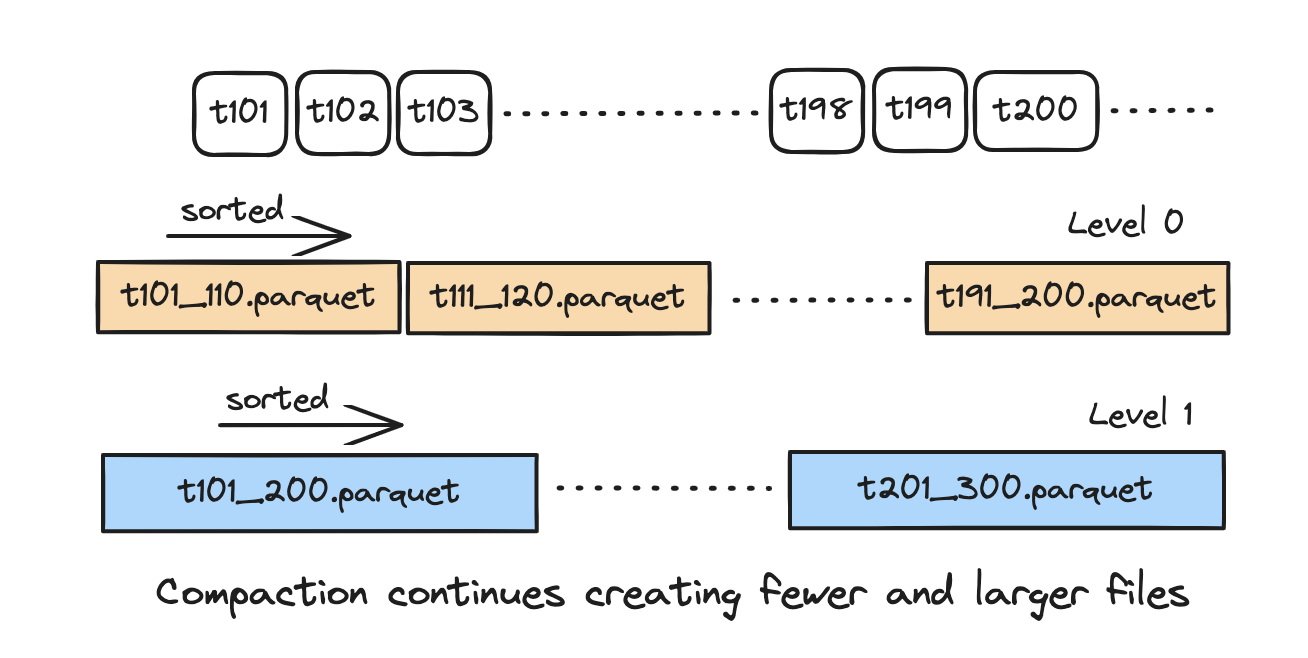
Adapted from the Apache Hudi documentation.
| Action | Example filename | Table | Description |
|---|---|---|---|
commit |
20260915090000123_20260915090004881.commit |
CoW | A Copy-on-Write write. Produces new base Parquet files |
deltacommit |
20260915090000123_....deltacommit |
MoR | A Merge-on-Read write. Produces new Avro delta log files |
replacecommit |
...replacecommit |
Both | Clustering or INSERT OVERWRITE. Replaces entire file groups |
compaction |
...compaction |
MoR | Merge base and log files. Fresh compacted base file |
logcompaction |
...logcompaction |
MoR | Merge log files only. Consolidated log file |
clustering |
...clustering |
Both | Data reorganisation, sort or repartition. New file layout |
clean |
...clean |
Both | Remove old file slices. Deletes files beyond retention |
indexing |
...indexing |
Both | Build or update metadata-table indexes. Index entries in the metadata table |
rollback |
...rollback |
Both | Remove failed or aborted write files. Previous state restored |
savepoint |
...savepoint |
Both | Protect instants from cleaning. Retained file versions |
restore |
...restore |
Both | Return the table to a savepoint. Reverted table state |
schemacommit |
...schemacommit |
Both | Record a schema change. Entry under .hoodie/.schema/ |
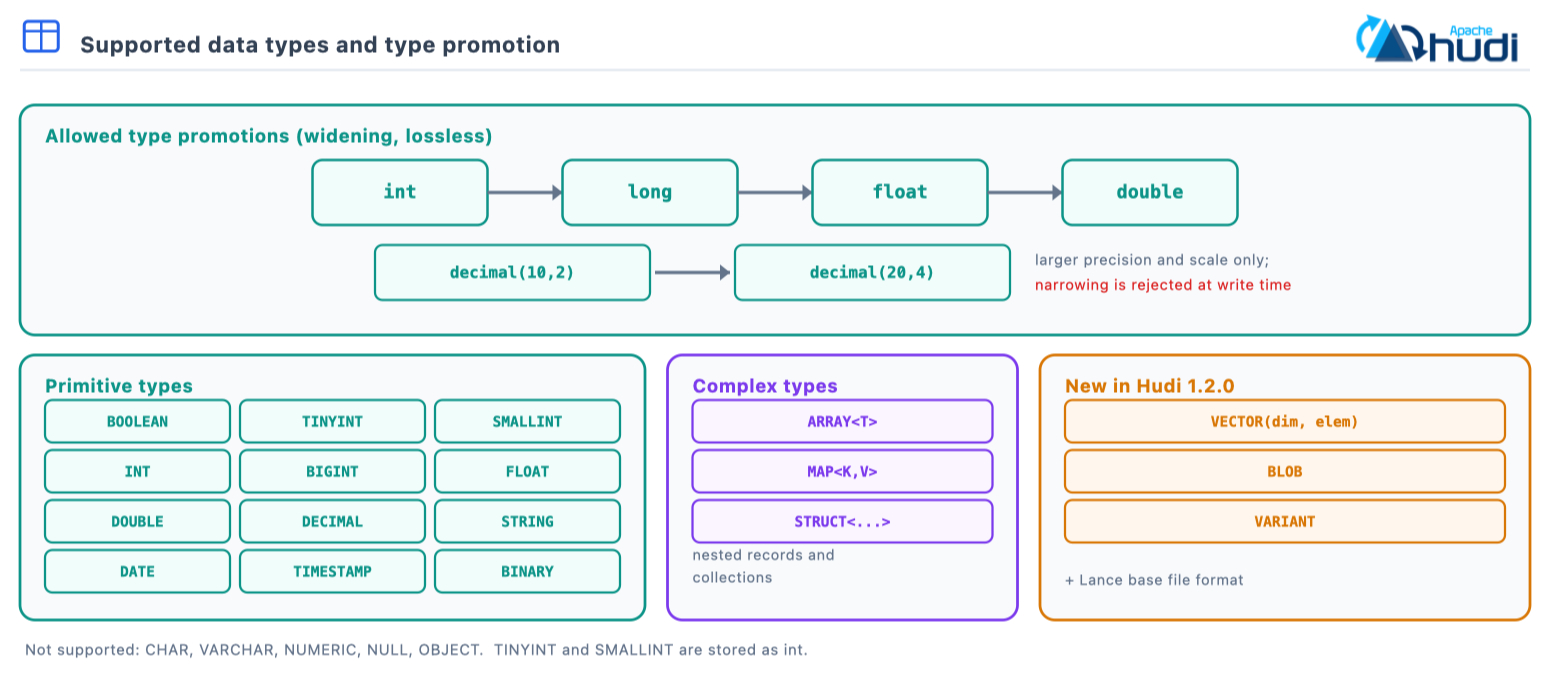
8. Supported data types
| Spark SQL | Hudi mapping | Notes |
|---|---|---|
BOOLEAN |
boolean | True or false |
TINYINT |
int | Stored as int |
SMALLINT |
int | Stored as int |
INT |
int | 4-byte signed integer |
BIGINT |
long | 8-byte signed integer |
FLOAT |
float | 4-byte IEEE 754 |
DOUBLE |
double | 8-byte IEEE 754 |
DECIMAL(p,s) |
decimal | Fixed precision, up to 38 digits |
STRING |
string | UTF-8 encoded |
DATE |
date | Days since 1970-01-01 |
TIMESTAMP |
timestamp | Microsecond precision |
BINARY |
bytes | Raw byte array |
ARRAY<T> |
array | Ordered collection |
MAP<K,V> |
map | Key-value pairs, string keys |
STRUCT<...> |
struct | Nested record |
New in 1.2.0, and the reason to be on it if you need them:
| Type | Mapping | Notes |
|---|---|---|
VECTOR(dim, elem) |
array | Top-level only; element type FLOAT, DOUBLE or INT8 |
BLOB |
bytes | INLINE or OUT_OF_LINE storage |
VARIANT |
variant or JSON | Native on Spark 4.0 and later; backward-compatible read on Spark 3.x |
1.2.0 also adds a Lance base file format for unstructured data.
Type promotion is widening and lossless: int -> long -> float -> double, and
decimal(p,s) to larger precision or scale. Narrowing is rejected. Not
supported: CHAR, VARCHAR, NUMERIC, NULL, OBJECT.
9. Write operations
The write operation controls index involvement, deduplication and file sizing, and the lane it falls into decides whether the write pays for an index lookup at all.
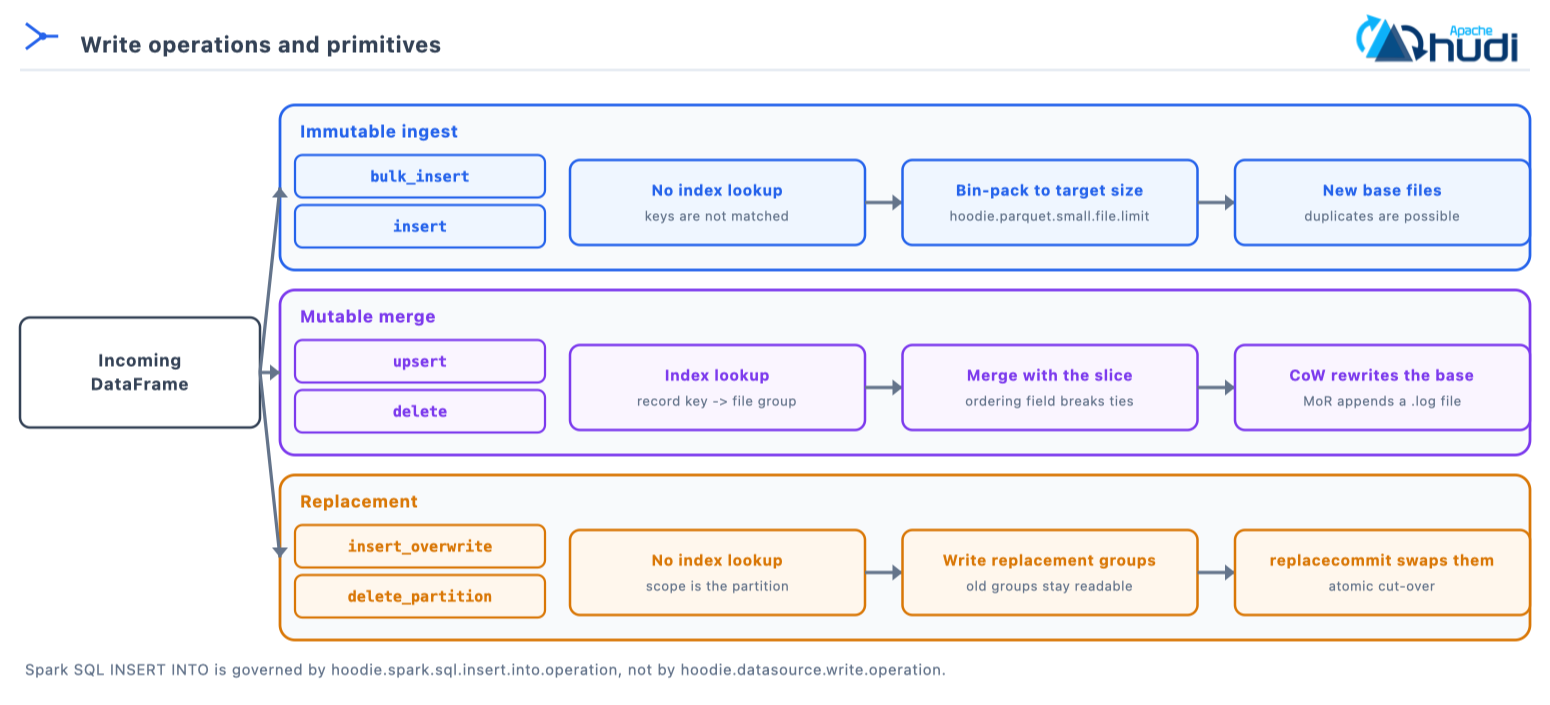
The reason the mutable lane exists at all is the shape of the write. A batch overwrite rewrites partitions wholesale; an incremental upsert touches only the file groups holding the keys in the batch:
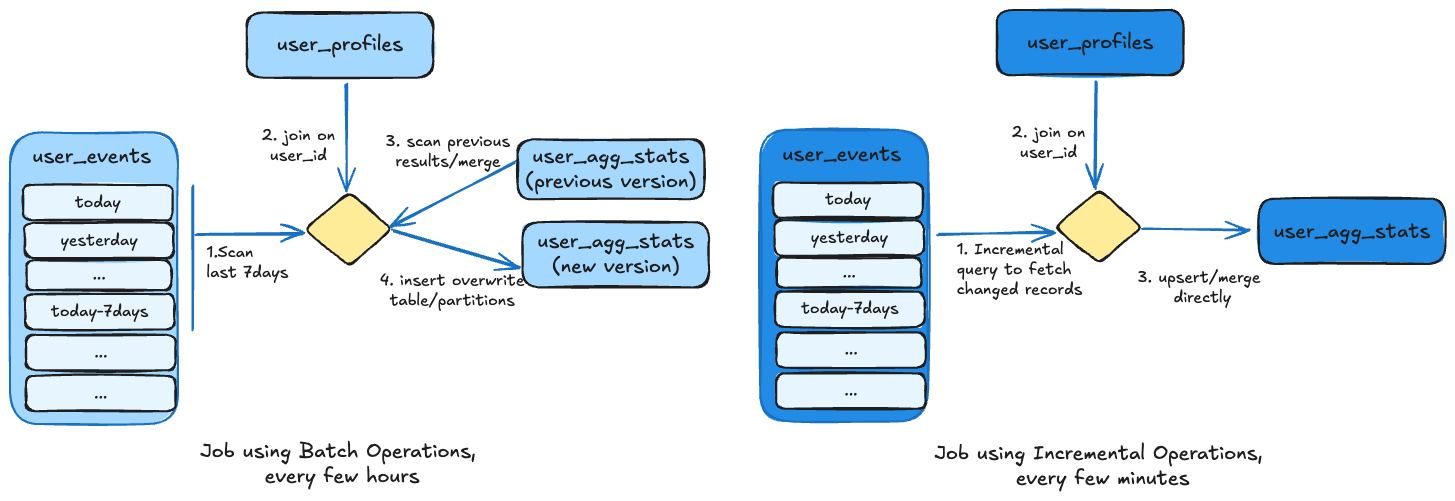
Adapted from the Apache Hudi documentation.
| Operation | Index involvement | Ordering applied | Use case |
|---|---|---|---|
bulk_insert |
No | Optional | Immutable: large initial loads; sorts data |
insert |
No, new file groups | Optional | Immutable: append-only, with small-file handling |
upsert |
Yes, looks up the file group | Yes | Mutable: merge new and existing records. The default |
delete |
Yes, hard delete | Yes | Mutable: remove records by key |
insert_overwrite |
No | Yes | Replace the partitions the batch touches |
insert_overwrite_table |
No | Yes | Replace the entire table |
delete_partition |
No | No | Drop entire partitions by partition path |
bootstrap |
No | Yes | Import an external Parquet dataset |
# Bulk insert: immutable, for initial large loads
hudi_options_bulk = {
    'hoodie.datasource.write.operation': 'bulk_insert',
    'hoodie.bulkinsert.shuffle.parallelism': '200',
    'hoodie.bulkinsert.sort.mode': 'GLOBAL_SORT',
}
-- insert (see the note below on which operation INSERT INTO actually uses)
INSERT INTO orders (order_id, status, amount, order_date)
VALUES ('ord-1', 'placed', 42.00, '2024-01-15');

-- insert_overwrite: replaces only the partitions this SELECT produces
INSERT OVERWRITE orders PARTITION (order_date = '2024-01-15')
SELECT order_id, status, amount FROM orders_staging WHERE order_date = '2024-01-15';

-- insert_overwrite_table: replaces every partition
INSERT OVERWRITE TABLE orders SELECT * FROM orders_staging;

-- upsert
UPDATE orders SET status = 'shipped' WHERE order_id = 'ord-1';

-- upsert
MERGE INTO orders t USING orders_staging s ON t.order_id = s.order_id
WHEN MATCHED THEN UPDATE SET *
WHEN NOT MATCHED THEN INSERT *;

-- delete
DELETE FROM orders WHERE order_id = 'ord-2';
Note: Spark SQL
INSERT INTOdoes not honourhoodie.datasource.write.operation. It is governed byhoodie.spark.sql.insert.into.operation(0.14.0 and later;insertby default, orbulk_insertorupsert), with duplicate handling throughhoodie.datasource.insert.dup.policy.
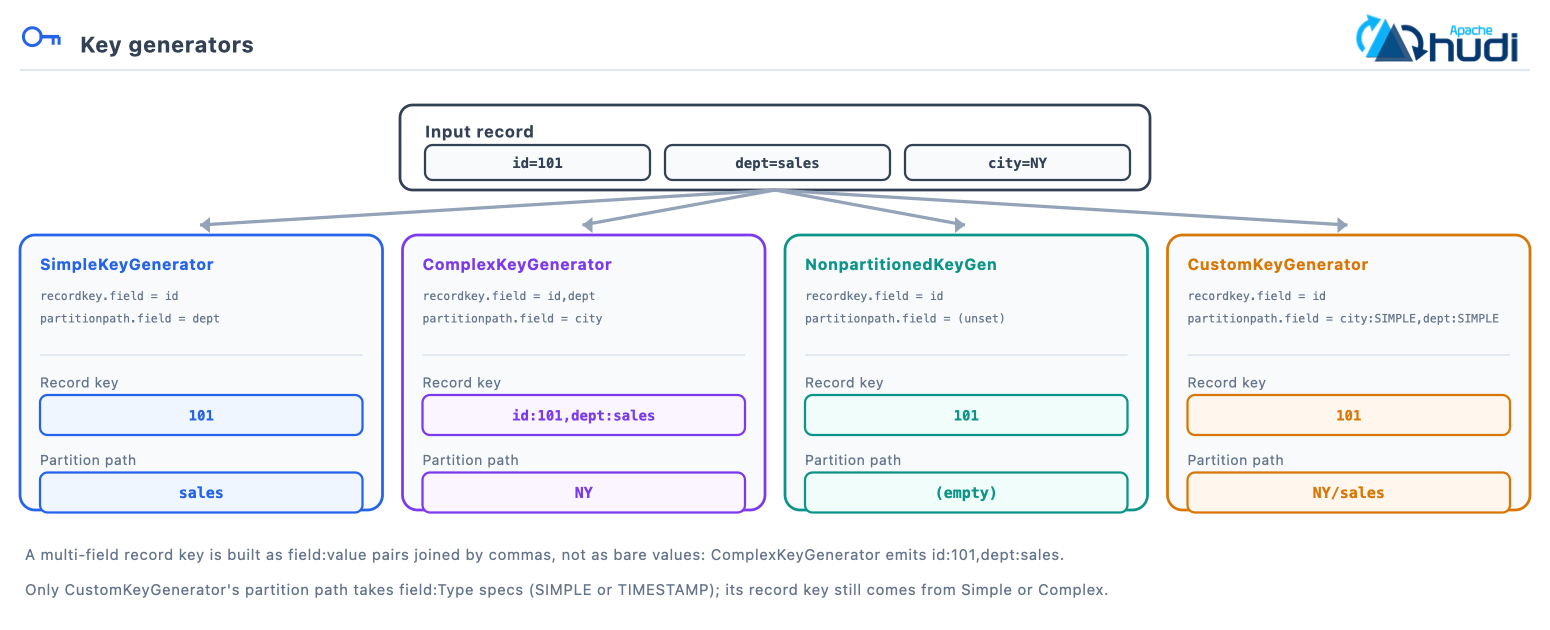
10. Key generators
A key generator derives the record key and partition path from named columns
through hoodie.datasource.write.keygenerator.class.
| Generator | Class | Partition path | Record key |
|---|---|---|---|
| Simple | SimpleKeyGenerator |
Single column | Single column |
| Complex | ComplexKeyGenerator |
Multi-column | Multi-column combined |
| NonPartitioned | NonpartitionedKeyGenerator |
None | Single column |
| Custom | CustomKeyGenerator |
Custom expression | Delegated |
| TimestampBased | TimestampBasedKeyGenerator |
Timestamp derived | Single column |
| Generator | Input (id, dept, city) | Record key | Partition path |
|---|---|---|---|
SimpleKeyGenerator |
(101, sales, NY) | 101 |
sales |
ComplexKeyGenerator |
(101, sales, NY) | id:101,dept:sales |
NY |
NonpartitionedKeyGenerator |
(101, sales, NY) | 101 |
empty |
CustomKeyGenerator |
(101, sales, NY) | 101 |
NY/sales |
A single-field record key is the bare column value; a multi-field key is built as
field:value pairs joined by commas. CustomKeyGenerator accepts field:Type
specs (SIMPLE or TIMESTAMP) on the partition path only and delegates the
record key to SimpleKeyGenerator or ComplexKeyGenerator, so the row above uses
recordkey.field=id with partitionpath.field=city:SIMPLE,dept:SIMPLE.
hudi_options = {
    'hoodie.datasource.write.recordkey.field': 'user_id,event_type',
    'hoodie.datasource.write.partitionpath.field': 'country,date',
    'hoodie.datasource.write.keygenerator.class': 'org.apache.hudi.keygen.ComplexKeyGenerator',
}
# user_id=101, event_type=click, country=US, date=2024-01-15
#   record key -> "user_id:101,event_type:click"
#   partition  -> "US/2024-01-15"
11. Query types
The same table reads five ways. All five are projections over one timeline, differing only in which instants and file slices they resolve.
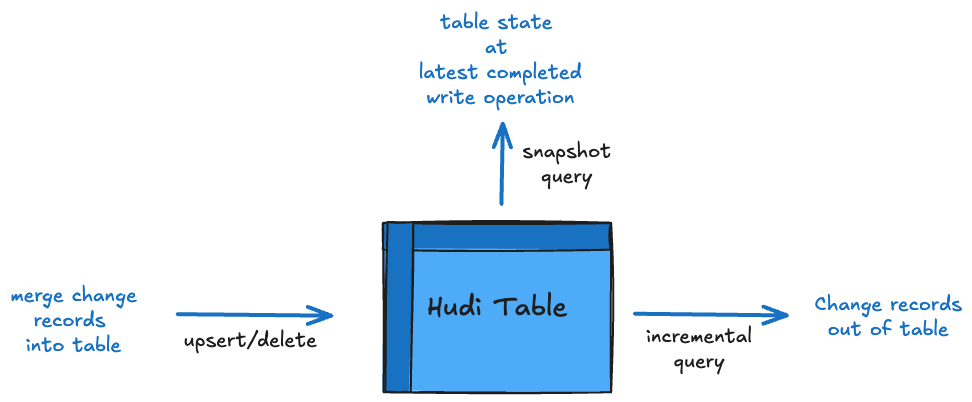
Adapted from the Apache Hudi documentation.
| Query type | CoW | MoR | How to ask for it | Returns |
|---|---|---|---|---|
| Snapshot | Yes | Yes, merges base and log | default | Latest committed state |
| Read-optimized | n/a | Yes, base only | read_optimized |
State as of the last compaction |
| Incremental | Yes | Yes | incremental plus begin.instanttime |
Latest state of changed keys |
| CDC | Yes | Yes | incremental plus incremental.format=cdc |
Row change log: operation, before, after |
| Time travel | Yes | Yes | as.of.instant |
Full table at a past instant |
base_path = 'file:///tmp/hudi_table'

df_snapshot = spark.read.format('hudi').load(base_path)

df_ro = spark.read.format('hudi') \
    .option('hoodie.datasource.query.type', 'read_optimized').load(base_path)

df_incr = spark.read.format('hudi') \
    .option('hoodie.datasource.query.type', 'incremental') \
    .option('hoodie.datasource.read.begin.instanttime', '20240101000000000') \
    .option('hoodie.datasource.read.end.instanttime', '20240102000000000').load(base_path)

df_cdc = spark.read.format('hudi') \
    .option('hoodie.datasource.query.type', 'incremental') \
    .option('hoodie.datasource.query.incremental.format', 'cdc') \
    .option('hoodie.datasource.read.begin.instanttime', '20240101000000000').load(base_path)

df_tt = spark.read.format('hudi').option('as.of.instant', '20240101000000000').load(base_path)
-- Snapshot, the default
SELECT * FROM hudi_table;

-- Read-optimized. The _ro suffix is the Hive-sync name; hudi_query is the
-- table-valued function equivalent and takes 'snapshot' or 'read_optimized'.
-- Every hudi_* function resolves a catalog table identifier, not a storage
-- path. Passing a path fails rather than falling back to a path-based read.
SELECT * FROM hudi_table_ro;
SELECT count(*) FROM hudi_query('hudi_table', 'read_optimized');

-- Incremental, and its CDC form
SELECT * FROM hudi_table_changes('hudi_table', 'latest_state', '20240101000000000');
SELECT * FROM hudi_table_changes('hudi_table', 'cdc', '20240101000000000');

-- Time travel: an instant string, or a timestamp in
-- yyyy-MM-dd HH:mm:ss.SSS or yyyy-MM-dd form
SELECT * FROM hudi_table TIMESTAMP AS OF '20240101000000000';
SELECT * FROM hudi_table TIMESTAMP AS OF '2024-01-01 00:00:00';
12. Indexes
Hudi’s writer-side index maps a record key (plus, for non-global indexes, its partition path) to a file group. That mapping is what lets a Copy-on-Write upsert avoid joining against the whole table to find files to rewrite, and bounds how many change records a Merge-on-Read base file merges against.
hoodie.index.type carries no default of its own. HoodieIndexConfig picks one
by engine: SIMPLE on Spark and Java, INMEMORY on Flink.
Choosing an index:
  Keys unique only within a partition, writer always knows the partition?
    -> RECORD_LEVEL_INDEX (large tables) or SIMPLE / BLOOM (small to medium)
  Keys unique table-wide, or records move across partitions?
    -> GLOBAL_RECORD_LEVEL_INDEX (large tables) or GLOBAL_SIMPLE / GLOBAL_BLOOM
  Very high write throughput with stable keys? -> BUCKET
A local index enforces uniqueness only within a partition, so a write probes just that partition’s files: cheap and scalable, but the writer must always supply the same partition path for a key. A global index enforces uniqueness across the table and can find or move a key in any partition, at the cost of a table-wide lookup that grows with the table.
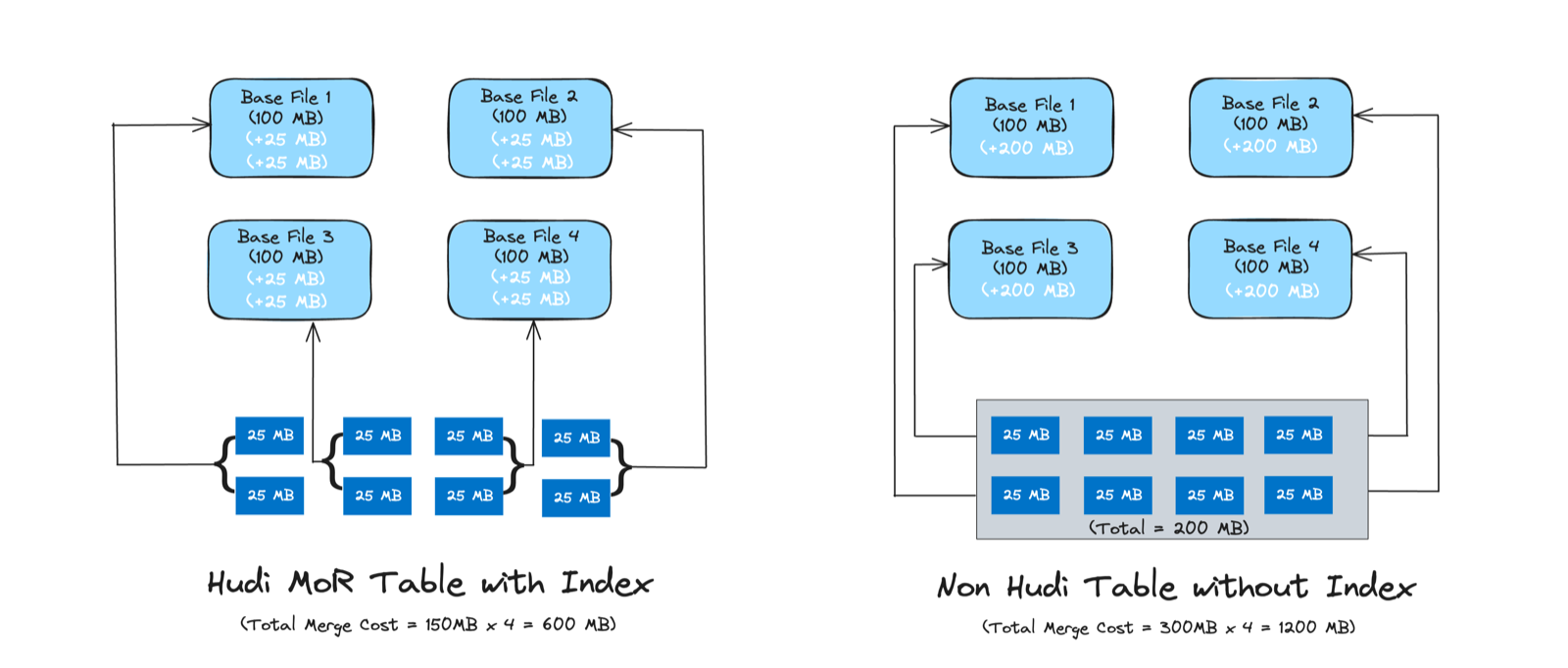
Adapted from the Apache Hudi documentation.
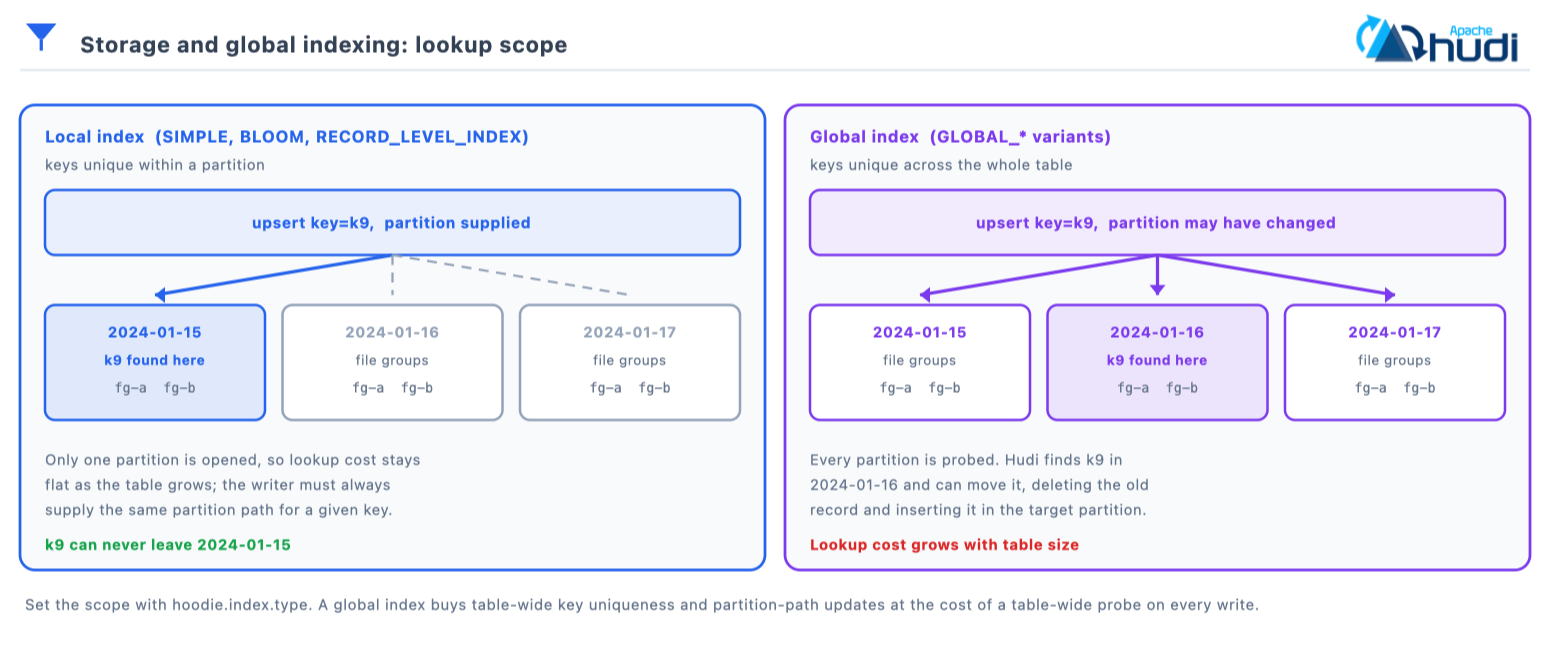
HoodieIndex.IndexType has exactly ten values in 1.2.0:
| Index | Scope | Example | Description |
|---|---|---|---|
SIMPLE |
Local | 'hoodie.index.type': 'SIMPLE' |
File-level lookups in-partition, no bloom filters. Small and medium datasets; minimal overhead |
GLOBAL_SIMPLE |
Global | 'hoodie.index.type': 'GLOBAL_SIMPLE' |
The same, across all partitions. Small and medium tables with changing partition paths |
BLOOM |
Local | 'hoodie.index.type': 'BLOOM' |
Bloom filters in Parquet footers. Keys with a temporal or monotonic prefix, so ranges prune |
GLOBAL_BLOOM |
Global | 'hoodie.index.type': 'GLOBAL_BLOOM' |
Bloom across all partitions. Records that move between partitions |
BUCKET |
Local | 'hoodie.index.type': 'BUCKET' |
Hash the key to a fixed bucket, no lookup at all. High-throughput streaming with stable keys |
RECORD_LEVEL_INDEX |
Local | 'hoodie.index.type': 'RECORD_LEVEL_INDEX' |
Exact key to file-group map in the metadata table. Fast partition-local updates. Added in 1.1.0 |
GLOBAL_RECORD_LEVEL_INDEX |
Global | 'hoodie.index.type': 'GLOBAL_RECORD_LEVEL_INDEX' |
The same, keyed table-wide. Large tables and global upserts |
RECORD_INDEX |
Global | 'hoodie.index.type': 'RECORD_INDEX' |
Deprecated alias of GLOBAL_RECORD_LEVEL_INDEX. Pre-1.1 tables; move to the new name |
INMEMORY |
Local | 'hoodie.index.type': 'INMEMORY' |
Non-persistent in-memory hash map. Development and testing |
FLINK_STATE |
Local | 'hoodie.index.type': 'FLINK_STATE' |
Flink state backend. Internal to the Flink writer |
HBASE was an eleventh in the 0.x line and is gone in 1.x, so a 0.x config
carrying it needs changing before you upgrade.
# Bucket index: deterministic hashing, no lookup
hudi_options_bucket = {
    'hoodie.index.type': 'BUCKET',
    'hoodie.index.bucket.engine': 'SIMPLE',        # or CONSISTENT_HASHING
    'hoodie.bucket.index.num.buckets': '256',
    'hoodie.bucket.index.hash.field': 'user_id',
}

# Global bloom
hudi_options_global = {
    'hoodie.index.type': 'GLOBAL_BLOOM',
    'hoodie.bloom.index.filter.type': 'DYNAMIC_V0',
    'hoodie.bloom.index.update.partition.path': 'true',
}

# Record-level index, backed by the metadata table
hudi_options_record = {
    'hoodie.index.type': 'GLOBAL_RECORD_LEVEL_INDEX',
    'hoodie.metadata.enable': 'true',
    'hoodie.metadata.global.record.level.index.enable': 'true',
    # partition-scoped keys instead:
    #   'hoodie.index.type': 'RECORD_LEVEL_INDEX'
    #   'hoodie.metadata.record.level.index.enable': 'true'
}
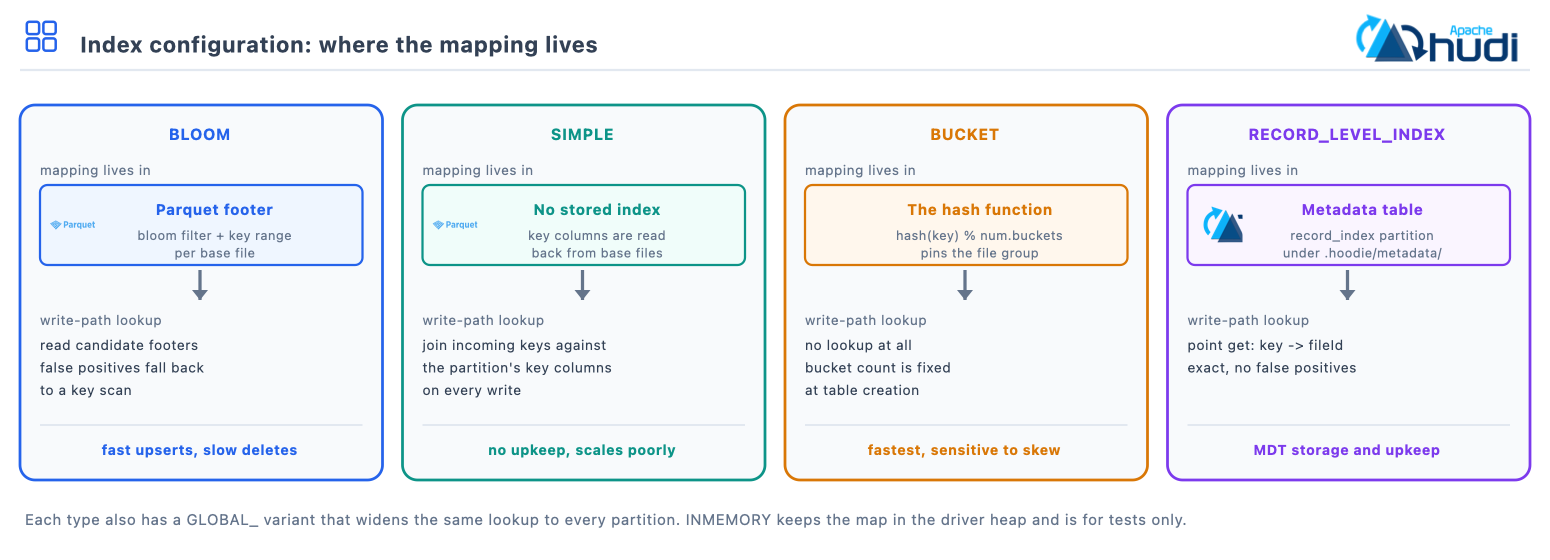
Note: The fixed-bucket
BUCKETindex (engineSIMPLE) can leave skewed partitions with oversized buckets. TheCONSISTENT_HASHINGengine, which is Merge-on-Read only, resizes buckets to counter that.
Note: The two record-index scopes keep separate sizing defaults, tuned to what each stores: 10 to 10000 file groups for the global index, 1 to 10 for the partition-scoped one. Let each use its own and the sizing looks after itself.
13. The metadata table
The metadata table is a single internal Merge-on-Read Hudi table under
.hoodie/metadata/, one partition per index, that replaces object-store LIST
calls and powers data skipping and point lookups.
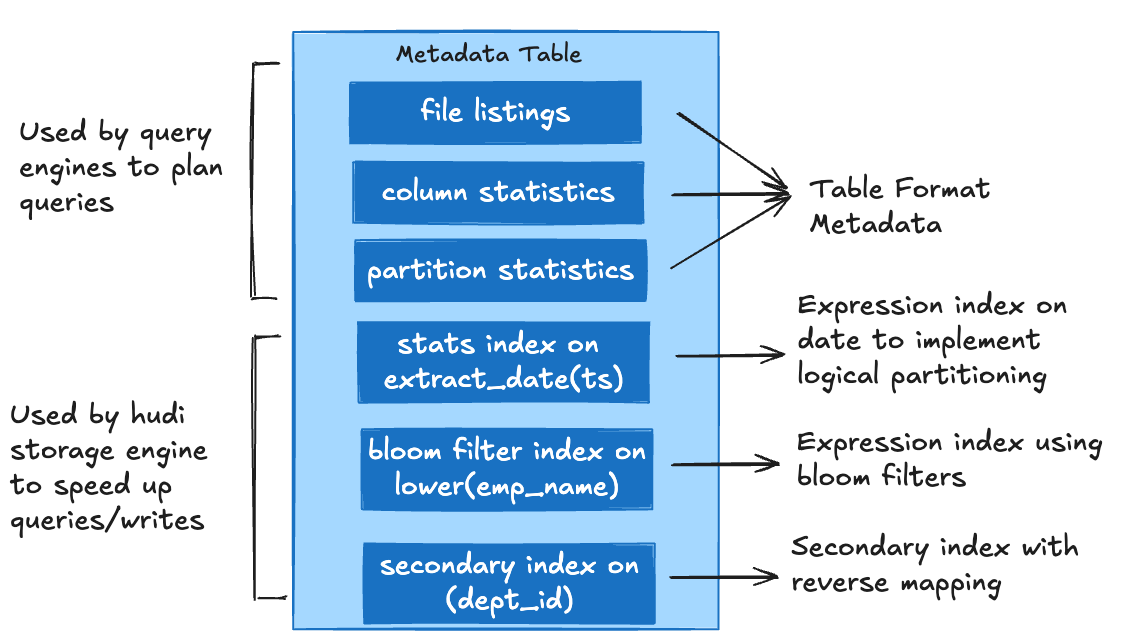
Adapted from the Apache Hudi documentation.
| Sub-index | Purpose | Enabling config | Default |
|---|---|---|---|
files |
File listing, avoids an object-store LIST |
hoodie.metadata.enable |
true since 0.7.0 |
column_stats |
Min, max and null counts for data skipping | hoodie.metadata.index.column.stats.enable |
false |
partition_stats |
Partition-level statistics | Built alongside column stats | Follows column stats |
bloom_filters |
Key-lookup acceleration | hoodie.metadata.index.bloom.filter.enable |
false |
record_index |
Record key to file group | hoodie.metadata.global.record.level.index.enable |
false |
secondary_index |
Indexes on non-key columns | hoodie.metadata.index.secondary.enable |
true since 1.0.0 |
expression_index |
Indexes on a function of a column | hoodie.metadata.index.expression.enable |
false |
hudi_options = {
    'hoodie.metadata.enable': 'true',                            # core, file listings
    'hoodie.metadata.index.column.stats.enable': 'true',         # data skipping
    'hoodie.metadata.index.column.stats.column.list': 'user_id,event_type,date',
    'hoodie.metadata.index.bloom.filter.enable': 'true',
    'hoodie.metadata.global.record.level.index.enable': 'true',
}
-- Secondary and expression indexes are DDL, not writer options
CREATE INDEX idx_email ON hudi_table (email);
CREATE INDEX idx_day ON hudi_table USING column_stats(ts)
  OPTIONS(expr='from_unixtime', format='yyyy-MM-dd');
DROP INDEX idx_email ON hudi_table;

-- What indexes does this table have?
SHOW INDEXES FROM hudi_table;

-- Inspect what the metadata table holds
SELECT type, key FROM hudi_metadata('hudi_table') LIMIT 20;
CALL show_metadata_table_partitions(table => 'hudi_table');
Note:
hoodie.metadata.record.index.enable(0.14.0) survives only as an alias ofhoodie.metadata.global.record.level.index.enable, so upgrades are uneventful. Use the new name when you want the partition-scoped index, since the alias resolves to the global one.
14. Concurrency control
Hudi separates three kinds of process acting on a table, writers, table services and readers, and layers four concurrency controls across them.
| Control | Governs | What it gives you |
|---|---|---|
| Snapshot isolation | All three process types | Everyone operates on a consistent committed snapshot |
| MVCC | Writer against table service, and table service against table service | Compaction, clustering and cleaning never block ingestion or queries |
| OCC | Writer against writer | Standard relational multi-writer semantics |
| NBCC | Writer against writer | Streaming semantics with no live-locks or starvation |
The first two are always on and need no configuration. The last two are the
choice you make, through hoodie.write.concurrency.mode plus a lock provider.
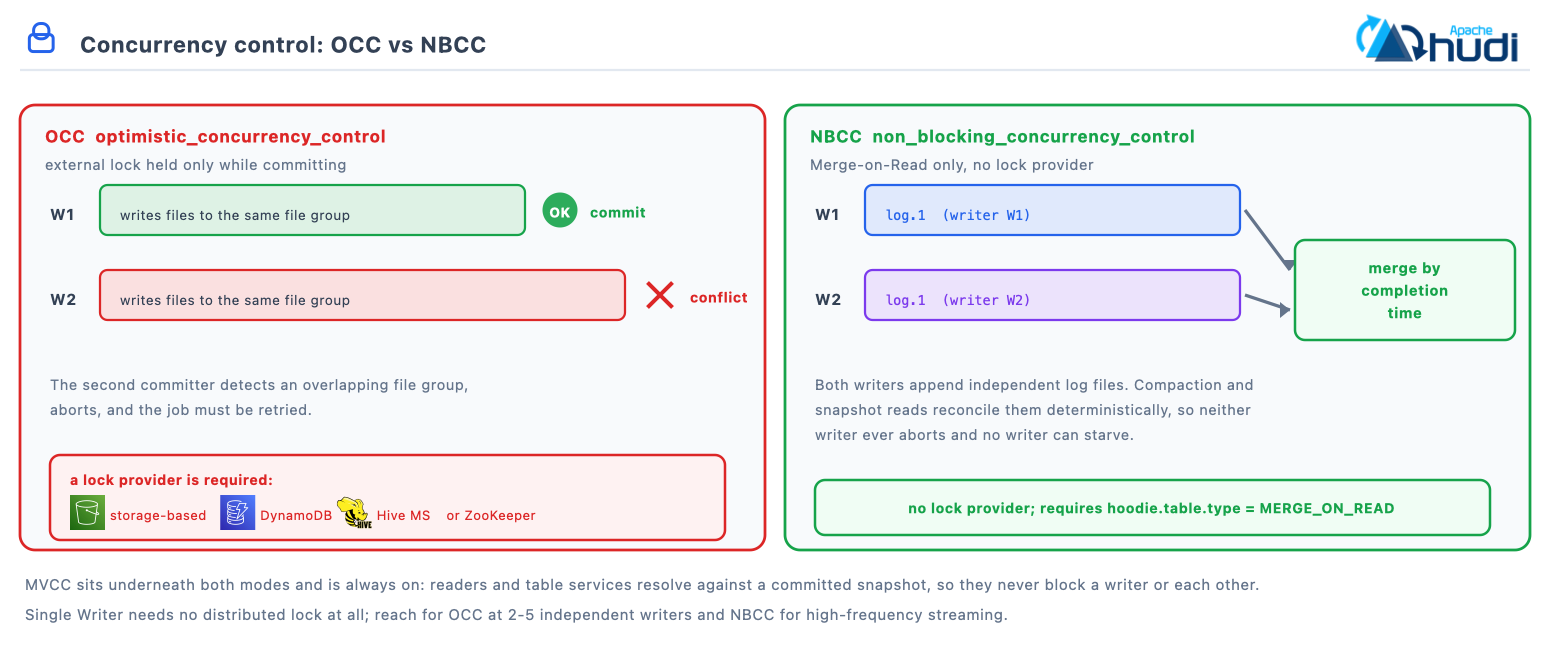
| Mode | Lock required | Conflict resolution | Best for |
|---|---|---|---|
| Single writer | Local only, JVM level | None needed, execution is sequential | Dedicated ETL, single-job deployments |
| MVCC | None, always on | Multiple file-slice versions coexist | Writers against table services and readers |
| OCC | Distributed | First committer wins; the loser fails and retries | Moderate concurrency, two to five writers |
| NBCC | None beyond timestamp generation | Deterministic merge by completion time, no aborts | High-frequency streaming and CDC |
| Lock provider | Class | Best for |
|---|---|---|
| Storage-based | StorageBasedLockProvider |
Cloud object stores, using conditional writes. No external infrastructure |
| ZooKeeper | ZookeeperBasedLockProvider |
Multi-node clusters |
| Hive Metastore | HiveMetastoreBasedLockProvider |
Hive-integrated stacks |
| DynamoDB | DynamoDBBasedLockProvider |
AWS deployments |
| In-process | InProcessLockProvider |
A single JVM doing both writing and table services |
# Optimistic concurrency with a DynamoDB lock
hudi_options = {
    'hoodie.write.concurrency.mode': 'optimistic_concurrency_control',
    'hoodie.clean.policy.failed.writes': 'LAZY',
    'hoodie.write.lock.provider': 'org.apache.hudi.aws.transaction.lock.DynamoDBBasedLockProvider',
    'hoodie.write.lock.dynamodb.table': 'hudi_locks',
    'hoodie.write.lock.dynamodb.partition_key': 'lock_key',
    'hoodie.write.lock.dynamodb.region': 'us-east-1',
    'hoodie.write.lock.wait_time_ms': '60000',
    'hoodie.write.lock.num_retries': '10',
}

# Non-blocking concurrency, Merge-on-Read only
hudi_options_nbcc = {
    'hoodie.write.concurrency.mode': 'non_blocking_concurrency_control',
    'hoodie.datasource.write.table.type': 'MERGE_ON_READ',
}
Note: Optimistic concurrency needs an external lock provider; non-blocking concurrency does not. The documentation scopes NBCC to Merge-on-Read tables using the simple or partition-level bucket index, and not to clustering against an ingestion writer, where you still use the optimistic mode.
15. Schema evolution
Backwards-compatible changes work at write time out of the box. The full DDL surface needs the experimental schema-on-read mode.
| Mode | Config | Supports |
|---|---|---|
| Schema-on-write | default | Add nullable columns including nested, appended at the end, plus widening type promotions |
| Schema-on-read | hoodie.schema.on.read.enable=true |
Adds rename, drop, reorder and add-at-position. Experimental; Hudi later than 0.11, Spark later than 3.1 |
| Change | Spark SQL | Mode required |
|---|---|---|
| Add column | ALTER TABLE t ADD COLUMNS (col TYPE) |
Schema-on-write; appended at the end |
| Alter column type | ALTER TABLE t ALTER COLUMN col TYPE new_type |
Widening only; implicit on write, DDL needs schema-on-read |
| Add at position | ALTER TABLE t ADD COLUMNS (col TYPE AFTER existing) |
Schema-on-read |
| Rename column | ALTER TABLE t RENAME COLUMN old TO new |
Schema-on-read |
| Drop column | ALTER TABLE t DROP COLUMN col |
Schema-on-read |
With schema-on-read enabled, Hudi assigns every column a permanent internal ID
and persists the versioned schema history under .hoodie/.schema/. Readers
resolve columns by ID rather than by name, which is why a rename is a
metadata-only change, a drop is a tombstone on the ID, and an add allocates a
fresh ID. Existing data files are never rewritten.
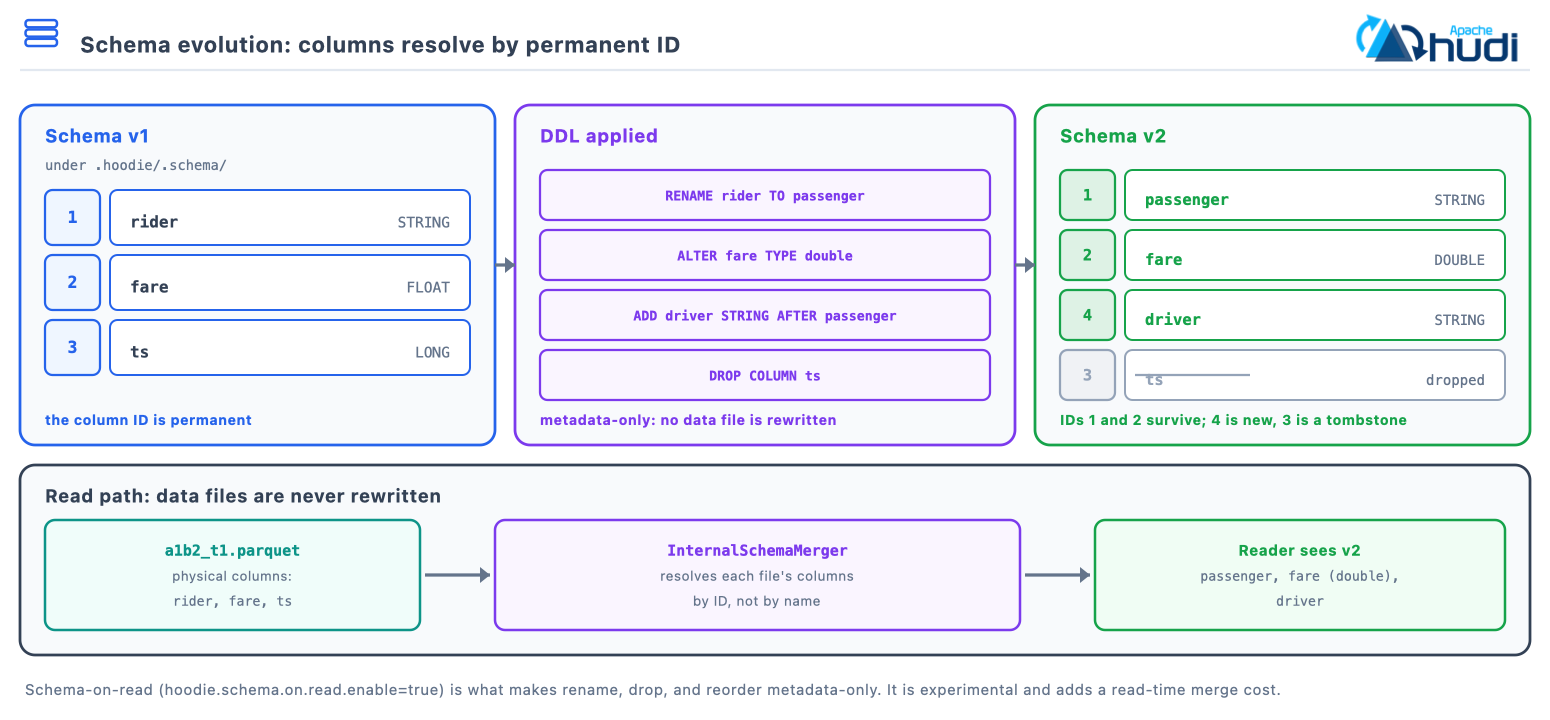
SET hoodie.schema.on.read.enable = true;

ALTER TABLE trips ADD COLUMNS (driver STRING AFTER rider);
ALTER TABLE trips ALTER COLUMN fare TYPE double;
ALTER TABLE trips RENAME COLUMN rider TO passenger;
ALTER TABLE trips DROP COLUMN driver;
Note: Schema-on-read is a one-way door. The documentation states that once it is enabled it cannot be disabled again, because the table will already have accepted changes that depend on it. Turn it on when you need rename, drop or reorder, and not before.
16. Table services
Self-managing background jobs keep file sizes, storage and the timeline healthy. Each runs inline or asynchronously, and they chain: compaction and clustering produce new file slices, cleaning reclaims the superseded ones, and archival trims the timeline entries left behind.
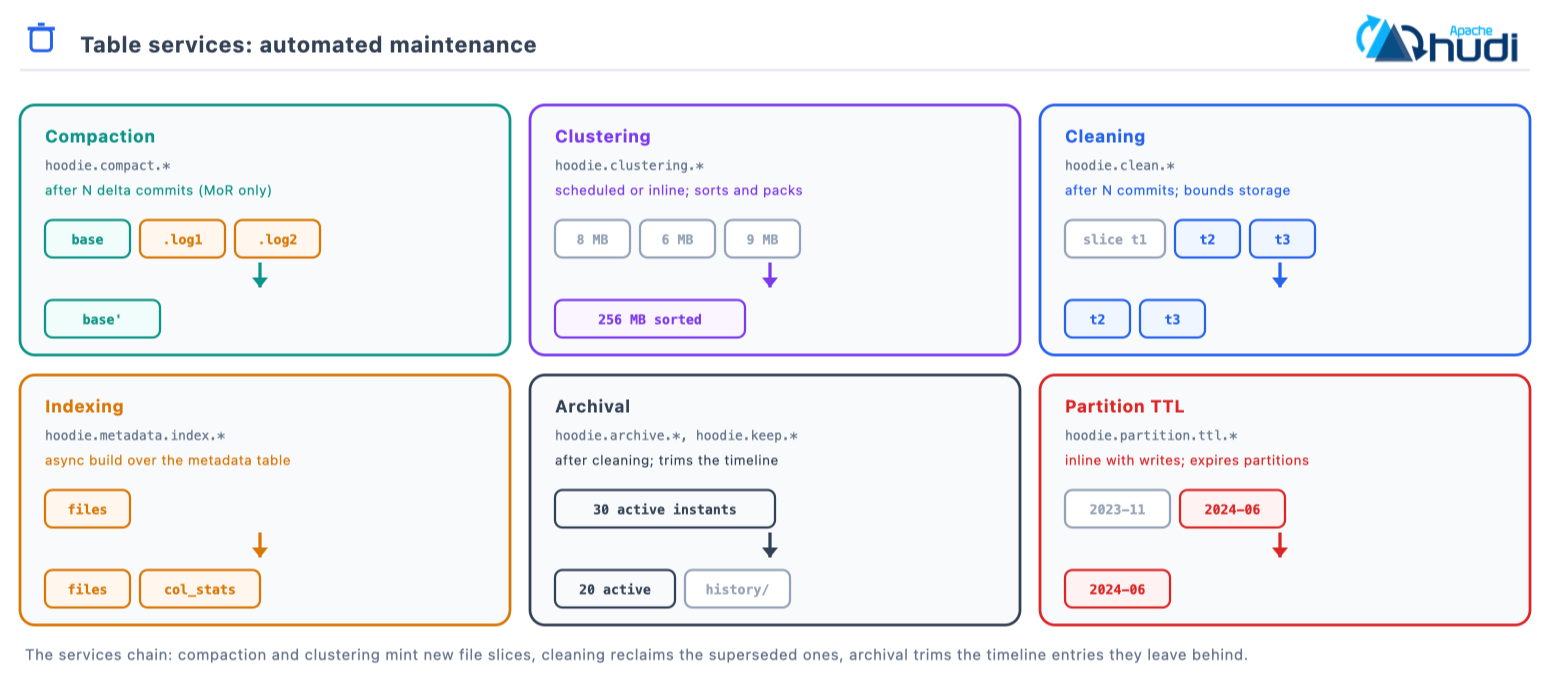
| Service | Purpose | Trigger | Config prefix |
|---|---|---|---|
| Compaction | Merge Merge-on-Read base and log files | After N delta commits | hoodie.compact.* |
| Clustering | Reorganise data, sort or repartition | Scheduled or inline | hoodie.clustering.* |
| Cleaning | Remove superseded file versions | After N commits | hoodie.clean.* |
| Indexing | Build metadata-table indexes asynchronously | Async protocol | hoodie.metadata.index.* |
| Archival | Move old timeline entries to timeline/history/ |
After cleaning | hoodie.archive.*, hoodie.keep.* |
| Partition TTL | Expire partitions past their retention | Inline with writes | hoodie.partition.ttl.* |
Clustering is the one worth seeing, because it changes layout without changing content: small files are rewritten into larger, sorted ones.
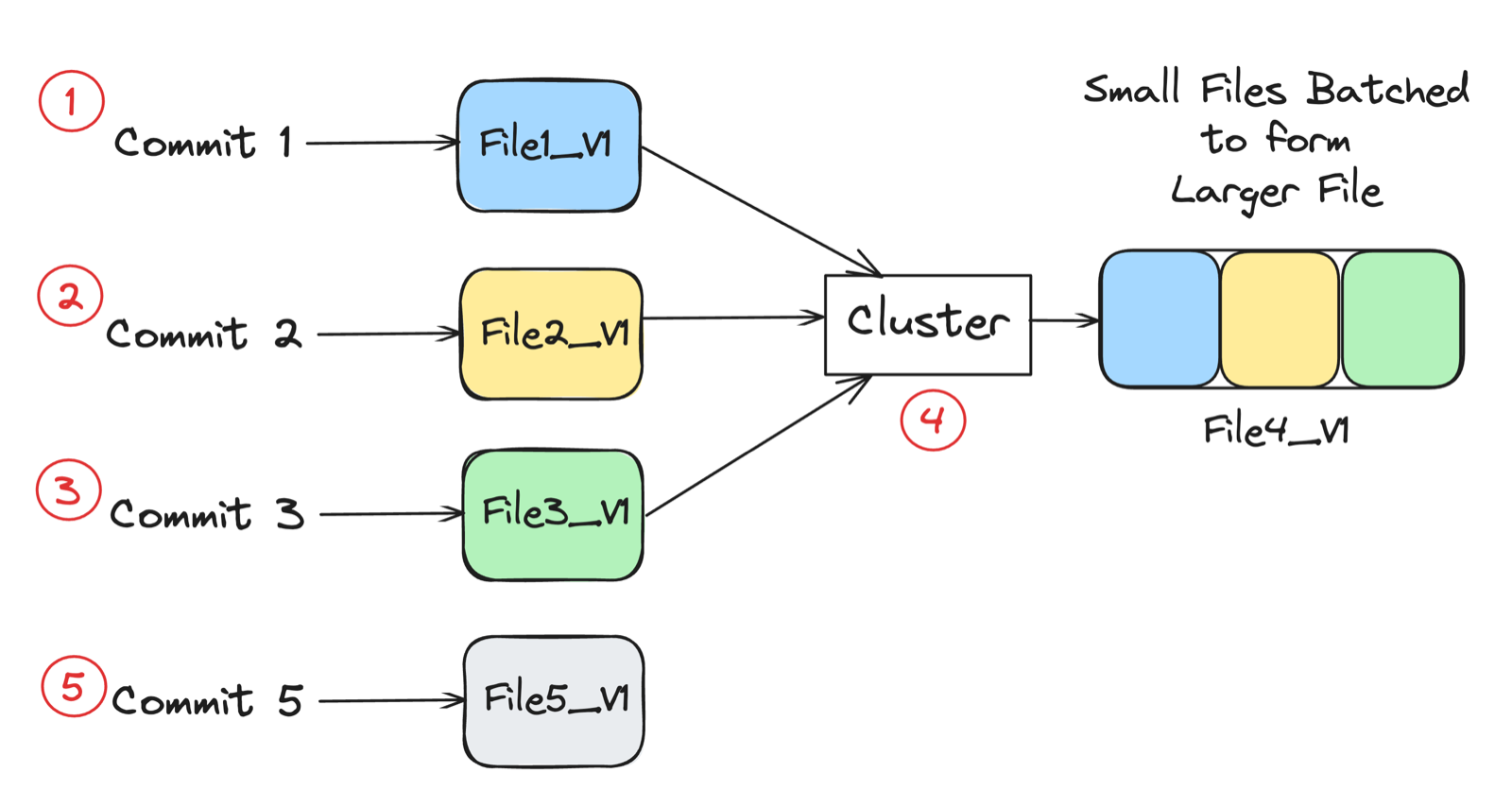
Adapted from the Apache Hudi documentation.
compaction_opts = {
    'hoodie.compact.inline': 'true',                  # default false
    'hoodie.compact.inline.max.delta.commits': '5',   # the default
    'hoodie.compaction.target.io': '512000',          # MB per run, default 500 GB
}

clustering_opts = {
    'hoodie.clustering.inline': 'true',
    'hoodie.clustering.inline.max.commits': '4',
    'hoodie.clustering.plan.strategy.sort.columns': 'user_id,date',
}

maintenance_opts = {
    'hoodie.clean.automatic': 'true',                 # the default
    'hoodie.clean.policy': 'KEEP_LATEST_COMMITS',     # the default
    'hoodie.clean.commits.retained': '10',            # the default
    'hoodie.archive.automatic': 'true',
    'hoodie.keep.min.commits': '20',
    'hoodie.keep.max.commits': '30',
    'hoodie.partition.ttl.inline': 'true',
    'hoodie.partition.ttl.strategy.days.retain': '90',
}
Note:
hoodie.clean.policyandhoodie.clean.commits.retainedare the canonical keys; the olderhoodie.cleaner.spellings are registered alternatives and still resolve.
Note: Async table services inside one writer process coordinate on their own. Running compaction or clustering as a separate job alongside a live writer is multi-writer territory: configure a lock provider and
hoodie.write.concurrency.modefirst.
17. Migrating a Hive table to Hudi
Convert an existing Hive or Parquet dataset into a Hudi table, with or without
rewriting the underlying data. Unlike Iceberg, which offers an in-place
migrate, Hudi always writes a new table: bootstrap produces a Hudi table at a
new base path and leaves the source where it is.
| Step | What it does |
|---|---|
| Pick a mode | METADATA_ONLY for cold history, FULL_RECORD for data you will upsert, or a selector that mixes them per partition |
| Declare the keys | The record key, partition path and key generator are frozen at this point, so get them right before you start |
| Run the bootstrap | Writes a new Hudi table at base_path, leaving the source dataset untouched |
| Sync the catalog | Hive sync registers the new table; a Merge-on-Read table registers as both _ro and _rt |
| Cut writers over | The source is still live until you point ingestion at the Hudi table |
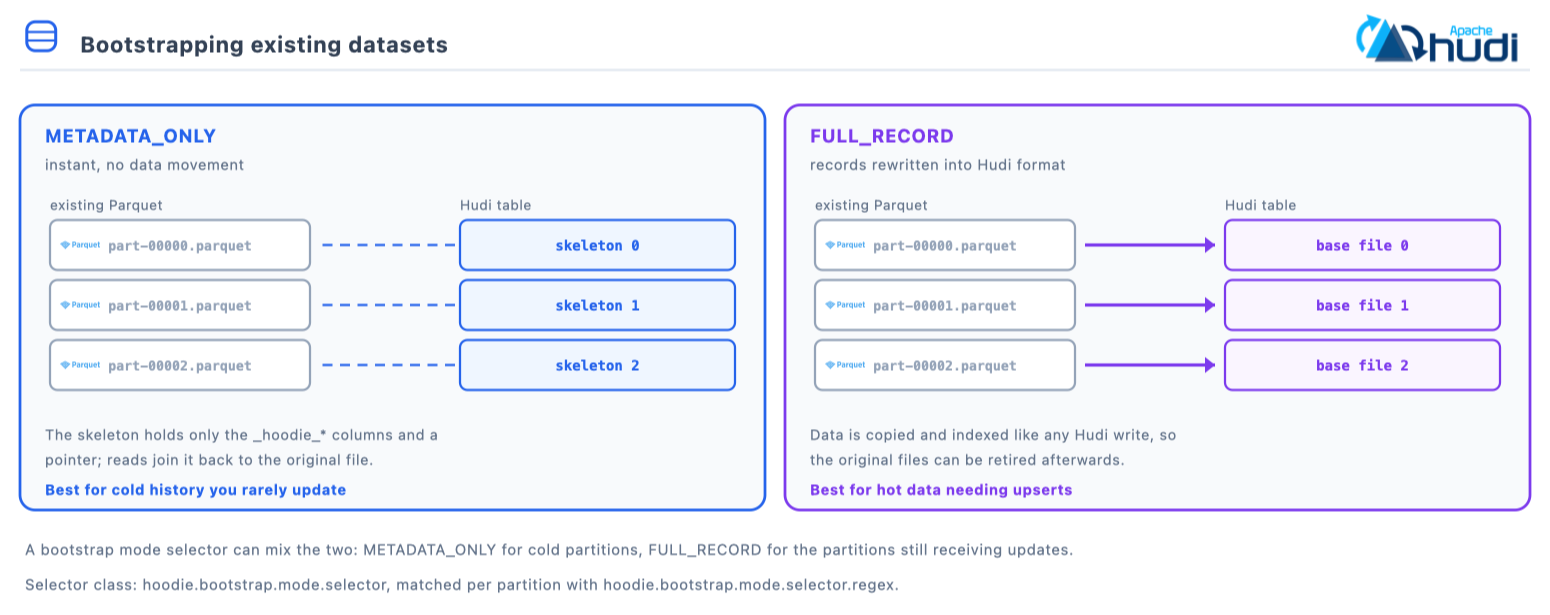
| Mode | What it does, and when |
|---|---|
METADATA_ONLY |
Skeleton pointing at the original files. Instant, no data movement. Good for cold history |
FULL_RECORD |
Rewrites records into Hudi base files. Good for hot data needing upserts and indexing |
| Mixed | A selector applies METADATA_ONLY to some partitions and FULL_RECORD to others |
CALL run_bootstrap(
  table => 'bootstrapped_table',
  table_type => 'COPY_ON_WRITE',
  bootstrap_path => 's3a://lakehouse-prod/raw/orders_parquet',
  base_path => 's3a://lakehouse-prod/warehouse/orders',
  rowKey_field => 'order_id',
  partition_path_field => 'order_date'
);
bootstrap_options = {
    'hoodie.table.name': 'bootstrapped_table',
    'hoodie.bootstrap.base.path': 's3a://lakehouse-prod/raw/orders_parquet',
    'hoodie.datasource.write.recordkey.field': 'order_id',
    'hoodie.datasource.write.precombine.field': 'updated_at',
    'hoodie.datasource.write.partitionpath.field': 'order_date',
    'hoodie.datasource.write.keygenerator.class': 'org.apache.hudi.keygen.SimpleKeyGenerator',
    'hoodie.bootstrap.mode.selector':
        'org.apache.hudi.client.bootstrap.selector.MetadataOnlyBootstrapModeSelector',
    'hoodie.bootstrap.mode.selector.regex.mode': 'METADATA_ONLY',
    'hoodie.bootstrap.mode.selector.regex': '.*',
}

spark.range(1).write.format('hudi').options(**bootstrap_options) \
    .option('hoodie.datasource.write.operation', 'bootstrap') \
    .mode('append').save('s3a://lakehouse-prod/warehouse/orders')
Four things worth knowing before bootstrapping something that matters.
METADATA_ONLY leaves you depending on the source files. The skeleton points
at the original Parquet, so those files must stay where they are and stay
readable. If the plan is to decommission the Hive table’s storage, that mode is
the wrong choice and FULL_RECORD is what you want.
The record key decision is permanent. Record key, partition path and key
generator go into .hoodie/hoodie.properties, and changing them later means
rewriting the table. Decide global against partition-scoped uniqueness from your
data model before running the bootstrap, not after.
Partitioning carries across as it is on disk. A Hive layout of
order_date=2024-01-15/ becomes a Hudi partition path of the same shape. Hudi
has no hidden partitioning, so the partition column stays explicit and queries
still have to filter on it.
Set the index at bootstrap time. A table bootstrapped for upserts wants a
record-level or bucket index chosen deliberately. The Spark default of SIMPLE
will make the first large upsert scan the table you just created.
Catalog registration is writer configuration rather than a procedure: set
hoodie.datasource.hive_sync.enable on the bootstrap write, or run the
HiveSyncTool afterwards. A Merge-on-Read table registers under two names,
_ro and _rt.
-- Confirm what the table actually recorded, since these values are now frozen
SELECT type, key FROM hudi_metadata('bootstrapped_table') LIMIT 10;
CALL show_commits(table => 'bootstrapped_table', limit => 5);
18. SQL procedures
Day-two administration from Spark SQL with CALL <procedure>(named => args),
returned as a result set. HoodieProcedures registers 71 of them in 1.2.0; these
are the ones worth remembering.
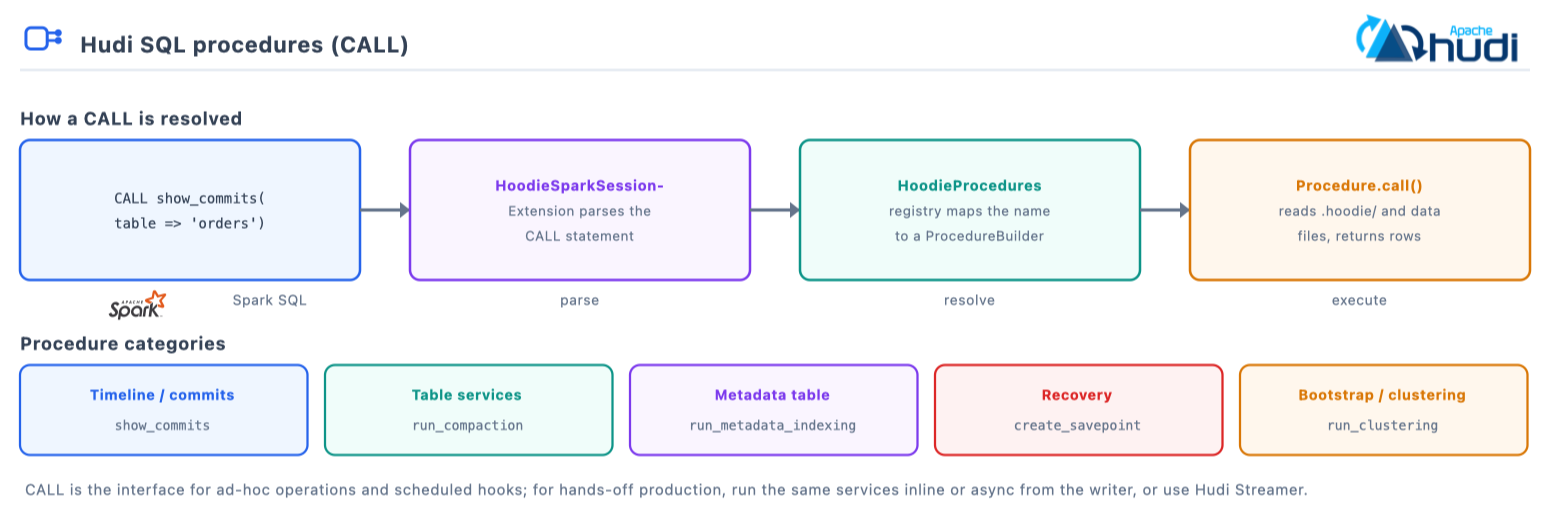
| Category | Procedures |
|---|---|
| Timeline and commits | show_commits, show_commit_files, show_commit_partitions |
| Table services | run_compaction, schedule_compaction, run_clustering, run_clean |
| Metadata table | show_metadata_table_partitions, show_metadata_table_stats, run_metadata_indexing |
| Recovery | create_savepoint, show_savepoints, rollback_to_savepoint, delete_savepoint |
| Bootstrap and clustering | run_bootstrap, schedule_clustering, run_clustering |
CALL show_commits(table => 'hudi_table', limit => 10);

-- op takes 'run', 'schedule' or 'scheduleandexecute'
CALL run_compaction(op => 'run', table => 'hudi_table');

-- order_strategy takes 'linear', 'z-order' or 'hilbert'
CALL run_clustering(
  table => 'hudi_table',
  order => 'user_id,event_type',
  order_strategy => 'z-order'
);

CALL show_metadata_table_partitions(table => 'hudi_table');
19. Savepoints and restore
A savepoint pins the file versions of a commit so cleaning and archival cannot remove them; restore rewinds the table to that instant. Together they are Hudi’s point-in-time recovery, which is a different guarantee from time travel: time travel reads an old state, restore makes it current again.
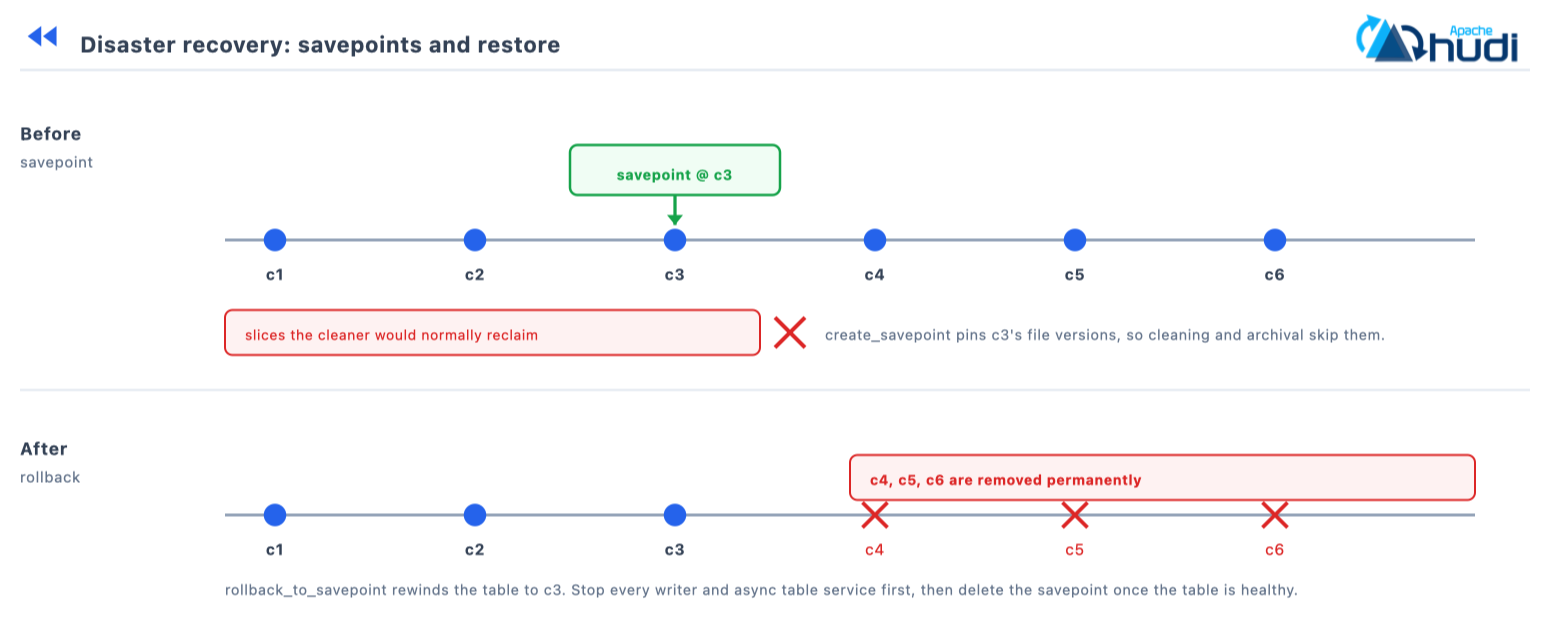
| Procedure | What it does |
|---|---|
create_savepoint |
Pin a commit’s file versions against cleaning and archival |
show_savepoints |
List the savepoints on the table |
rollback_to_savepoint |
Rewind to the savepointed instant; later commits are removed |
delete_savepoint |
Unpin, so the cleaner may reclaim those files |
rollback_to_instant |
Undo the latest instant without a prior savepoint |
-- 1. Before risky maintenance: a backfill, a migration
CALL create_savepoint(table => 'hudi_table', commit_time => '20260713100000000');

-- 2. What restore points exist
CALL show_savepoints(table => 'hudi_table');

-- 3. Rewind. Stop every writer and async table service first
CALL rollback_to_savepoint(table => 'hudi_table', instant_time => '20260713100000000');

-- 4. Release it once the table is healthy again
CALL delete_savepoint(table => 'hudi_table', instant_time => '20260713100000000');
Note:
rollback_to_savepointis destructive. Every commit after the savepoint is removed permanently, and all writers and async table services must be stopped before restoring. Savepointed file versions are exempt from cleaning, so long-lived savepoints grow storage; delete them once the risk has passed.
20. Catalog integration
Publish table metadata to external catalogs so engines can discover and query the tables.
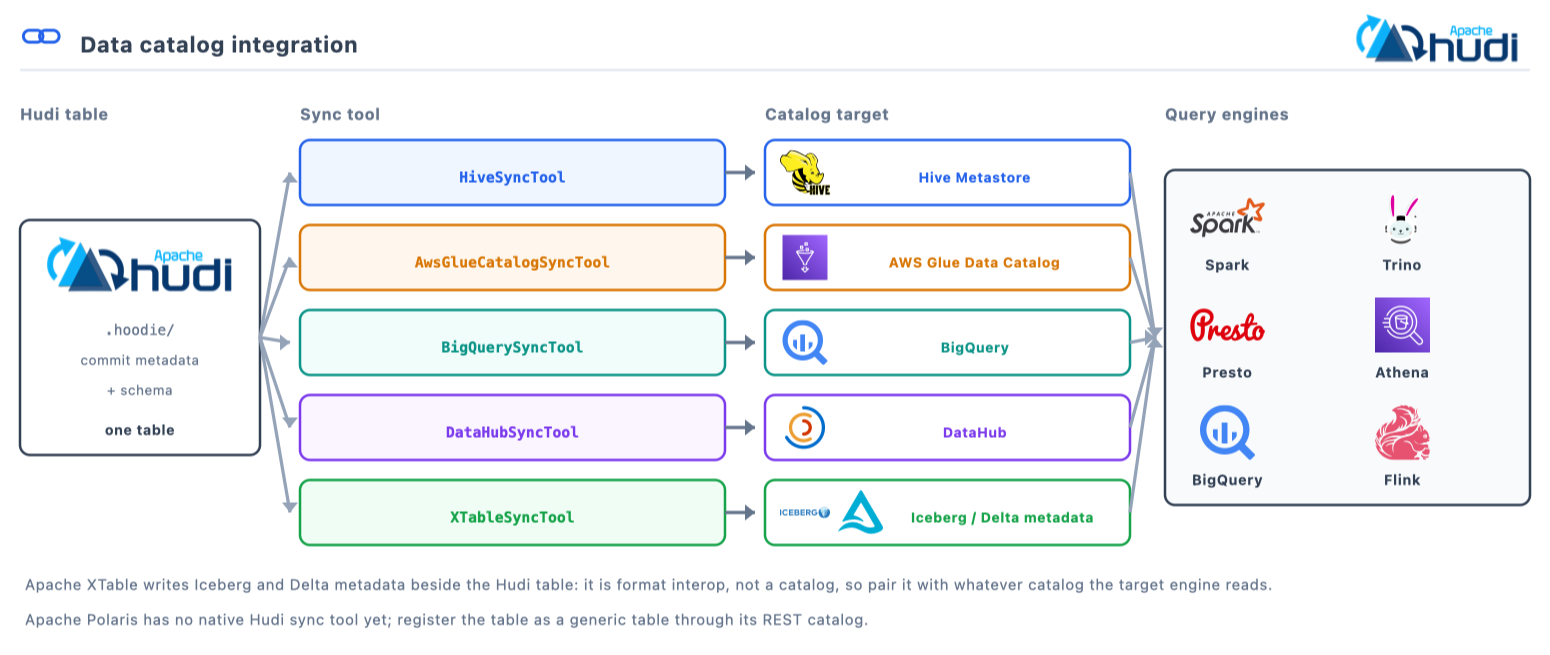
| Catalog | Sync tool | Config prefix |
|---|---|---|
| Hive Metastore | HiveSyncTool |
hoodie.datasource.hive_sync.* |
| AWS Glue | AwsGlueCatalogSyncTool |
hoodie.datasource.meta.sync.glue.* |
| Google BigQuery | BigQuerySyncTool |
hoodie.gcp.bigquery.sync.* |
| DataHub | DataHubSyncTool |
hoodie.meta.sync.datahub.* |
| Apache XTable | XTableSyncTool |
hoodie.xtable.formats.to.sync |
Hive sync registers a Merge-on-Read table under two names, and HiveSyncTool
spells the suffixes out: _rt serves snapshot reads and _ro serves
read-optimized reads. When an engine looks a commit behind, check which of the
two the catalog handed it.
hudi_options_hive = {
    'hoodie.datasource.hive_sync.enable': 'true',
    'hoodie.datasource.hive_sync.mode': 'hms',        # or 'jdbc', 'hiveql'
    'hoodie.datasource.hive_sync.metastore.uris': 'thrift://metastore.internal:9083',
    'hoodie.datasource.hive_sync.database': 'analytics',
    'hoodie.datasource.hive_sync.table': 'orders',
    'hoodie.datasource.hive_sync.partition_fields': 'order_date',
    'hoodie.datasource.hive_sync.partition_extractor_class':
        'org.apache.hudi.hive.MultiPartKeysValueExtractor',
}

hudi_options_glue = {
    'hoodie.datasource.meta.sync.enable': 'true',
    'hoodie.meta.sync.client.tool.class': 'org.apache.hudi.aws.sync.AwsGlueCatalogSyncTool',
    'hoodie.datasource.write.hive_style_partitioning': 'true',
    'hoodie.datasource.hive_sync.database': 'analytics',
    'hoodie.datasource.hive_sync.table': 'orders',
}
Note: Apache XTable is a format-interoperability tool, writing Iceberg and Delta metadata alongside Hudi, rather than a catalog. Pair it with whatever catalog the target engine reads.
21. Writer interfaces
The same table accepts writes through four Spark entry points, sharing the writer configs above and differing only in how the pipeline is driven.
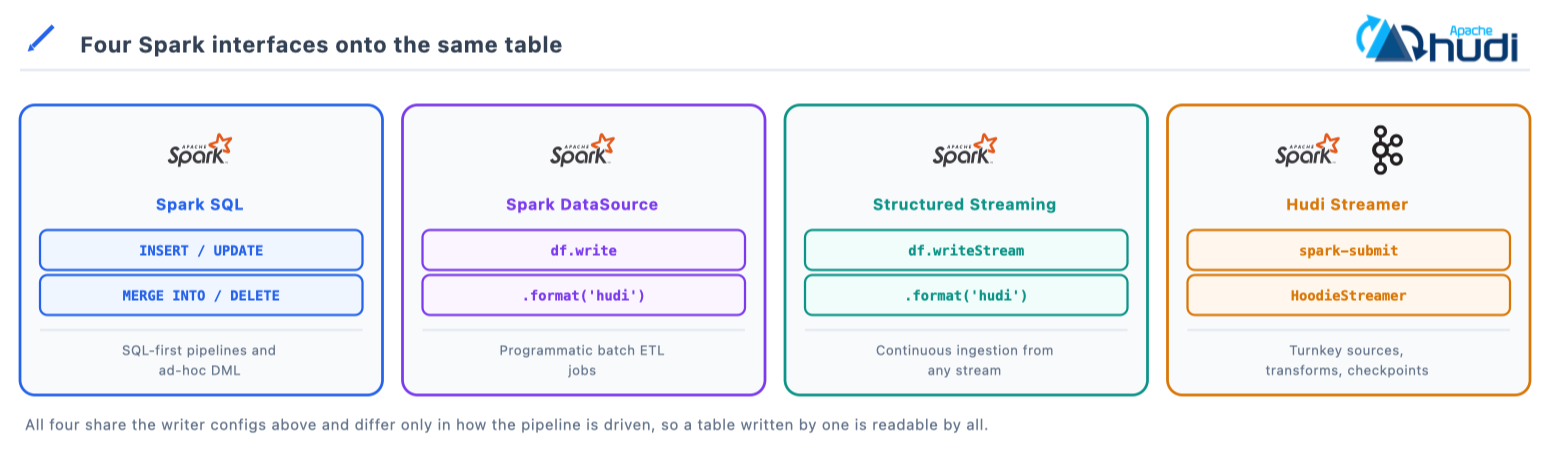
| Interface | How you write | Best for |
|---|---|---|
| Spark SQL | INSERT INTO, UPDATE, MERGE INTO, DELETE FROM |
SQL-first pipelines and ad-hoc DML |
| Spark DataSource | df.write.format('hudi') |
Programmatic batch ETL |
| Structured Streaming | df.writeStream.format('hudi') |
Continuous ingestion from a streaming DataFrame |
| Hudi Streamer | spark-submit with HoodieStreamer |
Turnkey ingestion: sources, transforms, checkpoints |
stream_df.writeStream.format('hudi') \
    .options(**hudi_options) \
    .option('checkpointLocation', 's3a://lakehouse-prod/checkpoints/orders') \
    .outputMode('append') \
    .start('s3a://lakehouse-prod/warehouse/orders')
22. Hudi Streamer
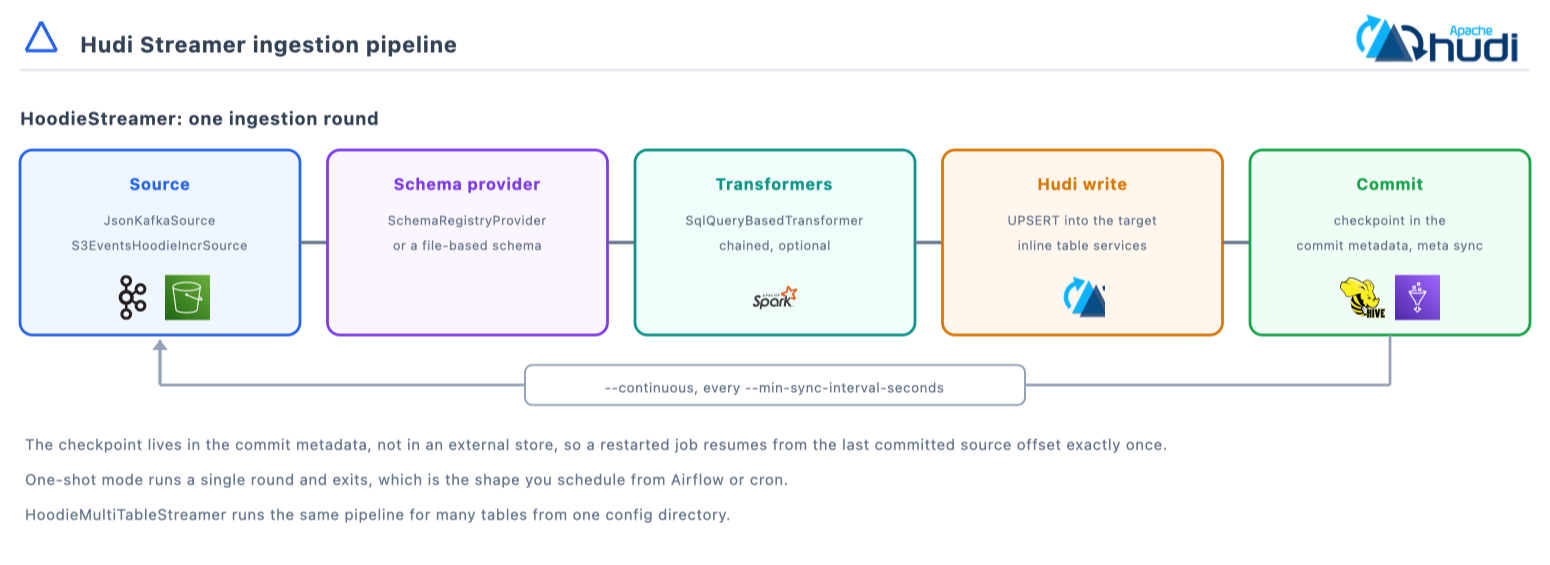
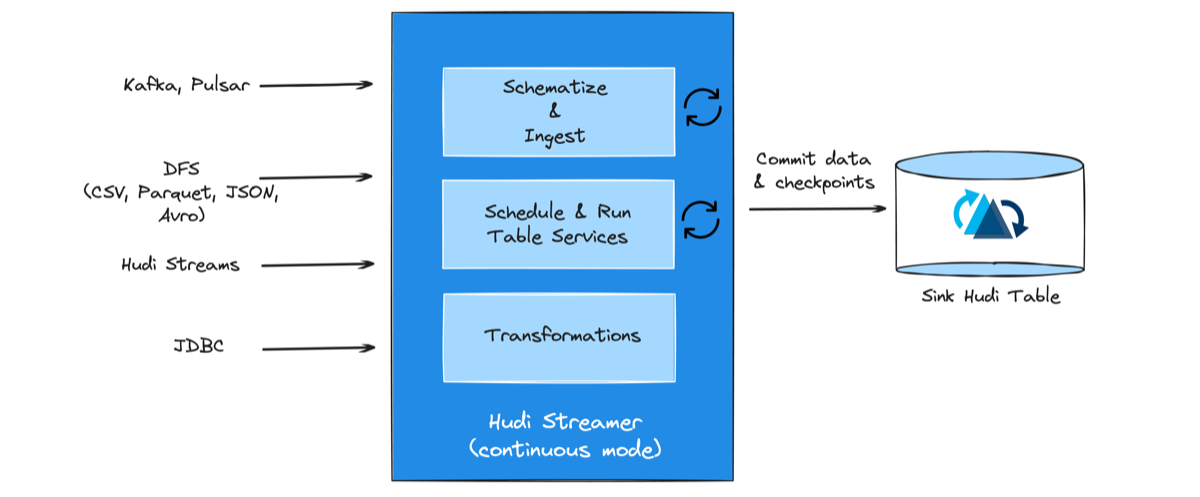
HoodieStreamer,
formerly DeltaStreamer, is a self-contained Spark job for one-shot or
--continuous ingestion: source, then schema provider, then transformers, then
the upsert, checkpointed for exactly-once resume.
| Source family | Classes |
|---|---|
| Kafka | JsonKafkaSource, AvroKafkaSource, ProtoKafkaSource |
| DFS | JsonDFSSource, AvroDFSSource, ParquetDFSSource, CsvDFSSource, ORCDFSSource |
| CDC | PostgresDebeziumSource, MysqlDebeziumSource |
| SQL and JDBC | SqlSource, SqlFileBasedSource, JdbcSource |
| Incremental chaining | HoodieIncrSource, S3EventsHoodieIncrSource, GcsEventsHoodieIncrSource |
| Other streams | PulsarSource, JsonKinesisSource |
| Schema providers | SchemaRegistryProvider, FilebasedSchemaProvider, JdbcbasedSchemaProvider, HiveSchemaProvider |
All of these live under
hudi-utilities,
and the set is pluggable through org.apache.hudi.utilities.sources.Source.
Operations are UPSERT (the default), INSERT, BULK_INSERT and DELETE;
HoodieMultiTableStreamer runs many tables from one job.
HUDI_SPARK_BUNDLE=/tmp/hudi-spark3.5-bundle_2.12-1.2.0.jar
HUDI_UTILITIES_SLIM_BUNDLE=/tmp/hudi-utilities-slim-bundle_2.12-1.2.0.jar

spark-submit \
  --jars $HUDI_SPARK_BUNDLE,$HUDI_UTILITIES_SLIM_BUNDLE \
  --class org.apache.hudi.utilities.streamer.HoodieStreamer $HUDI_UTILITIES_SLIM_BUNDLE \
  --table-type COPY_ON_WRITE \
  --source-class org.apache.hudi.utilities.sources.JsonKafkaSource \
  --source-ordering-field ts \
  --target-base-path s3a://lakehouse-prod/warehouse/events \
  --target-table events \
  --props /etc/hudi/kafka-source.properties \
  --schemaprovider-class org.apache.hudi.utilities.schema.SchemaRegistryProvider \
  --continuous --min-sync-interval-seconds 60
hoodie.datasource.write.recordkey.field=event_id
hoodie.datasource.write.precombine.field=ts
hoodie.datasource.write.partitionpath.field=event_date
hoodie.datasource.write.keygenerator.class=org.apache.hudi.keygen.SimpleKeyGenerator
hoodie.streamer.source.kafka.topic=events_topic
bootstrap.servers=kafka-broker1:9092,kafka-broker2:9092
group.id=hudi_ingestion_group
auto.offset.reset=latest
enable.auto.commit=false
hoodie.datasource.hive_sync.enable=true
hoodie.datasource.hive_sync.database=analytics
hoodie.datasource.hive_sync.table=events
hoodie.datasource.hive_sync.partition_fields=event_date
23. Tuning
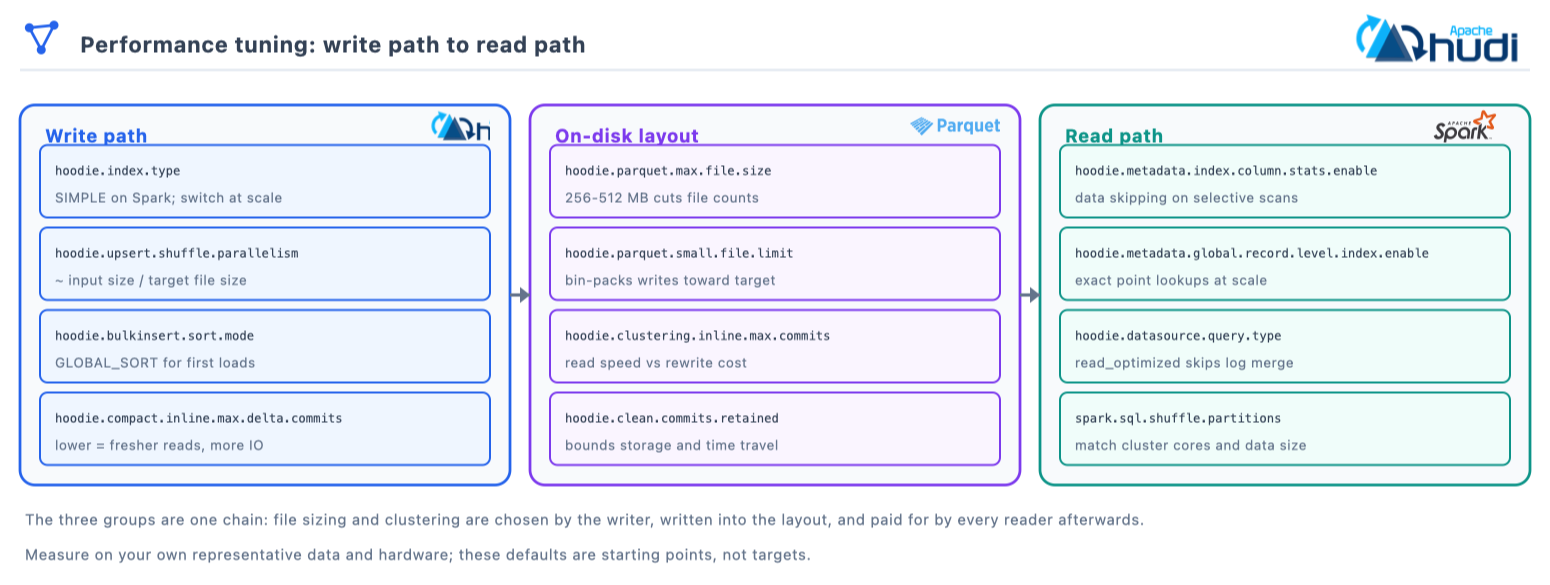
The knobs that most affect write and read performance. They fall into three stages, and the middle one is where a write-side decision becomes a read-side cost.
| Area | Config key | Default | Guidance |
|---|---|---|---|
| Small file handling | hoodie.parquet.small.file.limit |
104857600, 100 MB | Bin-packs writes toward the target size |
| Target file size | hoodie.parquet.max.file.size |
125829120, 120 MB | 256 to 512 MB on cloud storage cuts file counts |
| Shuffle parallelism | hoodie.{upsert,insert,bulkinsert}.shuffle.parallelism |
0, automatic | Around input size divided by target file size |
| Compaction frequency | hoodie.compact.inline.max.delta.commits |
5 | Lower means fresher reads and more IO |
| Cleaner retention | hoodie.clean.commits.retained |
10 | Bounds both storage and how far back time travel reaches |
| Bloom filter | hoodie.bloom.index.filter.type |
DYNAMIC_V0 |
Pair with max-entries sizing |
| Record-level index | hoodie.metadata.global.record.level.index.enable |
false |
Exact global lookups at scale |
| Index selection | hoodie.index.type |
SIMPLE on Spark |
BUCKET or a record-level index at scale |
| Bulk insert sort | hoodie.bulkinsert.sort.mode |
NONE |
GLOBAL_SORT for first loads |
| Clustering frequency | hoodie.clustering.inline.max.commits |
4 | Balance read speed against rewrite cost |
| Spark shuffle | spark.sql.shuffle.partitions |
200 | Match cluster cores and data size |
Treat every number above as a starting point and measure on your own data. File sizing and parallelism in particular depend on your record width and cluster shape, which no default can know.
24. Diagnosing a table
| Symptom | Where to look | Likely cause |
|---|---|---|
| Reads get slower every day, nothing errors | hudi_filesystem_view, Log_File_Unscheduled |
Compaction is not running on a Merge-on-Read table, so log files accumulate per file slice |
| Upsert time grows with the table, not the batch | hoodie.properties, the hoodie.index.type line |
The index is unset, so SIMPLE is scanning. Move to a record-level or bucket index |
| Storage grows far faster than data | CALL show_commits, and the cleaner config |
Cleaning is not keeping up, or a long-lived savepoint is pinning file slices |
| Duplicate keys after a partition value changed | The index scope | A non-global index, where the same key now lives in two partitions |
| A config you set looks ignored | .hoodie/hoodie.properties |
It is one of the properties frozen at table creation, so the writer option cannot change it |
| Writes fail with a commit conflict | The concurrency mode and lock provider | Two writers with optimistic concurrency. Expected behaviour; consider non-blocking mode for Merge-on-Read |
| An engine reads a commit behind | Which synced table name it was given | _ro serves read-optimized reads; _rt serves snapshot reads |
| Planning slower than the scan | hoodie.metadata.enable |
The metadata table is off, so planning is listing object storage |
-- The one-query health check: unscheduled log bytes per file group
SELECT File_ID, Partition_Path, Log_File_Count, Log_File_Unscheduled
FROM hudi_filesystem_view('hudi_table')
ORDER BY Log_File_Unscheduled DESC
LIMIT 20;

-- Is compaction actually completing?
CALL show_compaction(table => 'hudi_table', limit => 10);
The failure worth planning for is the quiet one. Nothing raises an error when compaction stops; snapshot reads simply merge a little more every hour, which is why the query above belongs on a schedule rather than in an incident.
25. Best practices
- Use a record-level index on large tables. Exact key-to-file lookups avoid bloom false-positive scans at billion-row scale.
- Resist over-partitioning. Thousands of tiny partitions mean small files and metadata pressure. Prefer coarse time buckets.
- Point BI at snapshot queries. Latest committed state with no change-tracking overhead.
- Point ETL at incremental queries. Process what changed since the last run instead of rescanning.
- Enable CDC when a consumer needs before and after images, since it persists extra data with every commit.
- Tune the cleaner deliberately. Retained commits bound storage growth and how far back time travel and rollback can reach.
- Tune compaction from write frequency. Fewer delta commits between compactions means fresher reads and more write amplification.
- Enable schema-on-read only when you need rename, drop or reorder, since it is experimental and cannot be turned off afterwards.
- When a config looks ignored, read what the table actually recorded.
.hoodie/hoodie.propertiesholds the frozen table contract, and reading it settles most arguments about why a writer option did not take effect.
Conclusion
A reference page is only worth keeping open if you trust it, so here is what to re-check when you move off the release this was written against. Read the release notes for table-version changes first, because a table version bump is what changes on-disk layout and reader compatibility. Then re-check the defaults in the tuning table, since file sizing and retention defaults are the ones that move quietly between releases. Config key renames are the third thing, and Hudi is good about keeping the old spelling as a registered alternative, so an upgrade keeps working; it just leaves you writing a name that is no longer the canonical one.
The three decisions worth more than the rest of this page put together are the table type, the record key and the index. The first two are frozen at creation and the third governs whether your write cost tracks your batch or your table. Everything else here is a knob you can turn later.
References
- Hudi configuration reference for every
hoodie.*key with its default and since-version - Hudi SQL DDL and SQL DML for the Spark SQL surface used throughout this page
- Hudi concurrency control for the four controls, the lock providers and the multi-writer setup
HoodieIndex.javafor the authoritativeIndexTypelist- Apache Hudi: architecture, features and what makes it different for the guide this page is the reference companion to
Trademarks
Apache Hudi, Apache Spark, Apache Flink, Apache Hive, Apache Kafka, Apache Parquet, Apache Avro, Apache Iceberg, Apache XTable (incubating), Apache Hadoop and Apache are either registered trademarks or trademarks of The Apache Software Foundation in the United States and other countries. Delta Lake is a trademark of the Linux Foundation.
Found this useful?
These posts and tools are free. If one saved you an afternoon, you can buy me a coffee.