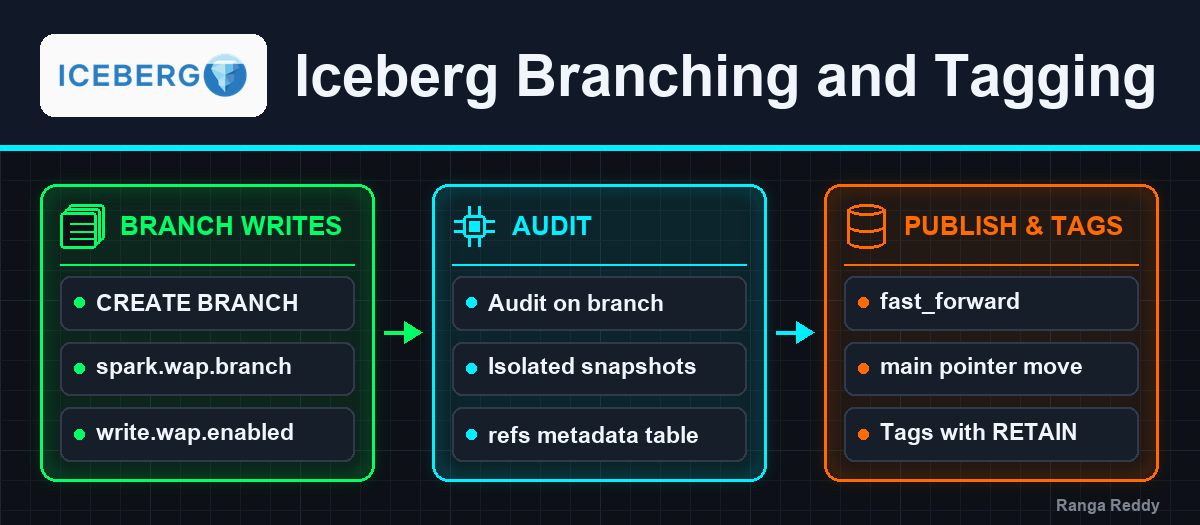
Branching, tagging and write-audit-publish in Iceberg: CI for a table
A branch lets a job write to a table nobody is reading, and publishing is a pointer move. Here is that measured - branch isolation, what spark.wap.branch redirects that is easy to miss, fast-forward, tags with retention, and the divergence that makes fast-forward refuse.
- What a branch actually is
- Branches are genuinely isolated
- Write-audit-publish, and the redirect that surprises people
- Publishing is a pointer move, not a merge
- Throwing work away is free
- Tags: a snapshot with a name
- Where this fits in practice
- Run it yourself
- Common misconceptions
- Frequently asked questions
- Conclusion
- References
- Trademarks
TL;DR
- A branch is an independent pointer into the same table. Writing two orders to a branch left
mainat 2 rows while the branch held 4: same table, same files, no copy.spark.wap.branchredirects plain reads as well as writes, once the branch exists. The same session can still readmainby naming it:t.branch_mainandVERSION AS OF 'main'both returnedmain’s 2 rows while the plain name returned the branch’s 4.- Without
write.wap.enabledon the table,spark.wap.branchis ignored. The “staged” write landed onmain, with no warning and no branch created.- Publishing is
fast_forward, a pointer move rather than a merge, and it refuses oncemainhas moved:Cannot fast-forward: main is not an ancestor of feature.cherrypick_snapshotcan still replay a single append from the diverged branch ontomain.- Tags are named snapshots.
RETAIN 30 DAYSis when the tag itself expires, not what protects it: a tag withoutRETAINnever expires and kept its snapshot throughexpire_snapshots, while aRETAIN 1 MINUTEStag was removed by the next expiry.
The pattern every data team reinvents is “check it before anyone sees it”. Usually that means writing to a staging table, running assertions, and then copying or swapping, which costs a full copy of the data and a rename that is not atomic anywhere object storage is involved.
Iceberg does it with a pointer. A branch is another named reference into the same
metadata tree, so a write to a branch produces files that only readers of that
branch can see, and publishing is updating which snapshot main names.
Every output below comes from the two scripts in Run it yourself, run on Spark 3.5.9 with Iceberg 1.11.0 on the local datalake-playground stack.
What a branch actually is
The three-tier model has the catalog holding one pointer to the current metadata file, and that file holding a tree of snapshots. A branch adds a named reference to a snapshot in that tree.
flowchart LR
    S1["snapshot 1"] --> S2["snapshot 2"]
    S2 --> S3["snapshot 3<br/>(main)"]
    S2 --> B1["snapshot 4<br/>(audit)"]
Nothing is copied. Both refs point into one set of data files, and a file referenced by either is kept. That is why creating a branch is instant whatever the table’s size, and why deleting one costs nothing.
ALTER TABLE ice.blog_branching.orders CREATE BRANCH audit;
Branches are genuinely isolated
A table of two orders, a branch, then a write to the branch only:
INSERT INTO ice.blog_branching.orders.branch_audit
VALUES (1003, 'PLACED', 310.25), (1004, 'PAID', 42.00);
MAIN_ROWS   2
AUDIT_ROWS  4
REFS        [('audit', 'BRANCH'), ('main', 'BRANCH')]
data files in main / in any ref: 2 / 4
Readers of the table see two rows throughout. main references its two data
files; the branch references those two plus the two it wrote. The refs metadata
table lists every named reference and its kind, which is the place to look when
you want to know what exists:
SELECT name, type, snapshot_id, max_reference_age_in_ms FROM ice.blog_branching.orders.refs;
Note that main is itself a branch. There is nothing special about it beyond
being the default.
A branch named in the identifier must already exist. INSERT INTO t.branch_missing
fails with Cannot use branch (does not exist): missing, so create it first with
CREATE BRANCH.
Write-audit-publish, and the redirect that surprises people
Writing to table.branch_audit works, but it requires changing the job’s SQL,
which is exactly what you do not want, because then the audited job is not the
job that runs in production.
That is what the WAP configuration is for. Enable it on the table, set one session property, and an unmodified job writes to the branch:
CREATE TABLE ice.blog_branching.orders_wap (order_id BIGINT, status STRING, amount DECIMAL(10,2))
USING iceberg
TBLPROPERTIES ('write.wap.enabled' = 'true');
spark.conf.set("spark.wap.branch", "staging")
spark.sql("INSERT INTO ice.blog_branching.orders_wap VALUES (1003, 'PLACED', 310.25), (1004, 'PAID', 42.00)")
The branch does not have to exist first: the first write creates it. Measured,
with main holding 2 rows before:
refs before the job     : [('main', 'BRANCH')]
plain read, no branch yet: 2 (staging does not exist, so reads stay on main)
refs after the job      : [('main', 'BRANCH'), ('staging', 'BRANCH')]
plain read now           : 4 (redirected to staging)
t.branch_main            : 2
VERSION AS OF 'main'     : 2
Read the fourth line carefully, because it is the part that catches people. While
spark.wap.branch is set and the branch exists, plain reads are redirected
too: SELECT count(*) against the table name returned the branch’s four rows,
not main’s two. That is the correct design, since a job that writes and then
asserts should be asserting on what it just wrote.
It does not trap you in the branch, though. SparkReadConf returns an explicit
branch first and consults spark.wap.branch only when none was given, so naming
main still reads main from the same session: t.branch_main and
VERSION AS OF 'main' both returned 2. What you cannot do is write to a named
branch while WAP is set:
INSERT INTO t.branch_main with wap.branch set: Cannot write to both branch and WAP branch, but got branch [main] and WAP branch [staging]
WAP only works on tables that opt in. SparkWriteConf.branch() reads
spark.wap.branch only when the table has write.wap.enabled=true. On a table
without it, the same session property is ignored, and the write goes to main:
== spark.wap.branch without write.wap.enabled ==
refs: [('main', 'BRANCH')]  main rows: 2
The second row landed on main and no staging branch was created. A pipeline
that relies on WAP for isolation should check the table property before it
writes, or write to t.branch_<name> explicitly.
The whole workflow is then three steps and no data movement:
# 1. write: the production job, unmodified
spark.conf.set("spark.wap.branch", "staging")
run_the_job()

# 2. audit: against the branch
bad = spark.sql("""SELECT count(*) FROM ice.blog_branching.orders_wap.branch_staging
                   WHERE amount <= 0 OR status IS NULL""").first()[0]

# 3. publish: a pointer move
spark.conf.unset("spark.wap.branch")
if bad == 0:
    spark.sql("CALL ice.system.fast_forward('blog_branching.orders_wap', 'main', 'staging')")
AUDIT_BAD_ROWS           : 0
after unsetting, main    : 2
AFTER_PUBLISH main       : 4
If the audit fails, nothing is published and nothing needs undoing. Readers of the table never saw the candidate data at any point.
The older form: spark.wap.id
Before branches, WAP staged a single snapshot. Set spark.wap.id instead, and the
write commits a snapshot that is not made current, tagged with the id in its
summary; publish_changes then publishes it by that id:
staged snapshot: [(6951097146348840297, 'run-2026-09-30')]
main rows before publish: 4
Row(source_snapshot_id=6951097146348840297, current_snapshot_id=6951097146348840297)
main rows after publish : 5
The two ids are equal because the staged snapshot’s parent was still main, so
the publish was a fast-forward and created no new snapshot. The two forms do not
mix: Cannot set both WAP ID and branch, but got ID [run-x] and branch [staging].
Publishing is a pointer move, not a merge
fast_forward returns exactly what it did:
Row(branch_updated='main', previous_ref=5758665409456594905, updated_ref=835809279677340196)
MAIN_ROWS after publish 4
Two snapshot ids: where main pointed, and where it points now. That is the whole
operation.
Which brings the important limitation. Iceberg has no branch merge. A
fast-forward is only valid when the target is an ancestor of the source, which
means main has not moved since the branch was created. Let both move and it
refuses:
MAIN 2   FEATURE 2
fast_forward: Cannot fast-forward: main is not an ancestor of feature
main took an independent write, so the two references diverged, and nothing in
Iceberg merges two histories. What it does have is cherrypick_snapshot, which
replays one snapshot onto the current state. Picking the branch’s commit onto
the diverged main:
cherrypick_snapshot of the feature commit onto main:
   Row(source_snapshot_id=4551797762619646334, current_snapshot_id=2821957304004513186)
   MAIN now 3 [2001, 2002, 2003]
main now holds its own order 2003 and the branch’s 2002, in a new snapshot. It
works snapshot by snapshot and only for some operations: CherryPickOperation
accepts an append, a dynamic overwrite based on an ancestor of the current
state, or a fast-forward, and rejects anything else with
Cannot cherry-pick snapshot ...: not append, dynamic overwrite, or fast-forward.
The mental model to carry is git’s fast-forward and cherry-pick without git’s
merge.
The practical consequences:
- Keep branches short-lived. The longer a branch exists, the more likely
mainmoves and the candidate stops being fast-forwardable. - One writer to
mainwhile a branch is outstanding, or accept that you may have to cherry-pick or redo the work. - Re-branch rather than reconcile when the branch holds updates or deletes; cherry-pick is for appends.
Throwing work away is free
The failure path is the reason to like this pattern:
ALTER TABLE ice.blog_branching.orders DROP BRANCH scratch;
AFTER_DROP_REFS   [('audit', 'BRANCH'), ('main', 'BRANCH')]
MAIN_UNCHANGED    4
files in any snapshot before / after drop: 5 / 5
expire_snapshots deleted data files: 1 | files in any snapshot now: 4
The ref is gone and main is untouched. The branch’s data file is still listed
right after the drop, because its snapshot is still in the metadata; the next
snapshot expiry removed it.
There is no special cleanup, and crucially no half-published state to repair.
Compare that with the staging-table version of this workflow, where a failed run leaves a populated staging table someone has to notice and truncate.
Tags: a snapshot with a name
A tag is a reference that is not meant to move. Where a branch is “work in progress”, a tag is “this exact state, remembered”:
ALTER TABLE ice.blog_branching.orders_tags CREATE TAG `q3-close` RETAIN 30 DAYS;
ALTER TABLE ice.blog_branching.orders_tags CREATE TAG `audit-2026`;
   ('audit-2026', 'TAG', None, None, None)
   ('main', 'BRANCH', None, None, None)
   ('nightly', 'BRANCH', 604800000, 3, 172800000)
   ('q3-close', 'TAG', 2592000000, None, None)
2592000000 ms is exactly thirty days. What that number controls is easy to get
backwards: it is the maximum age of the reference, after which
expire_snapshots removes the tag. It is not what protects the tagged snapshot.
Every live ref protects the snapshot it points at, so a tag without RETAIN
(None above, meaning never) is the most durable kind. Measured:
VERSION AS OF 'q3-close'   : 2
snapshots before expiry    : 4
snapshots after expiry     : 2
tag without RETAIN still reads: 2 rows
waiting 65 s for a 1-minute tag to age out ...
refs after expiry: [('audit-2026', 'TAG'), ('main', 'BRANCH'), ('nightly', 'BRANCH'), ('q3-close', 'TAG')]
Expiry with retain_last => 1 kept only the tagged snapshot and the current one.
A tag created with RETAIN 1 MINUTES, then left for 65 seconds, was gone after the
next expiry. So RETAIN is how you make a tag temporary; leave it off for a
state that must stay reproducible.
Reading through a tag is ordinary time travel by name, the same syntax as for a branch. That is the case tags earn their place in: a reported number that must still be reproducible after the underlying table has moved on. See time travel and rollback for the snapshot-id form and what rollback leaves behind.
Where this fits in practice
| Want | Use |
|---|---|
| Validate before anyone reads it | branch + spark.wap.branch (on a write.wap.enabled table) + fast_forward |
| Remember a state for reproducibility | tag, without RETAIN |
| Keep a reference for a limited time | tag or branch with RETAIN |
| Undo a bad write already published | rollback, not branching |
| Bring one append from a diverged branch | cherrypick_snapshot |
| Combine two lines of work | not available: re-branch and re-run |
The sweet spot is short-lived, single-purpose branches in an automated pipeline: create, write, assert, publish or drop, all inside one job run. Branches held open for days drift into the divergence problem, and the cost of re-running is usually lower than the cost of discovering you cannot publish.
Run it yourself
Both scripts run on the local lakehouse stack described in Run every demo on this blog locally:
git clone https://github.com/rangareddy/datalake-playground.git
cd datalake-playground
SPARK_VERSION=3.5.9 sh run_datalake.sh start
sh run_datalake.sh status
Save this as branches_and_tags.py. It covers isolation, fast-forward,
divergence and cherry-pick, dropping a branch, tags and ref retention; the tag
section waits 65 seconds for a one-minute tag to age out:
"""Branches, fast-forward, divergence, drop, tags and ref retention on an Iceberg table.

Run inside datalake-playground:
  docker cp branches_and_tags.py spark-master:/tmp/
  docker exec spark-master bash -c '$SPARK_HOME/bin/spark-submit --master "local[2]" \
    --driver-memory 1g --jars $(ls $ICEBERG_HOME/iceberg-spark-runtime*.jar) \
    /tmp/branches_and_tags.py'
"""
from pyspark.sql import SparkSession

spark = (
    SparkSession.builder.appName("iceberg-branches-and-tags")
    .config("spark.sql.extensions",
            "org.apache.iceberg.spark.extensions.IcebergSparkSessionExtensions")
    .config("spark.serializer", "org.apache.spark.serializer.KryoSerializer")
    .config("spark.sql.catalog.ice", "org.apache.iceberg.spark.SparkCatalog")
    .config("spark.sql.catalog.ice.type", "hive")
    .config("spark.sql.catalog.ice.uri", "thrift://hive-metastore:9083")
    .config("spark.sql.catalog.ice.warehouse", "s3a://warehouse/")
    .config("spark.eventLog.enabled", "false")
    .config("spark.ui.enabled", "false")
    .getOrCreate()
)
spark.sparkContext.setLogLevel("ERROR")
sql = spark.sql
NS = "ice.blog_branching"


def count(table):
    return sql(f"SELECT count(*) FROM {table}").first()[0]


def refs(table):
    return [(r.name, r.type) for r in
            sql(f"SELECT name, type FROM {table}.refs ORDER BY name").collect()]


def fails(label, statement):
    try:
        sql(statement).collect()
        print(f"{label}: succeeded")
    except Exception as e:
        java = getattr(e, "java_exception", None)     # Py4JJavaError carries the JVM exception
        msg = java.getMessage() if java is not None else str(e)
        print(f"{label}: {msg.splitlines()[0][:160]}")


sql(f"CREATE NAMESPACE IF NOT EXISTS {NS}")

# ------------------------------------------------------------------ isolation
ORDERS = f"{NS}.orders"
sql(f"DROP TABLE IF EXISTS {ORDERS} PURGE")
sql(f"CREATE TABLE {ORDERS} (order_id BIGINT, status STRING, amount DECIMAL(10,2)) USING iceberg")
sql(f"INSERT INTO {ORDERS} VALUES (1001, 'PLACED', 120.50), (1002, 'PLACED', 75.00)")
sql(f"ALTER TABLE {ORDERS} CREATE BRANCH audit")
sql(f"INSERT INTO {ORDERS}.branch_audit VALUES (1003, 'PLACED', 310.25), (1004, 'PAID', 42.00)")
print("== isolation ==")
print("MAIN_ROWS  ", count(ORDERS))
print("AUDIT_ROWS ", count(f"{ORDERS}.branch_audit"))
print("REFS       ", refs(ORDERS))
print("data files in main / in any ref:",
      count(f"{ORDERS}.files"), "/", count(f"{ORDERS}.all_data_files"))

# ----------------------------------------------------------------- fast-forward
print("\n== fast-forward ==")
r = sql(f"CALL ice.system.fast_forward('blog_branching.orders', 'main', 'audit')").first()
print(r)
print("MAIN_ROWS after publish", count(ORDERS))

# ---------------------------------------------------------------- divergence
DIV = f"{NS}.orders_div"
sql(f"DROP TABLE IF EXISTS {DIV} PURGE")
sql(f"CREATE TABLE {DIV} (order_id BIGINT, status STRING, amount DECIMAL(10,2)) USING iceberg")
sql(f"INSERT INTO {DIV} VALUES (2001, 'PLACED', 10.00)")
sql(f"ALTER TABLE {DIV} CREATE BRANCH feature")
sql(f"INSERT INTO {DIV}.branch_feature VALUES (2002, 'PLACED', 20.00)")
sql(f"INSERT INTO {DIV} VALUES (2003, 'PLACED', 30.00)")          # main moves too
print("\n== divergence ==")
print("MAIN", count(DIV), "  FEATURE", count(f"{DIV}.branch_feature"))
fails("fast_forward", f"CALL ice.system.fast_forward('blog_branching.orders_div', 'main', 'feature')")
feature_snap = sql(f"SELECT snapshot_id FROM {DIV}.refs WHERE name = 'feature'").first()[0]
print("cherrypick_snapshot of the feature commit onto main:")
print("  ", sql(f"CALL ice.system.cherrypick_snapshot('blog_branching.orders_div', {feature_snap})").first())
print("   MAIN now", count(DIV), sorted(r.order_id for r in sql(f"SELECT order_id FROM {DIV}").collect()))

# ----------------------------------------------------------------------- drop
print("\n== drop ==")
sql(f"ALTER TABLE {ORDERS} CREATE BRANCH scratch")
sql(f"INSERT INTO {ORDERS}.branch_scratch VALUES (1999, 'TEST', 1.00)")
before = count(f"{ORDERS}.all_data_files")
sql(f"ALTER TABLE {ORDERS} DROP BRANCH scratch")
print("AFTER_DROP_REFS  ", refs(ORDERS))
print("MAIN_UNCHANGED   ", count(ORDERS))
print("files in any snapshot before / after drop:", before, "/", count(f"{ORDERS}.all_data_files"))
exp = sql(f"CALL ice.system.expire_snapshots(table => 'blog_branching.orders', "
          f"older_than => TIMESTAMP '2099-01-01 00:00:00', retain_last => 1)").first()
print("expire_snapshots deleted data files:", exp.deleted_data_files_count,
      "| files in any snapshot now:", count(f"{ORDERS}.all_data_files"))

# ----------------------------------------------------------------------- tags
TAGS = f"{NS}.orders_tags"
sql(f"DROP TABLE IF EXISTS {TAGS} PURGE")
sql(f"CREATE TABLE {TAGS} (order_id BIGINT, status STRING, amount DECIMAL(10,2)) USING iceberg")
sql(f"INSERT INTO {TAGS} VALUES (3001, 'PLACED', 5.00), (3002, 'PLACED', 6.00)")
sql(f"ALTER TABLE {TAGS} CREATE TAG `q3-close` RETAIN 30 DAYS")
sql(f"ALTER TABLE {TAGS} CREATE TAG `audit-2026` ")                   # no RETAIN
sql(f"ALTER TABLE {TAGS} CREATE BRANCH nightly RETAIN 7 DAYS WITH SNAPSHOT RETENTION 3 SNAPSHOTS 2 DAYS")
print("\n== tags ==")
for r in sql(f"SELECT name, type, max_reference_age_in_ms, min_snapshots_to_keep, "
             f"max_snapshot_age_in_ms FROM {TAGS}.refs ORDER BY name").collect():
    print("  ", tuple(r))
for i in range(3):
    sql(f"INSERT INTO {TAGS} VALUES ({3100 + i}, 'PLACED', 1.00)")
print("VERSION AS OF 'q3-close'   :", count(f"{TAGS} VERSION AS OF 'q3-close'"))
print("snapshots before expiry    :", count(f"{TAGS}.snapshots"))
sql(f"CALL ice.system.expire_snapshots(table => 'blog_branching.orders_tags', "
    f"older_than => TIMESTAMP '2099-01-01 00:00:00', retain_last => 1)").collect()
print("snapshots after expiry     :", count(f"{TAGS}.snapshots"))
print("tag without RETAIN still reads:", count(f"{TAGS} VERSION AS OF 'audit-2026'"), "rows")

sql(f"ALTER TABLE {TAGS} CREATE TAG `short-lived` RETAIN 1 MINUTES")
print("\nwaiting 65 s for a 1-minute tag to age out ...")
import time
time.sleep(65)
sql(f"INSERT INTO {TAGS} VALUES (3200, 'PLACED', 1.00)")
sql(f"CALL ice.system.expire_snapshots(table => 'blog_branching.orders_tags', "
    f"older_than => TIMESTAMP '2099-01-01 00:00:00', retain_last => 1)").collect()
print("refs after expiry:", refs(TAGS))
spark.stop()
Save this as wap_workflow.py. It covers spark.wap.branch, reading main from
inside the WAP session, a table without write.wap.enabled, and
spark.wap.id with publish_changes:
"""Write-audit-publish on Iceberg: spark.wap.branch, spark.wap.id and what they redirect.

Run inside datalake-playground:
  docker cp wap_workflow.py spark-master:/tmp/
  docker exec spark-master bash -c '$SPARK_HOME/bin/spark-submit --master "local[2]" \
    --driver-memory 1g --jars $(ls $ICEBERG_HOME/iceberg-spark-runtime*.jar) \
    /tmp/wap_workflow.py'
"""
from pyspark.sql import SparkSession

spark = (
    SparkSession.builder.appName("iceberg-wap")
    .config("spark.sql.extensions",
            "org.apache.iceberg.spark.extensions.IcebergSparkSessionExtensions")
    .config("spark.serializer", "org.apache.spark.serializer.KryoSerializer")
    .config("spark.sql.catalog.ice", "org.apache.iceberg.spark.SparkCatalog")
    .config("spark.sql.catalog.ice.type", "hive")
    .config("spark.sql.catalog.ice.uri", "thrift://hive-metastore:9083")
    .config("spark.sql.catalog.ice.warehouse", "s3a://warehouse/")
    .config("spark.eventLog.enabled", "false")
    .config("spark.ui.enabled", "false")
    .getOrCreate()
)
spark.sparkContext.setLogLevel("ERROR")
sql = spark.sql
NS = "ice.blog_branching"
WAP = f"{NS}.orders_wap"


def count(table):
    return sql(f"SELECT count(*) FROM {table}").first()[0]


def refs(table):
    return [(r.name, r.type) for r in
            sql(f"SELECT name, type FROM {table}.refs ORDER BY name").collect()]


def fails(label, statement):
    try:
        sql(statement).collect()
        print(f"{label}: succeeded")
    except Exception as e:
        java = getattr(e, "java_exception", None)     # Py4JJavaError carries the JVM exception
        msg = java.getMessage() if java is not None else str(e)
        print(f"{label}: {msg.splitlines()[0][:160]}")


def run_the_job():
    """The production job, unmodified: it names only the table."""
    sql(f"INSERT INTO {WAP} VALUES (1003, 'PLACED', 310.25), (1004, 'PAID', 42.00)")


sql(f"CREATE NAMESPACE IF NOT EXISTS {NS}")
sql(f"DROP TABLE IF EXISTS {WAP} PURGE")
sql(f"""CREATE TABLE {WAP} (order_id BIGINT, status STRING, amount DECIMAL(10,2))
        USING iceberg TBLPROPERTIES ('write.wap.enabled' = 'true')""")
sql(f"INSERT INTO {WAP} VALUES (1001, 'PLACED', 120.50), (1002, 'PLACED', 75.00)")

print("== spark.wap.branch ==")
spark.conf.set("spark.wap.branch", "staging")
print("refs before the job     :", refs(WAP))
print("plain read, no branch yet:", count(WAP), "(staging does not exist, so reads stay on main)")
run_the_job()
print("refs after the job      :", refs(WAP))
print("plain read now           :", count(WAP), "(redirected to staging)")
print("t.branch_main            :", count(f"{WAP}.branch_main"))
print("VERSION AS OF 'main'     :", count(f"{WAP} VERSION AS OF 'main'"))
fails("INSERT INTO t.branch_main with wap.branch set",
      f"INSERT INTO {WAP}.branch_main VALUES (9, 'X', 0.00)")

# audit, against the branch
bad = sql(f"SELECT count(*) FROM {WAP}.branch_staging WHERE amount <= 0 OR status IS NULL").first()[0]
print("AUDIT_BAD_ROWS           :", bad)
spark.conf.unset("spark.wap.branch")
print("after unsetting, main    :", count(WAP))
fails("INSERT INTO t.branch_missing (no WAP)",
      f"INSERT INTO {WAP}.branch_missing VALUES (9, 'X', 0.00)")
if bad == 0:
    print(sql(f"CALL ice.system.fast_forward('blog_branching.orders_wap', 'main', 'staging')").first())
print("AFTER_PUBLISH main       :", count(WAP))

print("\n== spark.wap.branch without write.wap.enabled ==")
PLAIN = f"{NS}.orders_plain"
sql(f"DROP TABLE IF EXISTS {PLAIN} PURGE")
sql(f"CREATE TABLE {PLAIN} (order_id BIGINT, status STRING, amount DECIMAL(10,2)) USING iceberg")
sql(f"INSERT INTO {PLAIN} VALUES (1, 'PLACED', 1.00)")
spark.conf.set("spark.wap.branch", "staging")
sql(f"INSERT INTO {PLAIN} VALUES (2, 'PLACED', 2.00)")
spark.conf.unset("spark.wap.branch")
print("refs:", refs(PLAIN), " main rows:", count(PLAIN))

print("\n== spark.wap.id: a staged snapshot, then publish_changes ==")
spark.conf.set("spark.wap.id", "run-2026-09-30")
sql(f"INSERT INTO {WAP} VALUES (1005, 'SHIPPED', 18.00)")
spark.conf.unset("spark.wap.id")
staged = sql(f"""SELECT snapshot_id, summary['wap.id'] AS wap_id
                 FROM {WAP}.snapshots WHERE summary['wap.id'] IS NOT NULL""").collect()
print("staged snapshot:", [tuple(r) for r in staged])
print("main rows before publish:", count(WAP))
print(sql(f"CALL ice.system.publish_changes('blog_branching.orders_wap', 'run-2026-09-30')").first())
print("main rows after publish :", count(WAP))

print("\n== both at once ==")
spark.conf.set("spark.wap.branch", "staging")
spark.conf.set("spark.wap.id", "run-x")
fails("wap.id and wap.branch together", f"INSERT INTO {WAP} VALUES (9, 'X', 0.00)")
spark.conf.unset("spark.wap.branch")
spark.conf.unset("spark.wap.id")
spark.stop()
Snapshot ids are random, so yours will differ; the counts and messages will not.
Clean up afterwards: drop the tables first, then remove the folder markers that
PURGE leaves behind.
docker exec spark-master bash -c '$SPARK_HOME/bin/spark-sql --master "local[1]" \
  --jars $(ls $ICEBERG_HOME/iceberg-spark-runtime*.jar) \
  --conf spark.sql.catalog.ice=org.apache.iceberg.spark.SparkCatalog \
  --conf spark.sql.catalog.ice.type=hive \
  --conf spark.sql.catalog.ice.uri=thrift://hive-metastore:9083 \
  -e "DROP TABLE ice.blog_branching.orders PURGE;
      DROP TABLE ice.blog_branching.orders_div PURGE;
      DROP TABLE ice.blog_branching.orders_tags PURGE;
      DROP TABLE ice.blog_branching.orders_wap PURGE;
      DROP TABLE ice.blog_branching.orders_plain PURGE;
      DROP NAMESPACE ice.blog_branching"' 2>/dev/null
docker exec mc /usr/bin/mc rm --recursive --force minio/warehouse/blog_branching.db/
Common misconceptions
“Branching copies the table.” It adds a reference into the existing snapshot tree. Nothing is copied at any size.
“spark.wap.branch only affects writes.” It redirects plain reads in that
session too, once the branch exists: the table appeared to have 4 rows while
main had 2.
“With WAP set, I cannot see main from that session.” Name it:
t.branch_main and VERSION AS OF 'main' still read main.
“Setting spark.wap.branch is enough.” Only on a table with
write.wap.enabled=true. Elsewhere the write goes straight to main.
“I can merge a branch into main.” There is no merge. fast_forward requires
the target to be an ancestor, and cherrypick_snapshot replays one append or
dynamic overwrite at a time.
“A tag is only permanent with RETAIN.” The reverse: without RETAIN a tag
never expires; RETAIN sets when expire_snapshots removes it.
“main is special.” It is a branch like any other; refs lists it as one.
“A failed branch needs cleaning up.” Drop the ref. Ordinary snapshot expiry reclaims the files.
Frequently asked questions
Does WAP work outside Spark?
The branch and tag mechanics are in the table format, but spark.wap.branch and
spark.wap.id are Spark session properties. Reading refs works elsewhere: Trino
483 on this stack read the tag and the branch with
FOR VERSION AS OF 'q3-close' and FOR VERSION AS OF 'nightly', and lists them
in its "orders_tags$refs" table. Writing to a branch from other engines was not
tested here; check your engine rather than assuming, the same caution that
applies to Iceberg views.
Can two jobs write to different branches at once?
Yes, and they do not conflict with each other, because each updates its own ref.
Both still commit a new metadata.json through the same catalog pointer, so
simultaneous commits are serialized and the loser retries, as the
write path post measures.
What happens to branch files if I never publish?
They stay referenced while the branch exists, and become collectable once it is
dropped and snapshots are expired. A forgotten branch is a storage leak, so clean
up branches the way you clean up snapshots, or give them a RETAIN.
Is there a retention setting for branches?
Yes. CREATE BRANCH nightly RETAIN 7 DAYS WITH SNAPSHOT RETENTION 3 SNAPSHOTS 2 DAYS
set the branch’s own maximum age (604800000 ms) and how many of its snapshots, and
of what age, expiry keeps (3 and 172800000 ms), as the refs output above shows.
How does this compare with Hudi? Hudi has savepoints for pinning a state and restore for going back, but no branch-and-publish workflow of this shape. The nearest equivalent to the isolation here is writing to a separate table and swapping.
Conclusion
The numbers are small and the point is structural: main at 2 rows while a branch
held 4, a publish that moved a pointer rather than data, and a drop that cost
nothing until expiry reclaimed one file. That is the write-audit-publish pattern
with the copy removed from it.
Three things are worth remembering past the syntax. spark.wap.branch redirects
plain reads as well as writes, so validation inside that session is validating
the branch, while t.branch_main still reaches main. It does nothing at all on
a table without write.wap.enabled. And there is no merge: once main moves,
fast_forward refuses, and only single appends can be cherry-picked across.
Used that way, short-lived, automated and dropped on failure, branches replace the staging table and the copy that goes with it.
References
- Iceberg branching and tagging for the reference model and retention properties
- Spark DDL for
CREATE BRANCH,CREATE TAGand their options - Spark procedures for
fast_forward,cherrypick_snapshotandpublish_changes - Spark configuration for
spark.wap.branchandspark.wap.id SparkWriteConf,SparkReadConfandCherryPickOperationfor the WAP and cherry-pick rules quoted above- Time travel and rollback for reading and undoing by snapshot
- The three tiers of an Iceberg table for where refs sit in the metadata
Trademarks
Apache Iceberg, Apache Spark, Apache Hudi, Apache and the Apache feather logo are either registered trademarks or trademarks of The Apache Software Foundation in the United States and other countries. Trino is a trademark of the Trino Software Foundation.
Found this useful?
These posts and tools are free. If one saved you an afternoon, you can buy me a coffee.