What's new in Apache Spark 4.2: geospatial types, vector functions and a clearer SQL
Spark 4.2 new features, tested on 4.2.1: geospatial types, vector functions, QUALIFY, metric views, cursors and more. Each feature has a status, a source ticket, a sample with its printed output, and a plain note on what needs a flag or a connector.
- Before you start
- 1. Geospatial types: GEOMETRY and GEOGRAPHY [Intermediate]
- 2. NEAREST BY top-K join [Intermediate]
- 3. Vector functions [Beginner]
- 4. QUALIFY [Beginner]
- 5. SET PATH [Advanced]
- 6. Metric views [Intermediate]
- 7. time_bucket and IGNORE NULLS [Beginner]
- 8. Change data capture: the CHANGES clause [Advanced]
- 9. Cursors in SQL scripts [Advanced]
- Smaller additions worth knowing
- Version lineage
- Flags at a glance
- Settings and costs
- When these features bite
- Run it yourself
- Upgrade notes for teams moving to 4.2
- Known limitations in this release
- Cheat sheet
- Key takeaways
- Further reading
- Trademarks
Spark 4.2 puts three things that analytics and machine learning code used to hand-roll into the engine: spatial types, vector distance functions and a join that returns the K best matches. It also adds SQL for the clauses people kept rewriting, filtering on a window function, choosing where unqualified names resolve, and defining a metric once. This post is for analytics engineers, ML engineers and teams that plan change data capture. You will learn what nine features do, the syntax, what a real run printed, and which ones need a flag or a connector before they work. All four releases side by side are in the Spark 4.x features-by-release post.
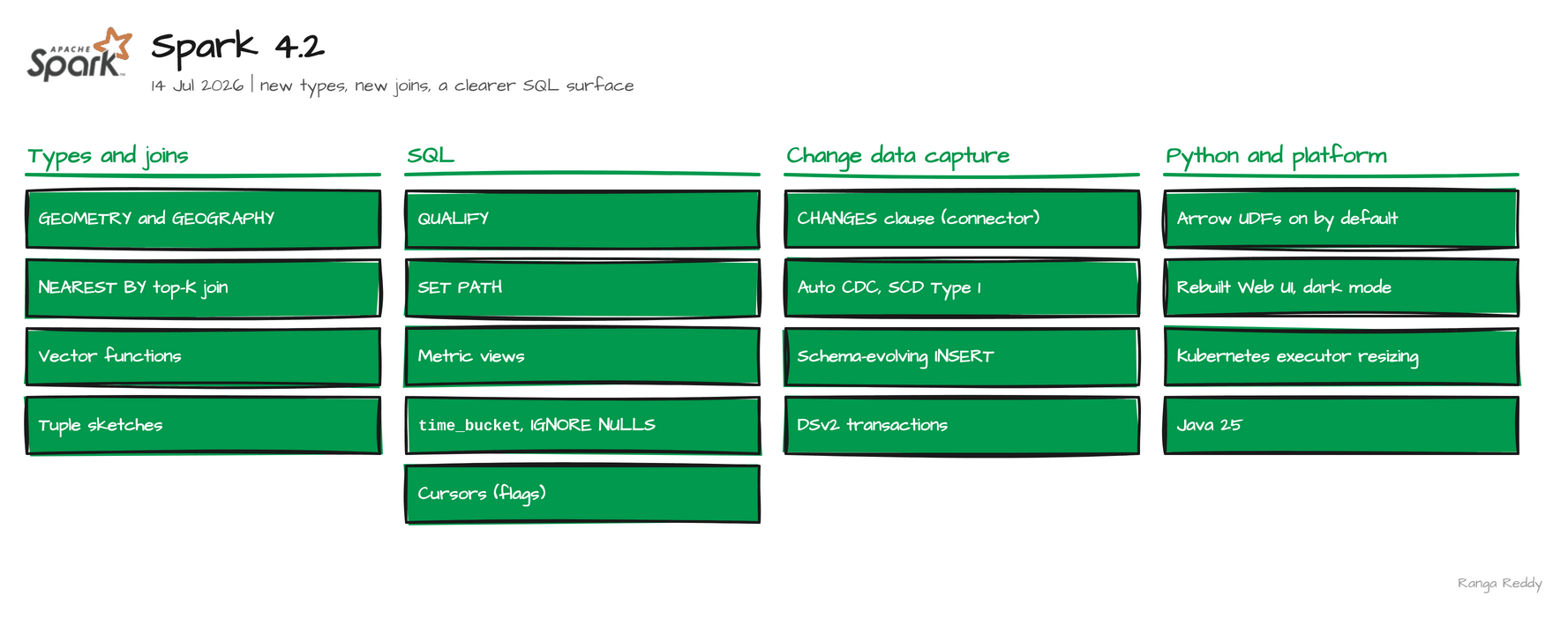 Everything in Spark 4.2.
Verified execution. Every sample in this post ran on Spark 4.2.1, on the
apache/spark:4.2.1-python3image, in November 2026. Each feature carries a Status line: Ran means the printed output is real, behind a flag names the setting, and needs a connector means the engine defines the syntax and a table format has to implement it. Where I could not run something, it is labelled listed and its limits are in Known limitations. The runnable files are in ranga-spark4-examples underspark-4.2/.
Before you start
What you need
| Need | Detail |
|---|---|
| Java | 17. The runs used the image’s Java 17 |
| Python, for PySpark | 3.10 or newer for the 4.2 tarball. Python 3.9 fails with a TypeError in a Python worker |
| Spark | The apache/spark:4.2.1-python3 image, or the 4.2.1 release tarball (529 MB) |
| A catalog with change data capture | Only to see feature 8 succeed. Built-in tables do not support it |
The smallest check that you are on the release you think you are on is
00_hello_world.sql. Run it first. It printed:
4.2.1 617618396087429b5627a86ce933bb0f5d6645cb
If it prints another version, an older SPARK_HOME in your shell is winning. Start with env -u SPARK_HOME.
Glossary
| Term | Meaning |
|---|---|
| SRID | Spatial reference identifier: the number that names a coordinate system, such as 4326 |
| WKB | Well-known binary: the standard byte encoding of a geometry |
| Embedding | A list of numbers that represents text, an image or a user, so similar things have similar lists |
| Window function | A function such as row_number() computed across a group of rows without collapsing them |
| SQL path | The ordered list of schemas Spark searches to resolve an unqualified name |
| Metric view | A view that defines dimensions and measures once, in YAML |
| CDC | Change data capture: a feed of inserts, updates and deletes from a table |
| Cursor | A way for a SQL script to walk a query result one row at a time |
Try this first
A three-step path if you are new to these features. None of it needs a connector.
- Confirm the version. Run the hello-world file above.
- Run one clause. Try
QUALIFYon a table with a window function. - Run one function. Compare two vectors with
vector_cosine_similarity.
1. Geospatial types: GEOMETRY and GEOGRAPHY [Intermediate]
Since: 4.2.0 · Status: Ran · Source:
SPARK-51658,SPARK-55261,SPARK-55260,SPARK-55790,SPARK-56771Lineage: the same five spatial functions are listed on 4.2.1 and 4.3.0, so 4.3 adds nothing to the function list.
What it is
Two new column types hold spatial values (SPARK-51658). A GEOMETRY describes shapes in
flat coordinates, and a GEOGRAPHY describes positions on the Earth. Each carries an SRID,
a spatial reference identifier that names its coordinate system, so a value knows where it
lives instead of being an anonymous BINARY. You build them from WKB, the standard
well-known binary encoding, and they read and write Parquet (SPARK-55261, SPARK-55260).
Why it matters
This means you can keep spatial data typed in a table and in Parquet, instead of as opaque bytes that every reader has to interpret.
Under the hood, the SRID registry is built from
PROJ 9.7.1 data (SPARK-55790), and the types are on by default in 4.2 (SPARK-56771); the
same call on 4.1.3 fails with GEOSPATIAL_DISABLED. A GEOMETRY defaults to SRID 0
(unknown) and a GEOGRAPHY to 4326. Be clear about the limit: on 4.2.1 SHOW FUNCTIONS lists
five spatial functions, st_asbinary, st_geogfromwkb, st_geomfromwkb, st_setsrid and
st_srid, and 4.3.0 lists the same five. There are no distance or containment functions yet,
so these types are a storage and interchange foundation, not a spatial query engine.
Sample code
Runnable file: 01_geospatial_types.sql.
-- a point as WKB: x = 1.0, y = 2.0
CREATE TEMP VIEW pt AS SELECT X'0101000000000000000000F03F0000000000000040' AS wkb;

SELECT typeof(ST_GeomFromWKB(wkb)) FROM pt;     -- geometry(0)
SELECT typeof(ST_GeogFromWKB(wkb)) FROM pt;     -- geography(4326)

-- give the geometry a coordinate system
SELECT ST_SRID(ST_SetSRID(ST_GeomFromWKB(wkb), 4326)) FROM pt;   -- 4326
When to use it
Use it when you store spatial values and want them typed in tables and in Parquet. Skip it when you need distance or containment; only five functions exist. Common beginner mistake: assuming a distance function exists, or leaving the SRID at 0 when the data has a coordinate system.
Visual
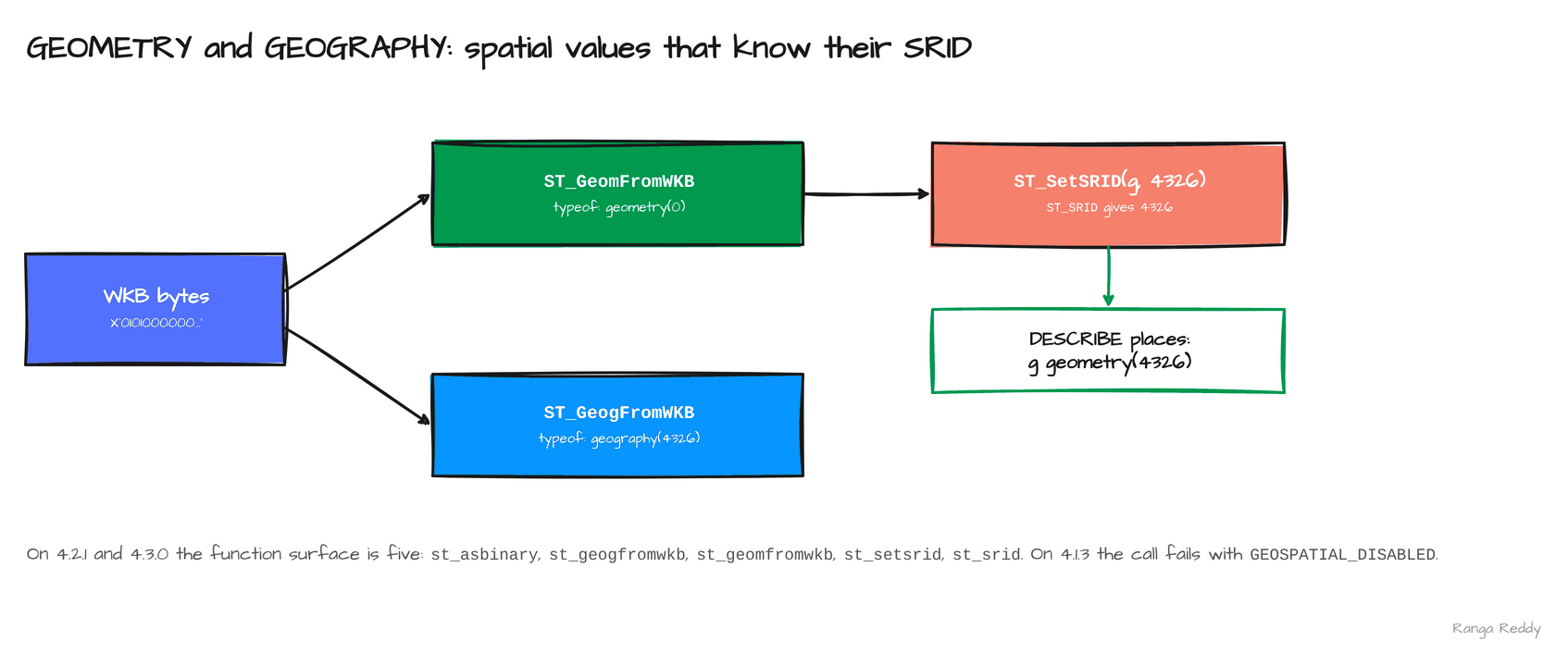 The same bytes become a geometry with SRID 0 or a geography with SRID 4326.
2. NEAREST BY top-K join [Intermediate]
Since: 4.2.0 · Status: Ran · Source:
SPARK-56395
What it is
For each row on the left, a NEAREST BY join returns the K best rows on the right under a
ranking expression (SPARK-56395). It is the join shape behind “closest store”, “most
similar item” and fuzzy matching. Before it, you wrote a cross join, a window function that
ranked the matches, and a filter on the rank. The syntax is
{ APPROX | EXACT } NEAREST [ k ] BY { DISTANCE | SIMILARITY } expr, and k defaults to 1.
Why it matters
This means you can ask “give me the two closest” in one clause that states its own intent.
Under the hood, evaluation is brute force today: the 4.2.1 documentation states that the
implementation evaluates the full cross product of the two sides, so a large right side
should be filtered first. APPROX lets the optimiser use a faster strategy once one
exists. INNER and LEFT OUTER are the supported join types, and
k ranges from 1 to 100000.
Sample code
Runnable file: 03_nearest_by_join.sql.
-- pts:  (q1, 1.0), (q2, 9.0)       base: (a, 0.0), (b, 2.0), (c, 8.0), (d, 20.0)
SELECT q, x, name, y
FROM pts JOIN base EXACT NEAREST 2 BY DISTANCE abs(x - y)
ORDER BY q, abs(x - y);
-- q1 1.0 a 0.0
-- q1 1.0 b 2.0
-- q2 9.0 c 8.0
-- q2 9.0 b 2.0
Before 4.2, the K nearest needed a cross join, a window to rank, and a filter:
SELECT q, x, name, y FROM (
  SELECT q, x, name, y, row_number() OVER (PARTITION BY q ORDER BY abs(x - y)) AS rn
  FROM pts CROSS JOIN base) WHERE rn <= 2 ORDER BY q, abs(x - y);
-- q1 1.0 a 0.0,  q1 1.0 b 2.0,  q2 9.0 c 8.0,  q2 9.0 b 2.0
It returns the same four rows, and it does the same cross-product work that the current NEAREST BY does.
When to use it
Use it when you want the K best matches per row without writing a cross join and a window. Skip it when the right side is large; evaluation is brute force, so filter it first. Common beginner mistake: forgetting to pre-filter the right side, which makes the work grow with left rows times right rows.
Visual
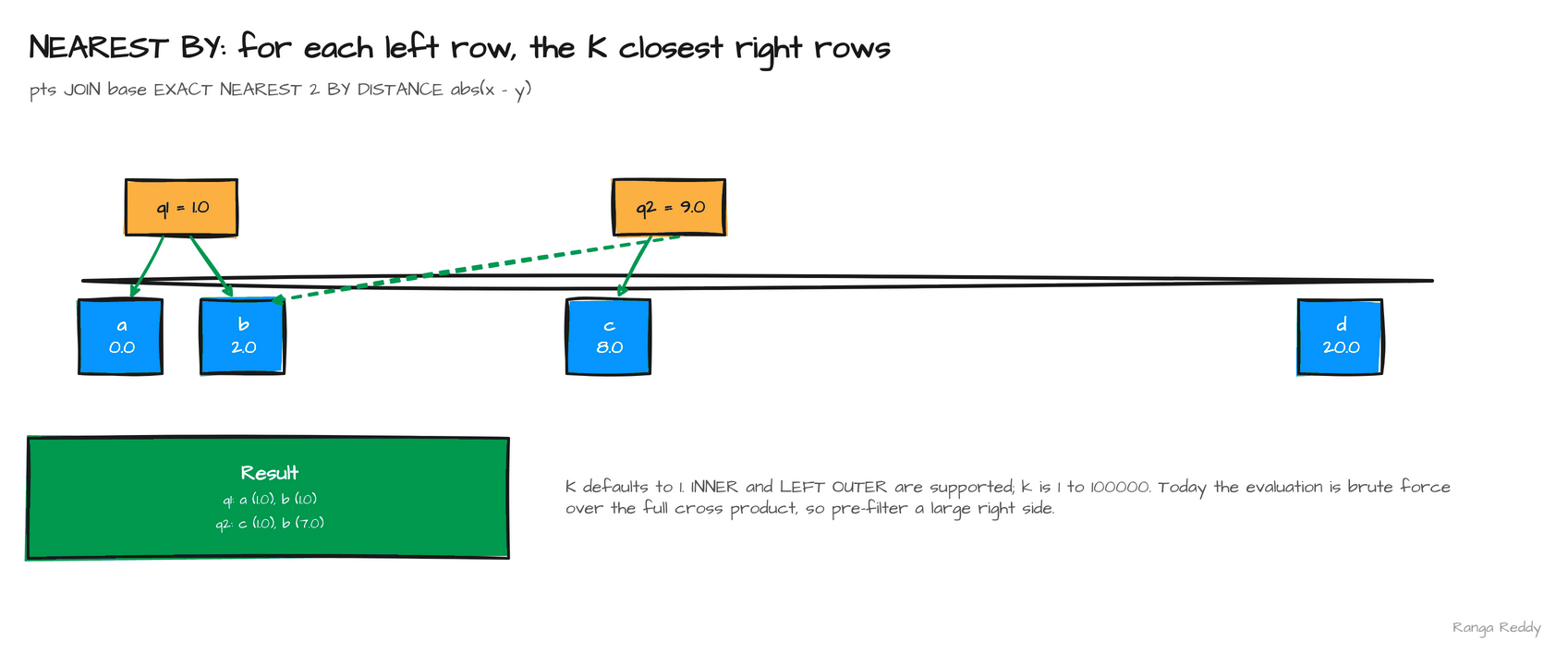 Each query point keeps its two nearest base points.
3. Vector functions [Beginner]
Since: 4.2.0 · Status: Ran · Source:
SPARK-54713,SPARK-55030,SPARK-55031Lineage: 4.3 adds Scala and Python bindings for the vector functions (
SPARK-57284).
What it is
An embedding is a list of numbers that represents a piece of text, an image or a user, so
that similar things have similar lists. 4.2 adds SQL functions that compare these lists
when they are stored as ARRAY<FLOAT> (SPARK-54713, SPARK-55030, SPARK-55031):
vector_cosine_similarity, vector_l2_distance, vector_inner_product, vector_norm,
vector_normalize, and the aggregates vector_avg and vector_sum.
Why it matters
This means you can rank documents against a query inside Spark SQL, with no UDF and no external service.
Under the hood, the functions compute exact results row by row, and they
are not an approximate-nearest-neighbour index, so they suit moderate candidate sets. The
arguments are strict about type: vector_norm(..., 2.0D) is rejected with
DATATYPE_MISMATCH.UNEXPECTED_INPUT_TYPE because the degree must be a FLOAT, so write
2.0F. Paired with the NEAREST BY join above, they give a top-K similarity search in plain
SQL. vector_avg over [1,2] and [3,4] returned
[2.0,3.0], and the join above matched q1 to d1 and d3, the two documents whose
cosine similarity to [1,0] is highest.
Sample code
Runnable files: 08_vector_functions.sql and 11_vector_similarity_join.sql.
SELECT vector_cosine_similarity(ARRAY(1.0F, 0.0F), ARRAY(1.0F, 1.0F));   -- 0.70710677
SELECT vector_l2_distance(ARRAY(1.0F, 2.0F), ARRAY(4.0F, 6.0F));         -- 5.0

-- the two closest documents to each query, ranked by cosine similarity
-- queries(q, qe) and docs(doc, de) hold ARRAY<FLOAT> embeddings
SELECT q, doc
FROM queries JOIN docs EXACT NEAREST 2 BY SIMILARITY vector_cosine_similarity(qe, de)
ORDER BY q, doc;
-- q1 d1,  q1 d3,  q2 d2,  q2 d3
When to use it
Use it when you rank embeddings against a query inside SQL for a moderate candidate set. Skip it when you have millions of candidates and need an approximate-nearest-neighbour index. Common beginner mistake: passing 2.0D to vector_norm, which fails with DATATYPE_MISMATCH.UNEXPECTED_INPUT_TYPE; the degree must be a FLOAT.
Visual
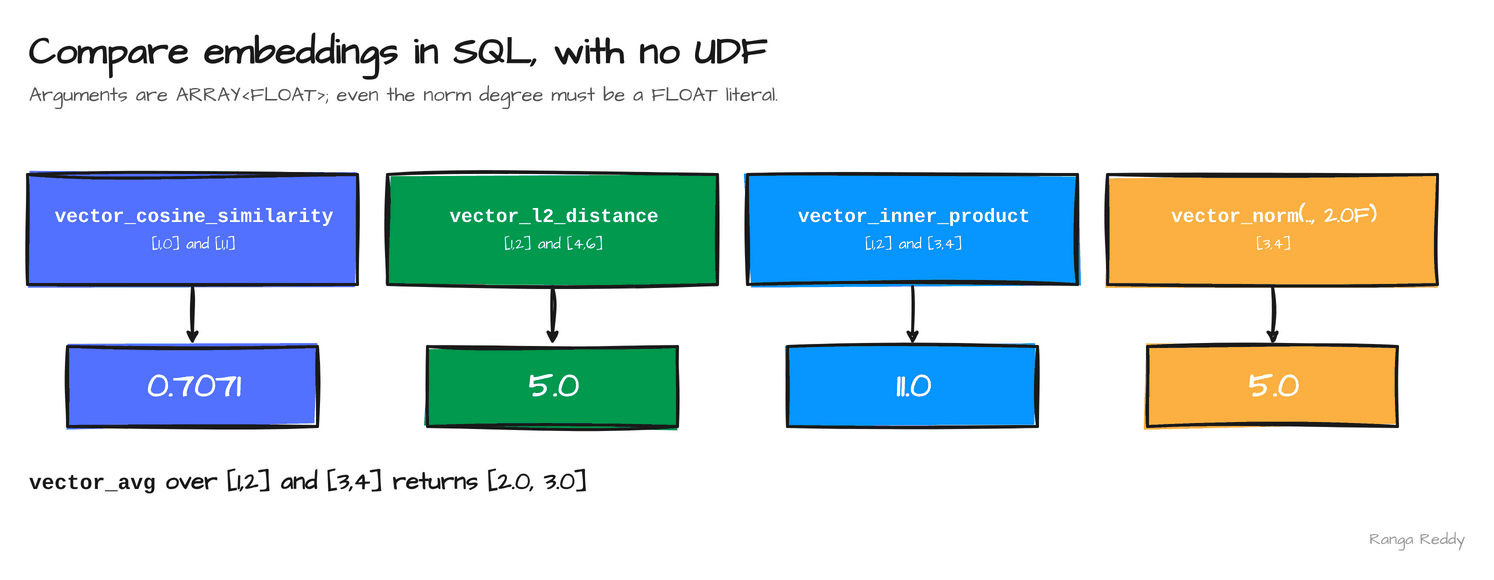 Each function takes
ARRAY<FLOAT> arguments and returns a single number.
4. QUALIFY [Beginner]
Since: 4.2.0 · Status: Ran · Source:
SPARK-31561
What it is
QUALIFY filters rows on the result of a window function (SPARK-31561). A window function,
such as row_number() or rank() with an OVER clause, computes a value across a group of
rows without collapsing them. Before QUALIFY, keeping “the top row per group” meant
computing the window in a subquery and filtering it in the outer query.
Why it matters
This means you can write the top-N-per-group query as one statement, and queries from
engines that already have QUALIFY port more easily.
Under the hood, the 4.2.1 documentation
says the clause filters rows after the window functions have been evaluated, and that it can
refer to a window function in the SELECT list by alias or define one directly in its
condition. Aggregates are not allowed in the condition. Ties behave as the window function defines them: with rank(), every tied
row qualifies, so a “top one” can return several rows. In the sample below, rank() = 1 returns ids 2, 3
and 5, because region eu has a tie at 30.0 between ids 3 and 5. Version note: QUALIFY
is new in 4.2.0.
Sample code
Runnable file: 02_qualify.sql.
-- the highest-amount order per region
SELECT id, region, amount FROM orders_t
QUALIFY row_number() OVER (PARTITION BY region ORDER BY amount DESC, id) = 1
ORDER BY region;
-- 3  eu  30.0
-- 2  us  20.0

-- an alias works; with ties, every row ranked 1 qualifies
SELECT id, region, rank() OVER (PARTITION BY region ORDER BY amount DESC) AS r
FROM orders_t QUALIFY r = 1 ORDER BY id;
-- 2 us 1,  3 eu 1,  5 eu 1
Before 4.2, the top row per group needed a subquery around the window:
SELECT id, region, amount FROM (
  SELECT id, region, amount, row_number() OVER (PARTITION BY region ORDER BY amount DESC, id) AS rn
  FROM orders_t) WHERE rn = 1 ORDER BY region;
-- 3  eu  30.0
-- 2  us  20.0
It returns the same two rows. All three before/after pairs are in 12_before_after.sql.
When to use it
Use it when you want the top row per group in one statement. Skip it when the condition has no window function; an aggregate is not allowed there. Common beginner mistake: expecting rank() = 1 to return one row per group. Ties all qualify, so ids 3 and 5 both came back for eu.
Visual
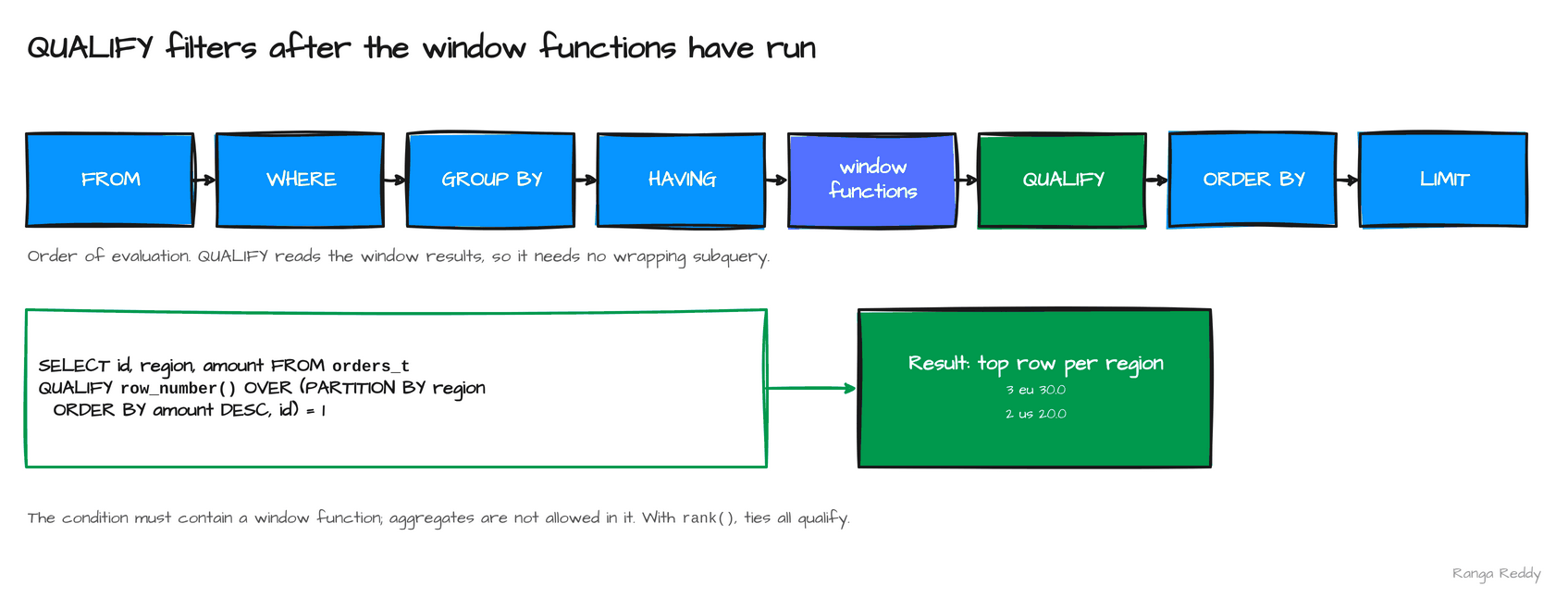
QUALIFY runs after the window functions, so it can filter on them directly.
5. SET PATH [Advanced]
Since: 4.2.0 · Status: Ran, behind a flag · Source:
SPARK-54806
What it is
The SQL path is the ordered list of schemas Spark searches to resolve an unqualified table,
view, function or variable name (SPARK-54806). SET PATH changes it for the session,
current_path() returns it, and persistent views and SQL functions capture the path when
they are created, so they resolve names the same way later. The default path is the system
schemas followed by the current schema.
Why it matters
This means you can point a session at a reference schema or a sales schema without prefixing every table, and switch with one statement.
Under the hood, the feature is behind
spark.sql.path.enabled, default false: with the flag off, SET PATH fails with
UNSUPPORTED_FEATURE.SET_PATH_WHEN_DISABLED. Two schemas can each hold a table named
facts, and the one that wins is decided by order in the path. DDL does not use the path:
CREATE TABLE t always creates t in the current schema. Built-in names can also be
qualified: system.builtin.upper('spark') returns SPARK on 4.2.1.
Sample code
Runnable file: 04_set_path.sql.
SET spark.sql.path.enabled = true;
-- ref.facts holds (2,'ref'); sales.facts holds (1,'sales')

SET PATH = spark_catalog.ref, DEFAULT_PATH;
SELECT current_path();  -- spark_catalog.ref,system.builtin,...
SELECT * FROM facts;    -- (2, 'ref')

SET PATH = spark_catalog.sales, DEFAULT_PATH;
SELECT * FROM facts;    -- (1, 'sales')
When to use it
Use it when a session should resolve unqualified names against a reference or sales schema. Skip it when explicit qualified names are clearer for the reader. Common beginner mistake: running SET PATH without spark.sql.path.enabled=true, which fails with SET_PATH_WHEN_DISABLED.
Visual
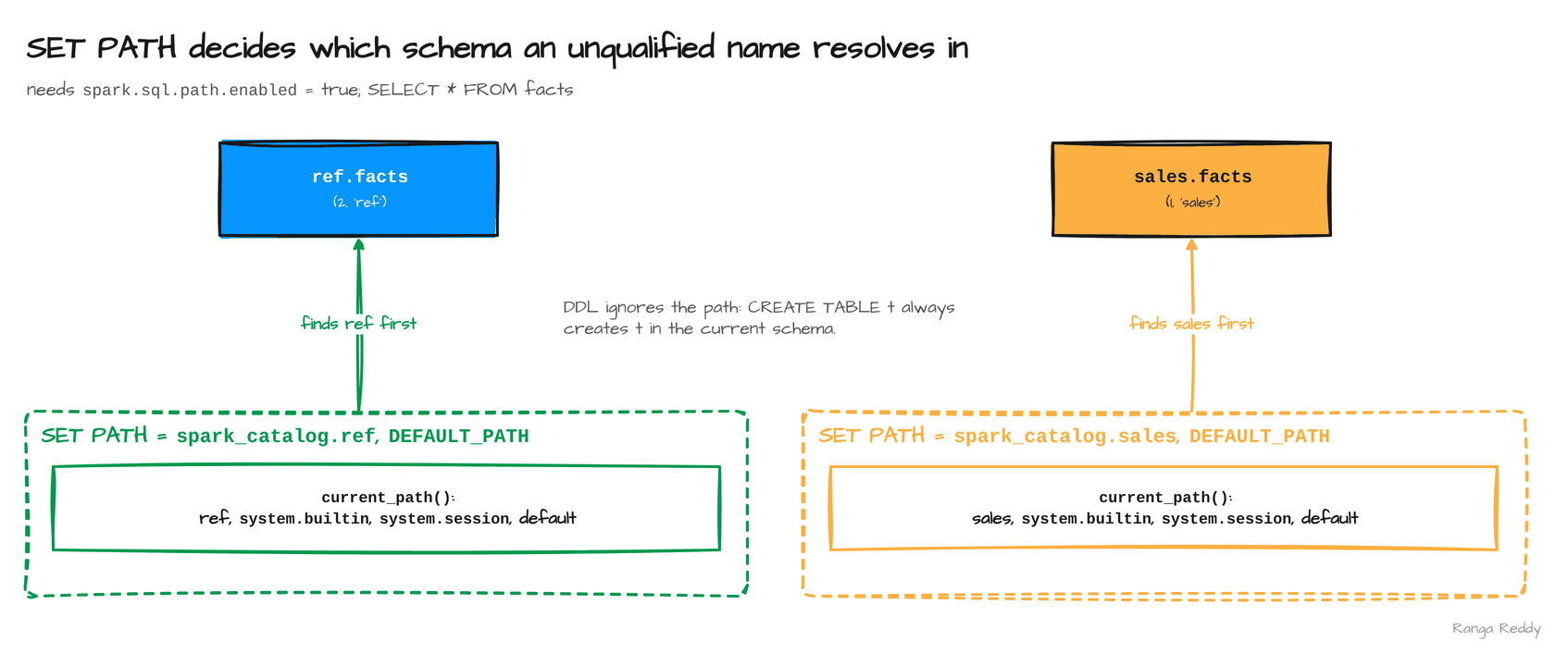 The first schema in the path that holds
facts wins.
6. Metric views [Intermediate]
Since: 4.2.0 · Status: Ran · Source:
SPARK-54119
What it is
A metric view defines dimensions and measures once, in YAML, so every report computes the
same number (SPARK-54119). A dimension is something you group by, such as a region. A
measure is an aggregation, such as total amount or order count. You create the view with
WITH METRICS LANGUAGE YAML, then query a measure with MEASURE(...) and group by a
dimension.
Why it matters
This means two dashboards cannot disagree about what “revenue” means, because the definition lives in one object, not in two copies of a query.
Under the hood, the view stores the YAML, and a query
refers to its measures by name through MEASURE(...). It works on the built-in catalog in 4.2. The 4.2.1 documentation has no page for this syntax, so the
statement form here comes from the project’s own test suite, and the YAML layout shown is the
one that ran. The YAML carries version: "0.1", a sign that the format is young, so expect
it to change. Version note: metric views are new in 4.2.0.
Sample code
Runnable file: 05_metric_views.sql.
CREATE OR REPLACE VIEW sales.revenue_mv WITH METRICS LANGUAGE YAML AS $$
version: "0.1"
source: spark_catalog.sales.orders
dimensions:
  - name: region
    expr: region
measures:
  - name: total_amount
    expr: sum(amount)
  - name: order_count
    expr: count(1)
$$;
SELECT region, MEASURE(total_amount) AS total, MEASURE(order_count) AS n
FROM sales.revenue_mv GROUP BY region ORDER BY region;
-- eu  70.0  3
-- us  25.0  2
When to use it
Use it when one definition of a measure must serve many reports. Skip it when the query is a one-off. Common beginner mistake: writing the YAML from memory. The 4.2.1 documentation has no page for the syntax, so copy the layout shown.
Visual
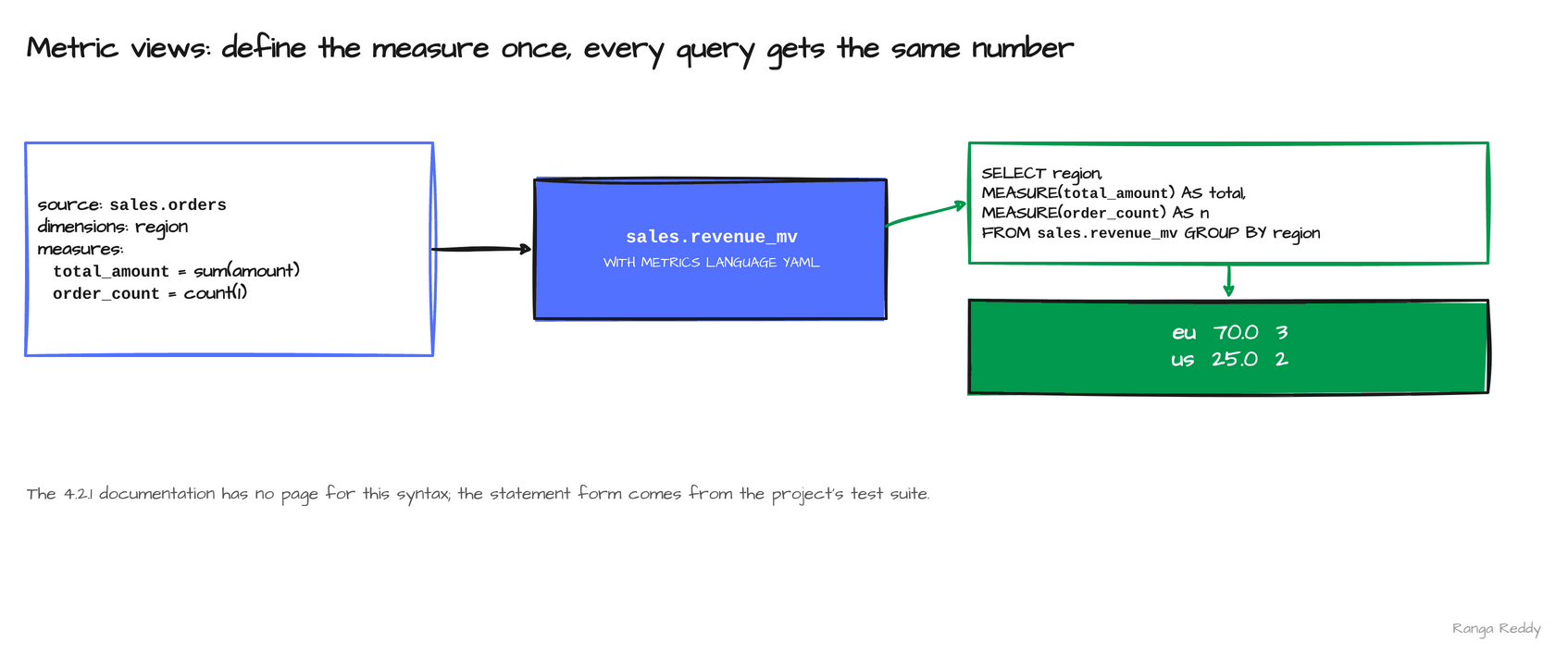 One YAML definition, queried with
MEASURE.
7. time_bucket and IGNORE NULLS [Beginner]
Since: 4.2.0 · Status: Ran · Source:
SPARK-56594,SPARK-55256,SPARK-55533Lineage: 4.3 adds
ASOF JOINandBIN BYfor more time-series SQL.
What it is
time_bucket(size, ts[, origin]) returns the start of the fixed-width bucket a timestamp
falls into (SPARK-56594). That replaces the date_trunc or epoch-division arithmetic that
everyone writes for fifteen-minute or six-hour windows. In the sample, 11:27 falls in the
fifteen-minute bucket that starts at 11:15. A second change is smaller:
collect_list, array_agg and collect_set now accept IGNORE NULLS and RESPECT NULLS
(SPARK-55256, SPARK-55533), so you choose whether nulls appear in the collected array.
Why it matters
This means a group-by-window query reads as what it is, and null handling is stated instead of
implied by a FILTER clause.
Under the hood, time_bucket takes an interval for the size and
an optional origin that aligns the buckets, and it returns the bucket start as a timestamp, so
you can group by it and join on it. Plain collect_list skips nulls, which I confirmed on 4.2.1 returns [1,3] for 1, NULL and 3, so
IGNORE NULLS states the existing behaviour and RESPECT NULLS is the new capability: it
returns [1,null,3].
Sample code
Runnable file: 06_time_bucket_ignore_nulls.sql.
SELECT time_bucket(INTERVAL '15' MINUTE, TIMESTAMP_NTZ '2026-11-01 11:27:00');
-- 2026-11-01 11:15:00

-- hourly counts and totals
SELECT time_bucket(INTERVAL '1' HOUR, ts) AS hour, count(*) AS n, sum(v) AS total
FROM (VALUES (TIMESTAMP_NTZ '2026-11-01 10:05:00', 1),
             (TIMESTAMP_NTZ '2026-11-01 10:40:00', 2),
             (TIMESTAMP_NTZ '2026-11-01 11:10:00', 5)) AS t(ts, v)
GROUP BY 1 ORDER BY 1;
-- 10:00  2  3
-- 11:00  1  5
Before 4.2, date_trunc covered calendar units only, so a 15-minute bucket needed epoch arithmetic. For an hour the two agree:
SELECT date_trunc('HOUR', TIMESTAMP_NTZ '2026-11-01 10:40:00');   -- 2026-11-01 10:00:00
SELECT time_bucket(INTERVAL '1' HOUR, TIMESTAMP_NTZ '2026-11-01 10:40:00');  -- 2026-11-01 10:00:00
When to use it
Use it when you group by fixed-width windows such as 15 minutes. Skip it when a calendar unit is enough; date_trunc already covers it. Common beginner mistake: assuming collect_list keeps nulls. Plain collect_list returns [1,3]; only RESPECT NULLS keeps them.
Visual
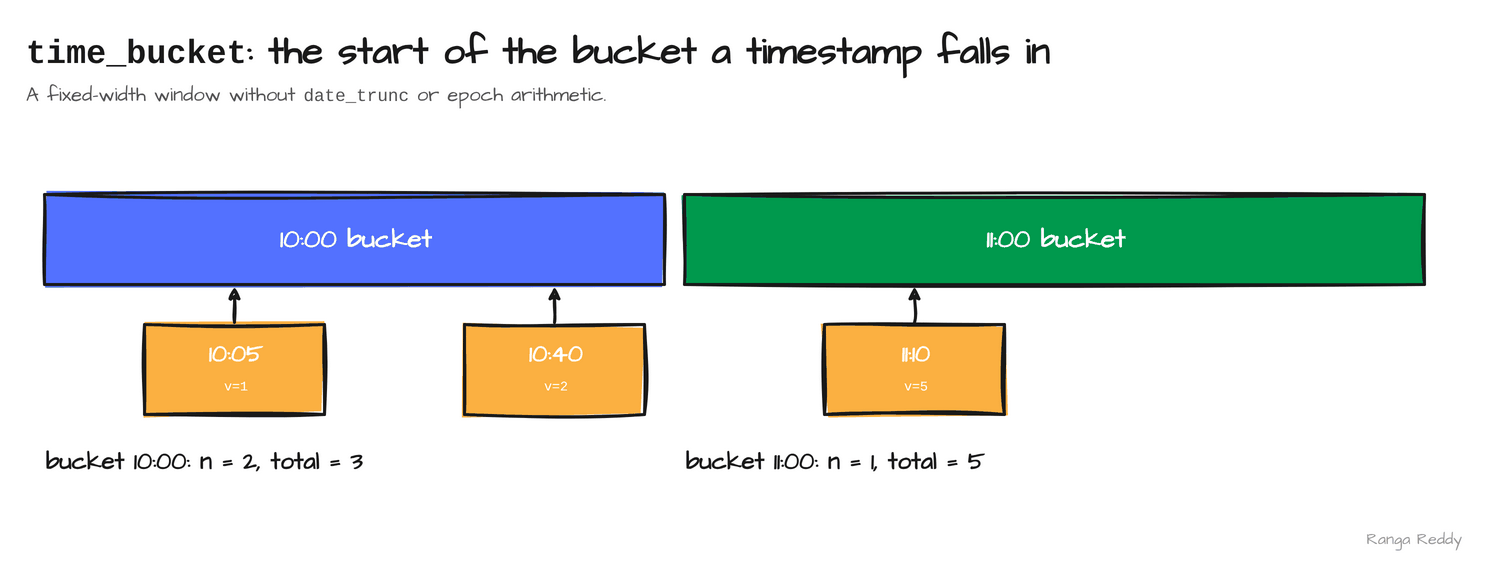 Each timestamp maps to the start of its hour; the group-by then needs no arithmetic.
8. Change data capture: the CHANGES clause [Advanced]
Since: 4.2.0 · Status: Ran to the error only; needs a connector · Source:
SPARK-55668,SPARK-55948,SPARK-55949,SPARK-55950,SPARK-56249Lineage: Auto CDC with SCD Type 1 in 4.2, SCD Type 2 in 4.3 (
SPARK-58321).
What it is
Change data capture (CDC) exposes what changed in a table between two versions, as rows
describing each change. 4.2 adds a CHANGES clause to SQL (SPARK-55948) and matching
DataFrame and PySpark APIs (SPARK-55949, SPARK-55950) under the umbrella SPARK-55668,
plus Auto CDC in Declarative Pipelines for
SCD Type 1, which keeps only the latest row per key (SPARK-56249). SCD means slowly
changing dimension, the pattern for tracking how a dimension row evolves.
Why it matters
This means you can read a change feed with a query and feed it into a pipeline, without hand-written diff logic.
Under the hood, Spark defines the syntax and plans the query, and
the catalog connector has to implement the change-feed API. A built-in table does not, so the
clause fails cleanly: on a Parquet table in spark_catalog the statement returned
UNSUPPORTED_FEATURE.CHANGE_DATA_CAPTURE, “Catalog spark_catalog does not support Change
Data Capture”. Treat CDC as a capability to ask of your table format. I did not run it
against a lakehouse connector, so no success output is shown.
Sample code
Runnable file: 10_changes_clause.sql.
CREATE TABLE ev (id INT, v STRING) USING parquet;
INSERT INTO ev VALUES (1, 'a');

-- needs a catalog that implements change data capture
SELECT * FROM ev CHANGES FROM VERSION 1 TO VERSION 2;
-- [UNSUPPORTED_FEATURE.CHANGE_DATA_CAPTURE] Catalog spark_catalog does not
-- support Change Data Capture (CDC).
When to use it
Use it when your table format implements change data capture and you want a change feed as a query. Skip it when the table is plain Parquet in spark_catalog, which does not support it. Common beginner mistake: running CHANGES on Parquet and expecting rows; it fails with UNSUPPORTED_FEATURE.CHANGE_DATA_CAPTURE.
Visual
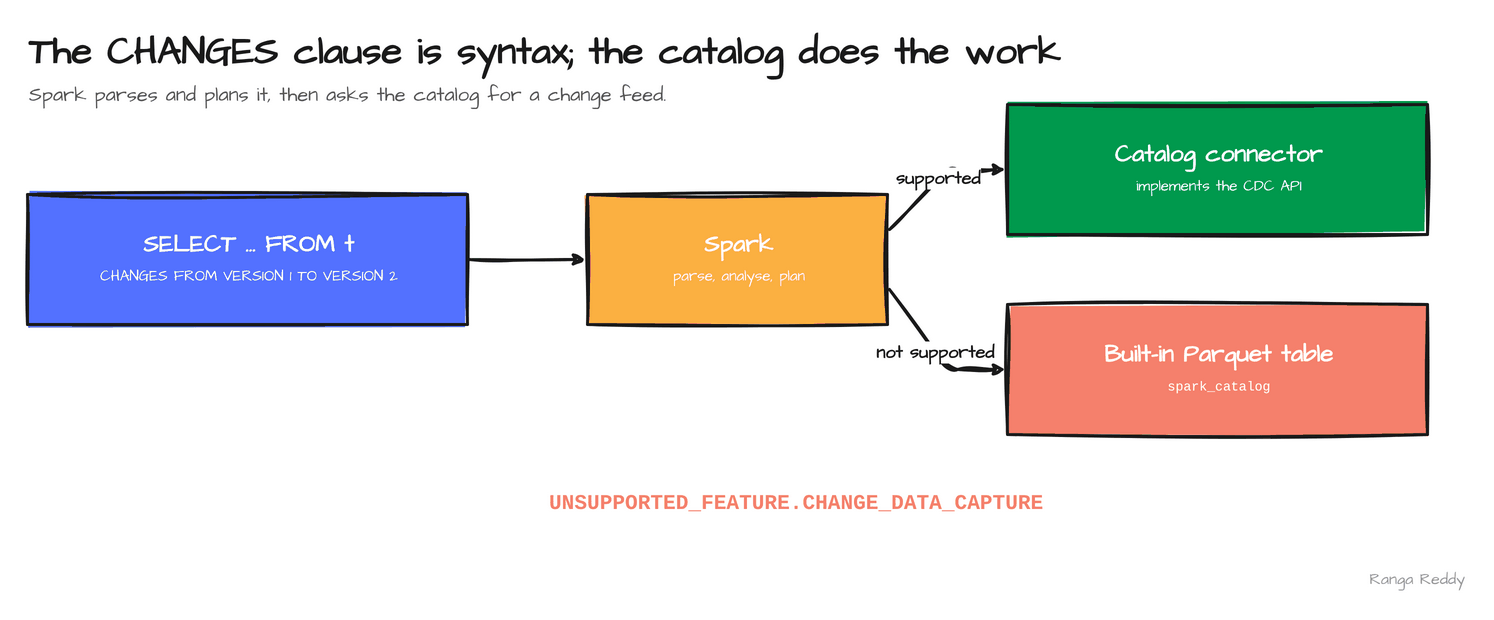 Spark owns the syntax; the catalog owns the change feed.
9. Cursors in SQL scripts [Advanced]
Since: 4.2.0 · Status: Ran, behind two internal flags · Source:
SPARK-54759Lineage:
CONTINUE HANDLERsupport arrived in 4.1 (SPARK-53621) behind an internal flag that is still off in 4.3.0.
What it is
A cursor lets a SQL script walk a query result one row at a time, with DECLARE ... CURSOR, OPEN,
FETCH and CLOSE (SPARK-54759). SQL scripting, which Spark 4.1 enabled by default, lets a
BEGIN ... END block declare variables, loop and handle errors. A handler is code that runs when a
condition occurs. A CONTINUE handler for NOT FOUND runs when FETCH has no more rows and lets
the script carry on, which is how a cursor loop knows to stop.
Why it matters
This means you can port row-by-row logic from another database’s procedural SQL.
Under the hood, both
pieces are behind internal flags that default to false: spark.sql.scripting.cursorEnabled
(since 4.2.0) and spark.sql.scripting.continueHandlerEnabled (since 4.1.0). Each missing flag fails
differently, on 4.2.1 as on 4.3.0: with neither, UNSUPPORTED_FEATURE.SQL_CURSOR; with only the cursor flag,
UNSUPPORTED_FEATURE.CONTINUE_EXCEPTION_HANDLER; with both, the script runs and returned 60. Because
both flags are internal, treat cursors as unfinished and keep them out of production scripts. A
set-based query is almost always the better answer.
Sample code
Runnable file: 09_sql_cursors.sql.
-- set spark.sql.scripting.cursorEnabled and ...continueHandlerEnabled to true first
BEGIN
  DECLARE total INT DEFAULT 0; DECLARE v INT; DECLARE done BOOLEAN DEFAULT false;
  DECLARE c CURSOR FOR SELECT col1 FROM VALUES (10), (20), (30);
  DECLARE CONTINUE HANDLER FOR NOT FOUND SET done = true;
  OPEN c;
  FETCH c INTO v;
  WHILE NOT done DO
    SET total = total + v;
    FETCH c INTO v;
  END WHILE;
  CLOSE c;
  SELECT total AS cursor_total;
END;
-- 60
On 4.2.1 run the script through spark.sql(...) in Scala or Python. The 4.2.1 spark-sql -f splits a file at each
;, so a BEGIN ... END script fails with PARSE_SYNTAX_ERROR on its first line. The 4.3.0 CLI ran the same file.
When to use it
Use it when row-by-row logic cannot be expressed set-based and you are porting a procedure. Skip it when
a set-based query will do, which is almost always. Common beginner mistake: setting only the cursor flag; the
CONTINUE handler needs its own, and without it the script fails with CONTINUE_EXCEPTION_HANDLER.
Visual
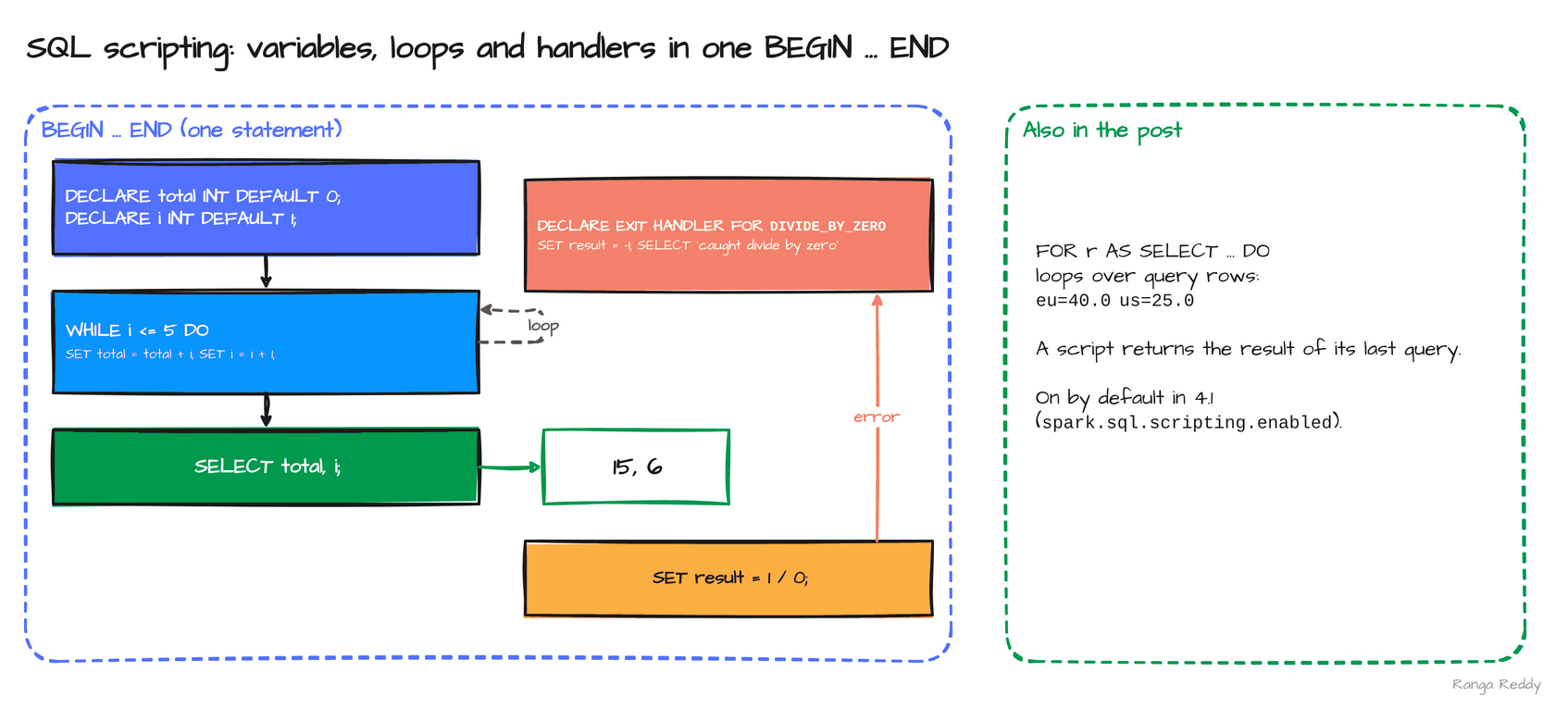 A loop over a cursor: the same
BEGIN ... END shape as the 4.1 scripting examples, with a handler that ends it.
Smaller additions worth knowing
| Feature | What it does | Status |
|---|---|---|
Arrow-optimized Python UDFs on by default (SPARK-54555) |
spark.sql.execution.pythonUDF.arrow.enabled reads true on 4.2.1, so Python UDFs exchange data with the JVM through Arrow |
Default changed; test your own UDFs |
SYSTEM.BUILTIN qualification (SPARK-54807) |
system.builtin.upper('spark') returned SPARK |
Ran |
Top-K max_by and min_by (SPARK-55322) |
Return the K best values instead of one | Ran |
Schema-evolving INSERT and REPLACE ON (SPARK-54971, SPARK-56001) |
Engine syntax that a connector must implement | Listed, needs a connector |
Data Source V2 transactions (SPARK-55855) |
Commit several operations atomically | Listed, needs a connector |
Auto CDC, SCD Type 1 (SPARK-56249) |
Apply a change feed in a pipeline | Listed, needs a connector |
Tuple sketches (SPARK-54179) |
Native Apache Tuple sketches, with set operations (SPARK-55558) |
Listed |
Web UI rebuilt on Bootstrap 5 (SPARK-55760) |
Dark mode, searchable and zoomable SQL plans | Listed |
Kubernetes executor resizing (SPARK-55555) |
Heterogeneous executors with resize plugins | Listed |
Java 25 (SPARK-51167) |
Build and runtime support for Java 25 | Listed |
Version lineage
Several 4.2 features start an arc that later releases continue. Read the 4.2 column as what this release added.
| Feature | 4.0 | 4.1 | 4.2 | 4.3 |
|---|---|---|---|---|
| Geospatial types | none | none (GEOSPATIAL_DISABLED on 4.1.3) |
Introduced, on by default (SPARK-51658, SPARK-56771) |
Same five functions listed |
| Top-K and vector search | none | none | NEAREST BY, vector functions (SPARK-56395, SPARK-54713) |
Scala and Python bindings for the vector functions (SPARK-57284) |
| Procedural SQL | Session variables, SQL UDFs (SPARK-42849, SPARK-46057) |
SQL scripting generally available (SPARK-54499) |
Cursors, behind flags (SPARK-54759) |
none in the headlines |
| Window and time-series SQL | none | none | QUALIFY, time_bucket (SPARK-31561, SPARK-56594) |
ASOF JOIN, BIN BY (SPARK-58092, SPARK-57133) |
| Names and views | none | none | SET PATH, metric views (SPARK-54806, SPARK-54119) |
none |
| Change data and history | none | Declarative Pipelines (SPARK-51727) |
CHANGES clause, Auto CDC SCD Type 1 (SPARK-55668, SPARK-56249) |
Auto CDC SCD Type 2 (SPARK-58321) |
| Python UDFs | Python UDTFs (SPARK-43797) |
Arrow UDF decorators (SPARK-52214) |
Arrow-optimized UDFs on by default (SPARK-54555) |
Experimental transpiling (SPARK-55206) |
Flags at a glance
A feature that parses is not a feature that is on. Every feature in this post that is off by default:
| Feature | Config key | Default | What it enables |
|---|---|---|---|
SET PATH |
spark.sql.path.enabled |
false |
The SET PATH statement |
| Cursors | spark.sql.scripting.cursorEnabled |
false, internal, since 4.2.0 |
DECLARE CURSOR, OPEN, FETCH, CLOSE |
CONTINUE handlers |
spark.sql.scripting.continueHandlerEnabled |
false, internal, since 4.1.0 |
The handler a cursor loop needs |
Geospatial types, NEAREST BY, the vector functions, QUALIFY, metric views and time_bucket have no flag in 4.2.
Settings and costs
| Setting | Default | What it does |
|---|---|---|
spark.sql.execution.pythonUDF.arrow.enabled |
true (read on 4.2.1) |
Python UDFs exchange data through Arrow |
| Feature | Cost to plan for |
|---|---|
NEAREST BY |
The current implementation evaluates the full cross product of the two sides, so its work grows with left rows times right rows times the log of k. Pre-filter the right side |
| Vector functions | Exact results row by row. They are not an approximate-nearest-neighbour index |
| Arrow-optimized Python UDFs | Types, nulls and timestamps are where the new exchange path can differ from the old. Test your own UDFs |
| Metric views | The 4.2.1 documentation has no page for the syntax, so you depend on the project’s tests and release notes |
| Change data capture | The connector decides whether the feature exists for your table |
| Cursors | Internal flags, so the behaviour can change without notice |
When these features bite
Each item is a failure hit during the runs, with the text it produced, so you can grep for it. Every item is also an anchor, so you can link to one error.
[UNSUPPORTED_FEATURE.GEOSPATIAL_DISABLED] on 4.1.3. Geospatial types are off before 4.2. Fix: On by default from 4.2.
[UNSUPPORTED_FEATURE.SET_PATH_WHEN_DISABLED]. SET PATH is behind a flag. Fix: spark.sql.path.enabled=true.
[UNSUPPORTED_FEATURE.CHANGE_DATA_CAPTURE]. The engine defines CHANGES, but the catalog, here spark_catalog, does not implement change data capture. The same shape applies to INSERT ... WITH SCHEMA EVOLUTION and Data Source V2 transactions. Fix: Check that your connector implements the feature before you plan around it.
[UNSUPPORTED_FEATURE.SQL_CURSOR], then [UNSUPPORTED_FEATURE.CONTINUE_EXCEPTION_HANDLER]. Cursors and CONTINUE handlers each have an internal flag in 4.2.1. Fix: Set spark.sql.scripting.cursorEnabled and spark.sql.scripting.continueHandlerEnabled, and keep cursors out of production.
[PARSE_SYNTAX_ERROR] on the first line of a BEGIN ... END script run with spark-sql -f. The 4.2.1 CLI splits the file at each ;, so a script is cut into pieces. Fix: Run the script through spark.sql(...) in Scala or Python. The 4.3.0 CLI ran the same file.
[DATATYPE_MISMATCH.UNEXPECTED_INPUT_TYPE] on vector_norm(..., 2.0D). The degree must be a FLOAT. Fix: Write 2.0F.
[UNSUPPORTED_FEATURE.TABLESAMPLE_SYSTEM_NO_SCAN]. TABLESAMPLE SYSTEM needs a direct reference to a source that supports block-level sampling. It failed on a view and on a Parquet table, checked on 4.2.1. Fix: Use a source that supports it.
TypeError: unsupported operand type(s) ... 'type' and 'type' from a Python worker. The 4.2 tarball declares Python 3.10 or newer, and Python 3.9 cannot run it. Fix: Use a newer interpreter.
Run it yourself
The samples ran on apache/spark:4.2.1-python3 and on the 4.2.1 release tarball (529 MB, Scala
2.13.18) with Java 17. The tarball declares Python 3.10 or newer. The vector, cursor and CHANGES
examples also ran on the 4.3.0 tarball with the same results. If you run a tarball locally, start it with env -u SPARK_HOME, because an
older SPARK_HOME in the shell wins over the tarball’s own directory and silently runs the wrong
Spark. The download script and the SQL runner are in RUNNING_ON_TARBALLS.md.
Hello world. 00_hello_world.sql printed 4.2.1 and the build hash. Before and after. 12_before_after.sql runs QUALIFY, NEAREST BY and time_bucket next to their older forms.
SQL. smoke/smoke42.sql printed this on 4.2.1:
geospatial         geometry(0)
QUALIFY            3 eu 30.0   /   2 us 20.0
NEAREST BY         q1 a   /   q2 c
SET PATH           current_path() = system.builtin,system.session,spark_catalog.default
time_bucket        2026-11-01T11:15
metric view        eu 70.0   /   us 25.0
Upgrade notes for teams moving to 4.2
Behaviour changes to test before you upgrade. The first rows come from the 4.2 release notes; the rest come from the official SQL and PySpark migration guides, which list more.
| Change | What to do | Source |
|---|---|---|
Python UDFs and UDTFs use Arrow by default, and spark.sql.execution.arrow.pyspark.enabled is true |
Run your UDFs. spark.sql.execution.pythonUDF.arrow.enabled=false and pythonUDTF.arrow.enabled=false restore the old path |
SPARK-54555 |
| The minimum PyArrow is 18.0.0, and PyPy is no longer officially supported | Check the Python environment | PySpark migration guide |
| Order-independent shuffle checksums are on, and a mismatch rolls back and re-runs dependent stages | spark.sql.shuffle.orderIndependentChecksum.enabled=false and ...enableFullRetryOnMismatch=false restore |
SQL migration guide |
Pandas UDFs receive nullable integer columns as Int8 to Int64, not float64 |
Retest UDFs that handle nulls | PySpark migration guide |
option(None) is treated as unset, and Python data sources whose Arrow types miss the declared schema fail with DATA_SOURCE_RETURN_SCHEMA_MISMATCH |
Pass "" to set an empty string; fix the schema |
PySpark migration guide |
NOT NULL is enforced on inserts into the built-in file sources |
A pipeline that wrote nulls into a NOT NULL column can now fail |
SPARK-55716 |
DROP TABLE can drop a view |
A script that relied on DROP TABLE failing for a view behaves differently |
SPARK-55019 |
The Postgres JDBC source has a default fetchSize |
Recheck large reads | SPARK-56251 |
NATURAL JOIN honours spark.sql.caseSensitive; duplicate CTE names are rejected case-insensitively with DUPLICATED_CTE_NAMES |
Recheck join keys; rename CTEs | SQL migration guide |
A SQL UDF parameter no longer shadows a parameterless built-in such as current_date; SET CATALOG name resolves a session variable first |
spark.sql.legacy.allowUdfParameterToShadowParameterlessFunction=true, or rename; use SET CATALOG 'name' |
SQL migration guide |
Observation.get raises the underlying error instead of returning an empty result |
Add error handling | SQL migration guide |
builtin.func() and session.func() try the system namespace first |
spark.sql.legacy.persistentCatalogFirst=true restores |
SQL migration guide |
| R 3.x is dropped, and per-write options take precedence over session configuration in file source writes | Upgrade R; recheck write options | SPARK-57767, SPARK-56414 |
The migration guide also lists GROUP BY GROUPING SETS (()) returning one row under 4.1 to 4.2, while the ticket
(SPARK-57775) has fix version 4.3.0. See the 4.3 post and test on your version.
Adopt now or wait?
4.2.0 shipped on 14 July 2026 and 4.2.1 followed on 27 October 2026, so the first patch release is out. The versioning policy states that the 18-month maintenance window for 4.2.x is unchanged, which makes 4.2 the 4.x line with the longest stated window so far. As of 18 November 2026, Apache Iceberg and Apache Hudi publish no Spark 4.2 artifact, and the latest Delta Lake, 4.4.1, is built against Spark 4.2.0. My recommendation, a judgement and not a measurement: if your connectors allow it, adopt 4.2.1, not 4.2.0, and test your own Python UDFs first, because the Arrow default is the change most likely to surprise a pipeline.
Known limitations in this release
- Change data capture. I did not run
CHANGESor Auto CDC against a catalog that implements change data capture, so only theUNSUPPORTED_FEATURE.CHANGE_DATA_CAPTUREfailure on Parquet is shown. - Geospatial. Five functions exist, and none measures distance or containment, so the types are a storage foundation.
- Search.
NEAREST BYevaluates the full cross product and the vector functions are exact, not approximate, so neither replaces a vector index. - Metric views and cursors. The metric-view syntax comes from the project’s tests, not the documentation, and its YAML is version
0.1. Cursors need two internal flags and cannot be run through the 4.2.1spark-sql -f. - Listed only. Schema-evolving
INSERT, Data Source V2 transactions, Auto CDC, the Web UI rebuild and Java 25 are from the release notes, not run.
Cheat sheet
| Feature | Syntax | Needs |
|---|---|---|
| Geospatial | ST_SetSRID(ST_GeomFromWKB(wkb), 4326) |
Nothing |
NEAREST BY |
a JOIN b EXACT NEAREST 2 BY DISTANCE abs(a.x - b.y) |
Nothing |
| Vector functions | vector_cosine_similarity(ARRAY(1.0F, 0.0F), ARRAY(1.0F, 1.0F)) |
Nothing |
QUALIFY |
... QUALIFY row_number() OVER (PARTITION BY k ORDER BY v DESC) = 1 |
Nothing |
SET PATH |
SET PATH = spark_catalog.ref, DEFAULT_PATH |
A flag |
| Metric view | CREATE VIEW v WITH METRICS LANGUAGE YAML AS $$ ... $$, then MEASURE(m) |
Nothing |
time_bucket |
time_bucket(INTERVAL '15' MINUTE, ts) |
Nothing |
CHANGES |
SELECT * FROM t CHANGES FROM VERSION 1 TO VERSION 2 |
A connector with change data capture |
| Cursors | DECLARE c CURSOR FOR ...; OPEN c; FETCH c INTO v; CLOSE c; |
Two internal flags |
Key takeaways
- Types:
GEOMETRYandGEOGRAPHYare a storage foundation today, with five functions and no distance or containment yet. - Matching:
NEAREST BYplus the vector functions give a top-K similarity search in SQL, with exact brute-force evaluation, so filter the right side first. - Everyday SQL:
QUALIFYandtime_bucketremove a subquery and some arithmetic from queries you already write. - Governance:
SET PATHis off until you set its flag, and metric views keep a measure’s definition in one object. - Connectors: change data capture, schema-evolving inserts and transactions are engine syntax. Check your table format supports them before you plan around them.
Further reading
- Spark 4.2.0 release notes, the source of every ticket number above
- JOIN syntax, including
NEAREST BYin the SQL reference QUALIFYin the SQL referenceSPARK-51658, the geospatial types, andSPARK-55668, change data capture- What’s new in Apache Spark 4.3 for the release after this one
- Spark 4.x features by release for all four releases side by side
Trademarks
Apache Spark, Apache Parquet, Apache Arrow and Apache are either registered trademarks or trademarks of The Apache Software Foundation in the United States and other countries. The Apache Software Foundation does not endorse this post.
Found this useful?
These posts and tools are free. If one saved you an afternoon, you can buy me a coffee.
Comments
Questions, corrections and reviews are welcome. Sign in with GitHub to post; comments are stored in this site's public GitHub Discussions.